A futures trade copier automates the process of replicating trades from a master account to multiple follower accounts in real time. This is essential for traders managing multiple accounts - be it personal, retail, or proprietary firm accounts. The best tools prioritize platform compatibility, execution speed, multi-account scaling, and robust risk management features. Trading prop firm accounts? See trade copiers for prop firms.
Key options include:
- Replikanto: Built for NinjaTrader, offers ratio-based copying, remote replication, and low latency. Costs $199 (one-time) or $149/year.
- Tickblaze IgniteCopier: Integrated with Tickblaze, supports multi-broker setups, offers 1.6 ms execution speed, and robust risk controls. Priced at $250/year.
- Affordable Indicators: Focused on NinjaTrader, includes advanced risk management and Rithmic resync tools. Costs $295 (full suite) or $175 (basic).
- SimpleTradeCopier: A free, basic NinjaTrader solution with local execution and safety features.
- Custom API-Based Solutions: Flexible for developers using platforms like Tradovate or TradeStation, enabling advanced customizations.
Quick Tip: For high-speed execution, combine desktop-based copiers with a VPS servers in Chicago for sub-2 ms latency. Risk management tools like daily loss limits are crucial for prop firm compliance.
Best Trade Copier - New Prop Firm Features In NinjaTrader
What to Look for in a Futures Trade Copier
When choosing a futures trade copier, platform compatibility should be your top priority. The copier must work seamlessly with the trading platform you rely on, whether that’s NinjaTrader 8, Tradovate, Rithmic, or TradeStation. Poor integration can lead to unnecessary friction and execution issues, so sticking with a copier designed for your platform is key.
Another important factor is how well the system handles multi-account scaling. If you’re managing several prop firm evaluations or funded accounts, you’ll need a copier that can scale effortlessly. Look for features like automatic symbol mapping that convert contracts - such as ES to MES or NQ to MNQ - without manual intervention. Some advanced systems even allow flexible leader-follower setups, meaning any account can act as a leader or follower across live, demo, or prop trading environments.
Execution speed is another critical consideration, especially when trading fast-moving contracts like ES, NQ, CL, or GC. Many professional-grade copiers use market execution modes, ensuring that follower accounts replicate the leader’s market orders in real time. This keeps everything synchronized, even if the leader uses limit orders. Where the copier runs matters just as much - a CME VPS in Chicago keeps exchange round trips at sub-2 ms.
Don’t overlook risk controls, as they play a vital role in protecting your accounts. Features like daily profit targets, loss limits, trailing drawdowns, and auto-flatten options can help safeguard your trading capital. For traders working with prop firms, stealth mode can hide automation signatures, while consistency trackers help ensure compliance with evaluation rules. Real-time syncing also helps prevent minor discrepancies from snowballing into bigger problems.
To make the most of these features, consider running your system on a dedicated VPS for copy trading (Virtual Private Server). A VPS ensures your copier operates continuously, with minimal downtime, and stays close to CME Group’s matching engines for faster execution. Opt for a NinjaTrader VPS with strong CPU performance, ample memory, and NVMe storage to handle the demands of multi-account trading.
Fred Harrington, Founder of Vetted Prop Firms, explains: "Hosting your copier (or webhook handler) on a high-speed VPS ensures your system is online 24/7 and close to the broker's exchange servers".
1. Replikanto (NinjaTrader)
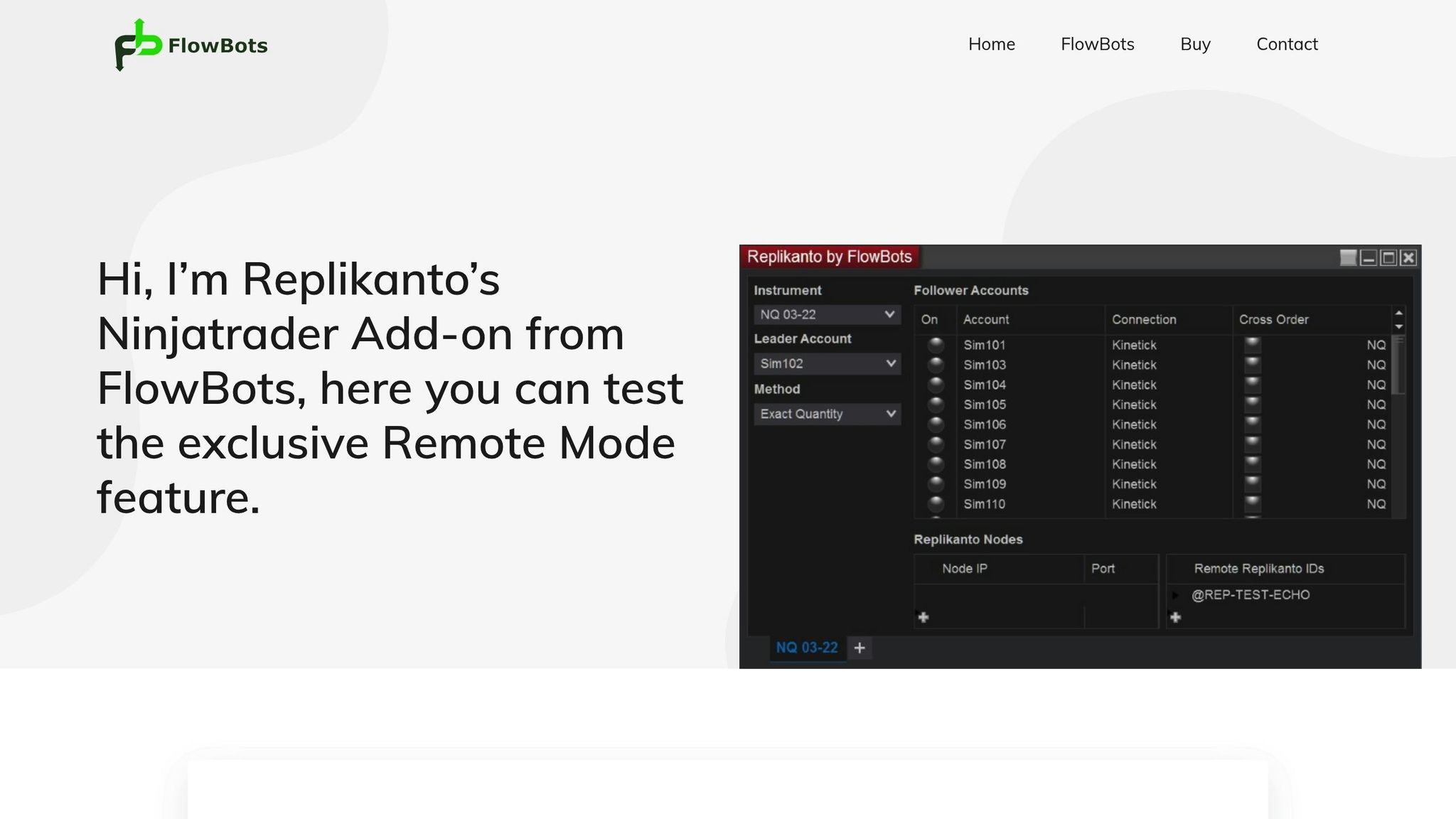
Replikanto is a well-regarded plugin built specifically for NinjaTrader, often favored by futures traders juggling multiple accounts, especially those working with proprietary trading firms. Unlike cloud-based trade copiers, Replikanto operates directly within NinjaTrader 8. It’s available for a one-time fee of $199 (which includes one year of updates) or an annual subscription of $149.
Platform Compatibility
Replikanto is tightly integrated with NinjaTrader, supporting a variety of data feeds like Rithmic and Tradovate. It accommodates a range of account types, including live, demo, simulation, and proprietary firm accounts, making it flexible for diverse trading setups. It also supports remote trade replication across different machines.
Multi-Account and Prop Firm Support
The plugin handles unlimited follower accounts and is designed to work seamlessly with both prop firm evaluations and funded accounts. It uses ratio-based trade copying, which adjusts contract sizes automatically (e.g., converting MES to ES), and even allows traders to fade or invert positions by using negative ratios. Additionally, users can choose between immediate and delayed synchronization modes, giving them control over how quickly trades are mirrored.
Latency and Execution Speed
Replikanto includes an ATM Copy feature, which applies the leader account’s NinjaTrader ATM strategy directly to follower accounts. This allows it to replicate exit orders faster than traditional order-by-order copying. Its Market Only Mode ensures that only completed market executions are mirrored, avoiding the replication of unfilled limit or stop orders. For users managing multiple remote accounts, the system parallelizes trade requests, reducing latency when sending orders to several accounts simultaneously. These features are designed to enhance execution speed and reliability.
Risk Management Features
While Replikanto offers basic risk management tools, it lacks some advanced features like daily loss limits or profit goal settings, which are often essential for strict compliance with prop firm requirements. There have also been occasional reports of unmanaged open positions during periods of high market volatility, typically due to missed limit orders or slippage. Despite these shortcomings, Replikanto remains a trusted choice for professional traders, thanks to its performance and ability to replicate trades across remote accounts effectively.
For those looking to implement this setup, see our NinjaTrader trade copying guide. Next, we’ll take a closer look at Tickblaze IgniteCopier, another prominent tool for futures trade copying.
2. Tickblaze IgniteCopier
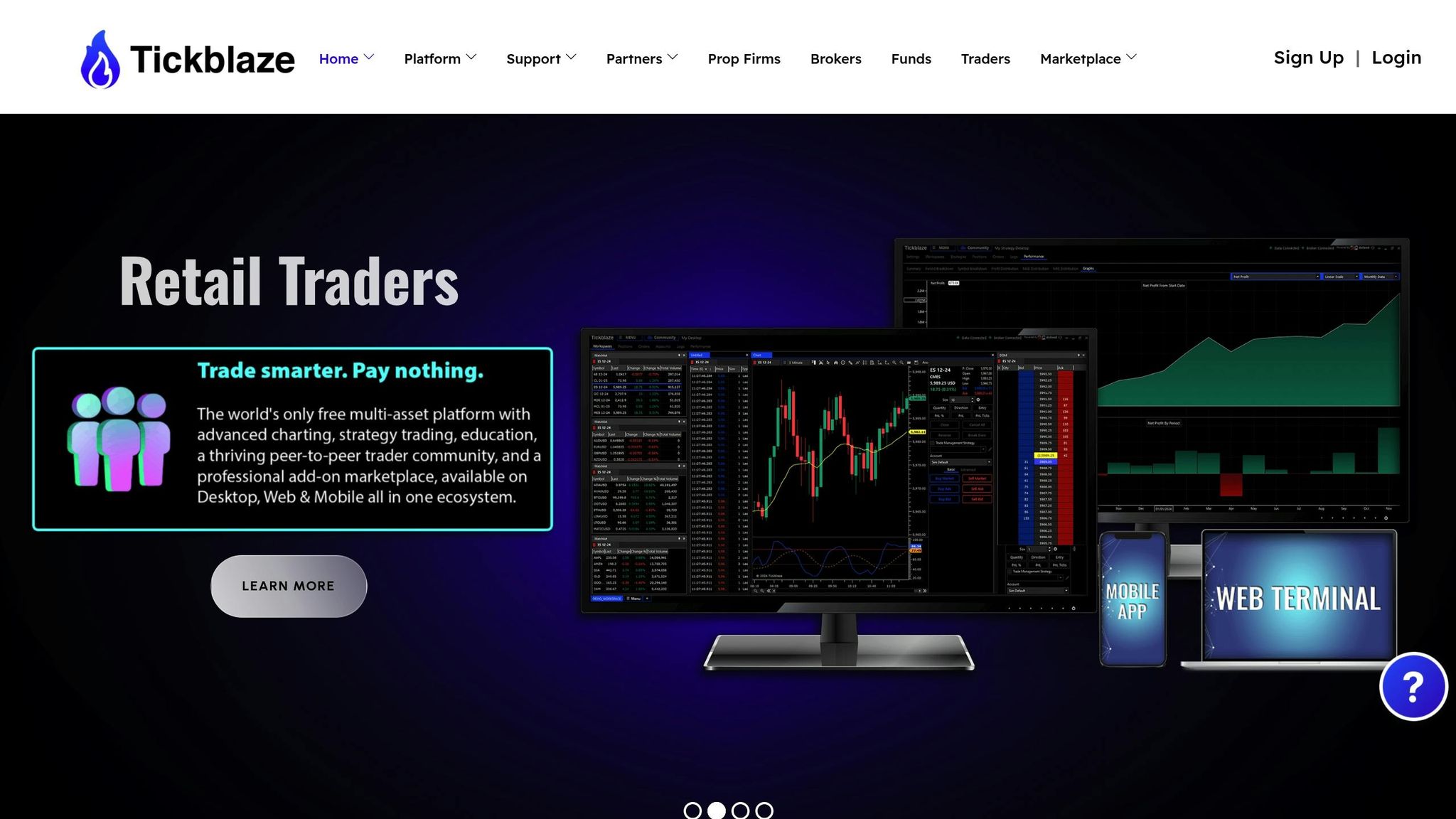
Tickblaze IgniteCopier brings trade copying directly into the Tickblaze platform, making it accessible on Desktop, Web, and Mobile. By replicating trades locally on your device, it minimizes latency and ensures that sensitive information stays secure. This built-in feature is designed for professional traders who demand fast and reliable execution without exposing their account credentials to external systems. It’s a solution tailored for those prioritizing both speed and security.
Platform Compatibility
Similar to Replikanto’s integration with NinjaTrader, IgniteCopier offers seamless connectivity within the Tickblaze ecosystem. It supports multiple broker and data connections, including Rithmic, CQG, Interactive Brokers, and YourBourse. Traders can manage diverse portfolios - futures, stocks, forex, and crypto - all from a single interface. The setup process is quick, taking less than a minute, and the system can handle hundreds of leader and follower accounts simultaneously. For the best experience, Tickblaze recommends using Windows 11 with an Intel Core i7 (11th Gen or newer) and at least 16GB of RAM.

Your trading computer. In the cloud.
Connect and control your trading strategies from any device, anywhere in the world, through secure remote desktop, while execution remains on QuantVPS.
From $29.99/mo · Windows or Linux · 8 datacenters
0.52ms to CME from our Chicago nodes.


 NinjaTrader
 MetaTrader
 TradingView
 Tradovate
 Rithmic
 Sierra Chart
 Bookmap
 Quantower
For an always-on trade copier setup, run the copier on a NinjaTrader VPS so every linked account stays online.
Multi-Account and Prop Firm Support
IgniteCopier comes with built-in symbol mapping, a handy feature for futures traders managing accounts of different sizes. It automatically translates between micro and mini contracts, such as MES to ES or MNQ to NQ. This is especially useful for traders juggling multiple prop firm evaluations or funded accounts with varying contract size requirements. By enabling exposure distribution across multiple accounts, it helps traders adhere to individual risk limits.
"We rejected most cloud-based copiers due to data risks. Tickblaze's native copier is fully compliant and safer for our traders. It's the only one we approve for firm use." - Cynthia R., Risk Manager, Proprietary Trading Firm
Latency and Execution Speed
One of IgniteCopier’s standout features is its local execution, which achieves speeds as fast as 1.6 milliseconds - significantly faster than the delays typical of cloud-based solutions. This speed is crucial during high-volatility periods in fast-moving futures markets like ES, NQ, CL, and GC. By eliminating the need for orders to travel to and from a cloud server, IgniteCopier ensures that trade replication remains quick and reliable.
"Every other copier failed when volatility spiked - Tickblaze hasn't missed a single fill. It's fast, stable, and bulletproof." - Mark A., Futures Prop Trader
Risk Management Features
IgniteCopier includes robust risk management tools, such as per-account daily loss and gain limits, which help traders comply with prop firm rules across multiple accounts. Additional features include news blockers and time filters to restrict trading during specific market conditions. Traders can also set up to three profit targets per trade and monitor real-time profit and loss across all connected accounts. Detailed audit logs with timestamps are generated for every trade modification, making it easier to resolve payout disputes or pass compliance reviews with prop firms.
Tickblaze offers IgniteCopier as an annual add-on for $250.00 for retail traders. This price includes software updates, extensive documentation, VIP AMA sessions, and remote installation support. As of January 9, 2026, the platform holds a 3.9 out of 5 rating on Trustpilot, based on 1,930 reviews. With its comprehensive feature set, IgniteCopier provides a solid solution for futures trade copying.
3. Affordable Indicators Trade Copier
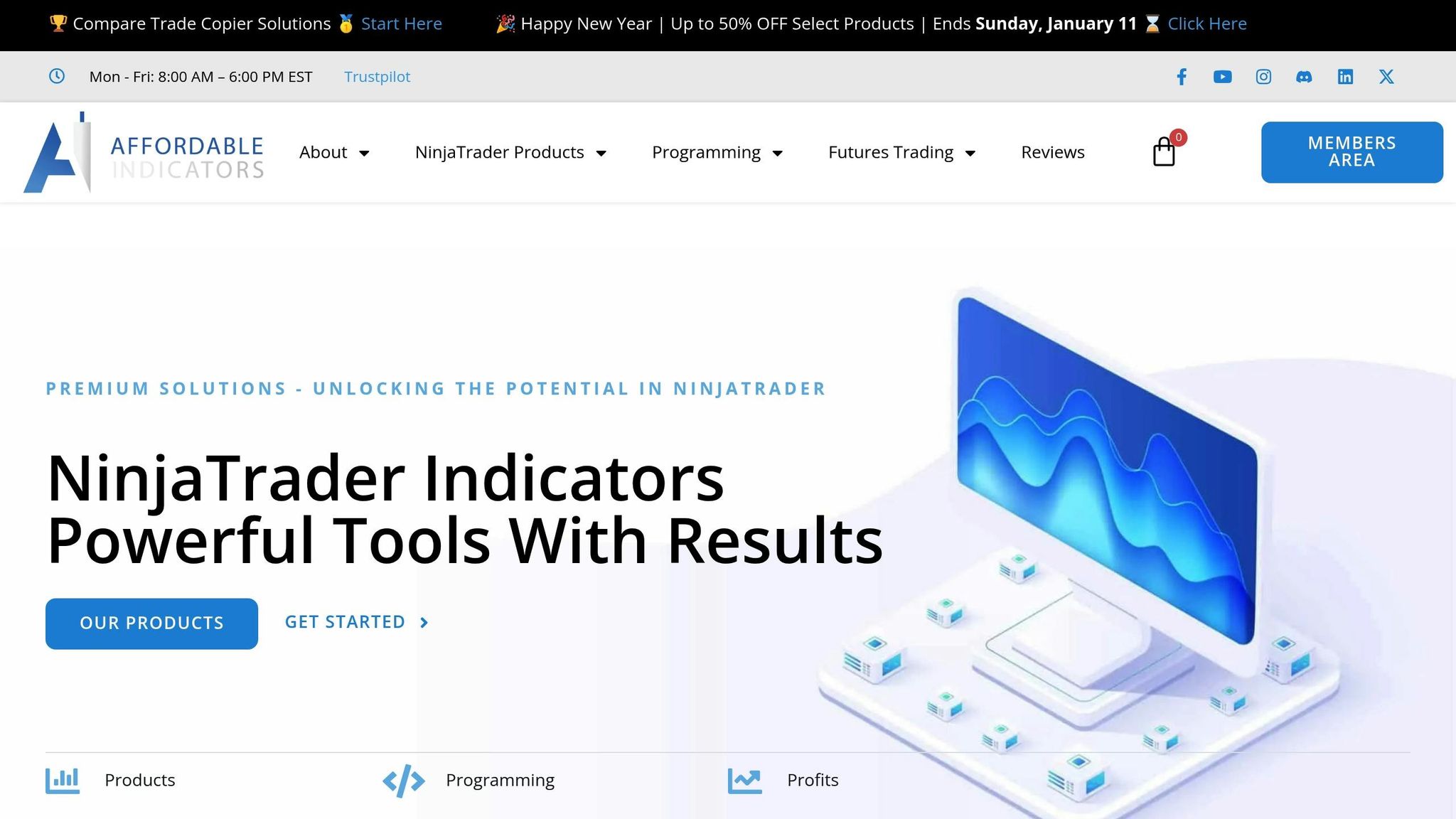
Affordable Indicators provides the "Duplicate Account Actions" trade copier, seamlessly integrated into NinjaTrader. This tool operates directly within the platform, making it especially appealing to traders who prefer on-platform copying rather than relying on external routing. Everything is managed through a central dashboard, eliminating the need for multiple windows for different instruments.
Platform Compatibility
The trade copier works natively with platforms like NinjaTrader, TradingView, Tradovate, and Rithmic. To function properly, it requires a stable desktop connection. For uninterrupted performance and reduced latency, a dedicated VPS is recommended. Futures traders, especially those dealing with fast-moving contracts like ES, NQ, CL, and GC, can benefit significantly from a Chicago-based VPS, which minimizes latency to CME servers. Beyond its smooth integration, this copier is a powerful tool for managing multiple accounts, whether for retail trading or prop firm evaluations.
Multi-Account and Prop Firm Support
Thanks to its native integration, this copier simplifies the management of multiple accounts, making it particularly useful for prop firm evaluations. It features a "Prop Firm Tracking" window that consolidates all prop firm account details into one display. The copier supports account grouping, flexible configurations, scaling of contract sizes, and even fading master orders. The full suite version adds advanced risk management tools, including daily profit targets, loss limits, and an auto-flatten feature to close positions automatically. A standout feature is the one-click Rithmic position resync, designed to address common synchronization challenges.
"Affordable Indicators leads with tight NinjaTrader integration... its depth in risk scaling and auto-handling of rejects make it especially suited for advanced day traders and copy networks." – Fred Harrington, Founder, Vetted Prop Firms
Latency and Execution Speed
The copier ensures fast execution by detecting trade events and submitting market orders to follower accounts with minimal delay. However, since follower accounts rely on market orders, there may be slight slippage compared to using limit orders.
Risk Management Features
The full suite version, available as a one-time purchase for $295, includes an extensive range of risk management tools that are particularly beneficial for prop firm traders. It automatically handles order rejections and re-submissions, ensuring accounts remain synchronized. With a Trustpilot rating of 4.8 out of 5 based on over 200 reviews, the software has earned a strong reputation. For those looking for a simpler option, the trade copier-only version is priced at $175 as a one-time payment. Both versions come with lifetime updates and no recurring subscription fees.
4. SimpleTradeCopier (NinjaTrader Community Builds)
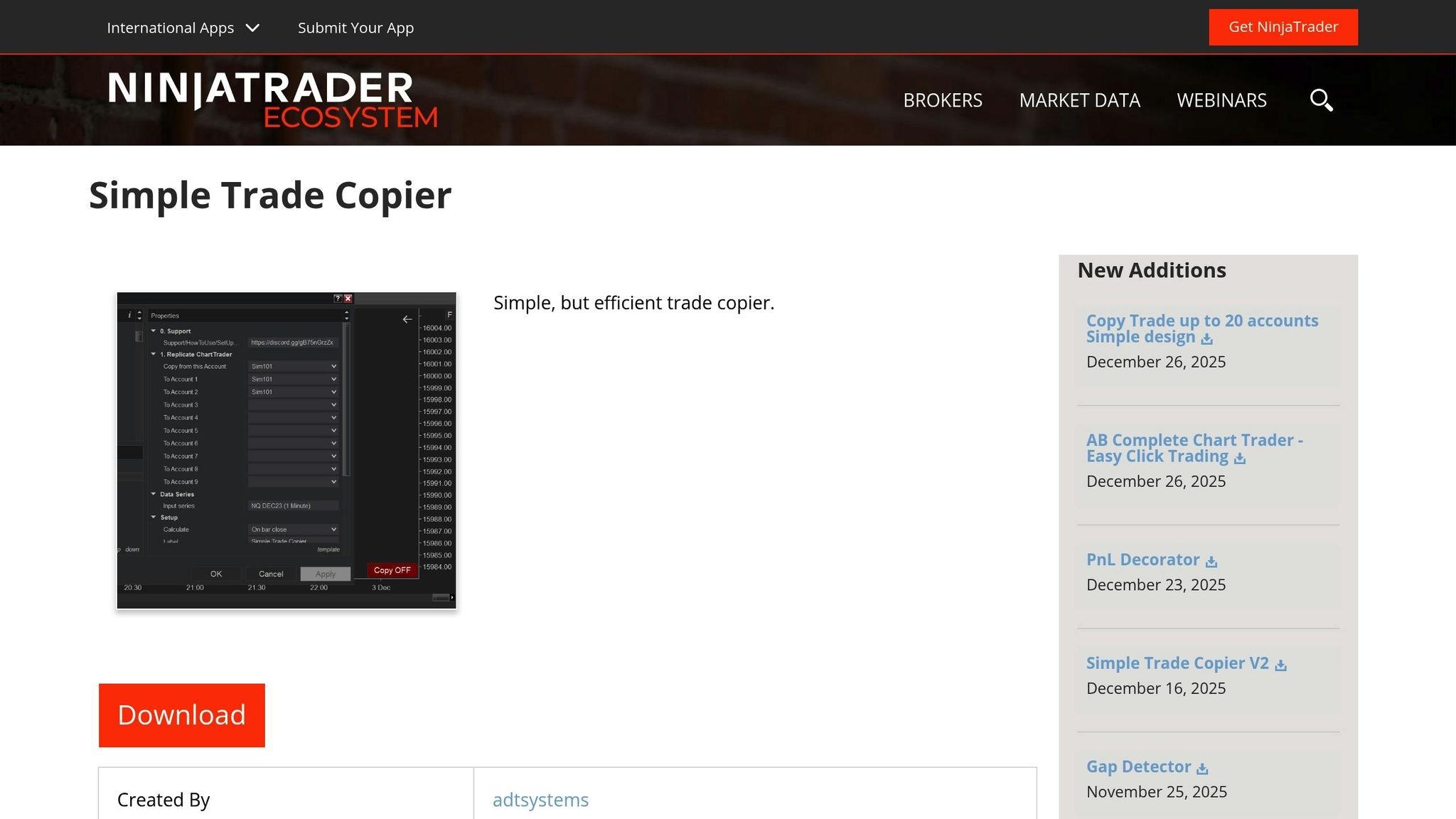
SimpleTradeCopier is a straightforward, community-built trade copier designed for traders who value simplicity and dependable execution. Available for free through the NinjaTrader Ecosystem, this tool has been downloaded 8,937 times as of February 2024. It works by copying trades from a master account to follower accounts using market orders.
Platform Compatibility
This tool is built exclusively for NinjaTrader 8 and operates locally within the platform. It offers flexible instrument mapping, making it possible to copy trades across different contracts. For instance, a position in /ES on the master account can be mirrored as a position in /MNQ on a follower account. For optimal performance, it’s recommended to run the tool on a dedicated VPS.
Multi-Account and Prop Firm Support
SimpleTradeCopier is capable of managing multiple follower accounts, even setups involving more than 20 accounts across various proprietary trading firms. It also includes quantity ratio settings, allowing traders to adjust contract sizes proportionally. Additionally, its safety feature, "Check Follower Positions are Flat", automatically flattens follower positions if they fall out of alignment within 1.5 seconds. This feature can be disabled when running independent strategies.
Latency and Execution Speed
The copier ensures fast trade replication by monitoring master orders and executing market orders on follower accounts as soon as the master order is filled. While this approach may introduce minor slippage compared to limit orders, many traders find the trade-off worthwhile. One trader shared their experience:
"I switched to this free copy trader and got better results. It simply copies the leader account's moves with market orders, ensuring execution. I prefer a slight slippage over a chaos of unmanaged orders across 20+ accounts." – Traderf549, Junior Member, NinjaTrader Support Forum
Risk Management Features
From a risk management perspective, SimpleTradeCopier includes loop protection, which disables the copier and notifies the user if an infinite order feedback loop is detected. This safeguard is critical, as one developer pointed out:
"The Simple Trade Copier allows for an infinite looping of order copying, instantly getting you into a margin call and crashing Ninja, if not careful." – zacharydw00, Developer, NinjaTrader Ecosystem
To minimize risks, traders are strongly encouraged to test the copier on simulation accounts before using it with live funds. A simple red/green toggle button on the chart provides an easy way to enable or disable the copying function as needed.
5. MultiTrader Copier Scripts
MultiTrader copier scripts are a go-to option for developers looking to customize futures trade copying. Written in NinjaScript or Python, these scripts allow traders to fine-tune how trades are copied and executed. Unlike plugin-based solutions, script-based copiers provide a deeper level of control and flexibility.
Platform Compatibility
These scripts are compatible with major futures trading platforms, including NinjaTrader 8, TradeStation, Tradovate, and TradingView. For example, TradeStation leverages API connections to process external signals, while NinjaTrader can use webhook alerts from charting platforms to automatically generate orders.
Multi-Account and Prop Firm Support
Script-based systems often support advanced features like multi-directional copying, enabling any account to act as a leader or follower. Some even include "Group Copiers" to organize accounts by type or strategy. For traders working with prop firms, "Stealth Mode" can mask automation signatures to comply with firm policies.
Latency and Execution Speed
Latency varies depending on the setup. Cloud-based routing can introduce around 100 milliseconds of delay, while native solutions can execute trades in as little as 1.6 milliseconds. For optimal performance, it's recommended to use hardware with at least 6 CPU cores and 16 GB of RAM. Hosting these scripts on a high-performance VPS located in Chicago helps reduce latency to CME endpoints.
6. TradeCopy Tools from Trading Solutions
TradeCopy Tools are third-party software packages designed to sync trading strategies across multiple futures platforms, making life easier for traders managing multiple accounts simultaneously.
Platform Compatibility
These tools work seamlessly with platforms like NinjaTrader, TradingView, Tradovate, and Rithmic. They use API-based connections to ensure smooth and efficient order routing, which is key for effective multi-account management.
Multi-Account and Prop Firm Support
One of the standout features of these copiers is their ability to automatically adjust trade sizes based on the equity of each account. This is a game-changer for traders juggling multiple accounts or working in prop firm environments. It ensures trades are scaled to match each account’s balance and risk tolerance. Execution speed is another critical factor to keep in mind, especially in fast-moving markets.
Stay online and closer to execution. Choose a VPS location for CME futures, New York markets, London FX, API trading, and more.
8 datacenters help your platforms keep running day and night without depending on your home PC.
From $29.99/mo · Windows or Linux · 8 datacenters
0.52ms to CME from our Chicago nodes.
Latency and Execution Speed
When it comes to execution, every millisecond counts. Cloud-based routing can introduce delays of up to 100 milliseconds, which might not sound like much but can make a big difference in volatile markets like ES and NQ. To minimize delays, traders can use native integrations or run the copier on a NinjaTrader VPS. This setup ensures faster order synchronization, even during periods of high market activity.
7. Charting + Copier Bundles
Some platforms combine charting tools and trade copying into one seamless solution, connecting TradingView signals directly with execution platforms like NinjaTrader, Tradovate, or Rithmic. These integrations work through cloud-based synchronization tools (such as Tradesyncer), webhook-to-API bridges (like CrossTrade and TradersPost), or native plugins (like Affordable Indicators). This approach simplifies the process by merging signal generation with trade execution, making it more efficient than traditional trade copiers.
Platform Compatibility
Tradesyncer, a cloud-based dashboard, aggregates accounts and signals from TradingView, serving over 17,500 traders and earning a 4.5-star rating on Google. CrossTrade and TradersPost specialize in converting TradingView strategy alerts or webhooks into executable orders on platforms like NinjaTrader and Tradovate. For traders who prefer an all-in-one platform, Affordable Indicators offers the "Accounts Dashboard Suite", which includes a trade copier alongside advanced risk management tools. This package is available for a one-time payment of $295.00.
Multi-Account and Prop Firm Support
These solutions are particularly effective for managing multiple funded accounts. Features like stealth modes ensure compliance with prop firm rules, while cross-instrument mapping allows leaders to trade standard contracts (e.g., ES) while followers use equivalent micro contracts (e.g., MES). Affordable Indicators also stands out with its dedicated prop firm tracking window, earning a 4.8-star rating on Trustpilot from over 200 reviews.
Latency and Execution Speed
Cloud-based systems generally achieve sub-100ms speeds, making them suitable for swing trading. However, for high-frequency strategies, integrated solutions like Copilink can deliver latency as low as 1.6ms. While cloud-based tools trade off some speed for continuous operation, local solutions running on one of the best VPS for futures trading near Chicago or Aurora, equipped with at least 6 CPU cores and 16GB of RAM, can drastically reduce latency - ideal for scalping or algorithmic trading.
Risk Management Features
Advanced bundles include tools like consistency trackers, auto-flatten options, and market execution modes to help enforce drawdown limits and synchronize orders. Affordable Indicators goes further by offering features to set daily goals, loss limits, and session lockouts. Pricing for these solutions varies: Copilink costs $24.88 per month, Tradesyncer ranges from $49.00 per month to $1,428.00 per year depending on the number of connections, and Affordable Indicators requires a one-time payment of $295.00.
8. Copier Tools Embedded in Prop Firm Platforms
Some proprietary trading firms have taken custom API-based solutions a step further by integrating copier tools directly into their platforms. These embedded tools, like the Apex-branded version of Replikanto, allow traders to manage both evaluation and funded accounts from a single interface. This setup makes it easier to handle multiple accounts simultaneously, streamlining operations for active traders.
Platform Compatibility
Most of these embedded copiers are designed for NinjaTrader, a platform widely used by prop firms for futures trading. Tools such as Replikanto and Copilink integrate seamlessly with NinjaTrader 8, ensuring smooth functionality. While some firms provide proprietary dashboards to consolidate account metrics, NinjaTrader often remains the core execution platform. When paired with a VPS located near major exchanges, these tools consistently deliver reliable performance.
Managing Multiple Accounts
One of the standout features of embedded copiers is their ability to efficiently manage multiple funded accounts. Features like "Cross-Order Support" make it possible to replicate trades across accounts with varying contract sizes. For instance, you can mirror trades from ES contracts into MES accounts, helping to balance risk across different account sizes. Many tools also include a "Stealth Mode" to conceal automation signatures, which can be crucial for adhering to prop firm rules on automated trading. Centralized dashboards provide an overview of key metrics and risk indicators across all accounts, giving traders a comprehensive view of their performance.
Latency and Execution Speed
Embedded copiers running locally - either on your machine or through a VPS - offer impressive execution speeds, often as fast as 1.6 milliseconds. By comparison, cloud-based solutions typically average around 100 milliseconds. For even faster performance, running the copier on a VPS located near the CME exchange in Chicago can reduce latency to sub-millisecond levels.
Risk Management Features
These tools also come equipped with robust risk management capabilities. Features like daily loss limits, maximum loss caps, and auto-flatten modes help traders stay within compliance guidelines. Some advanced copiers include consistency trackers that monitor trading behavior and can lock accounts if evaluation criteria are at risk of being breached. Additionally, session lockouts can prevent trading during high-volatility news events or outside permitted hours. By blending low latency with strong risk management features, these embedded solutions are well-suited for traders using a dedicated VPS setup.
9. Custom API-Based Copier Solutions
Custom API-based copiers offer a high degree of control for setting up your futures trading system. Instead of relying on pre-built plugins, these solutions connect directly to broker APIs - such as Tradovate, TradeStation, or Alpaca - using tools like Python, Node.js, or webhook listeners. This makes them an excellent choice for developers and institutional traders who need the flexibility to work across various platforms and brokers.
Platform Compatibility
One of the standout advantages of API-based copiers is their platform independence. You can send signals from TradingView webhooks straight to your broker's API without the need for resource-intensive desktop software. Fred Harrington, Founder of Vetted Prop Firms, highlights this benefit: "Traders Post... is a strong choice for developers or TradingView power users who want direct API connections to real brokers without relying on desktop software".
This adaptability opens the door to advanced multi-account management and a streamlined trading experience.
Multi-Account and Prop Firm Support
Thanks to their flexibility, API-based copiers are particularly effective for managing complex account setups. They support multi-account configurations with features like cross-instrument mapping. For instance, these tools can automatically convert standard ES contracts into MES (Micro E-mini) contracts across various prop firm accounts. Many API copiers even include stealth modes to conceal automation signatures, ensuring compliance with prop firm rules. Additionally, account grouping features allow traders to organize multiple accounts under separate lead accounts for different strategies.
Latency and Execution Speed
Speed is a critical factor for any trading copier, and custom API solutions are no exception. Cloud-based options can sync trades in under 100 milliseconds, while locally hosted setups can achieve speeds as fast as 1.6 milliseconds. For peak performance, hosting your API copier on a high-performance VPS - like QuantVPS - located near the CME exchange in Chicago is ideal. With direct fiber-optic connections to exchange matching engines, latency can drop below 0.52 milliseconds. In fast-moving markets, even a delay of 1–2 seconds could lead to missed fills or increased slippage on volatile contracts like NQ or ES.
Risk Management Features
These solutions also come equipped with robust risk management tools. For example, they can automatically flatten positions when daily loss limits or trailing drawdown thresholds are reached. Position sizing can be customized for each follower account using fixed ratios or multipliers, allowing traders to manage risk across accounts with different capital levels. Additional features, like session lockouts, can prevent trades during high-volatility news events or outside permitted trading hours. These controls are especially useful for traders managing multiple funded accounts, helping them stay compliant with prop firm rules while scaling their strategies effectively.
Futures Trade Copier Comparison
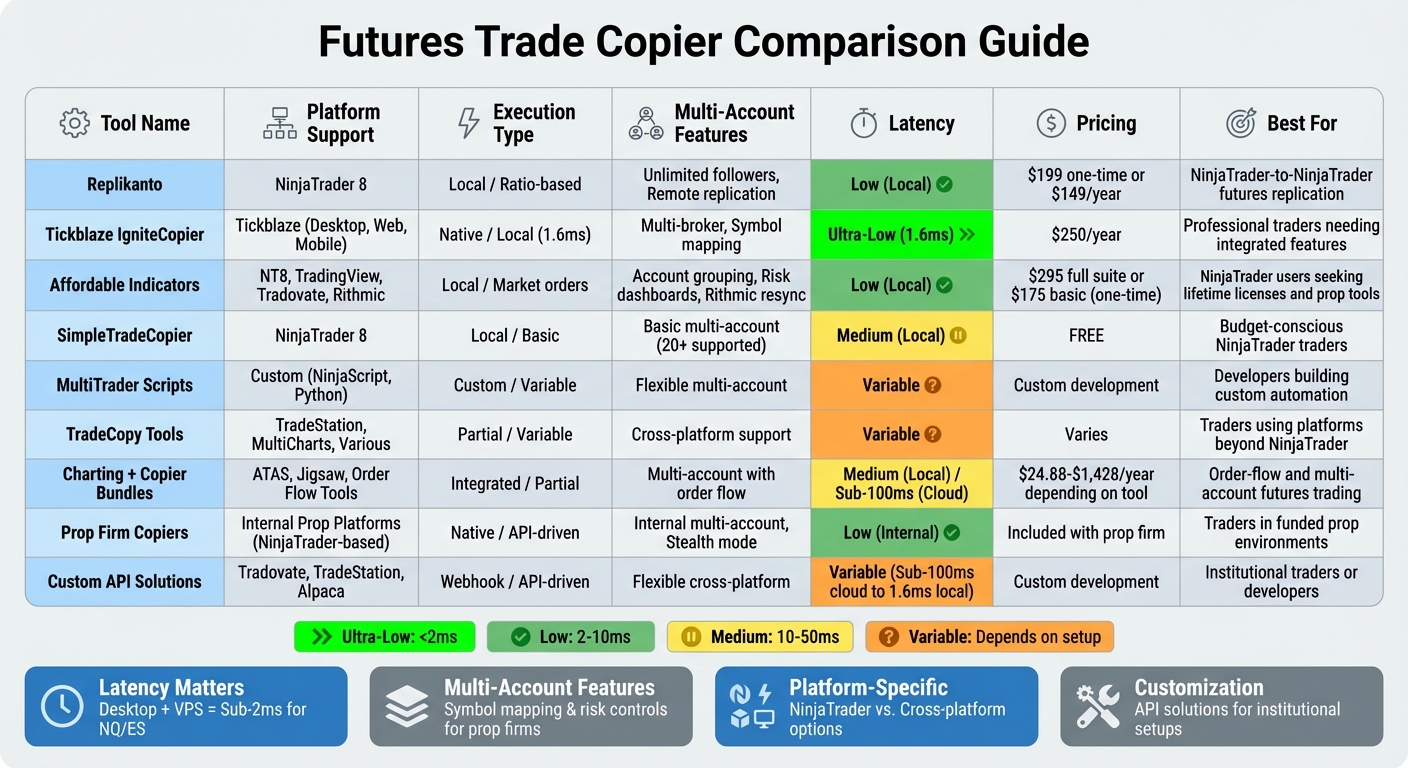
Futures Trade Copier Comparison: Features, Latency, and Pricing
Here's a closer look at nine futures trade copiers, breaking down their platform compatibility, execution methods, multi-account capabilities, latency, and ideal use cases. The table below highlights the key differences to help you choose the best fit for your trading needs.
| Tool | Platform Support | Execution Type | Multi-Account Features | Latency | Recommended Use Case |
|---|---|---|---|---|---|
| Replikanto | NinjaTrader 8 | Local / Ratio-based | Unlimited followers, Remote replication | Low (Local) | NinjaTrader-to-NinjaTrader futures replication |
| Tickblaze IgniteCopier | Tickblaze | Native / Local | Multi-broker, Multi-account | Low (Local) | Professional traders needing integrated copy features |
| Affordable Indicators | NT8, TV, Tradovate, Rithmic | Local / Market orders | Account grouping, Risk dashboards, Rithmic resync | Low (Local) | NinjaTrader users seeking lifetime licenses and prop tools |
| SimpleTradeCopier | NinjaTrader 8 | Local / Basic | Basic multi-account | Medium (Local) | Budget-conscious NinjaTrader traders |
| MultiTrader Scripts | Custom (NinjaScript, Python) | Custom / Variable | Flexible multi-account | Variable | Developers building custom automation systems |
| TradeCopy Tools | TradeStation, MultiCharts, Various | Partial / Variable | Cross-platform support | Variable | Traders using platforms beyond NinjaTrader |
| Charting + Copier Bundles | ATAS, Jigsaw, Order Flow Tools | Integrated / Partial | Multi-account with order flow | Medium (Local) | Order-flow and multi-account futures trading |
| Prop Firm Copiers | Internal Prop Platforms | Native / API-driven | Internal multi-account | Low (Internal) | Traders in funded prop environments |
| Custom API Solutions | Tradovate, TradeStation, Alpaca | Webhook / API-driven | Flexible cross-platform | Variable | Institutional traders or developers |
Key Takeaways for Choosing a Futures Trade Copier
- Latency Matters: Tools like Replikanto and Affordable Indicators shine when paired with a low-latency VPS for algorithmic trading. Their low-latency setups are ideal for fast-moving contracts like NQ or ES, ensuring trades replicate quickly and accurately. On the other hand, custom or third-party integrations may face variable latency due to system architecture.
- Multi-Account Features: Advanced options such as account grouping and symbol mapping allow seamless trade synchronization across accounts with different contract sizes or capital allocations. Affordable Indicators stands out with its additional risk management tools, including daily loss limits and trailing drawdown monitors - features especially useful for prop firm traders.
- Platform-Specific Needs: Some tools cater specifically to NinjaTrader users, like Replikanto and SimpleTradeCopier, while others, such as TradeCopy Tools and Custom API Solutions, offer broader cross-platform compatibility, making them suitable for traders working with multiple brokers or platforms.
- Customization and Flexibility: For developers or institutional setups, options like MultiTrader Scripts or Custom API Solutions provide the ability to build bespoke trading automation systems, offering unmatched flexibility.
Conclusion
Choosing the right trade copier depends on your trading platform, style, and infrastructure. For those exclusively using NinjaTrader, tools like Replikanto or Affordable Indicators provide seamless integration and ultra-low latency when hosted on a proper VPS. On the other hand, traders operating across multiple brokers or platforms might prefer cloud-based options like Tradesyncer, which eliminate the need for local software installation. However, keep in mind that cloud solutions typically introduce slightly higher latency - around 100 ms - compared to the sub-2 ms speeds achievable with desktop copiers running on a VPS. This makes your hardware setup just as important as the copier’s features.
Low latency plays a crucial role when trading fast-moving instruments like NQ or ES. Even a delay of one or two seconds can lead to slippage or missed fills. Desktop-based copiers, combined with a high-performance VPS located near exchange hubs (e.g., Chicago for CME futures), can reduce network round-trip times to under 2 ms. This ensures reliable, round-the-clock execution.
For traders working with top futures prop firms, risk management features are a must. Solutions like Copilink and Affordable Indicators include tools such as daily loss limits, trailing drawdown monitors, and auto-flatten capabilities to safeguard funded accounts from breaching firm rules. Additionally, some copiers offer a "Stealth Mode" feature, which can help traders comply with proprietary firm policies.
If you’re managing multiple accounts with varying contract sizes - like copying ES trades to MES accounts - look for a copier that supports advanced symbol mapping and contract scaling. Options such as Affordable Indicators offer features like account grouping and Rithmic resync tools to address position mismatches. For traders who need even more customization, solutions built with MultiTrader Scripts or custom APIs provide flexibility for creating tailored automation systems.
FAQs
What features should I consider when choosing a futures trade copier?
When choosing a futures trade copier, it's important to focus on platform compatibility. Make sure it works smoothly with your primary trading platform, whether that's NinjaTrader, TradeStation, or Tradovate. The copier should also handle multi-account scaling, enabling you to adjust trade sizes, set risk limits, and efficiently copy trades across multiple accounts or proprietary trading setups.
In fast-paced futures markets like ES, NQ, or CL, latency and execution speed can make or break your trades. Select a copier that operates locally or uses a low-latency VPS to reduce slippage and maintain real-time synchronization. Equally important are risk management tools - features like daily loss limits, drawdown caps, and per-account multipliers help you stay in control of your trading activity.
Additional features to consider include symbol mapping for contract rollovers, flexible trade configuration options, and VPS integration to ensure reliable performance and uninterrupted operation during volatile market conditions.
How can I reduce latency when using a trade copier for futures trading?
To keep latency to a minimum, opt for a locally-executed trade copier hosted on a low-latency trading VPS that’s physically close to the exchange - like Chicago for CME markets. Steer clear of cloud-based intermediaries and instead go for platform-integrated solutions that handle orders directly on the VPS. Using a VPS guarantees reliable uptime, quicker execution speeds, and reduced delays, even during fast-moving market conditions.
What are the key risk management features to look for in a futures trade copier?
Effective risk management plays a key role when using a futures trade copier. Prioritize tools that let you set loss limits for each account. For example, features like daily loss caps or overall drawdown thresholds can help minimize significant losses across multiple accounts. Look for options like auto-flatten, which automatically closes all positions once a loss limit is reached, and trailing-loss controls, which adjust stop-loss levels as trades move favorably.
Managing multiple accounts effectively requires allocation controls. A reliable copier should allow you to assign trade size multipliers or ratios tailored to each account’s capital. Additional features, such as symbol mapping - which adjusts orders to fit account-specific contracts - and profit-lock limits - which cap daily profits to match risk preferences - are also incredibly useful. Together, these tools help maintain safe and consistent futures trade copying.