
Duplikium is a cloud-based trade copier that simplifies replicating trades across multiple accounts and platforms like MT4, MT5, and cTrader. It eliminates the need for software installations or VPS setups, offering fast execution with just 1–3 milliseconds of internal latency. Trusted by over 25,000 accounts and processing 6 million weekly orders, it’s ideal for traders managing multiple accounts, prop firm traders, or money managers.
Source: https://www.trade-copier.com, October 2026
Key Features:
- Platform Compatibility: Works with MT4, MT5, cTrader, and more.
- Risk Management: Adjust trade sizes with "Risk Factor" settings.
- Security: High-level encryption and Two-Factor Authentication.
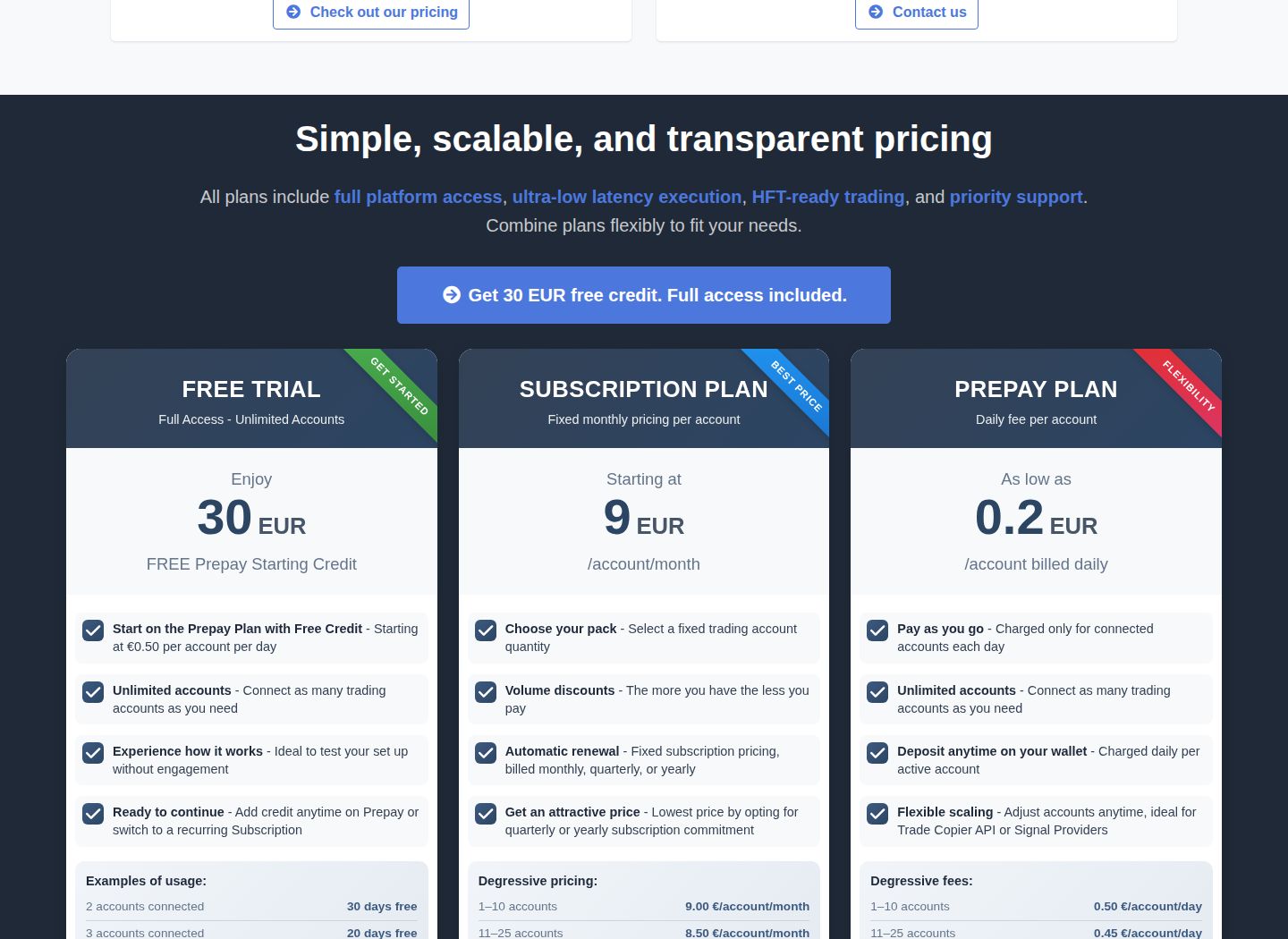
- Pricing: $0.54/day or $9.72/month per account, with free $32.40 trial credit.
- Ease of Use: No installations required; setup takes just minutes.
Duplikium supports various order types (market, pending, stop loss, take profit) and offers symbol mapping for cross-platform consistency. It’s perfect for traders who need reliable trade copying across different brokers and account sizes, with minimal effort required for setup and maintenance.
What Is Duplikium and What Are Its Key Features?
Duplikium is a cloud-based trade copier built by Swiss banking engineers that copies trades across multiple platforms in real time. Connect a main account and secondary accounts, and every position the main account opens is copied automatically with an internal latency of just 1 to 3 milliseconds. With over 25,000 connected accounts and more than 6 million orders copied weekly as of 2026, this is a genuinely professional-grade tool.
"Over 25,000 connected accounts and more than 6 million orders copied weekly as of 2026, making Duplikium one of the most actively used trade copiers in the world." (Duplikium, 2026) Comparing Duplikium with other MetaTrader options? See our roundup of the best MT4 trade copiers.
What It Does: Duplikium acts as a real-time bridge between your main trading account and any number of secondary accounts, eliminating the need for manual order replication across platforms.
Key Point: An internal latency of 1 to 3 milliseconds means your copied trades arrive nearly simultaneously with the original, a critical advantage in fast-moving markets where every millisecond counts.
| Feature | Details |
|---|---|
| Built By | Swiss banking engineers |
| Deployment | Cloud-based |
| Internal Latency | 1 to 3 milliseconds |
| Connected Accounts | 25,000+ |
| Orders Copied Weekly | 6 million+ |
| Grade | Professional |
Supported Platforms and Brokers
A trade copier is only as useful as the platforms it can connect. According to the Duplikium Trade Copier Homepage, the system supports 6+ platforms including MT4, MT5, cTrader, TradingView, DXTrade, and more, giving it an advantage over single-platform copiers that require rebuilding your setup when switching brokers.
Which platform combinations can you copy trades across?
Cross-platform copying lets you send signals from an MT4 master directly to a cTrader slave, or route TradingView webhook alerts into MT5 accounts without manual translation. Symbol mapping handles naming differences automatically, so "EURUSD" on MT4 and "EUR.USD" on cTrader work together. Exotic pairs sometimes need manual adjustment, but major and minor pairs require no extra steps. Broker compatibility extends to over 5,000 broker servers, including IC Markets, Exness, FTMO, and regional operations. If TradingView supplies the signals, a VPS for TradingView webhooks can host the receiving bridge while you check how the copier handles each follower account.
How does multi-master and multi-slave architecture remove copying limitations?
Most copying setups fail because they are too rigid: one master, one slave, fixed ratios. That model breaks when you run different strategies across multiple prop firm accounts or manage a signal group. Duplikium removes this limitation by supporting multiple master accounts feeding into multiple slave accounts simultaneously, with no hard cap on combinations.
What per-slave controls does this architecture give you?
Each slave account has independent risk setup: lot sizing through multiplier, fixed lot, or equity-based ratio, plus account-level equity protection that stops copying if drawdown crosses your threshold. Symbol blacklists, spread filters, and maximum open trade limits per slave provide precise control over what gets copied and when, a level of detail uncommon in competing copiers at this price point.
Uptime
99.999% uptime. Built for 24/7 trading reliability.
Your VPS runs in Tier IV datacenters with redundant power and network, monitored 24/7 on site.
See the uptime SLA







From $29.99/mo · Windows or Linux
Why does cloud-based architecture matter for trade copying?
Most traders use EA-based local copiers by default, but the hidden cost emerges quickly: when your machine restarts, your internet drops, or your VPS subscription expires, the copier stops working. Duplikium's cloud-based architecture eliminates that problem. You manage everything through a web dashboard, and the copier infrastructure runs continuously without requiring your computer to stay online. Our trading VPS remains worthwhile for any Expert Advisors executing on the master account, since Duplikium replaces the copier layer but not the execution environment where your strategy lives.
What features set Duplikium apart from cheaper alternatives?
Two features separate Duplikium from cheaper alternatives. First, partial close support: many copiers ignore partial closes or copy them with a delay. Duplikium handles them in real time, which matters when your strategy scales out of positions in stages. Second, reverse trading lets you flip signals from a consistently poor source into a usable feed. Traders have used this as a calculated hedge, not a gimmick. According to Duplikium Trade Copier's Why Choose Duplikium page, the platform has refined these capabilities since 2013, which explains why edge cases like partial closes and reverse trading are handled with more precision than newer entrants.
How quick is the setup and what does it cost?
Setup takes two to five minutes: register at trade-copier.com, add your master account credentials (investor password for MT4/MT5, OAuth for cTrader), set up slave accounts, choose your risk settings, and run a test trade. The free plan includes one master account and one slave account with no time limit. Pay-as-you-go pricing starts at €0.50 per account per day for 1–10 accounts, dropping to €0.20 per day for 1,000+ accounts. Monthly subscriptions start at €9 per account per month. Running 50 accounts costs approximately €375 per month, which is competitive for large-scale trading.
How do the dashboard and latency hold up in practice?
The dashboard contains substantial information, which new users note in Trustpilot reviews, though the interface becomes intuitive once learned. Understanding its organization transforms the customizable settings into a significant advantage. Latency ranges from 1 to 3 milliseconds within the system, with copy-to-fill times under one second during normal conditions and a few seconds during high-volatility events like NFP releases. Server nodes in Frankfurt, London, New York, and Singapore adequately cover most broker locations, though Tokyo-based brokers route through Singapore, adding marginal latency that our infrastructure can partially offset.
The infrastructure you choose for your master account matters more than most traders realize, and it fundamentally changes what "fast enough" means.
Duplikium for Prop Firm Traders
Prop firm traders represent one of the fastest-growing user groups for trade copiers in 2026, and Duplikium fits that use case with unusual precision. Your primary trading account runs as the master, and each funded account connects as a slave, with risk controls handling the rest. The per-account lot sizing matters because a $10,000 FTMO account and a $50,000 MyFundedFX account cannot share the same position sizing without breaking drawdown rules.
Tip: Always configure per-account lot sizing individually for each funded account. A single shared sizing setting is one of the fastest ways to violate prop firm rules across multiple accounts simultaneously.
| Account | Typical Size | Sizing Approach |
|---|---|---|
| FTMO Account | $10,000 | Individual lot scaling |
| MyFundedFX Account | $50,000 | Individual lot scaling |
| Master Account | Varies | Source of all copied trades |
The equity protection feature deserves specific attention. When a slave account approaches its maximum drawdown threshold, Duplikium stops copying automatically. Most traders lose funded accounts not from one catastrophic trade, but because copying continued when it should have paused.
"Most traders who lose funded accounts do so not from one catastrophic trade, but because copying continued when it should have paused." (Duplikium Use Case Insight)
Warning: Never assume your trade copier will self-manage drawdown limits without proper configuration. The equity protection feature works only when you set appropriate threshold values for each slave account.
Takeaway: Automatic copy-pause at the drawdown threshold is the single most important safeguard for prop firm traders managing multiple funded accounts simultaneously.
Who's Actually Getting the Most From This Tool
Prop firm traders represent one of the fastest-growing user groups for cloud-based trade copiers in 2026. After passing a challenge with FTMO, MyFundedFX, or The Funded Trader, traders want that same strategy running across three, five, or eight funded accounts simultaneously. Duplikium treats your personal account as the master and each prop firm account as a separate slave, with independent lot sizing and risk parameters for each.
Lot sizing controls matter most here. A $10,000 prop account and a $200,000 prop account cannot run identical position sizes, and each firm sets its own maximum drawdown threshold. Duplikium's per-account risk settings let you configure each slave independently, so the math stays correct across every account without manual adjustment.
The equity protection feature stops copying on a slave account when it approaches its drawdown limit, while other accounts continue running. This safeguard has prevented blown challenges that would otherwise cost traders hundreds of dollars in re-entry fees. Important note: several prop firms prohibit or restrict trade copiers in their terms of service, so check the rules before connecting any funded account.
What Real Users Are Saying
Duplikium has across 116 reviews as of early 2026. The distribution is polarized: 83% of reviews are, and 10% are, with almost nothing in between. This gap signals a product with a steep learning curve. Users who invest time in proper setup love it, while those expecting plug-and-play results encounter problems quickly.
Praise centers on speed, support quality, and cross-platform flexibility. According to the TradingView Copier Pro Duplikium Trade Copier Review 2026, execution latency runs between 200 and 500ms, sufficient for most swing and intraday strategies, though scalpers working sub-second windows should test carefully. Criticism focuses on per-account pricing that feels steep for traders managing 3 to 10 accounts and a dense dashboard that slows initial setup. The TradingView Copier Pro review notes that managing five prop firm accounts on the Pro plan costs approximately $828 per year, worth calculating against your expected funded account payouts before signing up.
When the Setup Breaks Down
The right setup depends on what your master account is doing.
Prerequisites and Account Setup
Creating Your Duplikium Account
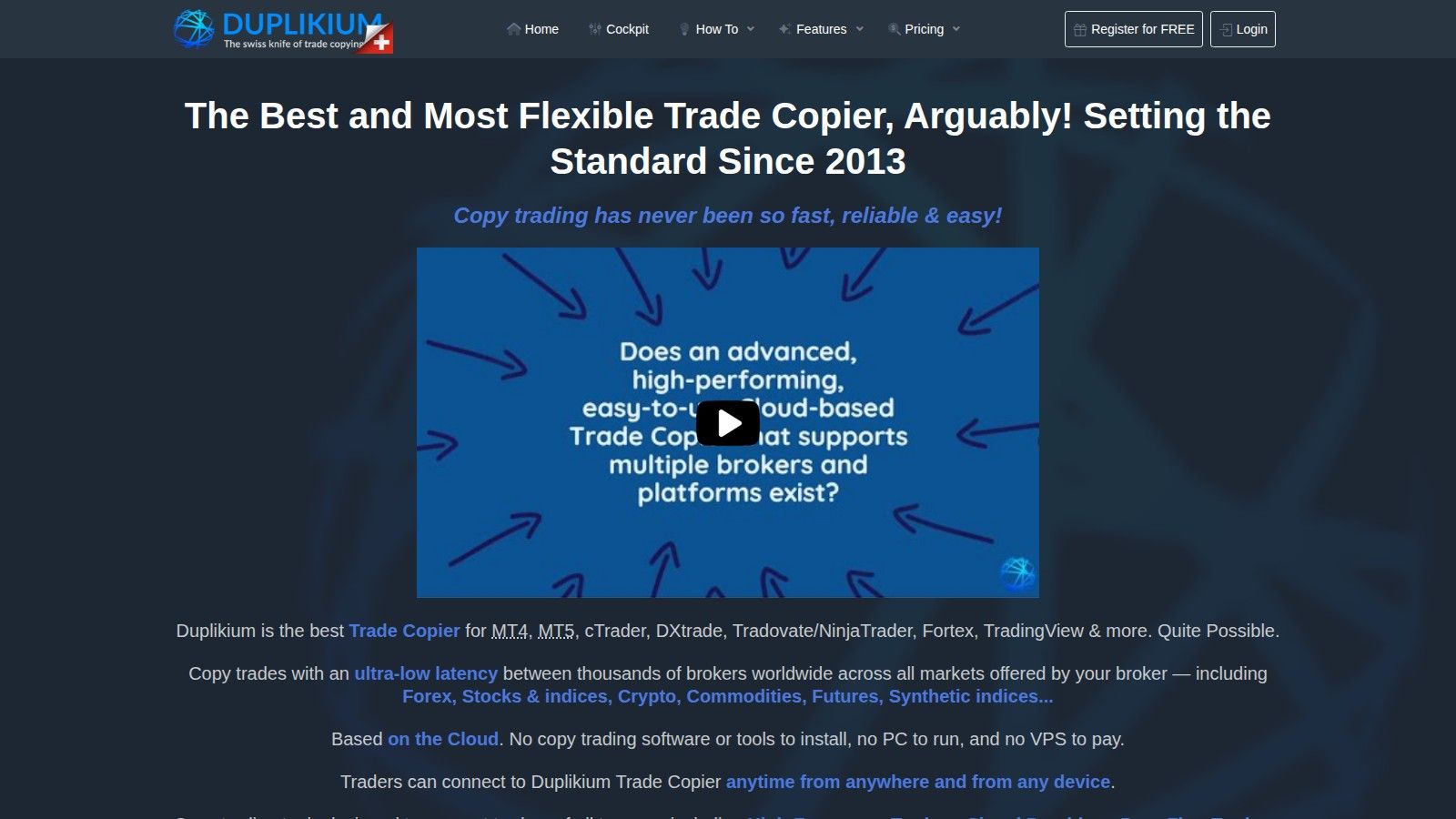
Getting started with Duplikium is quick and straightforward. Head over to the Duplikium website and complete the registration process in about three minutes - no credit card required. Once you’re signed up, you’ll gain access to the Cockpit, a cloud-based dashboard where you can handle all configurations. The Cockpit is accessible from any device with an internet connection, making it convenient to manage your accounts on the go.
As a new user, you’ll receive a free trial credit of 30 EUR (approximately $32.40). To activate this credit, you’ll need to verify your mobile number via SMS. This trial credit allows you to test the copier with either two accounts for 30 days or four accounts for 15 days - giving you plenty of time to explore the service and compare it with other copy trading platforms before committing to a paid plan. To ensure a smooth setup, have your broker login credentials and server details ready in advance.
Remote desktop
Your trading computer. In the cloud.
Connect and control your trading strategies from any device, anywhere in the world, through secure remote desktop, while execution remains on QuantVPS.
Explore the hardwareFrom $29.99/mo · Windows or Linux
Linking Master and Slave Accounts
Once inside the Cockpit, you can start linking your accounts. Simply input your account number, password, and broker server name using the dropdown menu provided. From there, you’ll designate which accounts will act as Master (initiating trades) and which will function as Slave (mirroring trades). You can also adjust the Risk Factor to scale trades proportionally. For instance, if your master account balance is $10,000 and your slave account has $5,000, setting a Risk Factor of 0.5 ensures trades are mirrored in proportion to the smaller account.
Duplikium supports over 5,000 broker servers globally, so compatibility is rarely an issue. Additionally, you can map symbols between platforms - for example, if one broker lists EUR/USD as "EURUSD" on MT4 but another shows it as "EUR.USD" on cTrader. If your broker requires IP whitelisting, you can assign a static or dedicated IP through the Account Settings for a small fee ($2.00 or $5.00 per month). Once your accounts are linked and settings are configured, double-check system compatibility to finalize the setup.
System Requirements and Platform Compatibility
The good news? You don’t need any special hardware or a high-speed internet connection. Once your accounts are linked, Duplikium’s powerful infrastructure takes care of everything, ensuring smooth, low-latency performance. With servers strategically located in Frankfurt, London, New York, and Singapore, the platform operates 24/7 with an impressive internal latency of just 1–3 milliseconds.
Duplikium works with a wide range of trading platforms, including MT4, MT5, cTrader, DXtrade, TradingView, FXCM, and LMAX. It supports various asset classes such as Forex, stocks, indices, cryptocurrencies, commodities, futures, and synthetic indices.
For MT4 and MT5 users, ensure your broker permits Expert Advisor (EA) trading on slave accounts, as copied trades will appear as EA-generated orders. On cTrader, trades are labeled as "openAPI Duplikium Ltd" due to platform transparency requirements - this label cannot be removed. If you’re working with proprietary trading firms, double-check that DXtrade API access is allowed, as some firms like FTMO, MyFundedFX, and InstantFunding have previously imposed restrictions. Lastly, note that Netting accounts, commonly used on platforms like Tradovate and NinjaTrader, do not currently support trade copying or hosting Stop Loss and Take Profit orders.
Setup Guide for MT4, MT5, and cTrader
Setting Up MT4
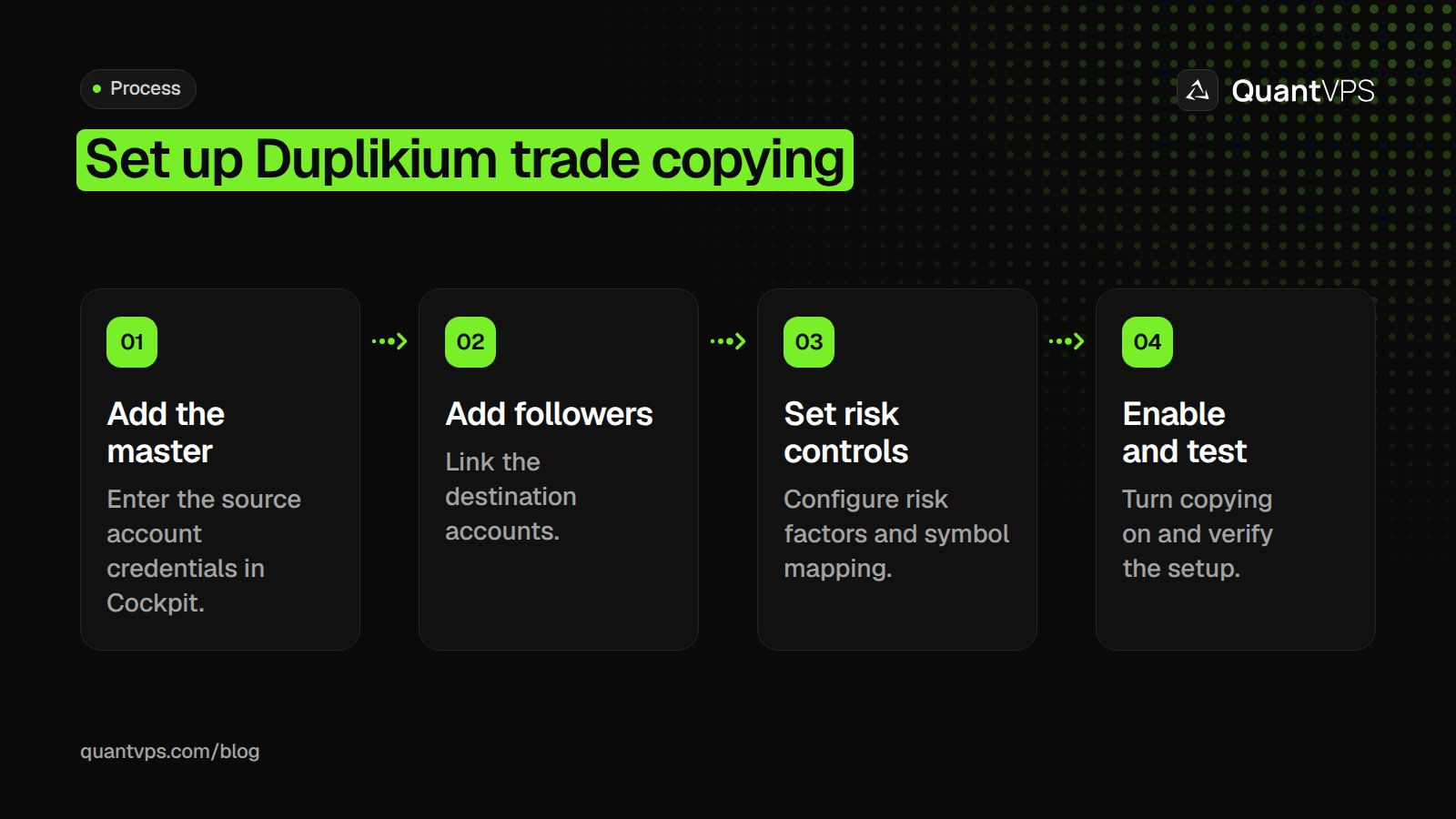
Once you've created your Duplikium account, connecting your MT4 account is straightforward. Start by logging into the Cockpit dashboard and selecting "Add Master". Enter your MT4 credentials - account number, password, and broker server name - exactly as they appear. Then, click "Add" to complete the connection. The system will verify your details and establish the link almost instantly.
Next, link your slave accounts by clicking "Add Slave" and inputting the credentials for each destination account. With both master and slave accounts connected, adjust your Risk Factor settings to control how trade sizes are mirrored. For instance, if your master account has $10,000 and your slave account has $5,000, setting a Risk Factor of 0.5 scales trades proportionally. Finally, toggle the copier status to "ON" in Global Settings.
If your broker uses non-standard symbol names, use the Symbol Settings feature to map them correctly. For example, if one broker lists gold as "XAUUSD" and another as "GOLD", create a mapping rule to ensure trades are copied accurately. Also, confirm that your broker permits Expert Advisor (EA) trading on slave accounts, as copied trades will appear as EA-generated orders. Once MT4 is set up, you can move on to MT5 for similar steps for that platform. Alternatively, if you prefer web-based charting, you might consider a TradingView trade copier for multi-account management.
Setting Up MT5
Setting up MT5 is similar to MT4, with a few extra options for customizing risk management. Start by selecting "Add Master" in the Cockpit, choose MT5 from the platform dropdown, and input your trading credentials. Once your master account is connected, add your slave accounts using the same process. Keep in mind that MT5 supports both hedging and netting account types, though netting accounts have limitations with Stop Loss and Take Profit orders.
After linking your accounts, configure your Risk Factor settings to ensure trades are appropriately sized. You can choose from several options: proportional (scaling based on account equity), fixed lot (copying a set lot size regardless of the master trade), or even custom formulas to match your risk management strategy.
Setting Up cTrader
The process for cTrader is similar but includes a key distinction regarding trade labeling. Start by clicking "Add Master" or "Add Slave" based on the account you’re linking. Enter your broker name, account login, and password. Note that copied trades on cTrader will be labeled as "openAPI Duplikium Ltd" due to the platform's transparency requirements - this label cannot be changed.
Symbol mapping is especially important when copying trades between different platforms or brokers. For example, if you're copying trades from MT4 to cTrader, you might encounter symbol discrepancies like "EURUSD" versus "EUR.USD" or "BTCUSD" versus "Bitcoin." Use the Symbol Settings feature to create mapping rules that ensure trades are recognized accurately across platforms. Additionally, filtering options allow you to select specific symbols for copying to your cTrader slave accounts.
Once everything is configured, perform a test trade to ensure the copier is functioning correctly. The system supports various order types, including market orders, pending orders (limit and stop), protection orders (stop loss and take profit), and partial closes. All updates happen in real time across your linked accounts.
Performance Review and Usage Tips
Performance Analysis
Duplikium offers lightning-fast trade execution with latency ranging from 1 to 3 milliseconds on MT4, MT5, and cTrader. With the ability to process over 6,000,000 orders weekly across 25,000+ connected accounts, it’s built to handle high-volume trading. User feedback is overwhelmingly positive, with Trustpilot showing (from 108 reviews) and TrustRadius giving it a perfect 10/10. Users frequently praise its execution speed and reliable 24/5 live chat support. One account manager even reported a 15% boost in profitability, citing reduced manual errors and smoother operations.
The copier supports a variety of complex order types, including market orders, pending orders, stop loss/take profit, and partial closes, all without requiring local software installation. However, some users mention that the interface can feel "tricky" at first due to its advanced settings. While there’s a steeper learning curve compared to simpler trade copiers, the depth of customization is particularly useful for traders juggling multiple accounts or platforms. These performance features make Duplikium a powerful tool for managing trades across various platforms.
Tips for Multi-Platform Trade Management
To get the most out of Duplikium, pay attention to a few key strategies:
- Enable protection orders on each slave account to ensure stop loss and take profit levels are copied accurately. This helps avoid unexpected losses caused by execution mismatches.
- When working across platforms with different naming conventions, double-check symbol mappings before going live. Use blacklist/whitelist filters to manage which instruments are copied to specific slave accounts.
- Keep an eye on equity ratios when scaling trades. Duplikium calculates trade volumes using the formula: (Investor's Equity ÷ Provider's Equity) × Provider's Volume. Avoid making deposits or withdrawals while trades are open, as this triggers immediate equity recalculations that can disrupt copied positions.
- For cTrader users working with prop firms, set your master account to "Read Only" mode. This prevents unnecessary alerts while keeping the copier functional.
- If your broker enforces strict security protocols, consider adding a static dedicated IP ($5.00/month) or static shared IP ($2.00/month) to prevent connection issues.
- Always test new configurations in demo mode to confirm that use, lot sizing, and risk settings align properly across your master and slave accounts.
Using VPS for 24/7 Operation
Although Duplikium operates entirely in the cloud - removing the need for a VPS to run the copier itself - using a VPS for your trading terminals ensures uninterrupted performance. Hosting MT4, MT5, or cTrader on a VPS keeps your master account active 24/7, eliminating risks from local internet outages or power failures.
For maximum reliability, consider a dedicated VPS like QuantVPS Pro. Placing your VPS in the same data center as your broker’s servers (e.g., LD4 in London or NY4 in New York) can reduce network latency to sub-millisecond levels, further enhancing execution speed.
According to NYCServers: "Hosting your copier and platforms on a low-latency Forex VPS near your broker's servers (e.g., LD4 or NY4) will significantly improve execution speed and reliability."
For traders managing Expert Advisors or multiple funded prop accounts, a dedicated VPS minimizes the risk of missed trades due to system restarts, updates, or unstable networks. As always, test your VPS setup in demo mode to ensure proper connectivity and synchronization of risk settings.
Order flow
Built for scalpers. Heatmaps on dedicated resources.
Order-flow heatmaps and DOM ladders run on dedicated CPU, memory and NVMe, so your charts keep responding during volatility.
Explore the hardwareFrom $29.99/mo · Windows or Linux
Conclusion
Summary
Duplikium Trade Copier is a cloud-based solution that eliminates the need for software installation or keeping your PC running continuously. It supports trade copying across MT4, MT5, and cTrader platforms - even between different brokers - making multi-account management much easier.
Linking and setting up accounts takes just three minutes, and the system accommodates various order types, including market orders, pending orders, and partial closes - all without requiring local installations. Users have shared positive feedback about its performance. For instance, TrustRadius gave it a perfect 10/10 rating, and one account manager reported a 15% boost in profitability, citing fewer manual errors and smoother operations as key factors. Risk management tools like Risk Factor adjustments, symbol blacklists/whitelists, and Global Account Protection allow users to customize trade replication for accounts of different sizes.
Pricing starts at $0.54 per account per day (or $9.72 per account per month), and a $32.40 free trial credit is available for new users. Together, these features create an efficient and reliable trade copying experience.
Final Thoughts
For those managing accounts across MT4, MT5, and cTrader - whether for proprietary trading, client portfolios, or personal strategies, including copy trading futures for prop accounts, - Duplikium simplifies the process by automating trade copying. The setup guide for MT4, MT5, and cTrader outlines how to streamline account management and improve risk control.
Although Duplikium doesn’t require a VPS, pairing it with QuantVPS Pro ensures your trading terminals stay online 24/7. To maximize performance, consider hosting your trading platforms on a VPS near your broker’s data center, such as LD4 in London or NY4 in New York, to achieve ultra-fast execution speeds. Start testing in demo mode, then scale up with confidence using precise trade replication.
Keep the desktop side of your Duplikium workflow available
A hosted copier and a separate desktop terminal can have different operating requirements. If your arrangement still needs a terminal open, QuantVPS provides trade copying workspaces with 24/7 server support. Identify that desktop component before adding hosting to the workflow.
FAQs
How does Duplikium keep my trading accounts secure?
Duplikium takes the protection of your trading accounts seriously by storing login credentials for both Master and Slave accounts in a secure, cloud-based environment. It employs local plugins that connect with trading platforms using encrypted channels, keeping your sensitive information safe from unauthorized access.
The system is built with a mix of on-premise plugins and a cloud-hosted infrastructure, ensuring that your credentials are never stored in plain text and are kept on servers shielded from public access. The setup process is straightforward, with a guided interface to securely add your accounts. Plus, Duplikium’s support team is readily available through live chat to assist with setup and ensure everything runs smoothly.
What should I do if my broker uses unusual symbol names?
If your broker uses unusual or non-standard symbol names, it could impact how trades are copied with the Duplikium Trade Copier. Unfortunately, general resources about Duplikium don’t cover this scenario in detail. The best course of action is to check Duplikium’s official documentation or contact their support team directly. They can guide you through the steps needed to ensure the copier works smoothly with your broker’s specific symbol naming practices.
Can I use Duplikium without a VPS, and what are the advantages of using one?
Yes, you can run Duplikium without a VPS by using its local plugins or tapping into its cloud-based setup. But opting for a VPS can take your trading experience to the next level.
With a VPS, you get faster execution speeds, reduced chances of interruptions from local power outages or internet problems, and a stable environment for uninterrupted trade copying. This is particularly useful for traders handling accounts on platforms like MT4, MT5, and cTrader, where smooth performance and reliability are crucial.


