Give your workspace room to run. Compare Windows Server VPS plans for NinjaTrader, MetaTrader, TradingView, and your other trading tools. Choose dedicated CPU cores, memory, and NVMe storage, with administrator access and 24/7 support.
Plan selection
Size for your busiest trading session
Start with the platforms, charts, and strategies you run at the same time. Compare the plan's cores, memory, and storage with your software's requirements, and leave room for backtests and additional workspaces. You can upgrade as your workload grows.
A starting point for active charts or automated strategies. Indicators, market data, and separate platform instances affect CPU and memory usage. Leave headroom for busy sessions and backtesting. Chart and prop-firm account ranges are workload estimates, not simultaneous maximums.
Our sizing guidance is based on audited analysis of more than 25,000 VPS performance support tickets and user-tested setups.
Start with 1 prop-firm account on compatible trading platforms, including accounts with Apex Trader Funding, Lucid Trading, Tradeify, and MyFundedFutures.
This is a workload estimate, not an account limit. Charts, indicators, market data, and copy-trading or automation software affect capacity; separate platform instances need more resources. Chart and account ranges are not simultaneous maximums.
Check each firm's rules on automation, trade copiers, and account access. Platform permissions and software licenses are separate.
Our sizing guidance is based on audited analysis of more than 25,000 VPS performance support tickets and user-tested setups.
QuantVPS Detect+ is in beta and free on every plan during the beta. It monitors NinjaTrader 8 and other trading platforms, and data feed and broker connections (for example Rithmic, CQG, Tradovate and IBKR), and alerts by email, in the dashboard, and in Telegram, Slack and similar apps.
$29.99 per month$29.99/month
Server Specifications
LatencyEstimated network latency from the VPS data center to the selected broker or exchange route. Lower latency helps order entry, automation, and market-data responsiveness.
PlatformSelect platform
Location
Chicago, USA
Processor
Rapid AMD processing with 2x cores (AMD EPYC) for your trading applications. More cores provide more capacity for running charts, indicators, and strategies at the same time.
Compute power
2,554 single-thread
Logarithmic scale from 1,000 to 65,708. Bar lengths are not proportional to scores.
Reference scores derived from PassMark's published CPU Mark for the installed processor (cpubenchmark.net, data through 2026-10-05), scaled to each plan's vCPU allocation. Dedicated servers show the bare-metal average. Not a live test of this VPS.
RAM
Rapid memory with 4GB DDR4 for active platforms, charts, and market data. More RAM gives you room for additional applications and larger datasets.
Storage
50GB NVMe storage for your platforms, historical market data, and files. The operating system and installed software also use this space; choose a larger plan if you need to retain more data.
Operating System
Loading operating system
Network
1 Gbps+ (10 Gbps burst) network connection in Chicago. This is connection speed, not order latency. Actual throughput depends on the network route and workload.
Monitor Support
Supports only 1 local monitor for your remote desktop. If you have 2 local monitors and want to use both with your VPS, choose VPS Pro or higher.
Setup Time
Your VPS is typically deployed and ready in under 60 seconds after purchase.
Backtesting
This plan is sized for live trading, not backtesting historical data. Choose VPS Pro or higher if you need to run backtests on your server.
Backups
Automatic off-site backups are included, providing an additional recovery point for your VPS. Keep separate copies of important trading files as well.
AI Compatible
Claude CodeLinux
CodexLinux
OpenCodeLinux
HermesLinux
OpenClawLinux
Cursor CLIWindows or Linux
AutoGPTLinux
n8nLinux
LM StudioWindows
Gemini CLILinux
Agents run on your plan's CPU, memory and storage with your own API keys. Local models need more memory.
Unsure which agent to use? Our team helps you set it up at no charge.
VPS Lite
Start with 1–2 prop-firm accounts on compatible trading platforms, including accounts with Apex Trader Funding, Lucid Trading, Tradeify, and MyFundedFutures.
This is a workload estimate, not an account limit. Charts, indicators, market data, and copy-trading or automation software affect capacity; separate platform instances need more resources. Chart and account ranges are not simultaneous maximums.
Check each firm's rules on automation, trade copiers, and account access. Platform permissions and software licenses are separate.
Our sizing guidance is based on audited analysis of more than 25,000 VPS performance support tickets and user-tested setups.
$59.99 per month$59.99/month
Server Specifications
Latency
PlatformSelect platform
Location
Chicago, USA
Processor
Rapid AMD processing with 4x cores (AMD EPYC) for your trading applications. More cores provide more capacity for running charts, indicators, and strategies at the same time.
Compute power
RAM
Rapid memory with 8GB DDR4 for active platforms, charts, and market data. More RAM gives you room for additional applications and larger datasets.
Storage
75GB NVMe storage for your platforms, historical market data, and files. The operating system and installed software also use this space; choose a larger plan if you need to retain more data.
Operating System
Loading operating system
Network
Monitor Support
Setup Time
Backtesting
Backups
AI Compatible
VPS Pro
Start with 3–5 prop-firm accounts on compatible trading platforms, including accounts with Apex Trader Funding, Lucid Trading, Tradeify, and MyFundedFutures.
This is a workload estimate, not an account limit. Charts, indicators, market data, and copy-trading or automation software affect capacity; separate platform instances need more resources. Chart and account ranges are not simultaneous maximums.
Check each firm's rules on automation, trade copiers, and account access. Platform permissions and software licenses are separate.
Our sizing guidance is based on audited analysis of more than 25,000 VPS performance support tickets and user-tested setups.
$99.99 per month$99.99/month
Server Specifications
Latency
PlatformSelect platform
Location
Chicago, USA
Processor
Rapid AMD processing with 6x cores (AMD EPYC) for your trading applications. More cores provide more capacity for running charts, indicators, and strategies at the same time.
Compute power
RAM
Rapid memory with 16GB DDR4 for active platforms, charts, and market data. More RAM gives you room for additional applications and larger datasets.
Storage
150GB NVMe storage for your platforms, historical market data, and files. The operating system and installed software also use this space; choose a larger plan if you need to retain more data.
Operating System
Loading operating system
Network
Monitor Support
Supports up to 2 monitors in one remote desktop session. These are the physical screens connected to your local computer. Spread charts and trading platforms across them using a compatible remote desktop client.
Setup Time
Backtesting
Suitable for simple strategy backtests on historical data. Large datasets or multiple simultaneous tests can strain this plan; choose an Ultra-tier plan or higher for more demanding testing.
Backups
AI Compatible
VPS Ultra
Start with 5–10 prop-firm accounts on compatible trading platforms, including accounts with Apex Trader Funding, Lucid Trading, Tradeify, and MyFundedFutures.
This is a workload estimate, not an account limit. Charts, indicators, market data, and copy-trading or automation software affect capacity; separate platform instances need more resources. Chart and account ranges are not simultaneous maximums.
Check each firm's rules on automation, trade copiers, and account access. Platform permissions and software licenses are separate.
Our sizing guidance is based on audited analysis of more than 25,000 VPS performance support tickets and user-tested setups.
$189.99 per month$189.99/month
Server Specifications
Latency
PlatformSelect platform
Location
Chicago, USA
Processor
Rapid AMD processing with 12x cores (AMD EPYC) for your trading applications. More cores provide more capacity for running charts, indicators, and strategies at the same time.
Compute power
RAM
Rapid memory with 32GB DDR4 for active platforms, charts, and market data. More RAM gives you room for additional applications and larger datasets.
Storage
300GB NVMe storage for your platforms, historical market data, and files. The operating system and installed software also use this space; choose a larger plan if you need to retain more data.
Operating System
Loading operating system
Network
Monitor Support
Supports up to 4 monitors in one remote desktop session. These are the physical screens connected to your local computer. Spread charts and trading platforms across them using a compatible remote desktop client.
Setup Time
Backtesting
Suitable for more involved strategy backtests and larger historical datasets than Pro-tier plans. Testing shares CPU and RAM with live platforms; choose Dedicated for extensive optimization workloads.
Backups
AI Compatible
Dedicated
Start with 20+ prop-firm accounts on compatible trading platforms, including accounts with Apex Trader Funding, Lucid Trading, Tradeify, and MyFundedFutures.
This is a workload estimate, not an account limit. Charts, indicators, market data, and copy-trading or automation software affect capacity; separate platform instances need more resources. Chart and account ranges are not simultaneous maximums.
Check each firm's rules on automation, trade copiers, and account access. Platform permissions and software licenses are separate.
Our sizing guidance is based on audited analysis of more than 25,000 VPS performance support tickets and user-tested setups.
$299.99 per month$299.99/month
Server Specifications
Latency
PlatformSelect platform
Location
Chicago, USA
Processor
Rapid AMD processing with 12x+ cores (AMD Ryzen) for your trading applications. More cores provide more capacity for running charts, indicators, and strategies at the same time.
Compute power
3,477 single-thread
Logarithmic scale from 1,000 to 65,708. Bar lengths are not proportional to scores.
Reference scores derived from PassMark's published CPU Mark for the installed processor (cpubenchmark.net, data through 2026-10-05), scaled to each plan's vCPU allocation. Dedicated servers show the bare-metal average. Not a live test of this VPS.
RAM
Rapid memory with 128GB DDR4 for active platforms, charts, and market data. More RAM gives you room for additional applications and larger datasets.
Storage
1TB NVMe storage for your platforms, historical market data, and files. The operating system and installed software also use this space; choose a larger plan if you need to retain more data.
Operating System
Loading operating system
Network
1 Gbps+ (3 Gbps burst) network connection in Chicago. This is connection speed, not order latency. Actual throughput depends on the network route and workload.
Monitor Support
Supports up to 6 monitors in one remote desktop session. These are the physical screens connected to your local computer. Spread charts and trading platforms across them using a compatible remote desktop client.
Setup Time
Dedicated servers are typically provisioned and ready within 30–120 minutes of purchase.
Backtesting
Designed for extensive backtesting and strategy optimization with dedicated server resources. Test duration still depends on your software, data size, and strategy complexity.
Backups
RAID1 mirrors data across drives to protect against a single drive failure. It is not a backup and does not protect against accidental deletion or data corruption.
Latest-generation high-clock AMD processing with 2x cores (AMD Ryzen 9 9950X) for your trading applications. More cores provide more capacity for running charts, indicators, and strategies at the same time.
Compute power
4,728 single-thread
Logarithmic scale from 1,000 to 65,708. Bar lengths are not proportional to scores.
Reference scores derived from PassMark's published CPU Mark for the installed processor (cpubenchmark.net, data through 2026-10-05), scaled to each plan's vCPU allocation. Dedicated servers show the bare-metal average. Not a live test of this VPS.
RAM
Latest-generation memory with 4GB DDR5 for active platforms, charts, and market data. More RAM gives you room for additional applications and larger datasets.
Storage
Operating System
Loading operating system
Network
3 Gbps+ (10 Gbps burst) network connection in Chicago. This is connection speed, not order latency. Actual throughput depends on the network route and workload.
Monitor Support
Supports only 1 local monitor for your remote desktop. If you have 2 local monitors and want to use both with your VPS, choose VPS Pro+ or higher.
Setup Time
Backtesting
This plan is sized for live trading, not backtesting historical data. Choose VPS Pro+ or higher if you need to run backtests on your server.
Backups
AI Compatible
VPS Lite+
Best first plan
$79.99 per month$79.99/month
Server Specifications
Latency
PlatformSelect platform
Location
Chicago, USA
Processor
Latest-generation high-clock AMD processing with 4x cores (AMD Ryzen 9 9950X) for your trading applications. More cores provide more capacity for running charts, indicators, and strategies at the same time.
Compute power
RAM
Latest-generation memory with 8GB DDR5 for active platforms, charts, and market data. More RAM gives you room for additional applications and larger datasets.
Storage
Operating System
Loading operating system
Network
Monitor Support
Setup Time
Backtesting
Backups
AI Compatible
VPS Pro+
Most popular
$129.99 per month$129.99/month
Server Specifications
Latency
PlatformSelect platform
Location
Chicago, USA
Processor
Latest-generation high-clock AMD processing with 6x cores (AMD Ryzen 9 9950X) for your trading applications. More cores provide more capacity for running charts, indicators, and strategies at the same time.
Compute power
RAM
Latest-generation memory with 16GB DDR5 for active platforms, charts, and market data. More RAM gives you room for additional applications and larger datasets.
Storage
Operating System
Loading operating system
Network
Monitor Support
Setup Time
Backtesting
Backups
AI Compatible
VPS Ultra+
$199.99 per month$199.99/month
Server Specifications
Latency
PlatformSelect platform
Location
Chicago, USA
Processor
Latest-generation high-clock AMD processing with 8x cores (AMD Ryzen 9 9950X) for your trading applications. More cores provide more capacity for running charts, indicators, and strategies at the same time.
Compute power
RAM
Latest-generation memory with 32GB DDR5 for active platforms, charts, and market data. More RAM gives you room for additional applications and larger datasets.
Storage
Operating System
Loading operating system
Network
Monitor Support
Setup Time
Backtesting
Backups
AI Compatible
Dedicated+
$399.99 per month$399.99/month
Server Specifications
Latency
PlatformSelect platform
Location
Chicago, USA
Processor
Latest-generation high-clock AMD processing with 12x+ cores (AMD Ryzen) for your trading applications. More cores provide more capacity for running charts, indicators, and strategies at the same time.
Compute power
4,728 single-thread
Logarithmic scale from 1,000 to 65,708. Bar lengths are not proportional to scores.
Reference scores derived from PassMark's published CPU Mark for the installed processor (cpubenchmark.net, data through 2026-10-05), scaled to each plan's vCPU allocation. Dedicated servers show the bare-metal average. Not a live test of this VPS.
Dedicated+ scores are for the Ryzen 9 9950X (65,708 CPU Mark, 4,728 single-thread). Some Dedicated+ servers run the Ryzen 9 9900X: 54,290 CPU Mark, 4,670 single-thread.
RAM
Latest-generation memory with 128GB DDR5 for active platforms, charts, and market data. More RAM gives you room for additional applications and larger datasets.
Storage
2TB+ NVMe storage for your platforms, historical market data, and files. The operating system and installed software also use this space; choose a larger plan if you need to retain more data.
Operating System
Loading operating system
Network
10 Gbps+ (20 Gbps burst) network connection in Chicago. This is connection speed, not order latency. Actual throughput depends on the network route and workload.
Monitor Support
Setup Time
Backtesting
Backups
AI Compatible
20 inclusions, every planAll platformsDDoS protection24/7 support99.999% uptime SLANo contracts
Included at no extra cost. Hover or tap a feature for details.
Trading & access
6 included
Run trading platforms compatible with your chosen Windows or Linux system. Platform licenses and market-data subscriptions are separate, and available CPU and RAM determine how much you can run at once.Run trading platforms compatible with your chosen Windows or Linux system. Platform licenses and market-data subscriptions are separate, and available CPU and RAM determine how much you can run at once.
No plan-imposed limit on exchange connections through your trading software. Exchange permissions, data subscriptions, platform limits, and available server resources still apply.No plan-imposed limit on exchange connections through your trading software. Exchange permissions, data subscriptions, platform limits, and available server resources still apply.
No plan-imposed cap on API connections for your trading tools. Broker and API rate limits, account permissions, and available server resources still apply.No plan-imposed cap on API connections for your trading tools. Broker and API rate limits, account permissions, and available server resources still apply.
Run AI agents, compatible runtimes, and your own MCP servers on your VPS. These workloads use your plan’s included CPU, memory, and storage; connect your own APIs and tools.Run AI agents, compatible runtimes, and your own MCP servers on your VPS. These workloads use your plan’s included CPU, memory, and storage; connect your own APIs and tools.
Administrator access on Windows or root access on Linux lets you install compatible platforms, indicators, and tools, and manage your server settings.Administrator access on Windows or root access on Linux lets you install compatible platforms, indicators, and tools, and manage your server settings.
Run compatible trade copiers such as Replikanto. Software licenses are separate, and the number of accounts you can copy depends on your software and server resources.Run compatible trade copiers such as Replikanto. Software licenses are separate, and the number of accounts you can copy depends on your software and server resources.
Network & protection
5 included
Choose Chicago for infrastructure near CME exchange connectivity. Actual latency depends on your broker, data feed, and network route; the latency row shows the estimate for the selected location.Choose Chicago for infrastructure near CME exchange connectivity. Actual latency depends on your broker, data feed, and network route; the latency row shows the estimate for the selected location.
Your server has its own IP address for remote access and connecting trading tools. You can use it with services that support IP allowlisting.Your server has its own IP address for remote access and connecting trading tools. You can use it with services that support IP allowlisting.
Always-on DDoS (distributed denial-of-service) protection with advanced traffic filtering, plus firewalls and intrusion detection.Always-on DDoS (distributed denial-of-service) protection with advanced traffic filtering, plus firewalls and intrusion detection.
Server protection complements network DDoS filtering. You should still keep your operating system and trading software updated and protect your account credentials; no protection eliminates every security risk.Server protection complements network DDoS filtering. You should still keep your operating system and trading software updated and protect your account credentials; no protection eliminates every security risk.
Traffic is not billed per gigabyte. Connection speed depends on your plan and location; unmetered bandwidth does not mean unlimited network speed.Traffic is not billed per gigabyte. Connection speed depends on your plan and location; unmetered bandwidth does not mean unlimited network speed.
Get help around the clock from a US-based team familiar with trading platforms, data feeds, and VPS troubleshooting.Get help around the clock from a US-based team familiar with trading platforms, data feeds, and VPS troubleshooting.
Our support team can help you move your trading environment from another server. Contact us to coordinate the move and check any platform-specific requirements.Our support team can help you move your trading environment from another server. Contact us to coordinate the move and check any platform-specific requirements.
Get assistance connecting to your server and setting up your trading environment. Provisioning time is shown separately for each plan.Get assistance connecting to your server and setting up your trading environment. Provisioning time is shown separately for each plan.
Our Network Operations Center monitors every server, network path, and datacenter 24x7x365 with a 15-minute first-reply target for critical issues. Average first response under 10 minutes.Our Network Operations Center monitors every server, network path, and datacenter 24x7x365 with a 15-minute first-reply target for critical issues. Average first response under 10 minutes.
BetaQuantVPS Detect+ is in beta and free on every plan during the beta. It monitors NinjaTrader 8 and other trading platforms, and data feed and broker connections (for example Rithmic, CQG, Tradovate and IBKR), and alerts by email, in the dashboard, and in Telegram, Slack and similar apps.
Our 99.999% uptime SLA covers service availability. Service credits are subject to the SLA terms; this does not guarantee broker, exchange, or trading-platform availability.Our 99.999% uptime SLA covers service availability. Service credits are subject to the SLA terms; this does not guarantee broker, exchange, or trading-platform availability.
Flexible plans
3 included
There is no one-time server setup charge. Your selected plan, billing period, and any optional add-ons determine the price shown at checkout.There is no one-time server setup charge. Your selected plan, billing period, and any optional add-ons determine the price shown at checkout.
Upgrade from your dashboard as your trading workload grows. To move to a smaller plan, contact support. Available configurations and billing adjustments depend on the change.Upgrade from your dashboard as your trading workload grows. To move to a smaller plan, contact support. Available configurations and billing adjustments depend on the change.
Cancel your subscription at any time with no hidden fees.Cancel your subscription at any time with no hidden fees.
The Windows VPS built for always-on charts, strategies, algos and faster execution.
Located in Chicago next to CME Group, QuantVPS provides a direct, lightning-fast pathway for your futures trades, ensuring sub-millisecond latency and virtually eliminating costly slippage. See the venues and latency on our Chicago VPS page.
How it works
A separate computer for your trading software
Your VPS runs your Windows trading platforms, charts, and automated strategies. Remote Desktop lets you control that computer from your own device. Disconnecting the remote session leaves your applications running; signing out of Windows or shutting down the VPS stops them.
Use a VPS for futures trading to keep advanced charting, trade copiers, and automated execution together in a Windows workspace. Your broker connection and market-data subscriptions still belong to your platform.
Replay
Replay
01
Secure remote accessWindows, Mac, iPhone, iPad or Android
Your trading computer.In the cloud.
Connect and control your trading strategies from any device, anywhere in the world, through secure remote desktop, while execution remains on QuantVPS.
Global Access
Remote Desktop
24/7 Uptime
Workflow stage
The complete workflow behind this stage
Connect to the Windows workspace through Remote Desktop from a supported desktop or mobile device. The platform and strategies keep running on the server when the local device disconnects.
Replay
02
Continuous operationWindows Server 2025
Run strategies in a Chicago datacenter.Built for continuous trading.
Host bots, algorithms, and critical software on the QuantVPS Edge in Chicago, configured for continuous low-latency operation.
High Performance
Chicago Datacenter
Trading Optimized
Workflow stage
The complete workflow behind this stage
Run automated platforms and related software on a server located in Chicago. Select the CPU, memory, and storage tier around the processes, charts, and historical work the setup performs. The firewall, network configuration, and security come optimized for trading performance.
03
0.52ms network latencyChicago → CME Globex
Execute through a direct CME path.Fewer hops, less slippage.
Send orders over a direct, low-latency connection to CME in <1ms, reducing network hops and slippage. The server remains available independently of the local computer and internet connection.
Low Latency
Fewer Hops
Reduced Slippage
Workflow stage
The complete workflow behind this stage
Place the workspace near CME when that route matters to the strategy. The published <1ms figure measures network latency; fills and slippage still depend on the broker, venue, order type, and market conditions.
Move the workload off your desk. Keep control from anywhere.
Your computer is the way in. Your VPS is where the trading runs: the compute happens in the datacenter, so your own machine's specs stop mattering.
Your PC / home internet
QuantVPS private Edge
Your PC / home internet
QuantVPS private Edge
Uptime
Your PC / home internetThe session ends with the machine: sleep, a reboot, an update, or a power cut.
QuantVPS private Edge99.999% monthly VPS availability, backed by our SLA.
Network path
Your PC / home internetHome Wi-Fi and a consumer ISP route add failure points in front of the exchange.
Your PC / home internetOrders leave from wherever you live, however far that is from the matching engine.
QuantVPS private EdgeChicago infrastructure beside CME, 0.52ms typical latency to the exchange.
Resources
Your PC / home internetCharts and strategies compete with the browser, updates, and everything else open.
QuantVPS private EdgeCPU, memory, and NVMe storage reserved for the trading workspace.
Staying connected
Your PC / home internetClosing the laptop, or losing the link, takes the workload down with it.
QuantVPS private EdgeWorkloads keep running after you disconnect; reconnect from any device.
5 common questions
Off your PC, answered
Yes. Your platforms run on the VPS, so you can close your laptop or turn off your PC. Leave the VPS and your trading software running.
Closing Remote Desktop disconnects your view of the workspace. The apps stay open on the VPS; reconnect from a supported device to pick up where you left off. Disconnect instead of signing out of Windows.
Yes. Bots, Expert Advisors, and automated strategies can keep monitoring markets and managing trades while you are away. Keep the platform connected and the strategy enabled.
Charting, datafeeds, indicators, and trade copiers can run together on the VPS. Choose enough CPU and memory for the platforms and workloads you run at the same time.
No. The compute happens in the datacenter: charts, indicators and strategies run on CPU and memory reserved for your VPS, not on your PC, so an older laptop, a Mac, an iPad or an Android tablet works. Local apps and updates never touch those resources; your connection only affects how smoothly the remote desktop updates.
Your PCConnectedDisconnected
Your VPSRunning 24/7
From your dashboard to your desktop.
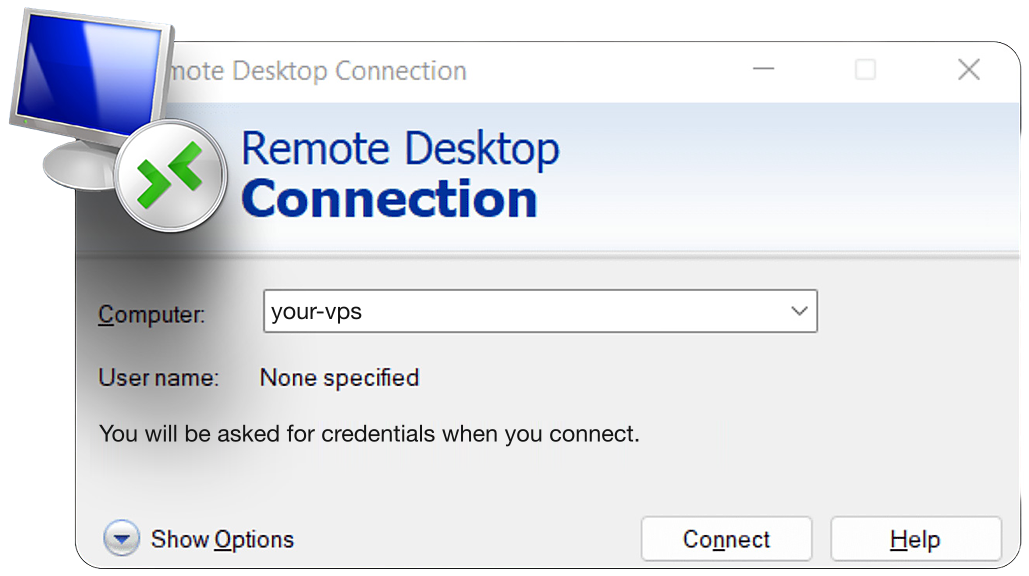
Your IP, username and password are under Connect to Your VPS in your dashboard once the VPS is live. Add them to Remote Desktop Connection on Windows, or to the Windows App on a Mac, iPhone, iPad or Android device.
Windows Server
Your trading computer in the cloud
Encrypted RDP
Connect to your desktop.
Remote Desktop on Windows
VPS running
Your PC disconnects. Your strategies keep running.
Illustrative workspace. Keep the VPS powered on and your strategies enabled. Your local connection affects how the desktop feels.
3 of 8Trading capabilities
Your Windows trading workspace: a tuned build, RDP that feels local, sized to your workload.
A familiar remote desktop with administrator access, room for your trading tools, and support when you need it. Choose the resources and location that fit your setup.
Your desktop, wherever you trade.
Connect through Remote Desktop from a Windows PC, Mac, iPhone, iPad or Android device. Your Windows session and trading tools stay on the VPS when you disconnect; sign back in to pick up where you left off.
Administrator access. Your setup.
Install your platforms, indicators, trade copiers, and other Windows software with full administrator access. VPS plans offer Windows Server 2025 or 2022. Dedicated servers come with Windows Server 2025.
Windows trading platforms
Run NinjaTrader, MetaTrader, TradingView, and other supported Windows tools in one workspace. Choose your platform at checkout to have it preinstalled.
Resources for your workload
Choose CPU, memory, and NVMe storage for your charts, strategies, and platforms. Leave room for busy sessions and upgrade as your setup grows.
A workspace that stays on
Your VPS stays online when your local computer sleeps or disconnects, so market data keeps flowing and your strategies can keep running. Keep the VPS powered on and your strategies enabled; signing out of Windows closes your applications.
A region near your market
Choose a server location close to your exchange, broker, or data feed. The right location shortens the route your trading platform uses; latency depends on that destination.
Protected remote access
Use encrypted RDP to reach your private Windows session. Firewall and network protection support your workspace while you control its users, applications, and settings.
Human support, 24/7
Get help connecting to your desktop, choosing resources, and troubleshooting your VPS. Our support team is available around the clock.
40+ trading platforms pre-installed on Windows: NinjaTrader, MetaTrader, Sierra Chart, TradingView and more.
Choose your platform during checkout. These popular Windows trading tools arrive pre-installed, ready for your own broker login, workspaces, and indicators.
A familiar Windows desktop.A serious trading computer.
Keep your charts, indicators, automated strategies, and trade copiers together on performance-tuned hardware. Connect through Remote Desktop whenever you need to take control.
Your OS. Your platforms. Your workspace.
A tuned Windows build, not a stock image.
Every Windows Server VPS ships with a build tuned for trading: background services that cause stutter stripped out, resources reserved for your platforms, and RDP ready the moment you get your credentials. Pick your platform at checkout, NinjaTrader, MetaTrader, TradingView, and more, and it arrives pre-installed.
Available on VPS plans, ready for your trading software.
Full administrator access. Make it your own.
Install your indicators, import chart templates, connect your data feeds, and configure the tools your trading day depends on. Your Windows desktop remains under your control.
Your platform layout
Charts, workspaces, and indicators
Your trading tools
Strategies, copiers, and backtests
Your account connections
Sign in with your own broker credentials
RDP that feels local.
Your desktop renders on QuantVPS hardware and streams to any device. Use Remote Desktop Connection on Windows, and the Windows App on a Mac, iPhone, iPad or Android device. Multi-monitor layouts carry over, and the session is exactly where you left it from every device.
Remote Desktop on Windows
More room for your charts
Use multi-monitor RDP with a supported client. Match the session resolution and display layout to your screens.
A responsive connection
The VPS handles platform calculations; RDP carries your screen, keyboard, and mouse. Your local connection still affects how the desktop feels.
Sized to your workload.
One platform and a few charts run comfortably on Lite tiers. Multi-platform desks and trade copiers size up to Pro+ and Ultra+. Dedicated removes the shared host entirely. AMD Ryzen and EPYC, DDR5 ECC on Performance tiers, NVMe throughout, dedicated IP, 99.999% uptime. Live in under 60 seconds with a 14-day money-back guarantee.
Fast CPU coresECC memoryNVMe storage
Fast CPU cores help with chart calculations. More memory gives multi-platform desks and backtests room to work. NVMe keeps historical data and workspace files close at hand.
Windows or Linux for trading? Desktop platforms here, headless bots on Linux.
Windows: desktop platforms and RDP
Run NinjaTrader strategies, MetaTrader EAs, Sierra Chart, TradingView desktop and TradeStation EasyLanguage with full administrator access. Connect to your graphical workspace over RDP.
Placed near your venue: 0.52ms to CME from Chicago, 0–2ms to NYSE and NASDAQ, 0–10ms to NY4 and LD4 brokers.
The same tuned Windows build wherever you deploy. Put your platform close to the broker, exchange, or data feed it connects to, and reach it over RDP from wherever you trade.
Choose the right connection path Choose the location closest to your broker's server, exchange gateway, or data feed. Your home-to-VPS connection affects how responsive the remote desktop feels; the VPS-to-venue connection is the separate path used by your trading software.
Every location except Dublin offers the Windows image; Dublin runs Ubuntu 24.04. Our network spans eight data centers, all available for self-service VPS orders. Availability is shown at checkout. Tokyo adds 0–1ms to Binance and Bybit; latency varies by destination and region.
Every plan runs on the same 99.999% infrastructure.
99.999% monthly VPS availability, backed by our SLA. Availability and service-credit eligibility are assessed monthly under the SLA’s measurement rules, coverage and exclusions.
Service availability
Read the commitment alongside the history
The 99.999% commitment covers monthly VPS availability under our Service Level Agreement. The status history shows recorded service availability over time. Review the SLA for its measurement rules, coverage, exclusions and service-credit eligibility.
Core infrastructure.Redundant systems ensure continuous operation.
Network availability.Multiple carriers and automatic failover.
SLA-backed promise.Contractual uptime guarantee with credits.
Tier IV facilities run N+1 power and cooling. The network fails over between tier-1 carriers by BGP. When one side goes down for maintenance or a fault, the other side carries your server.
Always-on mitigation filters attack traffic at the network edge. Every plan includes a dedicated IP and unmetered bandwidth for the trading environment.
Your strategies keep running, even when you step away. Low-latency execution, live market volume, and SLA-backed reliability. Here is what traders say about it in their own words.
Trader feedback
Compare experiences with a setup like yours
Look for traders using similar platforms and workloads. Consider session reliability, connection performance, and the help they received when an issue came up. Pair their feedback with the catalog specifications and benchmark references; your own results depend on your software, workload, and connection to your broker.
In their own words
01VPS Ultra+ user · Customer story
Reviews change on their own. Pause, Previous or Next keeps one on screen; Play starts them again.
2+ years
with QuantVPS
“I started off with a different VPS company. After no support and tons of issues, I switched to QuantVPS. Tremendous experience after being with them for more than 2 years now.”
VPS Ultra+ user ·2+ year customerCustomer story
Multiple accounts
Tradovate + Rithmic
“I run multiple Tradovate and Rithmic accounts, and everything works flawlessly.”
Futures prop-firm trader ·Tradovate + RithmicCustomer story
<0.52ms
Trader-verified latency to CME
“Ultra low latency (like 0.5ms) to CME if you are trading futures from the Chicago location.”
Futures trader ·Chicago locationCustomer story
5 min
Live issue resolved via chat
“Ricky resolved my issue within 5 minutes.”
Live chat support ·trading-hours emergencyCustomer story
“Quant VPS was incredibly easy and straightforward to setup. They provide through instructions + videos, paired with great customer support.”
Disclaimer: Testimonials are quoted verbatim from individual QuantVPS customers and public review sites. Some are excerpts from longer reviews. Individual results vary. Latency, error rates, and cost outcomes depend on your location, platform, broker, and configuration. Testimonials are not a guarantee of future performance and do not constitute trading advice.
8 of 8Questions, answered
Windows trading VPS FAQ.
Sound familiar?5 common ones
Ever missed a setup because you were away from your desk?
Market data keeps flowing and your strategies keep running.
Ever been stuck in a position when your internet dropped?
Orders leave the datacenter, not your home Wi-Fi.
Ever lost power mid-session during peak summer or winter load?
Redundant power and generators behind a 99.999% uptime SLA.
Ever seen sluggish quotes and fills when volatility spikes?
Dedicated cores beside the exchange, not a shared laptop.
Ever wanted your strategies to run 24/7 without you?
Always-on compute that keeps trading while you sleep.
If any of these sound familiar, a trading VPS is the fix.
1
VPS plans offer Windows Server 2025 or 2022, tuned for trading platforms with full administrator access. Windows Server 2025 is standard on Dedicated servers.
2
Yes. Disconnecting Remote Desktop leaves the Windows session and its applications running on the VPS. Keep the VPS powered on and your strategies enabled. Signing out of Windows or shutting down the VPS closes the applications; disconnect instead when you want them to keep running.
3
Yes. Use a supported Remote Desktop client and enable its multi-monitor option. You can work across your local displays while the trading platforms run on the VPS. Available display settings depend on the client and device.
4
Yes. Full administrator access lets you install platforms, indicators, trade copiers, browsers, and other tools.
5
Windows is best for platform interfaces such as NinjaTrader and MetaTrader. Linux is best for headless bots and APIs. You can choose either at checkout.
6
Lite tiers suit one platform and a few charts. Choose Pro+ or Ultra+ for multi-platform desks, several chart workspaces and trade copiers.
7
Yes. Install your copier with administrator access and keep the connected platforms running on the VPS. See the trade copier setup.
 View Windows plans