
Webull's official API, the Webull OpenAPI, lets you trade US stocks, options, futures, crypto and event contracts from code and pull market data, using official Python and Java SDKs. Webull account holders apply on the Webull website; production approval typically takes 1 to 2 business days, while sandbox (paper trading) access is approved automatically within minutes. Webull charges nothing extra for API access (checked on 10 Oct 2026).
What the Webull API Offers and Who Can Get It
The Webull OpenAPI covers the US market through HTTP APIs, real-time MQTT streaming for prices and gRPC for order updates. Webull offers four products, and an individual trader uses the first two.
| API | For | What it does |
|---|---|---|
| Trading API | Individuals and institutions trading their own accounts | Place, modify and cancel orders; accounts and positions |
| Market Data API | Traders, researchers, data apps | Real-time and historical ticks, snapshots, quotes and bars |
| Broker API | Firms building brokerage services | Account opening, funding and order execution for their users |
| Connect API | Third-party platforms | OAuth so Webull users can authorise an app |
Webull describes the Trading API as "a direct trading interface designated for natural persons". In Retail Individual Mode you apply for your own account, so you need an open Webull brokerage account first. Institutional traders get access through their firm's administrator instead.
Keep your platform running while you're away.






Applying for Webull API Access
Apply from the Webull website, not the app. The steps from Webull's individual application guide, checked on 10 Oct 2026:
- Log in at webull.com and click Developer Tool under your avatar to open the Developer Management Center. If you have no brokerage account, open one first.
- Go to OpenAPI Management, then My Application, and apply. Webull reviews production applications, typically in 1 to 2 business days, and emails you the result.
- Once approved, open API Keys Management, register an application name, accept the agreement and click Generate Key to get your App Key and App Secret.
- For paper trading, click Using OpenAPI service in Paper Trading on the My Application page and apply for the Sandbox Trading API. Webull approves it automatically, usually within minutes, and you generate separate sandbox keys the same way.
Reset Key replaces your keys at once and the old ones stop working immediately, so update your bot before you reset.
Keys and Authentication
Every Webull API request is signed with your App Secret, and the official SDK does the signing for you. Requests must use HTTPS, and the App Secret never travels in a header; only the App Key, a timestamp, a nonce and the signature do.
If you turn on two-factor authentication for your application, the API also needs a token. On your first production call the SDK creates one, Webull sends an SMS code, and you approve it in the Webull App under Menu, Messages, OpenAPI Notifications. The SDK waits up to 300 seconds, checking every 5. Tokens become invalid after 15 days without API calls; sandbox tokens are valid by default.
Webull says individual developers do not need an IP whitelist; it is an institutional feature. Keep the App Key and App Secret out of public code, such as GitHub repositories.
Market Data and an Order Example in Python
Install the official SDK. Webull supports Python 3.8 to 3.14; we checked the calls below against SDK version 3.0.3.
pip3 install --upgrade webull-openapi-python-sdk
This script reads five daily bars, finds your account ID and places a limit order for one share. It talks to the sandbox unless you start it with --live, and you must use the keys that match the environment.
import os
import sys
import uuid

from webull.core.client import ApiClient
from webull.data.common.category import Category
from webull.data.common.timespan import Timespan
from webull.data.data_client import DataClient
from webull.trade.trade_client import TradeClient

LIVE = "--live" in sys.argv   # sandbox unless you pass --live
host = "api.webull.com" if LIVE else "api.sandbox.webull.com"

api_client = ApiClient(os.environ["WEBULL_APP_KEY"], os.environ["WEBULL_APP_SECRET"], "us")
api_client.add_endpoint("us", host)

# 1. Market data: the last 5 daily bars for AAPL
data_client = DataClient(api_client)
res = data_client.market_data.get_batch_history_bar(
    ["AAPL"], Category.US_STOCK.name, Timespan.D.name, 5
)
print(res.status_code, res.json())

# 2. Your account ID
trade_client = TradeClient(api_client)
account_id = trade_client.account_v2.get_account_list().json()[0]["account_id"]

# 3. A limit order to buy 1 share during regular hours
order = {
    "combo_type": "NORMAL",
    "client_order_id": uuid.uuid4().hex,
    "symbol": "AAPL",
    "instrument_type": "EQUITY",
    "market": "US",
    "order_type": "LIMIT",
    "limit_price": "180",
    "quantity": "1",
    "support_trading_session": "CORE",
    "side": "BUY",
    "time_in_force": "DAY",
    "entrust_type": "QTY",
}
res = trade_client.order_v3.place_order(account_id, [order])
print(res.status_code, res.json())
Each order needs a unique client_order_id (up to 32 characters); you use it later with replace_order() and cancel_order(). The limit_price of 180 comes from Webull's own example; set your own. A preview endpoint (/trading/orders/preview) can estimate costs and fees before you place an order. Status updates arrive through the gRPC trade events subscription, not by polling.
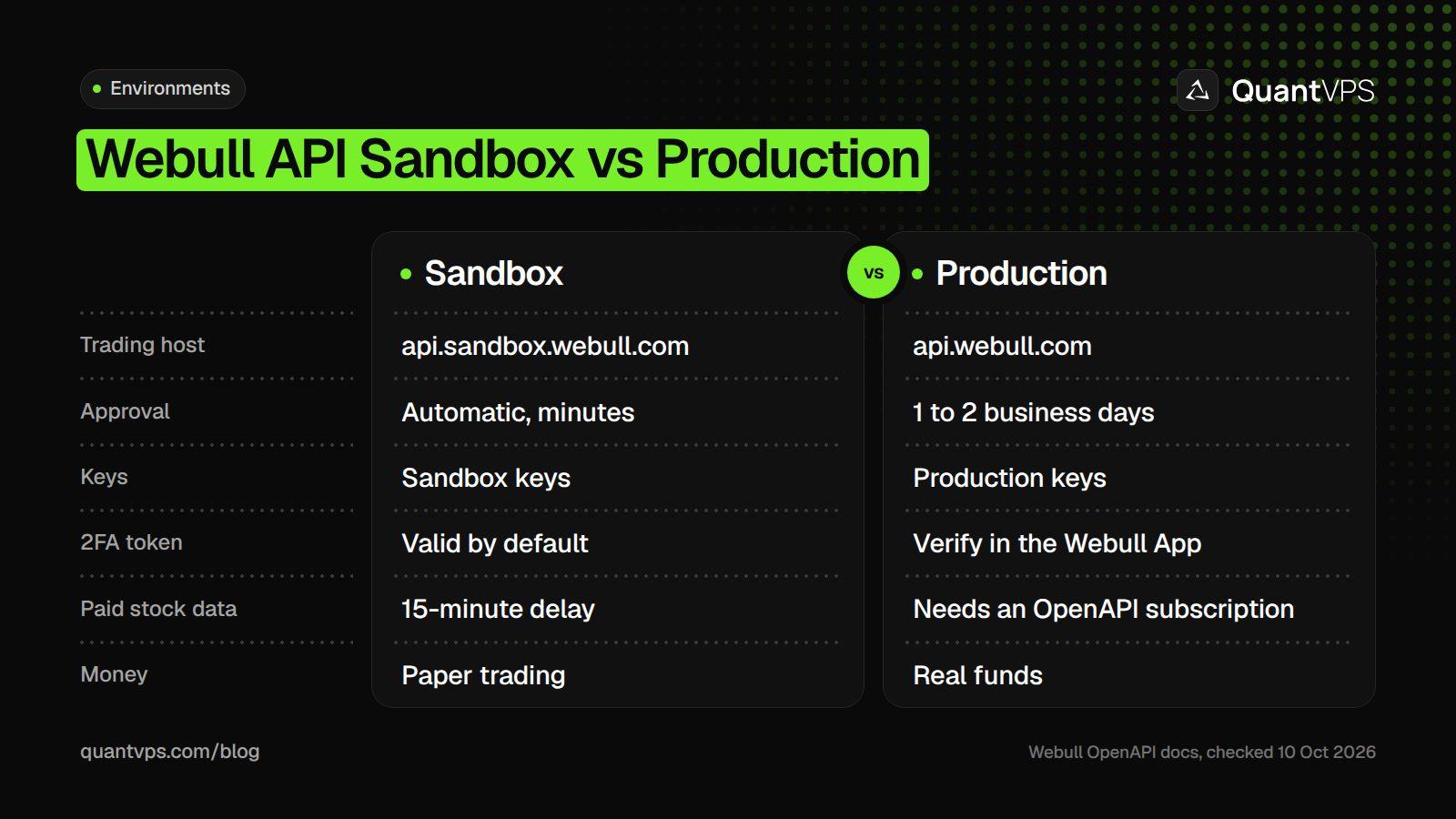
The same code runs in both; only the host and the keys change.
Stock and ETF data needs an OpenAPI market data subscription; without one you get HTTP 403. Subscriptions bought in the Webull app or desktop platform do not carry over to the API. In the sandbox, data that needs a paid subscription is delayed 15 minutes by default. Crypto and event contract data need no extra subscription.
DDoS protection
Always-on DDoS protection with advanced filtering. On every plan.
Always-on mitigation filters attack traffic at the network edge. Every plan includes a dedicated IP and unmetered bandwidth for the trading environment.
See every security layerFrom $29.99/mo · Windows or Linux
Limits and Fees
Webull limits each endpoint separately, per App Key, and returns HTTP 429 when you go over. Repeatedly exceeding limits can lead to a temporary IP block.
| Production endpoint (checked on 10 Oct 2026) | Limit |
|---|---|
| Place, replace or cancel order | 600 per 60 seconds each |
| Preview order | 150 per 10 seconds |
| Batch place orders | 150 per 60 seconds |
| Account balance, positions, open orders | 2 per 2 seconds |
| Account list | 10 per 30 seconds |
| Stock snapshot or historical bars | 60 per 60 seconds |
| Sandbox endpoints | Mostly 30 per 60 seconds |
Limits are from Webull's rate limits page. Streaming has its own rules: up to 5 MQTT connections per App Key, at most 3 pushes a second per connection, and subscriptions are not restored after a reconnect, so subscribe again.
Fees: Webull says there are no extra charges for using the OpenAPI, and trading fees are the same as in the Webull App. OpenAPI market data subscriptions are bought separately.
Webull with AI Agents
Webull runs two official MCP servers that let AI assistants use your account. Cloud MCP at https://api.webull.com/mcp connects ChatGPT, Claude or Grok through OAuth, and its order tools create instructions that need your confirmation in the Webull App or desktop platform. Local MCP runs on your own machine through uvx with your API keys and places orders directly.
Local MCP has guard rails you can set: WEBULL_MAX_ORDER_NOTIONAL_USD (default $10,000), WEBULL_MAX_ORDER_QUANTITY (default 1,000), WEBULL_SYMBOL_WHITELIST, and WEBULL_TOOLSETS=account,market-data for read-only use. Set WEBULL_ENVIRONMENT to uat to point it at the sandbox. For how AI models can be wired into a trading workflow, see our guide to algorithmic trading with LLMs. For a side-by-side view of Robinhood, Interactive Brokers, Webull and others, see our list of brokers that let AI agents trade.
Running a Webull Bot 24/7
Crypto trades around the clock and futures nearly 24 hours a day, six days a week, so a Webull bot needs a machine that does not sleep. Keep one MQTT session per process, resubscribe after every reconnect, and call the API at least once every 15 days so a 2FA token does not lapse.
Webull's API covers US markets, so a server in New York keeps the bot close to US stock venues. QuantVPS runs a New York VPS location with always-on DDoS protection with advanced filtering and automatic off-site backups on every VPS plan, from $29.99 a month (checked on 10 Oct 2026). It runs with 99.999% uptime.
Order flow
Built for scalpers. Heatmaps on dedicated resources.
Order-flow heatmaps and DOM ladders run on dedicated CPU, memory and NVMe, so your charts keep responding during volatility.
See the dedicated hardwareFrom $29.99/mo · Windows or Linux
FAQs
How do I get Webull API access?
Open a Webull brokerage account, then apply under Developer Tool, OpenAPI Management, My Application on webull.com. Approval typically takes 1 to 2 business days. Sandbox access is approved automatically, usually within minutes.
Is the Webull API free?
Yes. Webull charges nothing extra for OpenAPI access, and trading fees match the Webull App. Real-time stock data for the API needs a separate OpenAPI market data subscription.
Does Webull have an official Python API?
Yes. Install webull-openapi-python-sdk with pip. It handles request signing, tokens, HTTP calls, MQTT market data and gRPC order events.
What is the Webull API rate limit?
It depends on the endpoint. In production, placing, replacing and cancelling orders allow 600 requests per 60 seconds each, while balance and position queries allow 2 per 2 seconds. Over the limit you get HTTP 429.


