
The Alpaca API lets you trade US stocks, ETFs, options and crypto from code, and Alpaca's official Python SDK, alpaca-py, wraps it in a few classes: TradingClient for orders and StockHistoricalDataClient or StockDataStream for prices. Every user gets a free paper trading account with a $100k simulated balance, so you can build and test a bot against live quotes before you risk money (checked on 10 Oct 2026).
This guide covers the keys, the switch between paper and live, market data, orders, rate limits and a short example bot that trades on paper unless you pass an explicit --live flag.
What the Alpaca API Offers
Alpaca runs three APIs: the Trading API for your own account, the Market Data API for prices, and the Broker API for businesses that build brokerage apps on top of Alpaca. A personal trading bot uses the first two.
| API | What it does | Host |
|---|---|---|
| Trading API | Account, assets, orders, positions and order updates | api.alpaca.markets (live), paper-api.alpaca.markets (paper) |
| Market Data API | Historical and real-time bars, trades and quotes over HTTP and WebSocket | data.alpaca.markets |
| Broker API | Accounts and trading for a business's own customers | broker-api.alpaca.markets |
Hosts are from Alpaca's authentication docs, checked on 10 Oct 2026. Alpaca says equity trading is commission free, while crypto trades pay a volume-tiered fee that starts at 15 basis points for makers and 25 for takers.
Creating an Account and API Keys
Sign up at Alpaca, open the dashboard, find the API Keys section in the right sidebar and click Generate New Keys. Save both the key ID and the secret; if you lose the secret, regenerate the pair from the same panel.
- Paper Only Account: Alpaca says anyone globally can open one with just an email address. It runs the full API in the paper environment and gets IEX market data.
- Live account: a real-money brokerage account for individuals or businesses, plus crypto accounts.
- Separate keys: each account has its own credentials. Live keys do not work on the paper API, and paper keys do not work on the live API.
Keep the keys out of your code. The examples below read them from the APCA_API_KEY_ID and APCA_API_SECRET_KEY environment variables, the same names as the headers Alpaca's REST API uses.
Uptime
99.999% uptime. Built for 24/7 trading reliability.
Your VPS runs in Tier IV datacenters with redundant power and network, monitored 24/7 on site.
See the uptime SLA





From $29.99/mo · Windows or Linux
Alpaca Paper Trading: Switching Between Paper and Live
Alpaca paper trading is a free, real-time simulation: orders go through the same API as live trading, but Alpaca fills them against current quotes instead of sending them to an exchange. To switch, you change two things, the API keys and the host; the code stays the same.
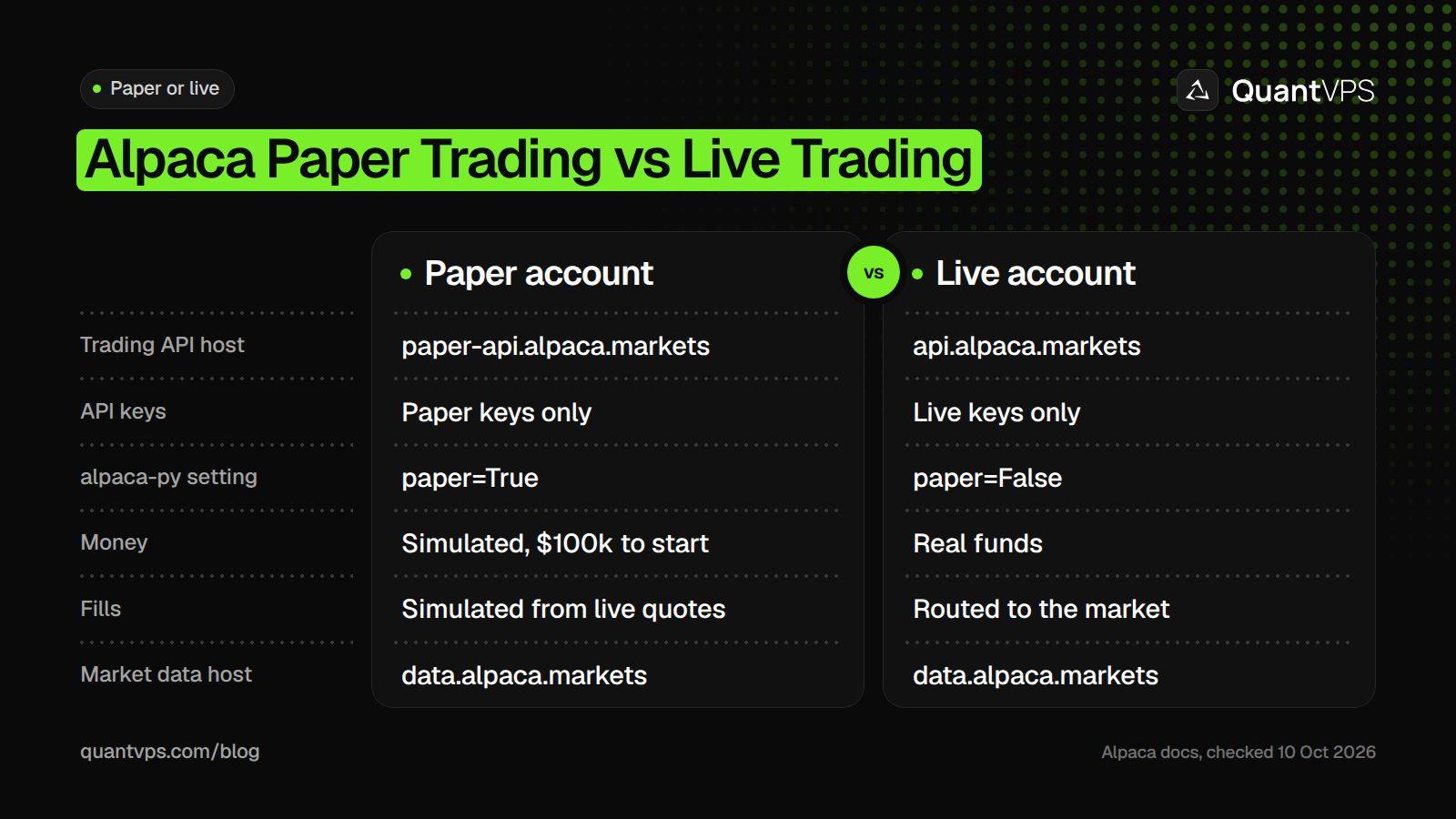
Switching from paper to live means new keys and a new host, not new code.
In alpaca-py, the host is set by one argument: TradingClient(key, secret, paper=True) calls paper-api.alpaca.markets, and paper=False (the default) calls api.alpaca.markets. For other tools, Alpaca says to set APCA_API_BASE_URL=https://paper-api.alpaca.markets. Market data comes from data.alpaca.markets in both modes.
A new paper account starts with $100k. You can no longer reset one from the dashboard; instead you create a new paper account (click the paper account number, then Open New Paper Account) or delete one under Account Settings, and generate new keys for any new account. Rules from the paper trading docs, checked on 10 Oct 2026:
- Orders fill only when they become marketable, matched against the NBBO.
- Order size is not checked against the quoted size, and about 10% of eligible orders get a random partial fill.
- Paper trading does not simulate dividends, market impact, slippage from latency, queue position, price improvement or regulatory fees.
- No fill emails are sent.
So a paper result is a test of your code, not a forecast of live results. Treat any live switch as a new test with small size.
Installing alpaca-py and Connecting
Install the SDK with pip. The current alpaca-py package on PyPI requires Python 3.10 or later (some Alpaca docs pages still say 3.7); the examples here were run with alpaca-py 0.44.0 on Python 3.12.
pip install alpaca-py
Then create a TradingClient with your paper keys and read the account. If the keys are wrong for the host, the call fails with an APIError saying "unauthorized."
import os
from alpaca.trading.client import TradingClient

trading = TradingClient(
    os.environ["APCA_API_KEY_ID"],
    os.environ["APCA_API_SECRET_KEY"],
    paper=True,   # paper-api.alpaca.markets; paper=False uses api.alpaca.markets
)
account = trading.get_account()
print(account.status, account.buying_power)
Market Data: Quotes, Bars and WebSocket Streams
Use a historical client for one-off requests and a stream client for live prices. Stock data needs your keys; crypto data does not, although keys raise your rate limit. Results are keyed by symbol even when you ask for one symbol.
import os
from alpaca.data.historical import StockHistoricalDataClient
from alpaca.data.live import StockDataStream
from alpaca.data.requests import StockLatestQuoteRequest

key, secret = os.environ["APCA_API_KEY_ID"], os.environ["APCA_API_SECRET_KEY"]

# One-off request: latest quote (keyed by symbol, even for one symbol)
client = StockHistoricalDataClient(key, secret)
quotes = client.get_stock_latest_quote(StockLatestQuoteRequest(symbol_or_symbols="SPY"))
print("SPY ask", quotes["SPY"].ask_price)

# Live stream: the handler runs for every new quote
stream = StockDataStream(key, secret)

async def on_quote(quote):
    print(quote.symbol, quote.bid_price, quote.ask_price)

stream.subscribe_quotes(on_quote, "SPY")
stream.run()
StockDataStream uses the IEX feed by default, which is the real-time feed on the free plan. Alpaca's test stream at wss://stream.data.alpaca.markets/v2/test with the symbol FAKEPACA works outside market hours, which helps when you build a handler on a weekend.
Your own order updates arrive on a separate stream: TradingStream(key, secret, paper=True) with subscribe_trade_updates(handler) reports each fill, cancel and rejection. Alpaca recommends the stream as the way to track order state, rather than polling.
DDoS protection
Always-on DDoS protection with advanced filtering. On every plan.
Always-on mitigation filters attack traffic at the network edge. Every plan includes a dedicated IP and unmetered bandwidth for the trading environment.
See every security layerFrom $29.99/mo · Windows or Linux
Placing Orders
Every order is a request object passed to submit_order(): MarketOrderRequest, LimitOrderRequest, StopOrderRequest or TrailingStopOrderRequest. For stocks, notional (a dollar amount) works only on market orders; for crypto it works on any order type.
from alpaca.trading.enums import OrderSide, TimeInForce
from alpaca.trading.requests import MarketOrderRequest

# Market order: buy $200 of SPY (notional orders are fractional)
order = trading.submit_order(order_data=MarketOrderRequest(
    symbol="SPY",
    notional=200,
    side=OrderSide.BUY,
    time_in_force=TimeInForce.DAY,
))
print(order.id, order.status)
A few rules from Alpaca's orders docs matter for bots (checked on 10 Oct 2026):
-
Extended hours: only limit orders with
time_in_forceofdayorgtcandextended_hours=Truecan trade overnight (8:00pm to 4:00am ET, Sunday to Friday), pre-market (4:00am to 9:30am ET) or after hours (4:00pm to 8:00pm ET). -
Crypto: market, limit and stop limit orders, with
time_in_forceofgtcorioc. Crypto trades all day, seven days a week, and one order cannot exceed $200k notional. - Buying power: open orders count against buying power until they fill or are cancelled.
-
Cleanup:
cancel_orders()cancels every open order andclose_all_positions(cancel_orders=True)flattens the account.
Rate Limits and Errors
Alpaca's support FAQ says the Trading API is throttled at 200 requests per minute per account, and you cannot raise it yourself. Market data has its own limits, set by your data plan.
| Limit (checked on 10 Oct 2026) | Basic (free) | Algo Trader Plus ($99 a month) |
|---|---|---|
| Historical data API calls | 200 a minute | 10,000 a minute |
| Real-time stock coverage | IEX only | All US stock exchanges |
| Stock WebSocket symbols | 30 | Unlimited |
| Recent historical data | Not the latest 15 minutes | No restriction |
| Options WebSocket quotes | 200 | 1,000 |
Source: Market Data API plans. Over the limit, the REST API returns HTTP 429, and the X-RateLimit-Limit, X-RateLimit-Remaining and X-RateLimit-Reset headers show where you stand. alpaca-py 0.44.0 retries a 429 or 504 three times, three seconds apart, before it raises an APIError.
Streams have their own errors. Most plans allow one data stream connection, so a second script or app on the same account gets error 406, "connection limit exceeded". Error 405 means you subscribed to more symbols than your plan allows, and 407 means your handler is too slow to keep up.
A Simple Strategy Example
The script below checks Bitcoin once a day: if the last closed daily bar is above its 20-day average and you hold no BTC, it buys $100 at market; if the close falls below the average, it closes the position. It runs on your paper account unless you start it with --live, so real orders always need a deliberate choice.
import os
import sys
from datetime import datetime, timedelta, timezone

from alpaca.data.historical import CryptoHistoricalDataClient
from alpaca.data.requests import CryptoBarsRequest
from alpaca.data.timeframe import TimeFrame
from alpaca.trading.client import TradingClient
from alpaca.trading.enums import OrderSide, TimeInForce
from alpaca.trading.requests import MarketOrderRequest

LIVE = "--live" in sys.argv   # paper trading unless you pass --live
SYMBOL = "BTC/USD"
LOOKBACK = 20                 # days in the moving average
NOTIONAL = 100                # dollars per buy

# 1. Signal: last closed daily bar against its 20-day average
data = CryptoHistoricalDataClient()   # no keys needed for crypto data
bars = data.get_crypto_bars(CryptoBarsRequest(
    symbol_or_symbols=SYMBOL,
    timeframe=TimeFrame.Day,
    start=datetime.now(timezone.utc) - timedelta(days=LOOKBACK * 2),
)).df
closes = bars["close"].iloc[:-1]      # drop today's unfinished bar
last = closes.iloc[-1]
average = closes.iloc[-LOOKBACK:].mean()
print(f"{SYMBOL} close {last:.2f}, {LOOKBACK}-day average {average:.2f}")

# 2. Act: paper account by default
trading = TradingClient(
    os.environ["APCA_API_KEY_ID"],
    os.environ["APCA_API_SECRET_KEY"],
    paper=not LIVE,
)
held = [p for p in trading.get_all_positions()
        if p.symbol.replace("/", "") == SYMBOL.replace("/", "")]

if last > average and not held:
    order = trading.submit_order(order_data=MarketOrderRequest(
        symbol=SYMBOL,
        notional=NOTIONAL,
        side=OrderSide.BUY,
        time_in_force=TimeInForce.GTC,
    ))
    print("buy submitted", order.id, order.status)
elif last < average and held:
    order = trading.close_position(held[0].symbol)
    print("exit submitted", order.id, order.status)
else:
    print("no change")
Run it with python bot.py for paper or python bot.py --live with live keys. The rule shows the plumbing; it is not a strategy we recommend, and paper results will not match live fills.
Before you trust a rule, test it on history. Our guide to Python backtesting libraries compares the main options. Our guide to trading bot strategies covers common rule types.
Running Your Alpaca Bot 24/7
A bot can only trade while its computer is on and connected. A daily script needs a scheduler (cron on Linux, Task Scheduler on Windows); a streaming bot needs a process that restarts after a crash and reconnects after a network drop.
- Restart on failure: run the script as a service so it comes back after an error or a reboot.
-
Watch for stale streams: stream clients have
data_timeoutoff by default; passdata_timeout=60to reconnect when a socket stays open but stops sending data. -
Log order IDs: keep each order's
idand theX-Request-IDresponse header, which Alpaca support asks for. - One stream per account: a second copy of the bot will hit the 406 connection limit.
QuantVPS hosts its Alpaca VPS in New York, with a published 0 to 10ms route to Alpaca, always-on DDoS protection with advanced filtering and automatic off-site backups on every VPS plan. Its servers run with 99.999% uptime. Performance plans use the AMD Ryzen 9 9950X, which helps when you backtest on the same server. Plans start at $29.99 a month (checked on 10 Oct 2026).
Order flow
Built for scalpers. Heatmaps on dedicated resources.
Order-flow heatmaps and DOM ladders run on dedicated CPU, memory and NVMe, so your charts keep responding during volatility.
See the dedicated hardwareFrom $29.99/mo · Windows or Linux
FAQs
Is the Alpaca API free?
Paper trading and the Basic market data plan are free, and Alpaca says equity trading is commission free. Crypto trades pay a tiered fee from 15 basis points (maker) and 25 basis points (taker), and full market data is $99 a month on Algo Trader Plus (checked on 10 Oct 2026).
How do I switch Alpaca from paper trading to live?
Generate keys on your live account and use the live host. In alpaca-py, that means passing live keys and paper=False to TradingClient; other tools use https://api.alpaca.markets as the base URL. Paper keys never work on the live API.
What is the Alpaca API rate limit?
Alpaca's support FAQ gives 200 requests per minute per account for the Trading API. Historical market data allows 200 calls a minute on the free plan and 10,000 on Algo Trader Plus. Over the limit you get HTTP 429.
Can I use the Alpaca API outside the US?
Yes. Anyone can open a Paper Only Account with an email address, and Alpaca says it supports live brokerage accounts for individuals and businesses from around the world, after onboarding with Alpaca Securities LLC. Retirement accounts are not supported, and business accounts need a $30,000 minimum deposit (checked on 10 Oct 2026).
Which Python library should I use for Alpaca?
Use alpaca-py, Alpaca's official Python SDK (pip install alpaca-py). It replaces the older alpaca-trade-api package and covers the Trading, Market Data and Broker APIs.


