
As of 10 Oct 2026, nine brokers publish an official MCP server that lets Claude, ChatGPT and other AI agents connect to a brokerage account: Robinhood, Interactive Brokers, NinjaTrader, TradeStation, Webull, tastytrade, moomoo, Public and Alpaca. Only some let the agent place orders by itself. Interactive Brokers has the agent draft instructions that you submit, and TradeStation requires your explicit confirmation before any order is sent.
Every fact below comes from each broker's own website, help center, developer docs or newsroom, checked on 10 Oct 2026. These products are new and change often, so check the broker's page before you connect a funded account.
What agentic trading is
Agentic trading means letting an AI agent read your account and act on it from plain-language instructions. The agent connects to the broker through the Model Context Protocol (MCP), an open standard for linking AI apps to outside services.
Most brokers run a hosted MCP server. You add its connector URL to your AI client (Claude, ChatGPT, Codex, Cursor and others), then log in on the broker's own screen through OAuth, so the AI never sees your password. A few brokers (tastytrade, Alpaca and Webull's local option) instead give you an MCP server that runs on your own computer with API credentials.
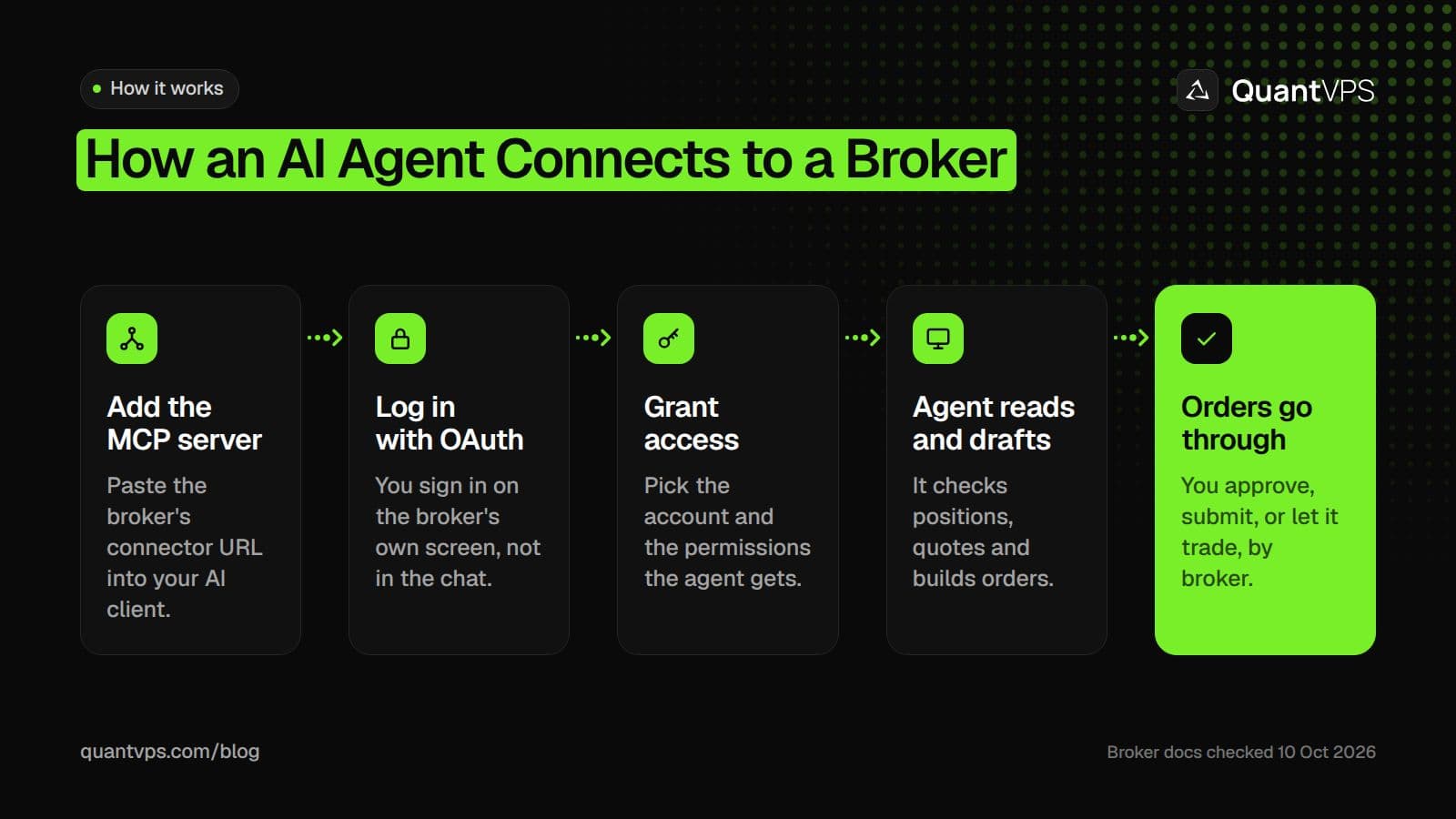
The usual MCP connection flow. The last step differs by broker.
Brokers with official MCP servers compared
The table shows who runs an official server, which AI clients the broker names, and whether the agent can place orders itself. Checked on 10 Oct 2026, from each broker's own pages.
| Broker | Official MCP server | AI clients the broker names | Agent places orders? | Safeguards | Status |
|---|---|---|---|---|---|
| Robinhood | Yes, hosted | Claude Code, Claude Desktop, ChatGPT, Codex, Cursor, Grok, Perplexity, OpenClaw and more | Yes, only in its own MCP account | Separate account; trade approvals toggle (off by default for MCP accounts); disconnect anytime | Launched 27 May 2026 |
| Interactive Brokers | Yes, hosted | ChatGPT, Claude, Grok, Perplexity, plus any MCP tool; Gemini coming soon | No, it drafts instructions you submit | Instructions never become orders automatically; one account per connection | Any MCP tool since 28 Jul 2026 |
| NinjaTrader | Yes, hosted | Claude Code, Claude Desktop, ChatGPT, Codex, Cursor | Yes | Separate Demo and Live servers; per-tool access levels; optional connection risk limits | Beta, not generally available |
| TradeStation | Yes, hosted | Claude, ChatGPT | Builds orders you confirm | Explicit confirmation before orders are placed | Released 13 Jan 2026 |
| Webull | Yes, hosted and local | ChatGPT, Claude, Grok | Cloud: you confirm in the Webull app; Local: yes | Per-account and per-capability authorization; sandbox for local | Since April 2026 (US) |
| tastytrade | Yes, self-hosted | Claude Desktop, Claude Code, Cursor, VS Code, Antigravity CLI, Perplexity | Yes, after a dry run | Dry-run-first confirmation; read-only and sandbox settings | Announced 31 Aug 2026 |
| moomoo | Yes, hosted | Claude Desktop, Claude Code, Cursor | Yes, with trade scope and trade password | OAuth scopes you choose | Live |
| Public | Yes, hosted | Claude, Perplexity, ChatGPT | Yes | Dedicated accounts; real-time trade confirmations | Live |
| Alpaca | Yes, self-hosted | Claude Desktop, Claude Code, Cursor, VS Code, Gemini CLI, PyCharm | Yes | Paper trading by default; toolset filter | Live (v2) |
Robinhood Agentic Trading
Robinhood Agentic Trading lets an outside AI agent trade in a dedicated Robinhood account through Robinhood's Trading MCP server. Robinhood's newsroom post of 27 May 2026 said: "Agentic Trading is launching in beta with support for equities only out of the gate."
Robinhood's Trading with your agent article has since widened that. On 10 Oct 2026 it says: "You can currently use a built-in or external agent to place long equities, options, and crypto orders." Order types are market (share or dollar based), limit, stop limit and stop market.
Uptime
99.999% uptime. Built for 24/7 trading reliability.
Your VPS runs in Tier IV datacenters with redundant power and network, monitored 24/7 on site.
See the uptime SLA







From $29.99/mo · Windows or Linux
The dedicated agent account
To trade with an external agent you open a Robinhood MCP account, a self-directed individual investing account, during the connection flow. You need a primary individual account in good standing first, and you can hold up to 10 self-directed individual accounts including the MCP account.
The agent gets read access to all your Robinhood accounts, positions, balances and order history. Robinhood's onboarding article is clear on the limit: "Your agent can only place trades in your Robinhood Agentic account."
Approvals, notifications and disconnecting
Trade approvals decide whether the agent proposes orders or places them. Robinhood says trade approvals "are turned on by default for Robinhood Agents (built-in agents), and are turned off by default for MCP accounts (external agents)." Turn them on in Agent Settings under Safety Controls if you want to approve each order.
The launch post says you get push notifications whenever the agent trades, a real-time activity feed and P&L in the app, and you "can disconnect the agent at any time with the tap of a button." The agent can trade crypto but cannot transfer, stake or lend it, and agentic crypto trading is not available in some states, including New York.
Interactive Brokers AI Integration
Interactive Brokers lets any MCP-compatible AI tool connect to an IBKR account, but the AI only drafts trade instructions. On 28 Jul 2026, IBKR announced that clients could connect from tools such as Claude Code, Cursor, Perplexity and Windsurf, not only the certified ChatGPT, Claude and Grok marketplaces.
The press release sets the limit in plain words: "In this release, the client reviews each instruction and converts it to an order on an Interactive Brokers platform before it is submitted." The AI Integration page adds: "Instructions never become orders automatically."
To connect a non-marketplace tool, use its "Add MCP Server" or "Custom Connector" setting, enter https://api.ibkr.com/v1/api/mcp-public, log in on IBKR's screen and authorize a single account. You then review and submit orders from the AI Instructions tab in Client Portal, IBKR Desktop, IBKR GlobalTrader, IBKR Mobile or Trader Workstation. If you keep Trader Workstation running all day, an IBKR VPS keeps it online when your own computer is off.
NinjaTrader MCP server and CrossTrade MCP
NinjaTrader runs an MCP server for futures and event contracts, but it is still in beta. The NinjaTrader MCP docs say the server and its trading skills "are in beta and aren't yet generally available."
The beta runs on a Demo server with simulated money and a Live server with real money, and the docs say "Start on Demo." Demo and Live use separate server URLs and completely separate accounts, and a Demo token cannot reach Live. In Claude Code, the docs connect the Demo server with claude mcp add ninjatrader-demo --transport http https://mcp-demo.tradovateapi.com/mcp, then /mcp to sign in.
Each tool needs a matching access level on your account, enforced server side; placing orders needs Orders: Full Access. Six of the seven write tools carry MCP's destructive-action flag, "so most clients pause for approval before running them." When you approve the connection, you can also set optional risk limits on total exposure and traded volume for that agent only. If you run NinjaTrader Desktop around the clock, a NinjaTrader VPS keeps the platform online.
CrossTrade is a separate service with a hosted MCP server for NinjaTrader 8 and Tradovate. Its MCP docs say "MCP tool calls require an Elite subscription", NinjaTrader 8 tools need the CrossTrade NT8 Add-On "v1.13.0 or higher", and Tradovate tools "need only a linked Tradovate account and no add-on." Tokens carry one of two scopes, mcp:read or mcp:trade. For Tradovate accounts, see Tradovate VPS.
DDoS protection
Always-on DDoS protection with advanced filtering. On every plan.
Always-on mitigation filters attack traffic at the network edge. Every plan includes a dedicated IP and unmetered bandwidth for the trading environment.
See every security layerFrom $29.99/mo · Windows or Linux
TradeStation, Webull, tastytrade, moomoo, Public and Alpaca
TradeStation released its MCP connection on 13 Jan 2026, first for Claude, and its TradeStation MCP page now names Claude and ChatGPT. It says "TradeStation MCP requires explicit confirmations before orders are placed." Clients request access in HUB on the Platforms page; the press release mentioned account minimums and approvals. To run the desktop platform full time, see TradeStation VPS.
Webull runs two MCP servers. The hosted Cloud MCP at https://api.webull.com/mcp uses OAuth, lets you authorize accounts and capability groups one by one, and creates order instructions that require "confirmation in Webull APP / Desktop." The Local MCP runs through uvx, places orders directly, and has a sandbox test environment. Webull's 11 Jun 2026 release says the server has run since April and is "available now to all clients in the U.S."
tastytrade offers an open-source, self-hosted tastytrade MCP server that gates order submission "behind a dry-run-first confirmation flow." The docs say "There is no tastytrade-hosted endpoint to connect to," the build needs Node.js 22 or newer, and TASTYTRADE_READ_ONLY=1 removes every write tool. Production is the default; TASTYTRADE_ENV=sandbox uses no real money.
moomoo hosts its moomoo MCP server at https://mcp.moomoo.com/mcp with OAuth sign-in. You pick scopes on the consent page: quote:read, quote:write, trade:read and trade:write. Placing orders needs the trade scope and your trade password, and moomoo warns: "Trading operations involve real funds."
Public says on its Public MCP page that "trades may be executed by your AI agent without your direct input on each transaction." It supports Claude, Perplexity and ChatGPT for US-listed stocks and ETFs, options, crypto and bonds, and lets you create dedicated accounts for MCP connections.
Alpaca publishes an official open-source Alpaca MCP server that runs locally with your Alpaca API keys. ALPACA_PAPER_TRADE defaults to true, so it starts on paper trading until you set it to false, and ALPACA_TOOLSETS limits which tools load. To run Alpaca strategies on a server, see Alpaca VPS.
Brokers with no official route
Fidelity, Charles Schwab, E*TRADE, Merrill and Ally had no first-party MCP server on their websites when we checked on 10 Oct 2026. MCP servers you find for them online are built by third parties, not the broker.
Schwab and E*TRADE do publish official trading APIs. Schwab's Trader API for individuals covers account information, order entry and an order preview screen. The E*TRADE API offers a sandbox key. Community MCP servers use those APIs, so you are trusting the code's author with your credentials, not the broker.
How to start safely
Start where a mistake costs nothing, then give the agent as little access as the task needs. Each broker above offers at least one of these controls:
- Paper or demo first. NinjaTrader's Demo server, Alpaca's default paper mode, tastytrade's sandbox and Webull's local sandbox all use simulated money.
- The smallest account the broker allows. Robinhood and Public both let you trade from a dedicated account; fund it only with money you can lose.
- Approval on every order. Turn on Robinhood trade approvals, set your AI client to ask before write tools, or use a broker that requires confirmation (Interactive Brokers, TradeStation, Webull Cloud MCP).
- Read-only where offered. Grant moomoo only the read scopes, use CrossTrade's mcp:read scope, set tastytrade's read-only flag, or authorize only read capabilities on Webull.
- Prop firm rules first. Funded accounts have their own automation rules, so read your firm's rules before an agent touches a funded account.
For example, the Topstep help center (checked on 10 Oct 2026) answers "Can I use automated trading strategies?" for Topstep accounts with: "Yes, with conditions. Topstep won't help set up or troubleshoot automated strategies, and no exceptions are made for errant trades or malfunctions. Test on your Practice Account first and review Prohibited Conduct and Prohibited Trading Strategies before going live."
Running your agent 24/7 on a VPS
The broker hosts the MCP server, but your agent runs wherever you start it. If Claude Code or OpenClaw runs on your laptop, it stops when the laptop sleeps, so a scheduled check or alert never fires.
A Claude Code VPS keeps the agent in a terminal session on a server that stays on. Follow our guide to install Claude Code on a VPS, then add your broker's MCP server there. Robinhood lists OpenClaw among its supported platforms, and an OpenClaw VPS runs its Gateway around the clock. If you use OpenAI's agent, see Codex VPS.
QuantVPS servers run with 99.999% uptime, always-on DDoS protection with advanced filtering, and automatic off-site backups on every VPS plan. Keep the same safeguards on a server as on your desk: approvals on, the smallest account, and demo first.
Order flow
Built for scalpers. Heatmaps on dedicated resources.
Order-flow heatmaps and DOM ladders run on dedicated CPU, memory and NVMe, so your charts keep responding during volatility.
See the dedicated hardwareFrom $29.99/mo · Windows or Linux
FAQs
Which brokers let an AI agent place trades by itself?
On 10 Oct 2026, Robinhood (in its MCP account), NinjaTrader (beta), Webull's Local MCP, tastytrade (after a dry run), moomoo (with the trade scope), Public and Alpaca let an agent place orders. Interactive Brokers, TradeStation and Webull's Cloud MCP need you to confirm or submit each order.
Can Claude trade on Interactive Brokers?
Claude can connect to an IBKR account and draft trade instructions, but it cannot submit them. You review each instruction and turn it into an order on an IBKR platform, such as the AI Instructions tab in Trader Workstation or IBKR Mobile.
Does the NinjaTrader MCP server work with live accounts?
Yes, in beta. NinjaTrader runs separate Demo and Live servers with separate accounts, and its docs say to start on Demo. The server is not yet generally available, and hostnames and tools may change before launch.
Is there an official Schwab or Fidelity MCP server?
Not as of 10 Oct 2026. Schwab has an official Trader API that community MCP servers use, but Schwab does not run them. We found no official MCP server from Fidelity, E*TRADE, Merrill or Ally either.
Can I use an AI agent on a prop firm account?
Only if the firm's rules allow automation, and only on its terms. Topstep, for example, allows automated strategies "with conditions" and makes no exceptions for errant trades or malfunctions. Check your firm's help center first.


