
A Rithmic trade copier sends instructions from a lead account to follower accounts connected through Rithmic. It can reduce repeated order entry when you manage several accounts, but each account still has its own orders, fills, position limits and drawdown. A copier does not turn separate accounts into one position or guarantee that they receive the same execution price.
Tradecopia is the first option to consider for a workflow that includes Rithmic and other supported futures connections. Replikanto suits an existing NinjaTrader 8 workspace, while ETP Trade Copier offers a separate desktop application with connection and account-group licensing. Start with the feed assigned to your account, the firm's copying rules and the number of simultaneous logins you need.
Prices and product details below were checked on the companies' own sites in October 2026. For an overview of the different setups, compare Tradovate and Rithmic trade copiers.
First, confirm that the account uses Rithmic
Your charting platform is not enough to identify the connection. NinjaTrader, Quantower or another interface may connect through different brokers and data feeds. Read the connection details supplied by the prop firm, including the trading username, system and gateway. Use the trading credentials, which can differ from the email and password used for the firm's customer portal.
For Apex, the username punctuation is a useful clue: a Rithmic username has a hyphen, such as Apex-123456, while a Tradovate username has an underscore, such as Apex_123456. These are examples, not credentials. Confirm the assigned backend in the dashboard before choosing a copier; a spelling convention should not replace the account's connection instructions.
An account issued on dxFeed or CQG is not a Rithmic account just because it trades the same futures contracts. Tradecopia's current compatibility guide says it does not support those two feeds. Check the actual account connection rather than assuming that every account sold by a particular firm uses the same infrastructure.
If the account is Tradovate-based, follow the separate Tradovate copying setup. Connecting to the correct backend comes before choosing a lead account or adjusting copy ratios.
Uptime
99.999% uptime. Built for 24/7 trading reliability.
Your VPS runs in Tier IV datacenters with redundant power and network, monitored 24/7 on site.
See the uptime SLA







From $29.99/mo · Windows or Linux
Which copiers support Rithmic?
Tradecopia: direct connections and account groups
Tradecopia connects directly to Rithmic-issued accounts, alongside Tradovate, NinjaTrader broker connections and TopstepX. Its desktop application runs on Windows or macOS; its hosted plans are accessed through a browser. Compatibility follows the underlying account connection, not the name of the charting frontend.
Monthly base prices are $49.99 for Pro Desktop, $79.99 for hosted Pro+ Lite and $149.99 for Pro+. Use code QUANT for 30% off. Pro Desktop and Pro+ Lite offer a seven-day trial with monthly or quarterly billing; Pro+ does not offer that trial. Quarterly cards can show a lower monthly equivalent, so compare the billing period and total charge before subscribing.
Every plan allows unlimited follower accounts, connections and copy groups according to Tradecopia's pricing page. A firm's funded-account cap, broker session limit or permitted copying arrangement still applies. Product capacity is not permission to connect accounts owned by someone else.
Tradecopia includes contract multipliers, account risk settings, a journal and Position Reconciler. Its copying guide describes reacting to leader fills and sending follower instructions. Confirm how your selected copy mode handles pending orders, protective orders and cancellations rather than assuming that every order type is mirrored identically.
Replikanto: copying inside NinjaTrader 8
Replikanto is a FlowBots add-on that runs inside NinjaTrader 8 and works with supported NinjaTrader connections, including Rithmic. It supports allocation methods, ATM copying, cross-order instrument mappings and Follower Guard actions such as flattening, disarming and sending alerts. Those controls need configuration; they do not replace the firm's rules.
FlowBots' USD product page showed $299 for a single-machine lifetime license and $249 for a single-machine one-year license in October 2026. The seven-day trial includes 20 Submit credits. Licensing is per computer rather than per account, and support or update extensions after the included first year are separate from a lifetime license's continued operation.
If you copy to another computer over the internet, each receiving machine needs NinjaTrader and its own license. Internet submissions consume the leader's Remote Copy credits; local-network copying does not. The Replikanto copier guide explains that workflow in more detail.
ETP Trade Copier: a desktop application
ETP's current site lists Rithmic among its direct connection types. Its desktop application organizes accounts into groups, applies quantity and instrument templates, and provides daily profit and loss controls. Accounts are unlimited, but simultaneous connections and active leader groups determine licensed capacity.
The current base lifetime license is €197 excluding VAT, with one simultaneous connection and one leader group. Additional connections and leader groups are paid add-ons; an extra leader group is €47. Keep the currency visible when comparing this with USD subscriptions, and calculate the actual connection count rather than comparing base prices alone.
Check the firm's copying rule before setup
Apex Trader Funding
Apex's current user agreement describes follower accounts as "solely owned and controlled by the same User". Its copying exception requires the trader to enter each originating order manually in real time. Do not interpret permission to copy your own manual trades as permission to run an automated strategy on the lead account or distribute trades to other users.
Apex also publishes a household limit on Performance Accounts. Keep that separate from the copier's unlimited-account claim, and check the current limit for your account type. The Apex trade copier guide covers the connection choice and the distinction between the firm's rules and third-party software.
Bulenox
Bulenox's FAQ states: "Bots, algorithms and trade copiers are permitted." The same answer says that a third-party API or composite-software connection to Rithmic carries an additional $100 monthly fee. Check whether the connection you intend to use falls into that category before calculating the total cost.
Permission to use a copier does not remove the account's contract limits, drawdown rules or other qualification requirements. Keep each account's limits visible while allocating follower quantities, and use the firm's current rules for the specific program you purchased.
Remote desktop
Your trading computer. In the cloud.
Connect and control your trading strategies from any device, anywhere in the world, through secure remote desktop, while execution remains on QuantVPS.
Explore the hardwareFrom $29.99/mo · Windows or Linux
Topstep is a different connection case
Current Topstep accounts use TopstepX, so do not select Rithmic simply because an older tutorial describes it. Topstep's native copier is available for Trading Combine and Express Funded Accounts. Its help article states: "Live Funded Account® accounts cannot use the Trade Copier."
Topstep's API policy states: "All trading activity must originate from your personal device. The use of VPS, VPNs, and remote servers is prohibited by Topstep's Terms of Use." Read the Topstep copying guide before combining that connection with a Rithmic group.
Set up a Rithmic group in Tradecopia
1. Add the firm-issued connection
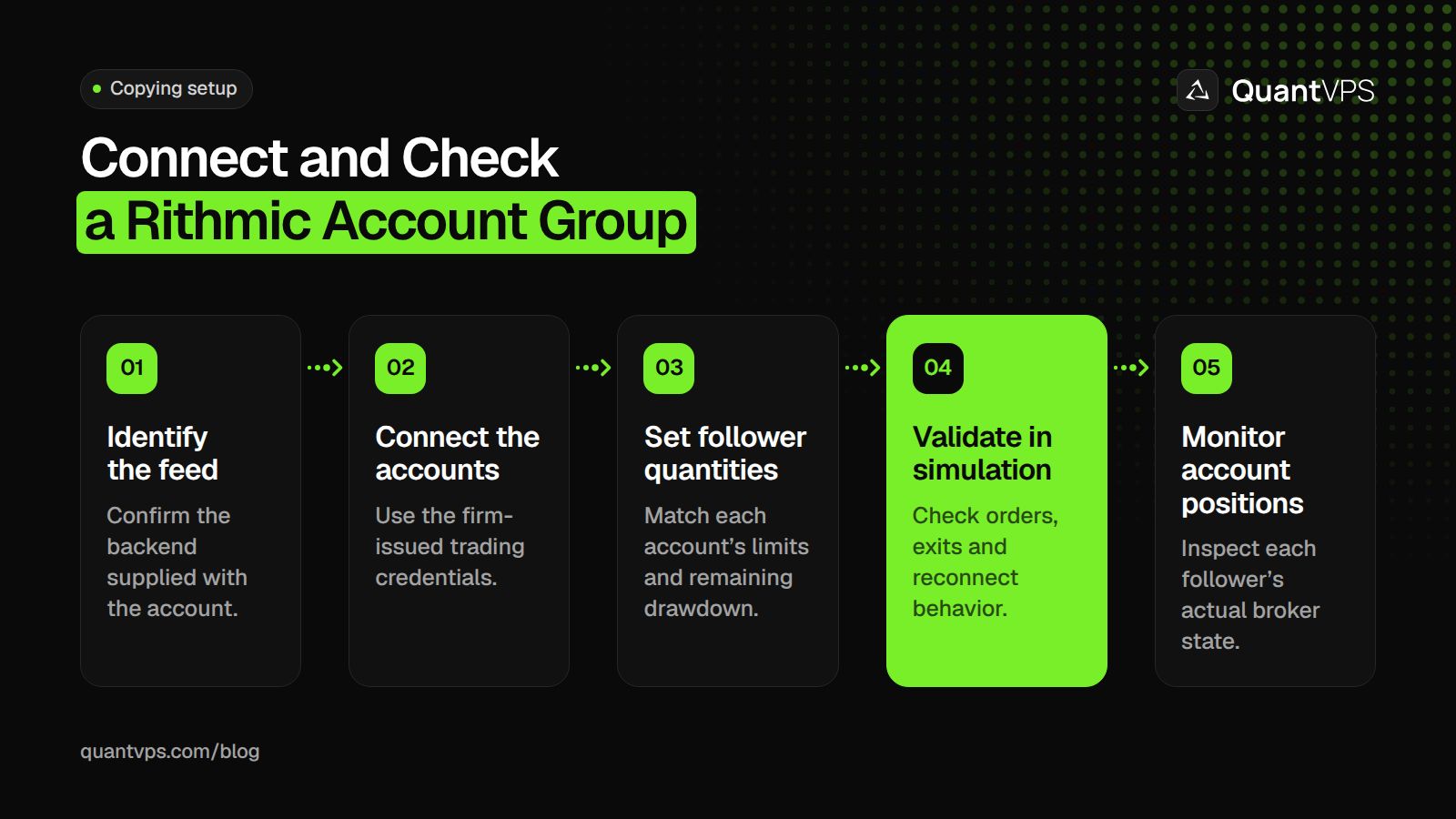
Open Connections, choose Add Connection and select Rithmic. Enter the username and password supplied for trading, then select the firm's assigned Rithmic system. Tradecopia's guide recommends the Chicago Area gateway, but follow the account provider's instructions if they specify another gateway or connection requirement.
Connect and inspect the account list before enabling copying. Check that the expected evaluation or funded accounts appear, and confirm that their identifiers match the dashboard. A successful login to the portal does not prove that the trading credentials or selected system are correct.
2. Select one lead and the intended followers
Create a copy group and choose the account where you will enter the original trades. Add only the followers intended for that strategy and session. Keep unrelated accounts out of the group so an order is not copied to an account you meant to leave inactive.
Write down which connection supplies each account. Two account identifiers under one login may need one connection, while accounts under separate credentials can require separate connections. Check simultaneous-session restrictions before opening several charting platforms with the same login.
3. Configure quantity and risk limits
Set the follower quantity or multiplier against each account's actual contract limit and remaining drawdown. An account's advertised size is not its available loss allowance. Avoid using the same contract quantity merely because two accounts have the same headline balance.
Confirm the instrument and expiry month. If copying between standard and micro contracts, explicitly configure a supported mapping and verify the resulting quantities. A symbol substitution alone does not establish equal dollar exposure or an equal distance to the account's loss threshold.
Record the behavior you expect at a daily risk limit, on a rejected order and when a connection drops. Configure available controls accordingly, then check positions at the broker. An alert or risk setting is useful only if its action matches the account and the orders actually outstanding.
Order flow
Built for scalpers. Heatmaps on dedicated resources.
Order-flow heatmaps and DOM ladders run on dedicated CPU, memory and NVMe, so your charts keep responding during volatility.
Explore the hardwareFrom $29.99/mo · Windows or Linux
4. Validate without assuming the test button is simulation
Use available demo or simulation accounts first. Check entry, partial fills, reductions, exits, order changes and reconnect behavior before applying the arrangement to an evaluation or funded account. Keep the lead and every follower's position and open-order views visible during validation.
Tradecopia's built-in Test Copy Trading feature is different: its documentation says it submits a real one-contract MES buy-limit order below the market and then cancels it. It is not a paper-trading mode. Read the documentation and understand the order risk before using that feature on a connected account.
5. Monitor the group during trading
After each lead trade, compare follower positions, quantities and open orders. Separate account instructions can receive different fills, rejections or partial fills. If a follower diverges, pause further copying and use the broker's account views to determine what remains open before taking corrective action.
Check again after a restart or reconnection. Do not assume an old connection state, risk setting or group selection survived. Keep a record of rejected orders and timestamps so support can investigate the specific connection and account, without sharing passwords.
Where should the copier run?
Hosted Tradecopia plans run in the cloud. Desktop copiers such as Replikanto and ETP need their application and connections running throughout the trading day. A NinjaTrader-based copier setup also needs NinjaTrader open all day. A QuantVPS server keeps that NinjaTrader desktop and copier running when your home computer is off; see QuantVPS NinjaTrader hosting.
Hosting location can affect network travel time, but it does not guarantee follower fills, protect a drawdown threshold or override a firm's rules. Choose the connection and permitted operating environment first, then the software and hosting arrangement.


