
The Schwab Trader API is Charles Schwab's developer API for automating your own self-directed brokerage account, the same account you trade in thinkorswim. Schwab says it covers authentication, market data, account information, order and transaction information, order entry and an order preview. You register on the Schwab Developer Portal, request access to Trader API, Individual, create an app, and log in through OAuth (checked on 10 Oct 2026).
This guide walks through access, tokens, quotes, orders in Python, limits and how to run a bot unattended, plus how to practise first in thinkorswim paperMoney.
Keep Thinkorswim running while you're away.






What the Schwab Trader API Is
Schwab lists two Trader API products. Trader API, Individual is for "your own personal use application for your own self-directed Brokerage account", and Trader API, Commercial is for apps you distribute to other Schwab clients. A personal trading bot uses the Individual product.
| Trader API, Individual (checked on 10 Oct 2026) | What it gives you |
|---|---|
| Accounts and Trading Production | Account balances and positions, and trading |
| Market Data Production | APIs to access market data, such as quotes and price history |
| Who can use it | Individual developers, for their own Schwab brokerage account |
| Authentication | OAuth 2 with access and refresh tokens |
This API replaced the TD Ameritrade API after Schwab took over TD Ameritrade accounts. The schwab-py documentation says the old TD Ameritrade API stopped working on 13 May 2024. It adds that old TD Ameritrade apps and tokens do not carry over, so you must register a new app with Schwab, and that saved orders and watchlists were not carried into the new API.
Developer Access and App Approval
Access takes three approvals: your portal account, your product access and your app. Schwab says most product access requests are reviewed within two business days, though it can take longer.
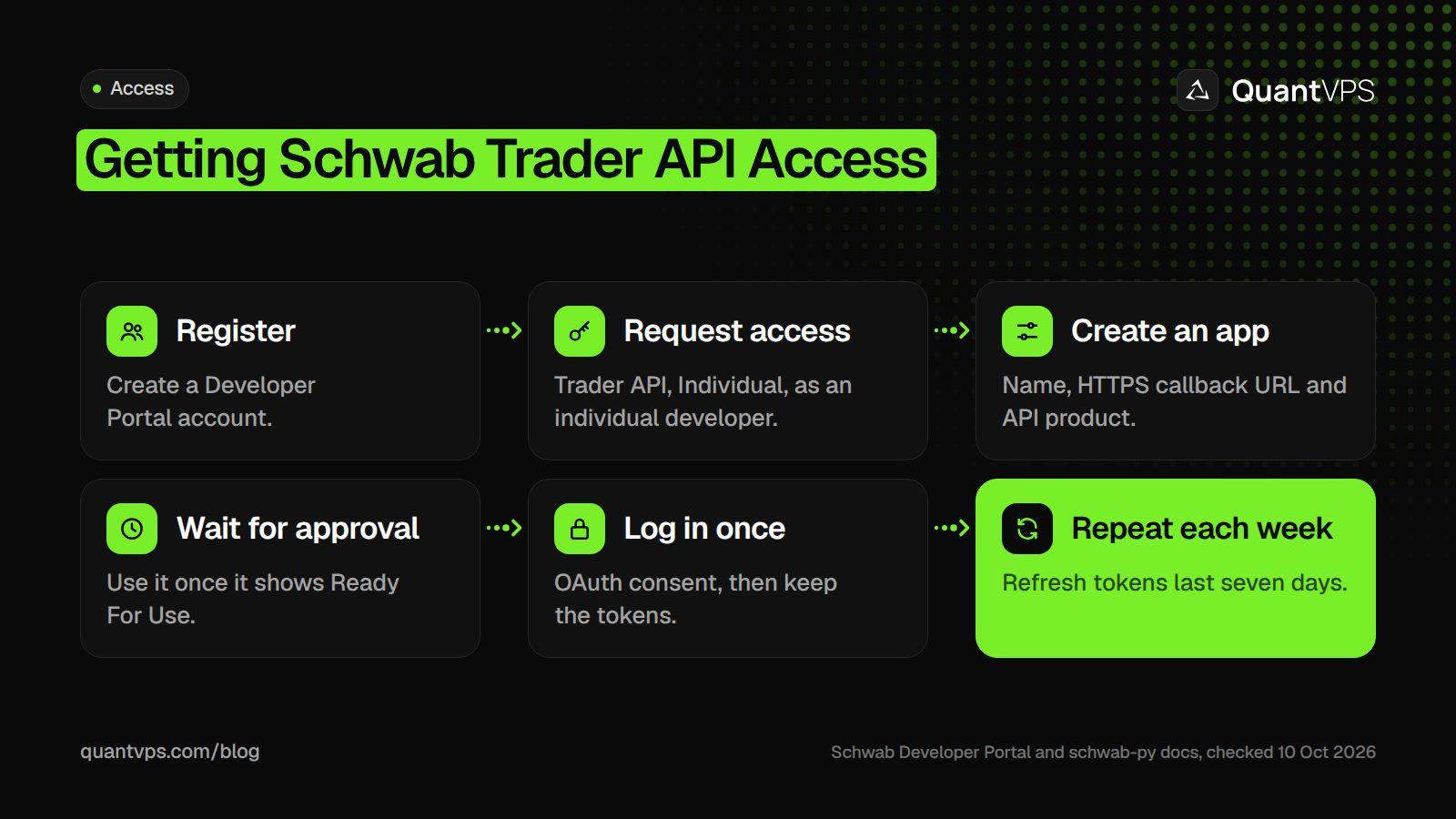
The weekly login is the step that most often stops an unattended Schwab bot.
- Register on the Schwab Developer Portal and confirm your email from the time-limited link.
- Choose a profile: register as an individual developer. Schwab notes that an Individual Developer role is required to access certain products.
- Request access: open API Products, choose Trader API, Individual, select Learn More, then Request Access and accept the terms.
- Create an app: Dashboard, then Apps, then Create App. Enter an app name, a callback URL and the API product. Callback URLs must use HTTPS, and the field allows 255 characters in total; separate several URLs with commas.
-
Wait for "Ready For Use": the
schwab-pyguide warns that "Approved, Pending" is not ready yet, and that full approval can take a few days.
Once approved, your app's App Key (client ID) and Secret appear in App Details. Schwab says to treat both as highly confidential. The schwab-py guide also suggests setting the app's order limit to 120 order requests a minute, and a callback URL of https://127.0.0.1:8182 so the login comes back to your own machine.
OAuth and Token Refresh
Schwab uses three-legged OAuth: you log in on Schwab's own site, pick which accounts the app may use, and Schwab redirects back to your callback URL with a code. Your app swaps that code for an access token, sent as Bearer on every request, and a refresh token that gets new access tokens.
| Token | Lifetime | What to do when it expires |
|---|---|---|
| Access token | 30 minutes | Use the refresh token; libraries do this for you |
| Refresh token | 7 days | Log in again through the full OAuth flow |
Lifetimes are from the schwab-py documentation, which notes that Schwab sets and enforces them; Schwab's own specification is visible after you sign in. After seven days, a refresh fails with invalid_client, and the only fix is a fresh login. Schwab's guide adds other reasons to restart the flow: a revoked token, a password or two-factor change, or a need to authorise different accounts. Refreshing a little before the access token expires avoids "401 Unauthorized" errors.
Python Libraries
Schwab does not publish an official Python SDK. The most used library is schwab-py, an open-source community project modelled on the older tda-api; it handles the OAuth login, token refresh and order building. It needs Python 3.10 or later, and the examples here use version 1.5.1.
pip install schwab-py
Because it is community code, read it before you give it your app secret, and pin the version you tested. Every call below appears in the schwab-py docs.
Market Data: Quotes and Price History
easy_client() loads token.json if it exists; otherwise it opens a browser for you to log in and saves the new token. After that, each call returns an HTTP response you check and read as JSON.
import os

import httpx
from schwab.auth import easy_client

client = easy_client(
    api_key=os.environ["SCHWAB_APP_KEY"],
    app_secret=os.environ["SCHWAB_APP_SECRET"],
    callback_url="https://127.0.0.1:8182",   # exactly as entered on your app
    token_path="token.json",
)

resp = client.get_quote("AAPL")
assert resp.status_code == httpx.codes.OK
print(resp.json())
Other market data calls include get_quotes() for several symbols (use it for futures symbols such as /ES), get_price_history_every_day() and the other price history helpers, and get_option_chain(). For streaming quotes and order book data, schwab-py has a separate StreamClient that logs in once and then pushes messages to handlers you register.
Placing Orders
Orders go to an account hash, not your account number, so fetch the hash first with get_account_numbers(). schwab-py builds the order JSON from templates such as equity_buy_limit() and equity_buy_market(). The script below only prints the order unless you start it with --live.
import sys

import httpx
from schwab.orders.equities import equity_buy_limit
from schwab.utils import Utils

LIVE = "--live" in sys.argv   # dry run unless you pass --live

# The API wants an account hash, not your account number
resp = client.get_account_numbers()
assert resp.status_code == httpx.codes.OK
account_hash = resp.json()[0]["hashValue"]

order = equity_buy_limit("AAPL", 1, "100.00")   # a limit far below the market

if not LIVE:
    print("dry run, not sent:", order.build())
else:
    r = client.place_order(account_hash, order)
    assert r.status_code == httpx.codes.OK, r.raise_for_status()
    print("order id", Utils(client, account_hash).extract_order_id(r))
A successful place_order() returns the new order ID in the Location header, which extract_order_id() reads. If you place, cancel or replace more orders per minute than your app's order limit, Schwab throttles and rejects them.
Paper Trading with thinkorswim paperMoney
thinkorswim paperMoney is Schwab's free paper trading mode: $100,000 of virtual buying power, real-time market data, and equities, options, futures and forex in a live market simulation (checked on 10 Oct 2026). You need a Schwab account to log in; without one, Schwab offers a Guest Pass to look around.
- Switch to it on thinkorswim web: log in and make sure you have toggled to paperMoney mode, not Live Trading.
-
Check which mode you are in: paperMoney account numbers begin with
D-; live ones are 8 digits followed by SCHW. - Reset or add funds: on the Monitor tab, open Activity and Positions, click Adjust Account in the Position Statement section, then set the cash or tick Reset All Balances and Positions.
- Know the limits: Schwab says executions, transaction costs and other elements in paperMoney are simulations, and simulated performance does not ensure success in a live environment.
Schwab's public Trader API pages list only Production products, and none mention paperMoney. So use paperMoney to practise the strategy by hand in thinkorswim, and test your code with dry runs and limit orders far from the market before you trade real size.
Uptime
99.999% uptime. Built for 24/7 trading reliability.
Your VPS runs in Tier IV datacenters with redundant power and network, monitored 24/7 on site.
See the uptime SLAFrom $29.99/mo · Windows or Linux
Limits and Errors
The limits you control are your app's order limit and your token lifetimes. Schwab's full specification for each endpoint, including error codes, is shown once you are signed in and approved.
- 401 Unauthorized: the access token expired or is missing. Refresh it.
- invalid_client on refresh: the refresh token is older than seven days. Delete the token file and log in again.
- Throttled orders: too many order requests in a minute for your app's order limit.
-
Timeouts:
schwab-pywaits 30 seconds per call by default;set_timeout()changes it.
Running a Schwab Bot Unattended
A Schwab bot can run around the clock, but the seven-day refresh token means a person has to log in once a week. The schwab-py docs suggest doing it on Sunday before the market opens, so the token does not expire on a Monday morning.
- Use a machine that stays on: a laptop that sleeps loses the stream and misses order updates.
-
Log in where a browser is available: on a Windows server you reach by Remote Desktop,
easy_client()can open the login page; elsewhere,client_from_manual_flow()lets you paste the redirect URL. -
Protect
token.json: it grants access to your account until it expires.
QuantVPS runs its thinkorswim VPS in New York with a published 0 to 2ms route to NYSE and NASDAQ and thinkorswim pre-installed, so the platform and your API scripts can share one server. It comes with 99.999% uptime, always-on DDoS protection with advanced filtering and automatic off-site backups on every VPS plan, from $29.99 a month (checked on 10 Oct 2026). If thinkorswim slows down on a busy day, our guide to thinkorswim memory settings helps.
FAQs
Does thinkorswim have an API?
Yes, through the Schwab Trader API. It works with your Schwab brokerage account, the same one you trade in thinkorswim, and covers quotes, account data and order entry.
Is the Schwab API free?
Schwab lists no fee for Trader API, Individual on its developer portal. You need a Schwab brokerage account, and normal trading commissions and fees apply to the orders you place.
How long does Schwab API approval take?
Schwab says most product access requests are reviewed within two business days. App approval comes after that, and the schwab-py docs say it can take up to a few days before the app shows "Ready For Use".
Can I paper trade with the Schwab API?
Schwab's public developer pages list only Production products and do not mention paperMoney. Practise strategies in thinkorswim paperMoney by hand, and test code with dry runs before sending live orders.
Why does my Schwab API token stop working after a week?
Refresh tokens last seven days. After that, refreshing fails with invalid_client, and you must log in again through the OAuth flow to get new tokens.


