
The Binance API lets you read prices, stream trades and place spot orders from code, and Binance's official Python package, binance-sdk-spot, handles signing and retries for you. You need a verified Binance account and an API key restricted to your IP address before the key can trade. Binance.com is not open to US residents; US traders use Binance.US, which runs its own separate API (checked on 10 Oct 2026).
This guide covers keys, Python setup, market data, orders, rate limits and the Spot Testnet, with live orders kept behind an explicit --live flag.
Binance API Overview: REST, WebSocket and Binance.US
Binance offers three ways in: a REST API for requests, WebSocket streams for live market data, and a WebSocket API that takes requests over a socket. Most Python bots use REST for orders and WebSocket streams for prices.
| Interface | Use it for | Base URL (checked on 10 Oct 2026) |
|---|---|---|
| REST API | Orders, account data, market data on request | https://api.binance.com (also api-gcp and api1 to api4) |
| Market data only | Public prices, no key needed | https://data-api.binance.vision |
| WebSocket streams | Live trades, klines, order book | wss://stream.binance.com:9443, or wss://data-stream.binance.vision |
| WebSocket API | Requests and orders over one socket | wss://ws-api.binance.com/ws-api/v3 |
| Binance.US REST | US residents in supported states | https://api.binance.us |
Binance.com is not open to US residents, and its API rejects requests from restricted locations with the message "Service unavailable from a restricted location", citing section "b. Eligibility" of its terms. Binance.US has its own accounts, keys and API documentation, and its terms limit it to US persons outside its unsupported states.
Creating and Securing Binance API Keys
Create keys under Account then API Management then Create API on Binance. Before Binance lets you create one, you must turn on two-factor authentication, verify your identity and deposit any amount to your Spot Wallet.
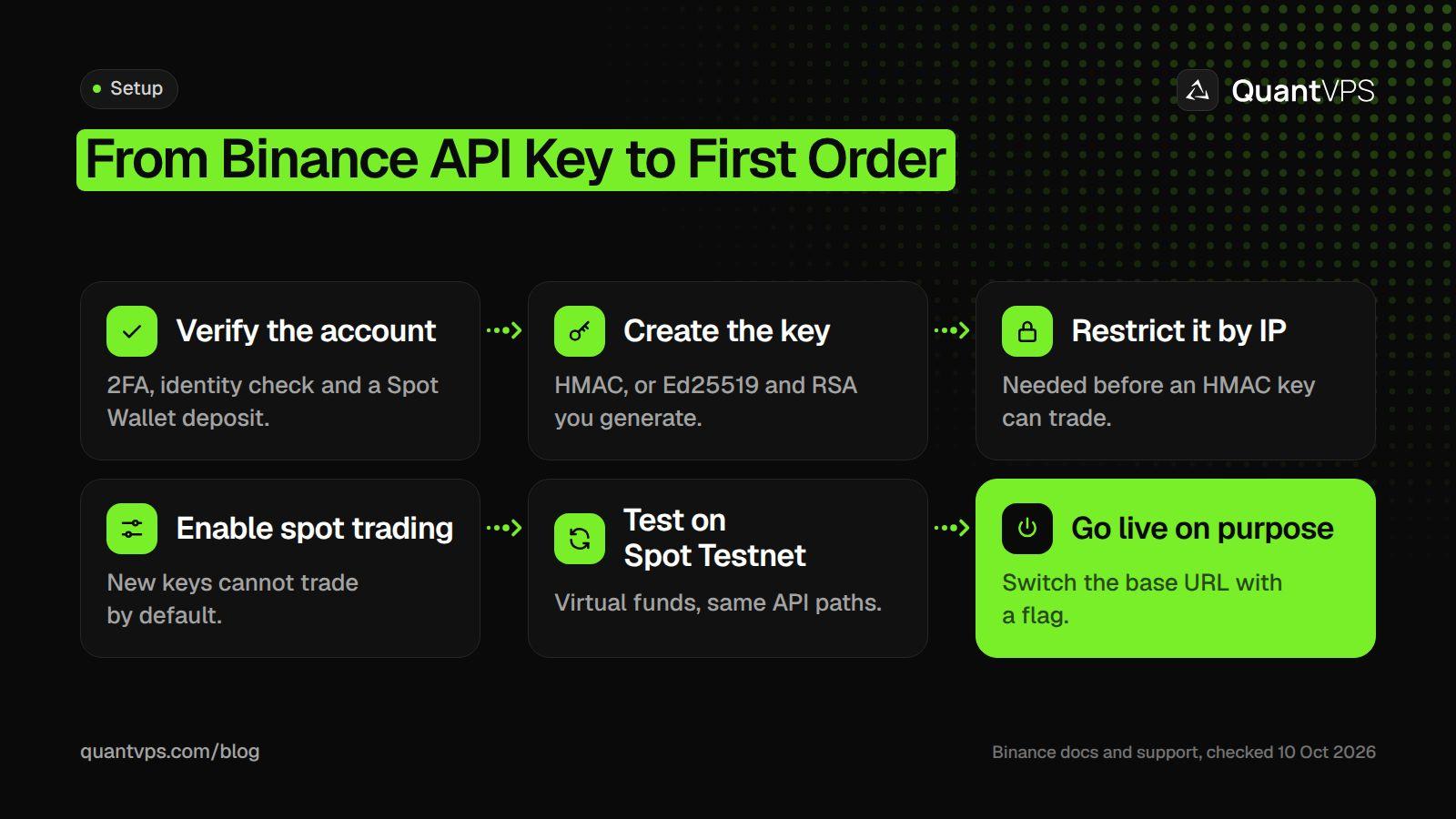
Binance keys can only read until you add an IP restriction and turn on trading.
| Key type | How it works | Notes |
|---|---|---|
| HMAC (system-generated) | Binance gives you an API key and a secret key | Can only read unless you add an IP restriction |
| Ed25519 (self-generated) | You create a key pair and give Binance the public key | Binance's recommended type for performance and security |
| RSA (self-generated) | Same idea as Ed25519, with an RSA key pair | Signatures are case-sensitive |
IP whitelisting is the main safeguard. Binance's API key FAQ says HMAC keys with unrestricted IP access get no permission other than reading, and withdrawal permission always needs an IP restriction. New keys also cannot trade until you enable trading in API Management.
-
One job per key: Binance suggests one key with
TRADEpermission for orders and another withUSER_DATAto watch order status. - Never enable withdrawals for a trading bot.
-
Keep secrets out of code: the examples read
BINANCE_API_KEYandBINANCE_API_SECRETfrom environment variables. - Revoke on any doubt: Binance says to revoke all keys and contact support if you see unusual activity.
Uptime
99.999% uptime. Built for 24/7 trading reliability.
Your VPS runs in Tier IV datacenters with redundant power and network, monitored 24/7 on site.
See the uptime SLA





From $29.99/mo · Windows or Linux
Python Setup with binance-sdk-spot
Binance publishes its Python connectors as separate packages, and binance-sdk-spot covers the Spot REST API, WebSocket API and WebSocket streams. It needs Python 3.10 or later. The examples here were run with version 13.1.0 on Python 3.12.
pip install binance-sdk-spot
Each client takes a configuration object with your keys and a base_path. Without one, the REST client calls https://api.binance.com. By default it retries a failed request 3 times, 1,000 ms apart, and times out after 1,000 ms; retries, backoff and timeout change that. Signed requests also carry a timestamp, and Binance rejects them if they arrive outside recvWindow, which defaults to 5,000 ms and cannot exceed 60,000.
Market Data and Streams
Public prices need no key. Point the REST client at Binance's market data host and ask for klines (candles), tickers or the order book. Each response carries rate_limits, so you can see how much weight you have used.
from binance_common.constants import SPOT_REST_API_MARKET_URL
from binance_sdk_spot.spot import Spot, ConfigurationRestAPI
from binance_sdk_spot.rest_api.models import KlinesIntervalEnum

# Public market data needs no keys; data-api.binance.vision serves it
client = Spot(config_rest_api=ConfigurationRestAPI(base_path=SPOT_REST_API_MARKET_URL))

response = client.rest_api.klines(
    symbol="BTCUSDT",
    interval=KlinesIntervalEnum["INTERVAL_1h"].value,
    limit=24,
)
print(response.rate_limits)          # weight used so far this minute
for k in response.data()[-3:]:
    print(k[0], "close", k[4])       # open time (ms) and close price
For live prices, open a WebSocket stream instead of polling. This one prints the price and size of each aggregated trade for ten seconds:
import asyncio

from binance_common.configuration import ConfigurationWebSocketStreams
from binance_common.constants import SPOT_WS_STREAMS_MARKET_URL
from binance_sdk_spot.spot import Spot

client = Spot(config_ws_streams=ConfigurationWebSocketStreams(
    stream_url=SPOT_WS_STREAMS_MARKET_URL,   # market data only, no keys
))

async def main():
    connection = await client.websocket_streams.create_connection()
    try:
        stream = await connection.agg_trade(symbol="btcusdt")
        stream.on("message", lambda trade: print(trade.p, trade.q))
        await asyncio.sleep(10)              # a bot would keep running here
        await stream.unsubscribe()
    finally:
        await connection.close_connection(close_session=True)

asyncio.run(main())
Stream rules from Binance's Spot API docs on GitHub, checked on 10 Oct 2026: symbols are lowercase, one connection can carry up to 1,024 streams, you may send at most 5 messages a second, and an IP may open 300 connections every 5 minutes. A connection lasts at most 24 hours. The server sends a ping every 20 seconds and drops you if no pong comes back within a minute, so your bot must reconnect on its own.
Placing Orders
Orders go to POST /api/v3/order, which the SDK calls new_order(). Use order_test() first: it runs the same checks without sending the order to the matching engine. The script below uses the Spot Testnet unless you start it with --live.
import os
import sys

from binance_common.constants import SPOT_REST_API_TESTNET_URL
from binance_sdk_spot.spot import Spot, ConfigurationRestAPI, SPOT_REST_API_PROD_URL
from binance_sdk_spot.rest_api.models import (
    NewOrderSideEnum, NewOrderTypeEnum, OrderTestSideEnum, OrderTestTypeEnum,
)

LIVE = "--live" in sys.argv   # Spot Testnet unless you pass --live

client = Spot(config_rest_api=ConfigurationRestAPI(
    api_key=os.environ["BINANCE_API_KEY"],
    api_secret=os.environ["BINANCE_API_SECRET"],
    base_path=SPOT_REST_API_PROD_URL if LIVE else SPOT_REST_API_TESTNET_URL,
))

# 1. Validate the order without sending it to the matching engine
client.rest_api.order_test(
    symbol="BTCUSDT",
    side=OrderTestSideEnum["BUY"].value,
    type=OrderTestTypeEnum["MARKET"].value,
    quote_order_qty=10,
)

# 2. Send it: spend 10 USDT at market
response = client.rest_api.new_order(
    symbol="BTCUSDT",
    side=NewOrderSideEnum["BUY"].value,
    type=NewOrderTypeEnum["MARKET"].value,
    quote_order_qty=10,
)
print(response.rate_limits)   # includes your order count
print(response.data())
quote_order_qty=10 spends 10 USDT; use quantity to set the amount of BTC instead. BTCUSDT accepted market, limit, limit maker, stop loss and take profit orders, with a minimum order value of 5 USDT, in the exchange info we read on 10 Oct 2026. Read each symbol's filters from exchange_info() before you size orders, because an order that breaks a filter is rejected.
Treat a 5XX response or a -1007 timeout as "status unknown", not as a failure. Binance says the order may still have executed, so query the order before you send it again.
Locations
Trade beside your market. 8 datacenters, 3 continents.
Pick the location closest to what you trade, not to where you live.
Compare locationsFrom $29.99/mo · Windows or Linux
Rate Limits and Request Weights
Binance limits each IP address by request weight and each account by order count. The limits are based on IPs, not API keys, so two bots on one server share the same budget.
| Limit (from exchangeInfo, checked on 10 Oct 2026) | Value | Applies to |
|---|---|---|
| REQUEST_WEIGHT | 6,000 a minute | Your IP address |
| RAW_REQUESTS | 300,000 every 5 minutes | Your IP address |
| ORDERS | 100 every 10 seconds | Unfilled orders on your account |
| ORDERS | 200,000 a day | Unfilled orders on your account |
Each endpoint has a weight. Klines cost 2, a new order costs 1, account information costs 20, and the order book costs 5 to 250 depending on how many levels you ask for. Check X-MBX-USED-WEIGHT-1M (the SDK's rate_limits) as you go, and query exchange_info() for the current limits rather than hard-coding them.
Over a limit, Binance returns HTTP 429 with a Retry-After header. Keep sending and you get HTTP 418, an IP ban that lasts from 2 minutes to 3 days for repeat offenders. The SDK raises TooManyRequestsError and RateLimitBanError for these, so catch them and back off. Binance says that if your orders keep getting filled, you can keep placing orders.
Testing on the Spot Testnet
The Spot Testnet is a separate copy of the Spot API with virtual funds. Log in at testnet.binance.vision, generate a key there, and switch base_path to SPOT_REST_API_TESTNET_URL (https://testnet.binance.vision).
-
Only
/apiendpoints exist on the testnet, not/sapi(wallet, savings and similar). - IP limits, order limits and filters are generally the same as live.
- Balances and orders are wiped about once a month without notice; your keys survive the reset.
- Funds are virtual and cannot be moved in or out.
Binance also runs a Demo Mode at https://demo-api.binance.com with keys from the Demo Trading screen of your Binance account. Either way, a test fill is not a live fill, so start live trading with small size.
Hosting Your Bot Near the Exchange
A bot needs a machine that stays on, keeps a steady connection and reconnects streams after the 24-hour cut-off. A home PC that sleeps, updates or loses Wi-Fi will miss fills and leave positions unmanaged.
QuantVPS hosts its Binance VPS in Tokyo with a published 0 to 1ms route to Binance, and each server has a dedicated IP you can add to your API key's whitelist. You also get 99.999% uptime, always-on DDoS protection with advanced filtering and automatic off-site backups on every VPS plan, from $29.99 a month (checked on 10 Oct 2026). If you also trade prediction markets, see our Binance to Polymarket arbitrage guide.
FAQs
Order flow
Built for scalpers. Heatmaps on dedicated resources.
Order-flow heatmaps and DOM ladders run on dedicated CPU, memory and NVMe, so your charts keep responding during volatility.
See the dedicated hardwareFrom $29.99/mo · Windows or Linux
Do I need an API key for Binance market data?
No. Public prices, klines and order books are served without a key from https://data-api.binance.vision and wss://data-stream.binance.vision. You need a key only for orders and account data.
Can I use the Binance API in the US?
Not Binance.com: it rejects requests from restricted locations, including the US. Eligible US residents use Binance.US, which has its own keys and its own API at https://api.binance.us.
Why can my Binance API key only read?
System-generated HMAC keys without an IP restriction are limited to reading. Add your server's IP address in API Management, or use a self-generated Ed25519 or RSA key, then enable spot trading on the key.
What happens if I hit the Binance rate limit?
You get HTTP 429 and a Retry-After header saying how long to wait. If you keep going, Binance bans the IP with HTTP 418 for 2 minutes up to 3 days.
Which Python library is official for Binance?
binance-sdk-spot and its sister packages (such as binance-sdk-derivatives-trading-usds-futures) are published by Binance. Other popular libraries are community projects.


