
TradingView trade copiers turn TradingView alerts into orders on one or many broker and prop firm accounts, using webhooks. This list covers only tools that take TradingView alerts as the signal source and route them to platforms like MT4, MT5, cTrader, Tradovate and NinjaTrader. For copy trading between accounts on any platform, use a general trade copier instead. Our best trade copier guide compares those tools.
TradingView copiers suit traders managing several accounts, including prop firm portfolios, and add trade multipliers and risk limits. If TradingView supplies the signals, a VPS for TradingView webhooks can host the receiving bridge while you check how the copier handles each follower account.
Here’s a quick overview of the seven TradingView trade copiers in this guide:
- Duplikium: Cloud-based, ultra-low latency, supports multiple platforms (MT4, MT5, cTrader, DXtrade, TradingView, etc.), offers flexible risk tools, and costs from €9 per account per month.
- TradeSyncer: Fast execution under 100ms, centralized risk controls, supports platforms like NinjaTrader, Tradovate, Rithmic and Quantower, and costs from $49/month.
- Affordable Indicators: Budget-friendly one-time fee ($175 for the copier, $295 with Risk Manager), runs on your PC, and offers prop firm-specific tools.
- Copygram: Simple webhook setup, cloud-based, supports MT4, MT5, Tradovate, NinjaTrader, DXtrade and more, costs from $29/month, and offers AI-enhanced risk management.
- TradersPost: Cloud alert-to-broker platform for stocks, options, futures and crypto, with Tradovate, NinjaTrader, TradeStation, ProjectX and tastytrade for futures, from $49/month.
- PickMyTrade: Cloud TradingView automation for Tradovate, Rithmic, Interactive Brokers, TradeStation, ProjectX and more, at $50/month with unlimited accounts.
- CrossTrade: Sends TradingView webhooks into NinjaTrader 8 through an add-on, with a built-in trade copier, from $29/month with unlimited accounts.
Quick Comparison:
| Copier | Type | Platforms and brokers | Speed (vendor claim) | Starting price |
|---|---|---|---|---|
| Duplikium | Cloud | MT4, MT5, cTrader, DXtrade, TradingView, FXCM, LMAX (Tradovate, NinjaTrader, Fortex in beta) | 1 to 3ms internal | €9/account/month |
| TradeSyncer | Cloud | NinjaTrader, Tradovate, Rithmic, TradingView, ProjectX and more | Under 100ms | $49/month |
| Affordable Indicators | Desktop (runs on your PC) | Copies trades placed on NinjaTrader, TradingView, Tradovate or Rithmic | Relies on NinjaTrader | $175 one-time (copier only) |
| Copygram | Cloud | MT4, MT5, Tradovate, NinjaTrader, DXtrade, TradeLocker, MatchTrader, OANDA, Binance Futures | Under 20ms | $29/month ($12.50/month billed yearly) |
| TradersPost | Cloud | Tradovate, NinjaTrader, TradeStation, ProjectX, tastytrade, Interactive Brokers (beta) for futures | Not published | $49/month (1 live account) |
| PickMyTrade | Cloud | Tradovate, Rithmic, Interactive Brokers, TradeStation, TradeLocker, ProjectX, MatchTrader | Sub-second | $50/month, unlimited accounts |
| CrossTrade | NinjaTrader 8 add-on | NinjaTrader 8 and Tradovate | About 30ms alert to execution | $29/month, unlimited accounts |
Prices checked on 10 Oct 2026 on each vendor's site; speeds are the vendors' own claims.
Choose based on your trading goals, platform compatibility, and budget. Testing in a demo environment is recommended to fine-tune settings.
1. Duplikium Trade Copier
TradingView Integration
Duplikium serves as a cloud-based bridge, connecting your TradingView account - acting as the "master" - to multiple brokerage accounts, referred to as "followers." It achieves this integration through an API connection or a TradingView bot that captures signals directly from your charts. To enable webhook functionality, you’ll need a paid TradingView subscription. Setting it up is simple: link your master account, connect follower accounts using broker API keys, configure trade multipliers and filters, and test the setup in demo mode. From there, you can take advantage of Duplikium’s ability to link with a variety of platforms and brokers.
Supported Platforms and Brokers
Duplikium supports an extensive list of platforms, including MT4, MT5, cTrader, DXtrade, TradingView, FXCM and LMAX, with Tradovate, NinjaTrader and Fortex in beta. It’s broker-neutral, meaning it works with any broker that supports these platforms. This flexibility allows it to copy trades across major asset classes such as forex, stocks, indices, cryptocurrencies, commodities, futures, and synthetic indices. What’s even more impressive is its cross-platform copying capability, enabling a signal from a TradingView strategy to be executed simultaneously on accounts using different platforms. This makes it a practical solution for managing multiple accounts simultaneously.
Latency and Reliability
Duplikium prioritizes fast and reliable trade execution by using cloud servers in Frankfurt, London, New York or Singapore, or a dedicated server. These servers ensure ultra-low latency and operate 24/7, eliminating the need for a local computer or VPS. If a broker rejects an order, the system automatically retries it as a different order type, such as market or limit. Additionally, Duplikium supports a multi-master setup, allowing signals from multiple TradingView accounts to be merged into a single follower account.
Risk Management Features
Duplikium offers risk management tools to help safeguard your trades. You can adjust position multipliers (e.g., copying 1 lot as 0.5 or 2 lots) and automatically attach stop-loss and take-profit orders to trades. Other features include instrument filters, daily loss limits, contract limits, and a manual lockout option for added security. Before going live, it’s essential to confirm the symbol mapping between TradingView and your broker to ensure everything aligns smoothly.
Pricing: Duplikium bills in euros. Subscriptions cost €9 per account per month for 1–10 accounts, with lower per-account rates as you add accounts (down to €6 at 1,000+), or you can prepay from €0.50 per account per day. New users get €30 of prepay credit to test it, with no credit card required.
Uptime
99.999% uptime. Built for 24/7 trading reliability.
Your VPS runs in Tier IV datacenters with redundant power and network, monitored 24/7 on site.
See the uptime SLA







From $29.99/mo · Windows or Linux
2. TradeSyncer Cloud Trade Copier
TradingView Integration
TradeSyncer is a cloud-based trade copier that makes syncing trades across accounts simple. After registering with your email, you’ll follow an easy setup process to connect both your TradingView and broker accounts. Once everything is linked, any trade you place on TradingView is instantly mirrored across all connected follower accounts. Plus, it supports a variety of platforms, giving you more flexibility in how you trade.
Supported Platforms and Brokers
Beyond TradingView, TradeSyncer integrates with several other platforms, including NinjaTrader, Tradovate, Rithmic, ProjectX, Volumetrica, DxFeed, Quantower, ATAS, and Sierra Chart. It’s designed to meet the needs of prop firm traders, making it a go-to tool for those managing multiple accounts. This extensive compatibility is paired with low-latency futures execution and dependable performance, which we’ll unpack next.
Latency and Reliability
TradeSyncer doesn’t just offer broad platform support - it’s also built for speed and reliability. Trades are executed in under 100ms, and the platform boasts an impressive 99.9% uptime, thanks to its enterprise-grade cloud infrastructure. Because it runs independently of your computer or VPS, it’s operational 24/7, ensuring you never miss a trade. Tradesyncer says it is trusted by 25,000+ funded traders, and it states compliance with GDPR, CCPA, NIS2, and ISO 27002.
Risk Management Features
Speed and reliability are just part of the story - TradeSyncer also emphasizes risk management. It offers automated tools to help you stay in control, such as position limits, maximum loss caps, and automatic stop-loss settings. You can also set manual lockouts, define specific trading hours, and establish daily profit or loss targets to maintain discipline. The platform’s ratio copying feature lets you customize trade sizes, and its cross-order copying allows trades like NQ to be replicated as MNQ, tailoring risks to individual accounts. All of this is managed through a centralized Cockpit module, which gives you real-time control to monitor trades, cancel orders, or adjust follower settings. Plans cost $49/month (Basic: 2 connections, 10 accounts per connection), $99/month (Pro: 4 connections, 20 accounts per connection) and $149/month (Flex: unlimited connections, 120 accounts included), with up to 30% off on yearly billing. A 7-day free trial is available; a card is required up front and is charged on day 7 unless you cancel (checked on 10 Oct 2026).
3. Affordable Indicators TradingView Trade Copier
TradingView Integration
Affordable Indicators connects TradingView trades through a Tradovate account, using copier software that operates on NinjaTrader 8. To set it up, first link your Tradovate account in TradingView's trading panel. Then, install the copier software in NinjaTrader 8. Once configured, assign the Tradovate-linked account as the "Master" and other accounts as "Followers." The copier offers two modes for execution: Executions Mode, which places market orders on follower accounts to mirror the master account's trades, and Orders Mode, which synchronizes pending orders. This setup forms the basis for the platform's unique integration capabilities, discussed further below.
Supported Platforms and Brokers
The copier software is designed exclusively for NinjaTrader 8, which serves as the desktop platform where the software runs. For TradingView integration, a Tradovate account is required - Rithmic accounts are not supported for this specific function. Additionally, the software supports trades executed directly on NinjaTrader or Tradovate. It includes bracket order management with OCO (One Cancels Other) logic, ensuring stop loss and take profit orders are synchronized.
Latency and Reliability
This solution relies on an active NinjaTrader session to execute trades. To minimize disruptions, the software features a "Rejected Order Handling" system. This tool automatically resubmits rejected Stop Market or Stop Limit orders as Market or Limit orders, reducing the risk of missed trades. Affordable Indicators says the copier runs on your own PC, with a VPS optional.
Risk Management Features
For those looking to pass a prop firm challenge, Affordable Indicators provides a range of risk management tools. The Account Risk Manager allows users to set daily profit targets and loss limits, while the Exit Shield restricts changes to stop losses and profit targets, helping traders avoid emotional decisions. The software also monitors essential metrics for prop firms, such as auto-liquidation levels and "amount from funded" status. Additional features include the "Fade" function, which enables traders to take opposite positions on specific follower accounts, and the "Type" column, which automatically converts trades from Mini to Micro contracts for designated accounts.
The copier is available for a one-time fee of $175 (copier only, list $295), or $295 for the Accounts Dashboard Suite with the Account Risk Manager (list $495); both are lifetime licenses with free updates and live support (checked on 10 Oct 2026). These risk management tools, combined with the copier's core functionality, ensure trades are executed with precision and discipline. For a MetaTrader-focused alternative, compare FX Blue and other forex trade copiers before choosing a TradingView bridge.
4. Copygram Automation
TradingView Integration
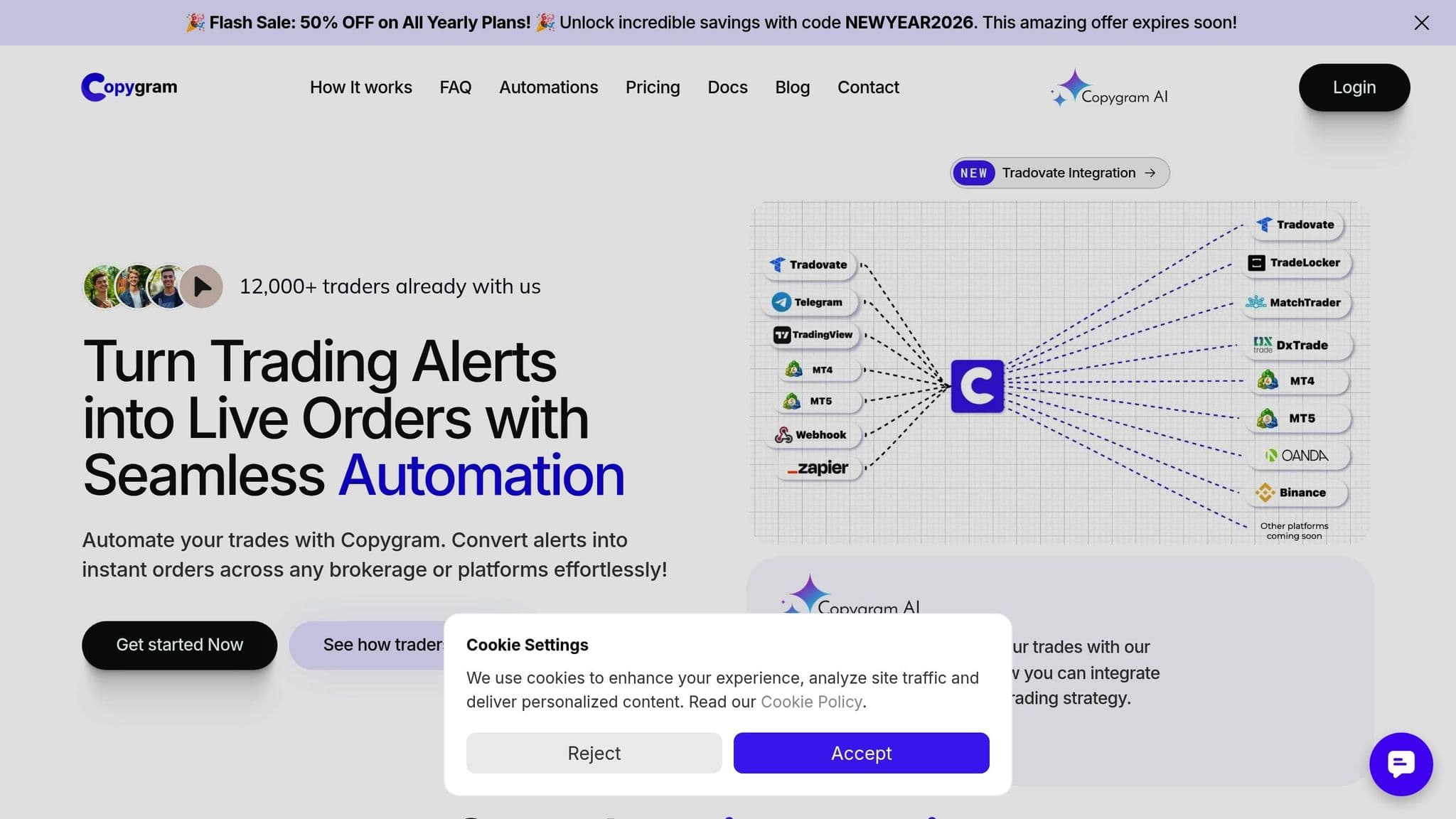
Copygram links TradingView to multiple broker accounts using webhooks, making automation straightforward. To get started, create a Room by connecting your broker accounts via credentials or official APIs. Set TradingView as the Master, then copy the provided webhook URL into your TradingView alerts. Once set up, the Room instantly syncs signals. The platform supports advanced features like pending orders and trade closures. Keep in mind, you'll need a paid TradingView subscription to access the webhook functionality required for automation.
Supported Platforms and Brokers
Copygram is compatible with MT4, MT5, Tradovate, NinjaTrader, DXtrade, TradeLocker, MatchTrader, OANDA, and Binance Futures as receiver accounts. Copygram says its MetaTrader copying is 100% cloud-based, with no VPS or Expert Advisor required, and platforms like OANDA and Tradovate connect through official APIs. The service is broker-agnostic for supported platforms, meaning it works with any broker using MT4 or MT5. If you trade prop firm accounts, such as those with TopStep or Apex Trader Funding, check each firm's copy trading rules before you connect them. New Topstep accounts trade only on TopstepX, which is not among Copygram's receiver platforms.
Latency and Reliability
Built on enterprise-grade cloud infrastructure, Copygram eliminates the need for a PC or VPS. Copygram states execution in under 20 milliseconds. The platform ensures 99.99% uptime through automatic failover and a global server network. Copygram says it serves 30,000+ traders, and its TradingView automations route webhook alerts to MT4, MT5, Tradovate, DXtrade and more.
Risk Management Features
Copygram includes tools like lot multipliers, equity risk settings, and maximum trade limits to help traders manage risk effectively. Its "Trade Brackets" feature automatically attaches stop-loss and take-profit orders, while symbol filters and automated matching reduce the risk of errors. Additionally, AI integration enhances trade validation by using confidence scores and sentiment analysis.
Plans cost $29/month for Starter (up to 2 trading accounts), $49/month for Pro (up to 3 accounts) and $79/month for Advanced (up to 5 accounts), or $12.50, $20.50 and $33 per month billed yearly (checked on 10 Oct 2026). Every plan includes webhooks, Telegram sources, AI validation and unlimited Rooms and trade executions. These features highlight how Copygram is adapting to meet the needs of modern traders with its advanced risk management tools and automation capabilities.
Remote desktop
Your trading computer. In the cloud.
Connect and control your trading strategies from any device, anywhere in the world, through secure remote desktop, while execution remains on QuantVPS.
Choose your cloud trading computerFrom $29.99/mo · Windows or Linux
5. TradersPost
TradingView Integration
TradersPost is a cloud platform that turns TradingView and TrendSpider alerts into broker orders through webhooks. You create a strategy with entry and exit rules, subscribe one or more broker accounts to it, and paste the webhook into your TradingView alert. TradersPost's Parallel Account Execution sends one signal to every selected account at once.
Supported Platforms and Brokers
TradersPost lists 17+ connections. For futures it fully supports Tradovate, NinjaTrader, TradeStation, ProjectX and tastytrade, with Interactive Brokers in beta, and it also covers stocks, options and crypto at other brokers. Prop firm sim and evaluation accounts can be connected as add-on accounts.
Pricing
Plans cost $49/month (Starter: 1 live and 4 paper accounts), $99 (Basic), $199 (Pro) and $299 (Premium), with 15% off on yearly billing. Extra live accounts cost $10/month each, and a 7-day free trial needs no credit card (checked on 10 Oct 2026).
6. PickMyTrade
TradingView Integration
PickMyTrade is a cloud-based automation platform, founded in 2023, that connects TradingView alerts to live, demo and prop firm accounts without code. You connect a broker, click "Generate Alert" to get the alert message, and paste it into TradingView. PickMyTrade advertises sub-second execution and runs 24/7 in the cloud.
Supported Platforms and Brokers
PickMyTrade supports Tradovate, Rithmic, Interactive Brokers, TradeStation, TradeLocker, ProjectX and MatchTrader, with Ironbeam, Tradier and cTrader in beta. It names prop firms such as Apex Trader Funding, Topstep and E8 Markets, and it allows unlimited sub-accounts under one prop firm login.
Pricing
PickMyTrade costs $50/month, $135 per quarter or $500 per year, each with unlimited strategies, trades and accounts, and a 7-day free trial with no card required (checked on 10 Oct 2026).
7. CrossTrade
TradingView Integration
CrossTrade sends TradingView webhook alerts into NinjaTrader 8 through its NT8 add-on, using a permanent webhook URL and unlimited alerts. It can also route directly to Tradovate in the cloud. CrossTrade says its alert-to-execution time is about 30ms.
Supported Platforms and Brokers
CrossTrade is built for NinjaTrader 8 and Tradovate. Its Pro plan adds a trade copier for NT8 and Tradovate accounts, an Account Manager for risk limits and a REST API, and the Elite plan adds Signal Share across your own NT8 machines and an MCP server for AI agents. Because the add-on runs inside NinjaTrader, that machine has to stay on. Read our CrossTrade review for setup detail.
Pricing
CrossTrade costs $29/month (Standard), $49 (Pro) or $99 (Elite), with unlimited accounts and alerts on every plan, up to 20% off on yearly billing and a 7-day free trial (checked on 10 Oct 2026).
Pros and Cons
When comparing these trade copiers, each one brings its own strengths and weaknesses to the table:
Duplikium: Known for its ultra-low latency and compatibility with multiple platforms like MT4, MT5, cTrader, and DxTrade, this copier is perfect for managing multiple accounts. The downside? It operates on a recurring subscription model.
TradeSyncer: Boasts execution under 100ms and a 99.9% uptime, and says it is used by 25,000+ traders. It also includes advanced risk management tools, such as daily loss limits and account lockouts.
Pricing starts at $49 per month.
Affordable Indicators: Offers a budget-friendly option with a one-time fee, which is great for traders seeking predictable long-term costs. It's particularly useful for prop firm challenges and funded accounts. However, it has limited platform compatibility compared to cloud-based alternatives.
Copygram: Designed for retail traders who prioritize simplicity. It enables direct execution from TradingView and supports platforms like DxTrade and Tradovate. Its plans cover 2 to 5 trading accounts, so it suits smaller setups better than large account stacks.
TradersPost: Covers stocks, options, futures and crypto from one dashboard. Pricing grows with live accounts: $49/month includes one, and each extra live account costs $10/month.
PickMyTrade: One flat price with unlimited accounts and a wide broker list, including Rithmic. It is cloud-only, with no NinjaTrader add-on.
CrossTrade: The cheapest flat price here with unlimited accounts and native NinjaTrader 8 integration. The add-on needs NinjaTrader running on a PC or VPS.
Before committing to any of these tools, it’s always a good idea to test them with a demo account. This allows you to fine-tune settings like multipliers, stop-loss orders, and position sizing.
Order flow
Built for scalpers. Heatmaps on dedicated resources.
Order-flow heatmaps and DOM ladders run on dedicated CPU, memory and NVMe, so your charts keep responding during volatility.
See the dedicated hardwareFrom $29.99/mo · Windows or Linux
Conclusion
The comparisons above showcase the strengths of each trade copier across various trading scenarios. The key is to choose one that aligns with your specific trading needs.
For traders looking for a one-time payment and compatibility with platforms like NinjaTrader or TradingView, Affordable Indicators is a strong option. On the other hand, professional trading teams may find Duplikium appealing for its ultra-low latency, while TradeSyncer offers centralized risk management, making it ideal for managing multiple accounts efficiently. For TradingView-to-futures routes, PickMyTrade and CrossTrade cover many accounts at a flat price, and TradersPost adds stocks and options. If you trade on MT4 or MT5, see our guide to sending TradingView alerts to MetaTrader.
Before committing, it's smart to test your selected copier in a demo environment. This allows you to confirm that trades are executed at the correct sizes and speeds. Adjusting multipliers to fit your account size and risk tolerance is also crucial. During volatile markets, daily loss limits and exit shields can help protect trading capital.
Keep in mind that reliable hosting is just as important as the copier itself. For software-based copiers, the best VPS for copy trading ensures 24/7 connectivity and reduces latency. Cloud-based solutions, on the other hand, eliminate the need for local installations. Opting for enterprise-grade hosting with features like DDoS protection and automated backups can further enhance performance and reliability.
Ultimately, the right trade copier will depend on factors like your trading volume, preferred platform, and priorities, whether that's speed, cost, or functionality. Choose wisely to ensure efficient trade execution.
Setting up a TradingView trade copier
Cloud copiers such as Duplikium and TradeSyncer need no server; copiers that run on your own computer need it switched on. Test copying on demo accounts first and confirm your prop firm permits it. For copiers that run locally, a TradingView copier VPS from QuantVPS keeps them online.
Sources: vendor sites checked on 10 Oct 2026 (trade-copier.com, tradesyncer.com, affordableindicators.com, copygram.app, traderspost.io, pickmytrade.io, crosstrade.io); TradeSyncer screenshot from tradesyncer.com, October 2026.
FAQs
How can I use trade copiers with TradingView?
Trade copiers integrate with TradingView by leveraging its alerts and webhook system to automate the process of copying trades. With any paid TradingView plan (Essential, Plus, Premium or Ultimate), you can send alerts to a webhook URL for actions like entries, exits, stop-losses, or take-profits; the free Basic plan has no webhooks. These alerts are sent as JSON messages to the trade copier's designated webhook URL. Once received, the copier processes the information and sends the appropriate orders to your connected broker accounts.
To begin, you’ll need to configure alerts in TradingView with a webhook URL, link your broker accounts to the trade copier using API keys or tokens, and set up master-follower relationships for trade replication. Most trade copiers also offer customization options, such as adjusting trade sizes or distributing signals across multiple accounts. When properly configured, trade copiers allow you to replicate strategies across several accounts with minimal delay, often within milliseconds.
What sets the top trade copiers for TradingView apart?
The best trade copiers for TradingView stand out in several key areas, including how they connect, how quickly they execute trades, their pricing, platform compatibility, and extra features. For example, tools like Copygram use advanced webhook integration, while others rely on cloud-based systems or API connections to brokers. Execution speed is another differentiator, with some copiers promoting ultra-low latency for near-instant trade replication.
For pricing, most copiers offer a 7-day free trial, subscriptions start at $12.50 per month (Copygram, billed yearly) or $29 per month billed monthly (Copygram and CrossTrade), and Affordable Indicators sells a $175 one-time license (checked on 10 Oct 2026). Compatibility with platforms also varies - some tools are designed for MT4/MT5 brokers, while others support a wider range of platforms, including those for futures and crypto trading. Many of these copiers also include standout features like risk management dashboards, equity protection, or the ability to copy trades across unlimited accounts. These differences allow traders to pick a copier that aligns with their priorities, whether that’s speed, advanced tools, or affordability.
What factors should I consider when selecting a trade copier for multiple accounts?
When selecting a trade copier to manage multiple accounts, focus on speed and reliability. A copier with low latency, ideally around 20 to 30 milliseconds or less, ensures trades are mirrored almost instantly, minimizing slippage. Additionally, aim for one with high uptime (e.g., 99.999%) to avoid disruptions during crucial market movements.
It's also crucial to ensure the copier works with your brokers and trading platforms. Look for a clear master-follower setup that allows follower accounts to replicate trades effortlessly, including entries, exits, stop-losses, and take-profits. Features like customizable position sizing and integrated risk management tools (such as equity protection) are vital for managing exposure and adjusting risk levels across accounts effectively.
Lastly, evaluate the copier's scalability, cost, and user-friendliness. It should handle multiple accounts without hefty price hikes, offer straightforward pricing, and be easy to set up. Reliable customer support and well-organized documentation can make troubleshooting much easier. To boost performance, consider pairing the copier with a reliable VPS, especially for multi-account trading setups.


