
CrossTrade connects TradingView webhook alerts to supported execution workflows and provides account tools for NinjaTrader 8. It suits traders who need an alert-to-order bridge, with copying and Account Manager features available on higher plans. A webhook receiver and an account copier are different parts of the system, so choose the plan around the feature you actually need.
This review uses CrossTrade's published pricing and product information checked in October 2026. It does not claim a tested execution speed, independently measured uptime or a customer rating. The current plan names are Standard, Pro and Elite.
How CrossTrade works
For NinjaTrader, install and run the CrossTrade desktop Add-On with the trading platform and the required account connections. TradingView alerts send the configured webhook instructions to that workflow. The account's broker still accepts and executes the resulting orders, and the desktop platform must remain available.

Uptime
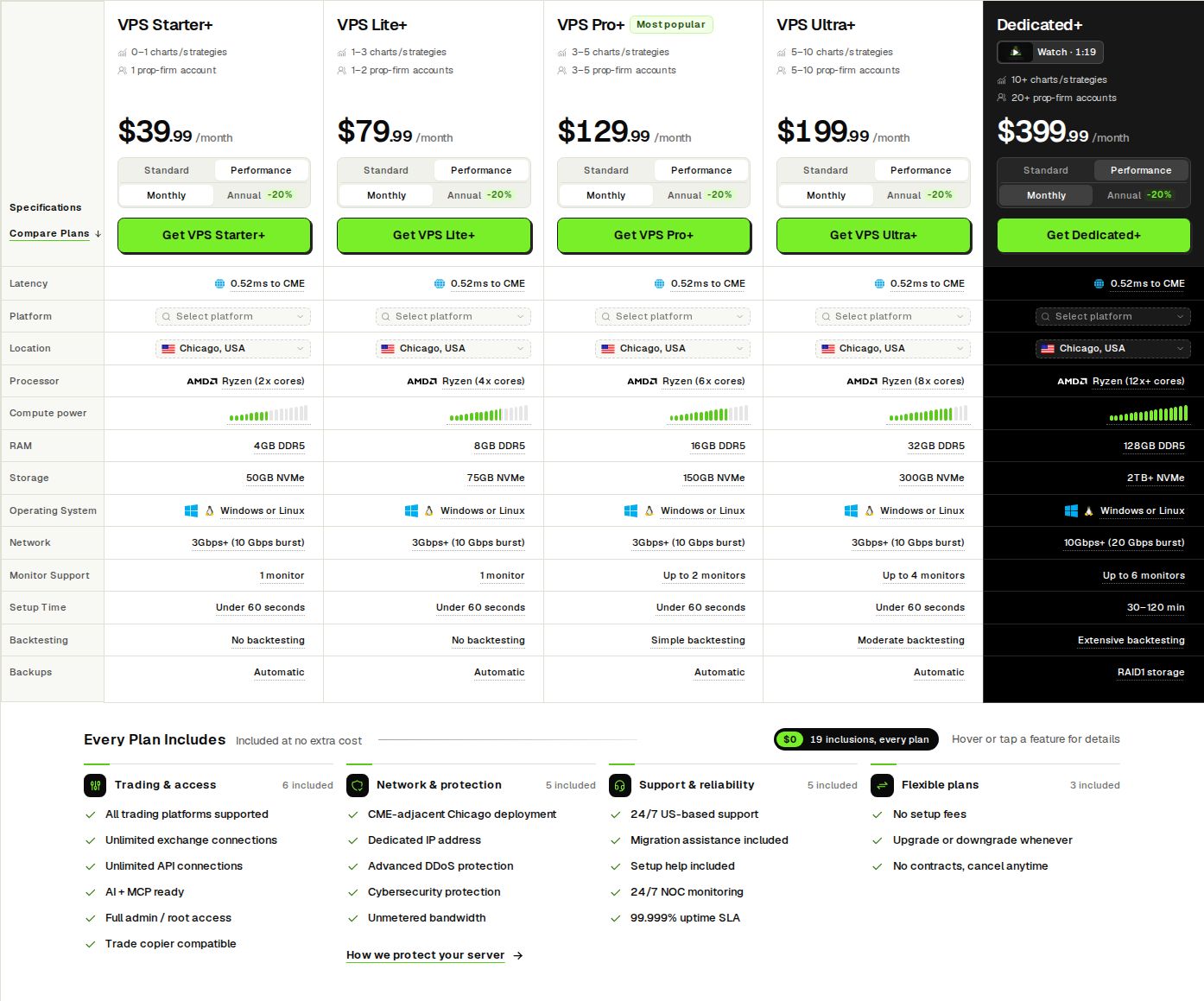
99.999% uptime. Built for 24/7 trading reliability.
Your VPS runs in Tier IV datacenters with redundant power and network, monitored 24/7 on site.
See the uptime SLA







From $29.99/mo · Windows or Linux
Source: https://crosstrade.io, October 2026
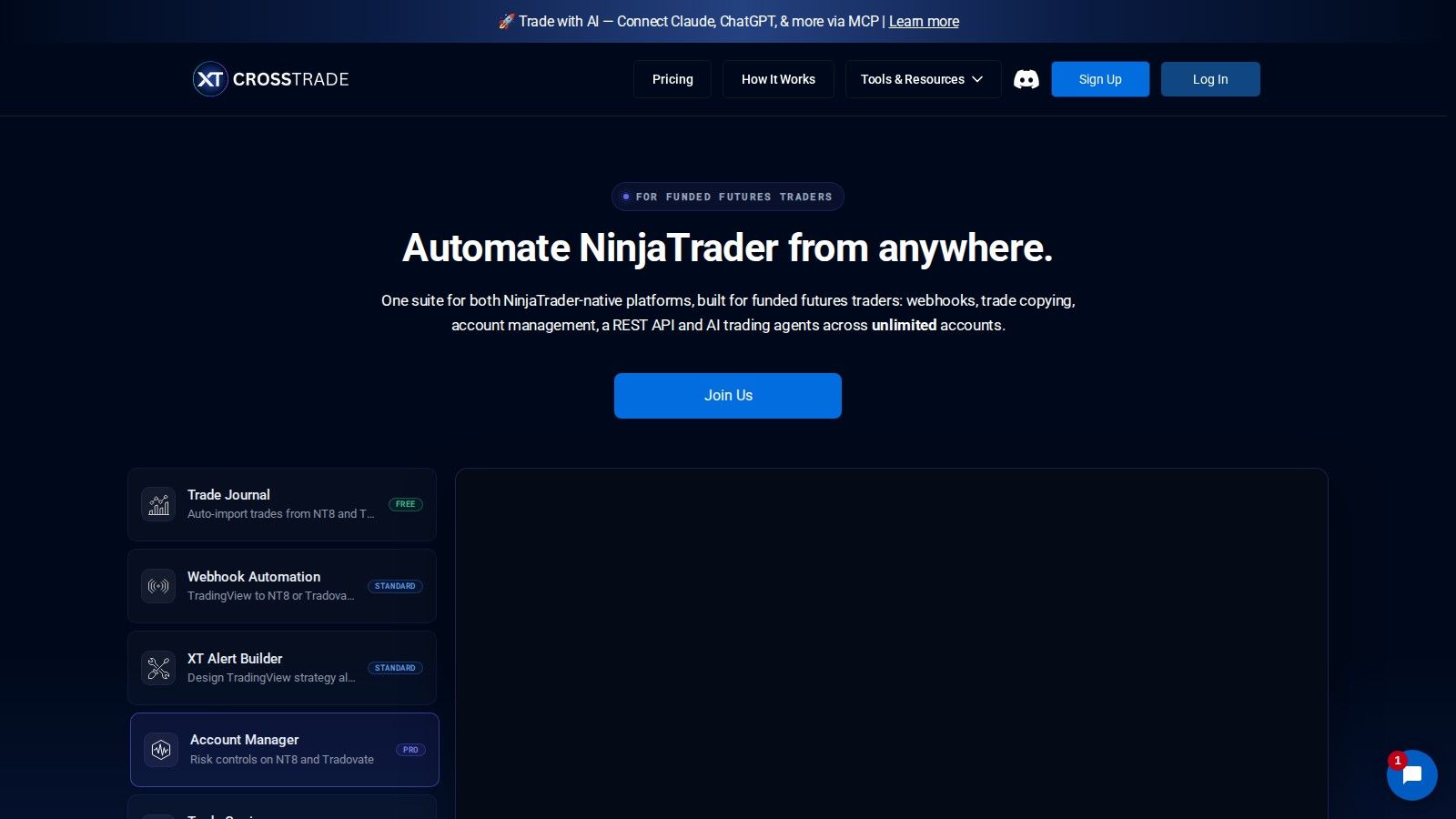
CrossTrade also supports direct Tradovate cloud routing, which is a different operating model from its NinjaTrader desktop Add-On. Signal Share works between your own NinjaTrader machines and is not a Tradovate feature. Check which route a strategy uses before deciding what software must stay running.
An alert firing in TradingView does not prove that an order was accepted. Review the receiver, account selection, instrument and quantity, then inspect the actual order and position at the broker. Keep duplicate alerts and reconnect behavior in the validation plan rather than assuming a webhook always produces the intended exposure.
Current plans and prices
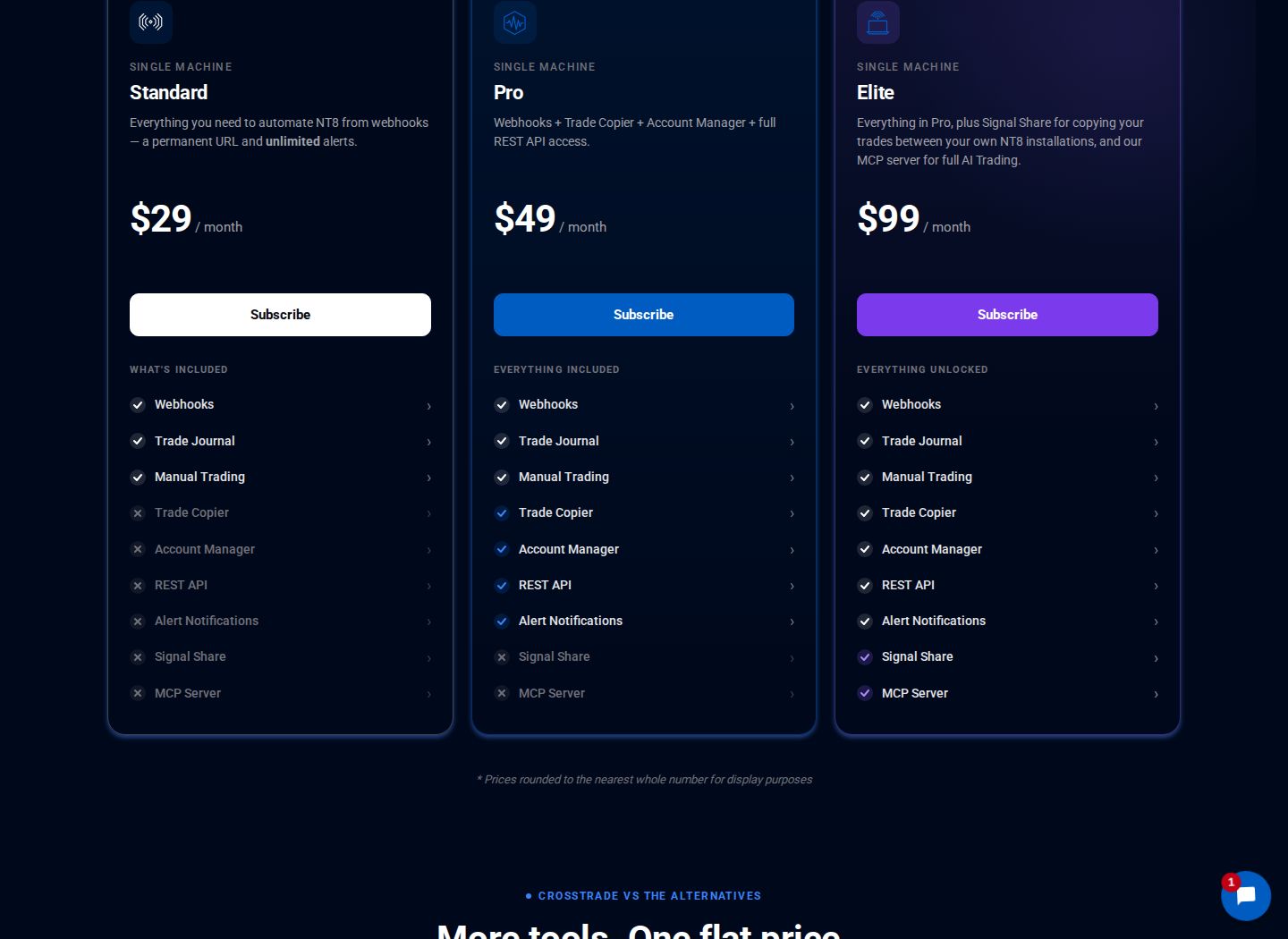
CrossTrade's pricing page shows the following USD prices. Annual amounts are the full annual charges, not monthly subscriptions with the same renewal period.
Source: quantvps.com/pricing, October 2026
| Plan | Monthly | Annual | Main included features |
|---|---|---|---|
| Standard | $29 | $279 | Webhooks, trade journal and manual dashboard |
| Pro | $49 | $469 | Standard features plus copier, Account Manager and REST API |
| Elite | $99 | $949 | Pro features plus Signal Share and MCP server |
The seven-day trial includes all features. Review the current renewal terms and the features needed after the trial, rather than assuming a trial feature will be included in the lowest plan. Prices can change.
Standard fits an alert-to-order workflow that does not need the Pro copier or Account Manager. Pro is the relevant tier when those account-management and copying functions are needed. Elite adds the cross-machine Signal Share and MCP features; those additions are not required simply because a trader uses TradingView alerts.
Remote desktop
Your trading computer. In the cloud.
Connect and control your trading strategies from any device, anywhere in the world, through secure remote desktop, while execution remains on QuantVPS.
Explore the hardwareFrom $29.99/mo · Windows or Linux
Account management and risk controls
The Pro Account Manager provides tools for monitoring and managing NinjaTrader account activity. Configure risk settings around the account's actual rules and remaining drawdown. A control is not a guarantee that an order cannot slip, a connection cannot fail or a firm rule cannot be breached.
For account copying, inspect both the lead and follower positions after orders. Separate accounts can receive different fills, partial fills or rejections. Check what happens when copying is stopped, a connection drops or one follower reaches its own position limit.
Signal Share on Elite is intended for your own NinjaTrader machines. Each machine still needs the required platform and account connections, and the firm's permissions remain relevant. Do not treat a multi-machine feature as permission to route orders for another user.
Setup and validation
Start with the vendor's how-it-works guide and confirm the chosen connection. Set the receiver and account details before building a TradingView alert. Use an available simulation or demo account to check entry, quantity, exits and reconnect behavior.
Check webhook content, instrument identifiers and order handling for the actual platform route. A strategy alert and a manually submitted broker order can have different permissions under a prop firm's rules. Validate the permitted lead-order method before enabling a funded-account workflow.
Keep the order and position views visible during validation. If an alert is received but no order appears, inspect the exact error and connection state instead of sending repeated copies of the alert. Record timestamps and order identifiers for support without sharing credentials.
Does CrossTrade need a VPS?
The NinjaTrader Add-On needs its desktop application and connections running. A permitted NinjaTrader VPS workspace or VPS for TradingView alerts can host that desktop workload, while the direct Tradovate cloud route has a different hosting requirement. Match hosting to the actual execution path.
Check the firm's published restrictions before routing orders remotely. Topstep's API policy, for example, requires a personal-device origin for order activity and prohibits VPS, VPN and remote-server routing. A server can still be used for the read-only work described by that policy, but not as an order bridge for that connection.
Network location affects only one part of order travel time. Broker handling, liquidity and the alert strategy affect the result too. Choosing remote desktop access does not establish that every firm permits the same order-routing arrangement.
Order flow
Built for scalpers. Heatmaps on dedicated resources.
Order-flow heatmaps and DOM ladders run on dedicated CPU, memory and NVMe, so your charts keep responding during volatility.
Explore the hardwareFrom $29.99/mo · Windows or Linux
Alternatives and who each workflow suits
For TradingView alerts into NinjaTrader, consider CrossTrade first when its desktop bridge and account features match the setup. For Tradovate, Rithmic and mixed supported account copying, Tradecopia is another option with desktop or hosted operation. Identify the connection and the required features before comparing subscription prices.
Tradecopia's monthly base prices are $49.99 for Pro Desktop, $79.99 for Pro+ Lite and $149.99 for Pro+. Use code QUANT for 30% off. Pro Desktop and Pro+ Lite offer a seven-day trial on monthly or quarterly billing; Pro+ does not. Its current compatibility guide excludes dxFeed and CQG.
Replikanto is an alternative when the accounts and copying workflow already sit inside NinjaTrader 8. Its allocation, ATM and Follower Guard features fit that operating model; the Replikanto guide explains per-computer licensing and remote-copy considerations. Compare these jobs in our TradingView and account copier overview rather than treating all automation products as interchangeable.


