
Tradervue is a web-based trading journal that imports your trades from a broker or platform, charts every entry and exit, and turns your history into performance reports. It has a free plan limited to 30 imported trades a month, plus Silver at $29.95 a month and Gold at $49.95 a month with unlimited imports, and it supports stocks, options, forex and futures (tradervue.com, checked on 10 Oct 2026).
In short:
- Best for: active day traders who want detailed reports on stocks or futures.
- Imports: more than 80 platforms by file upload, with automatic broker sync where the broker allows it.
- Futures: tick-based reports, and imports from Tradovate, NinjaTrader and Rithmic R | Trader.
- Watch out for: commissions and net P&L need Gold, and most futures imports are manual file uploads.
Keep your platform running while you're away.






What Tradervue Is
Tradervue is a trade journal and analytics tool: you import executions, and it groups them into trades, draws price charts and builds reports. Its trading analysis page lists overview, detailed, comparison, advanced, tag, risk and liquidity reports. You can tag setups, write daily journal notes, share trades and invite a mentor.
Tradervue's site and help center carry a SureSwift Capital copyright line. The homepage says it has "80+ Trading Platform Integrations" and that it lets you "track, analyze, and improve your stock, futures, and forex trades."
Tradervue Plans and Pricing
Tradervue has three plans: Free, Silver at $29.95 a month and Gold at $49.95 a month (Tradervue pricing page, checked on 10 Oct 2026). The paid plans differ mainly in Gold's commission, exit and risk analysis.
| Plan | Price | Trade imports | What it adds |
|---|---|---|---|
| Free | $0 | 30 trades a month | The pricing page does not list free plan features beyond this quota |
| Silver | $29.95 a month | Unlimited | Futures, forex and options support, advanced reports, MFE/MAE statistics, mentoring, broker sync, 1 GB image storage |
| Gold | $49.95 a month | Unlimited | Everything in Silver, plus exit analysis, commission and fee support, liquidity reports, risk tracking, advanced filters and 5 GB storage |
The import quota article explains the free limit: "Users on the free plan have a monthly import limit of 30 trades." It counts grouped trades, not executions, per calendar month. A trader who takes 5 trades a day for 20 trading days imports 100 trades a month, so they would need Silver or Gold.
Free trials of Silver and Gold are offered at signup. The pricing page says: "Your credit card will be automatically charged when the trial period is up, unless you switch to a free plan before the end of the trial period." Downgrades and cancellations take effect at the end of the billing period.
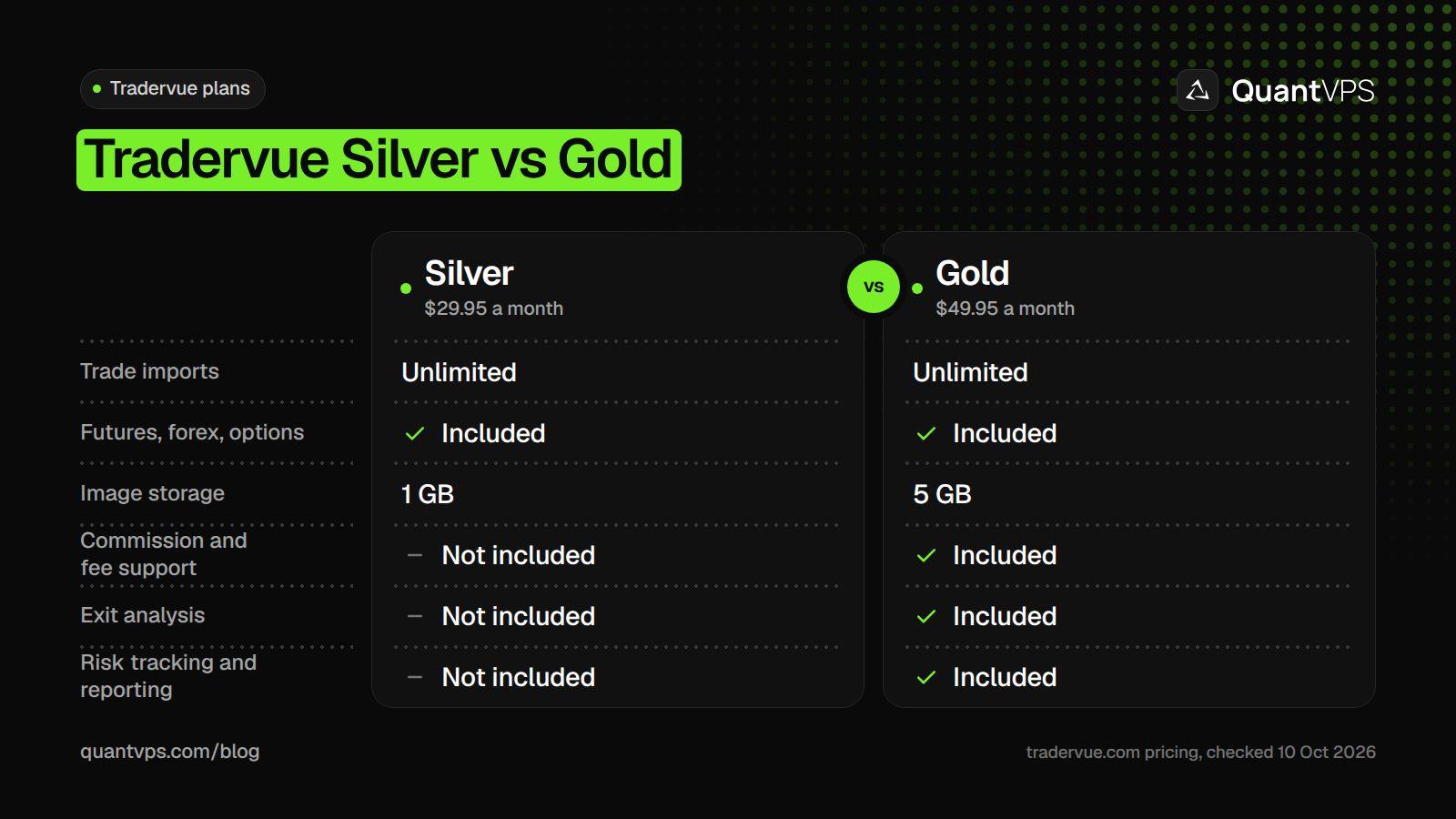
Gold adds net P&L with commissions, exit analysis and risk reports.
Imports, Supported Brokers and Platforms
Tradervue imports trades two ways: a standard file import, or broker sync that pulls trades automatically. The broker sync article says standard import "requires you to periodically export and upload new trade data files", while broker sync "connects directly to your brokerage account via API integration" where the broker allows it.
Tradervue's platforms page lists stock brokers such as Interactive Brokers, TradeStation, Schwab, Thinkorswim, Webull and Robinhood, plus forex platforms such as MetaTrader 4 and 5, cTrader and Oanda. A generic import format covers anything else, and an API lets you push trades and journal entries from your own code.
Tradervue for Futures and Prop Firm Traders
Tradervue handles futures well on the reporting side: it can run futures reports "based on either return in USD, or in ticks", even across several instruments. Its supported products list covers index futures such as ES, NQ, MES and MNQ, plus Treasury, currency, energy, metals and agricultural contracts.
Prop firm platforms are supported by file upload, not broker sync. Tradervue publishes an import guide for each platform, linked in the table below. For NinjaTrader 8 you export executions from the Trader Summary; Tradervue notes that "fully automated and near-realtime trade importing is available using the third-party Journal Lync NinjaTrader plugin."
| Futures platform | How trades get into Tradervue |
|---|---|
| Tradovate | Account tab, Orders tab, Download Report, then upload the file |
| NinjaTrader 8 | Trader Summary, Executions tab, Save to Disk as CSV, then upload |
| Rithmic R | Trader | Recent Orders (or Order History), add the Qty Filled column, export CSV, then upload |
Paid plans include "Unlimited Trading Accounts", so you can keep each evaluation or funded account separate. If you run NinjaTrader on a NinjaTrader VPS, you can export the executions file there and upload it from the same session.
Getting Started With Tradervue
Setting up takes one import and a few settings. A typical first session for a futures trader, based on Tradervue's own guides:
- Sign up for the free plan and check that your platform is on Tradervue's integrations list.
- Export your trades from the platform (for Tradovate: Account tab, Orders tab, Download Report).
- Upload the file on the import page and pick the time zone your data uses.
- Add commission estimates under Trade Settings if your file has no fees (net P&L reports need Gold).
- Tag your setups so comparison and tag reports can show which ones work.
- Start a Silver or Gold trial from Plans and Billing once you need more than 30 trades a month.
Reports, Journaling and Sharing
Reports are Tradervue's strongest feature. You can compare winning days with losing days, longs with shorts, or any two tagged sets of trades, and plot trades by duration, time of day or P&L.
- MFE/MAE statistics show how far each trade went for and against you.
- Risk reports (Gold) analyze results in R multiples.
- Exit analysis (Gold) compares your exits with the best potential exit.
- Commissions and fees (Gold): the help center says "tracking commissions and related features, such as reporting net P&L data, requires a Gold subscription."
- Mentoring: mentors get read-only access and can leave private comments; "Both mentors and mentees must have a silver or gold subscription."
Tradervue Pros and Cons
| Pros | Cons |
|---|---|
| Free plan for light journaling (30 trades a month) | Net P&L with commissions needs Gold |
| More than 80 platform integrations plus a generic format | Tradovate, NinjaTrader and Rithmic imports are manual uploads |
| Tick-based reports for futures | No backtesting or trade replay in the plan list |
| Mentoring and trade sharing | Mentors and mentees both need a paid plan |
| API for automated imports | Pricing page shows monthly prices only |
Order flow
Built for scalpers. Heatmaps on dedicated resources.
Order-flow heatmaps and DOM ladders run on dedicated CPU, memory and NVMe, so your charts keep responding during volatility.
See the dedicated hardwareFrom $29.99/mo · Windows or Linux
as low as0.52ms
Chicago to CME
Tradervue Alternatives
The main alternatives add backtesting, trade replay or AI features at similar prices. Prices from each company's pricing page, checked on 10 Oct 2026:
| Journal | Prices | Notes |
|---|---|---|
| Tradervue | Free; Silver $29.95 a month; Gold $49.95 a month | Strong reports, tick-based futures reports |
| TradeZella | Essential $35, Pro $59, Ultra $99 a month; or $315, $531, $891 a year | Trade replay on Pro and Ultra, manual backtesting, AI credits |
| TraderSync | Pro $269.52, Premium $449.52, Elite $719.52 a year (billed annually) | 7-day free trial; market replay and AI assistant |
| Edgewonk | $197 for 12 months (outside the EU and UK) | One annual plan |
For a closer look at the two most common picks, see our TradeZella vs TraderSync comparison.
Is Tradervue Worth It?
Tradervue is worth it if you want deep reports on your own trades and do not need replay or backtesting. Start on the free plan to test imports from your platform; move to Silver once you pass 30 trades a month, and to Gold if you need net P&L after commissions or risk reports.
FAQs
How much does Tradervue cost?
Tradervue has a free plan, Silver at $29.95 a month and Gold at $49.95 a month (pricing page, checked on 10 Oct 2026). Silver and Gold both have unlimited trade imports.
Is Tradervue free?
Yes, there is a free plan, but it imports up to 30 trades per calendar month. Silver and Gold also offer a free trial at signup.
Does Tradervue support futures?
Yes. Silver and Gold list futures support, Tradervue can report futures results in dollars or ticks, and it imports from Tradovate, NinjaTrader, Rithmic R | Trader and other futures platforms.
Does Tradervue sync with Tradovate automatically?
Tradervue's Tradovate guide uses the file upload method: download the orders report from Tradovate and upload it to Tradervue.
Is Tradervue good for prop firm traders?
It works for prop firm traders who are happy to upload files from Tradovate, NinjaTrader or Rithmic, since those imports are not automatic. Paid plans allow unlimited trading accounts, so each evaluation or funded account can be tracked on its own.
Who owns Tradervue?
The Tradervue site and help center are copyrighted by SureSwift Capital.


