
The best futures trading platform is the one that connects to your broker and runs the way you trade. NinjaTrader fits Windows traders who want desktop charts and automated strategies, Tradovate fits browser, desktop and mobile trading on one account, and Sierra Chart fits technical traders who want deep configuration, with broker-connected packages from $36 a month (checked on 31 Oct 2026). For beginners, NinjaTrader and Tradovate are the easiest start: both have a Free plan with no monthly fee, free simulated trading and a web version.
Choosing a futures trading platform means choosing an execution workflow, not just attractive charts. Your broker must support the connection, your subscription must include the features you use, and your computer must run the application reliably. If a home PC sleeps or loses power, a CME VPS keeps the platform online. QuantVPS is a fully managed trading computer in the cloud (QuantVPS plans and pricing). Exchange data, commissions and account margin remain separate decisions.
Key facts
- The comparison table covers 9 platforms by price, connections, operating system and automation. Platform comparison table
- NinjaTrader Desktop with a third-party broker needs the multi-broker add-on, at $99 a month. NinjaTrader
- Tradovate's Lifetime plan can also be paid in 4 installments of $499. Tradovate
- Quantower's All-in-One license costs $70 a month, and annual billing takes 30% off. Quantower
- ATAS Start is free, but it shows futures data with a 15-minute delay. ATAS
This comparison covers nine platforms and their official plans, checked on 31 Oct 2026 on each platform's own site. Prices describe the stated billing arrangement, rather than turning an annual commitment into a cancel-anytime monthly offer. Data subscriptions, taxes, broker charges and optional add-ons can increase the total.
The right starting point is your required futures market and broker. Establish that combination first, then compare order entry, replay, automation and operating system. For the broker side, compare futures brokers with the lowest commissions and futures brokers with low intraday margin. A platform that cannot connect to your account is unsuitable regardless of its charting features.
Keep your futures platform running near CME while you're away.






Futures platform comparison
The table separates application pricing from the execution account. Some products sell independent software licenses; others provide an interface through a brokerage relationship. A free software plan does not make a futures transaction free.
| Platform | Software or plan price (checked on 31 Oct 2026) | Connections and execution | Operating system | Automation approach | Best for |
|---|---|---|---|---|---|
| NinjaTrader | Free plan $0; Monthly $99; Lifetime $1,499 | NinjaTrader brokerage; other brokers via a $99/month add-on | Windows desktop; web and mobile | NinjaScript (C#) on desktop | Windows traders who want one desktop for charts, strategies and orders |
| Tradovate | Free plan $0; Monthly $99; Lifetime $1,499 | Tradovate brokerage | Windows and Mac desktop; browser; mobile | Third-party tools and approved API integrations | Browser and multi-device futures trading |
| Sierra Chart | Base packages $26 or $36/month; integrated packages $36, $46 or $56/month | Integrated packages for external services and Denali data | Windows | ACSIL custom studies and automated systems | Low software cost and deep configuration |
| Quantower | Limited free version; All-in-One $70/month | Connections include Rithmic, dxFeed and Interactive Brokers | Windows 10/11 64-bit | C# API and algo strategies | Several brokers and feeds in one workspace |
| Optimus Flow | $0 with an Optimus Futures account | Optimus Futures brokerage; Rithmic and CQG | Windows desktop; web and mobile | Third-party platforms such as Sierra Chart; TradingView order routing | Order-flow tools with no platform fee |
| TradingView | Basic free; Essential $12.95/month billed annually | Supported integrated brokers; exchange data separately | Web; Windows, macOS and Linux apps; mobile | Pine Script strategies and alerts; execution through a broker integration | Beginners who want charts on every device |
| MultiCharts | Free $0; Standard $99/month; Advanced $149/month | Standard and Advanced add supported brokers and data feeds | Windows | PowerLanguage/EasyLanguage, or .NET edition in C# and VB.NET | Strategy coding, backtesting and automation |
| Bookmap | Digital free; Global $49, Global Plus $99, Global Premium $199/month | BookmapData, dxFeed and Rithmic for futures data | Windows, Mac and Linux | Add-ons API for indicators and strategies | Order-flow and liquidity heatmap reading |
| ATAS | Start free; Plus €24.95, Pro €69.95, Ultra €89.95/month | Connectors include Rithmic and CQG | Classic ATAS on Windows; ATAS X (beta) on Windows and macOS | C# development for indicators and algorithms | Footprint and order-flow analysis |
| MotiveWave | Community free; Standard $24, Order Flow $49, EW Lite $89, PRO $99, Ultimate $159/month | Supported brokers and feeds | Windows, macOS and Linux | Strategies and backtesting in PRO and Ultimate | Mac and Linux users who want a full desktop platform |
Annual equivalents are not monthly installment offers. Connection availability also differs by package, account permission and feed entitlement. Check the exact license and connection before buying data or moving an execution workflow.
Best futures trading platform for beginners
The best futures trading platform for beginners has a free plan, a free simulator and simple order entry. NinjaTrader and Tradovate meet all three: both list a Free plan with no monthly plan fee, both include free simulated trading, and both run in a web browser and on mobile (checked on 31 Oct 2026). TradingView's free Basic plan is a good place to learn charts, and its Paper Trading feature lets you practice with simulated money.
| Beginner need | Platforms that fit | What to check |
|---|---|---|
| Free to start | NinjaTrader Free, Tradovate Free, TradingView Basic, MultiCharts Free, Quantower free version, ATAS Start, MotiveWave Community, Bookmap Digital, Optimus Flow (no platform fee with an Optimus Futures account) | Free editions limit data or connections. ATAS Start shows futures data with a 15-minute delay, and MultiCharts Free has no market data. |
| Practice without real money | NinjaTrader and Tradovate simulated trading, TradingView Paper Trading, MultiCharts Free Trading Simulator, Sierra Chart Simulated Trading Service, Optimus Flow simulated trading | Simulated fills can differ from live fills. |
| Trading on a Mac | Tradovate desktop for Mac, NinjaTrader Web, TradingView, MotiveWave, Bookmap, ATAS X (beta), Optimus Web | NinjaTrader Desktop, Sierra Chart, Quantower and MultiCharts are Windows applications. |
| Learning to code later | NinjaScript (C#), Pine Script, MultiCharts PowerLanguage | Start with manual trades before automating anything. |
A simple first setup takes four steps. Each one removes a common beginner mistake before real money is involved.
- Pick the broker first, then a platform that connects to it.
- Trade in simulation until order entry, brackets and position closing feel routine. Our guide to futures trading simulators compares free practice options.
- Learn market, limit and stop orders, and the bracket orders your platform offers.
- Add commissions, exchange fees and market data to the platform price before you trade live.
1. NinjaTrader: desktop strategies and brokerage integration
Best for: Windows traders who want one desktop platform for charts, NinjaScript strategies and an integrated futures broker.
NinjaTrader combines a Windows desktop application with brokerage, web and mobile access. The brokerage pricing page lists Free, Monthly and Lifetime plans (checked on 31 Oct 2026). Free has no plan subscription, Monthly costs $99 per month, and Lifetime requires a $1,499 payment. The plans change commission rates as well as the software arrangement.
Its advertised per-side commissions are $1.29 for standard contracts and $0.39 for micros on Free, $0.99 and $0.29 on Monthly, and $0.59 and $0.09 on Lifetime. These are broker commissions, not the complete exchange, regulatory and clearing cost. A trader comparing platform prices should keep those transaction charges in a separate cost calculation.
NinjaScript supports custom indicators and automated strategies in the desktop environment. That matters when the strategy needs a persistent local process, historical testing or custom order handling. A browser chart is not automatically an equivalent runtime for the same strategy.
NinjaTrader Desktop runs on a Windows PC, while NinjaTrader Web runs in any PC or Mac browser. Using NinjaTrader Desktop with a third-party broker needs the multi-broker add-on, listed at $99 per month.
NinjaTrader can suit a Windows user who wants one supported desktop workflow for research and execution. Confirm the account's connection, market data entitlement and strategy behavior in simulation. Automated order handling still needs explicit restart, connection-loss and position reconciliation checks.
2. Tradovate: browser-first futures execution
Best for: traders who want the same futures account in a browser, a desktop app and a phone, with no separate platform license.
Tradovate offers a browser-based futures trading workflow, desktop apps for Windows and Mac, and mobile apps. Its current plan structure uses the same Free, $99 Monthly and $1,499 Lifetime choices shown above, with corresponding standard and micro commission rates; Lifetime can also be paid in 4 installments of $499 (checked on 31 Oct 2026). That does not make the two interfaces interchangeable for every strategy or third-party tool.
Browser access can help a trader who moves between computers or uses a Mac. The broker hosts the account and its execution services, while the browser provides the interface. Local browser availability, network access and the broker's services can all affect what the trader sees and can control.
Automation through an API is a separate integration decision. Account approval, API access, connection limits and the third-party application must be checked before using automated orders. Do not assume a script written for another platform will run inside Tradovate without an adapter.
Tradovate is a practical candidate when straightforward futures order entry and browser access matter more than a particular desktop scripting language. Compare its order templates, account permissions and data arrangements against the workflow you actually use, rather than treating a low software subscription as the full trading cost.
3. Sierra Chart: configurable charting and execution services
Best for: technical traders on Windows who want deep configuration and a low monthly software price.
Sierra Chart's official package list distinguishes base packages from integrated packages. Base Package 3 costs $26 per month and Package 5 costs $36. Integrated Packages 10, 11 and 12 cost $36, $46 and $56 per month (checked on 31 Oct 2026). Integrated packages are required for the relevant external services and Denali arrangements.
Exchange data fees are additional. Package features, the trading service and the data entitlement must line up: purchasing the software alone does not grant every exchange subscription or brokerage connection. Its longer service purchases offer discounts, but the monthly package prices above are the useful starting comparison.
The Windows application supports custom development through ACSIL, including fully automated trading systems that can be backtested. This gives a technically comfortable user substantial control over studies and strategy behavior. It also requires the user to understand the specific order routing service and how the system handles reconnects and incomplete data.
Sierra Chart can fit a trader who values configurable execution, detailed data handling and a deliberate setup process. Our Sierra Chart pricing guide explains the package distinction. Choose the service and data feed before judging the final monthly cost.
4. Quantower: multiple connections in a Windows workspace
Best for: traders who want several broker and data connections in one Windows workspace.
Quantower provides a limited free version and an All-in-One license listed at $70 per month (checked on 31 Oct 2026). Paying annually takes 30% off, a 7-day full-featured trial is available, and third-party market data remains a separate expense. The free edition's limitations matter if the workflow needs multiple simultaneous connections or paid analysis tools.
Its connection directory includes Rithmic, dxFeed and Interactive Brokers. A listed connection is not a promise that every broker account supports every order type through it. The broker's account permissions, connector configuration and market data subscription must still match the intended futures market.
Quantower provides an open C# API for custom indicators, strategies and trading automation, and the app runs on Windows 10 and 11 (64-bit). That makes it relevant to users building a Windows automation workflow, as well as manual traders working with several feeds. Testing should include the actual adapter rather than relying solely on historical strategy output.
The Quantower review covers its workspace in more detail. Compare the free edition against the functions you require before subscribing, then include data and any broker-specific costs in the budget. The number of visible tools is less useful than reliable access to the few you use.
Optimus Flow: Quantower with no platform fee
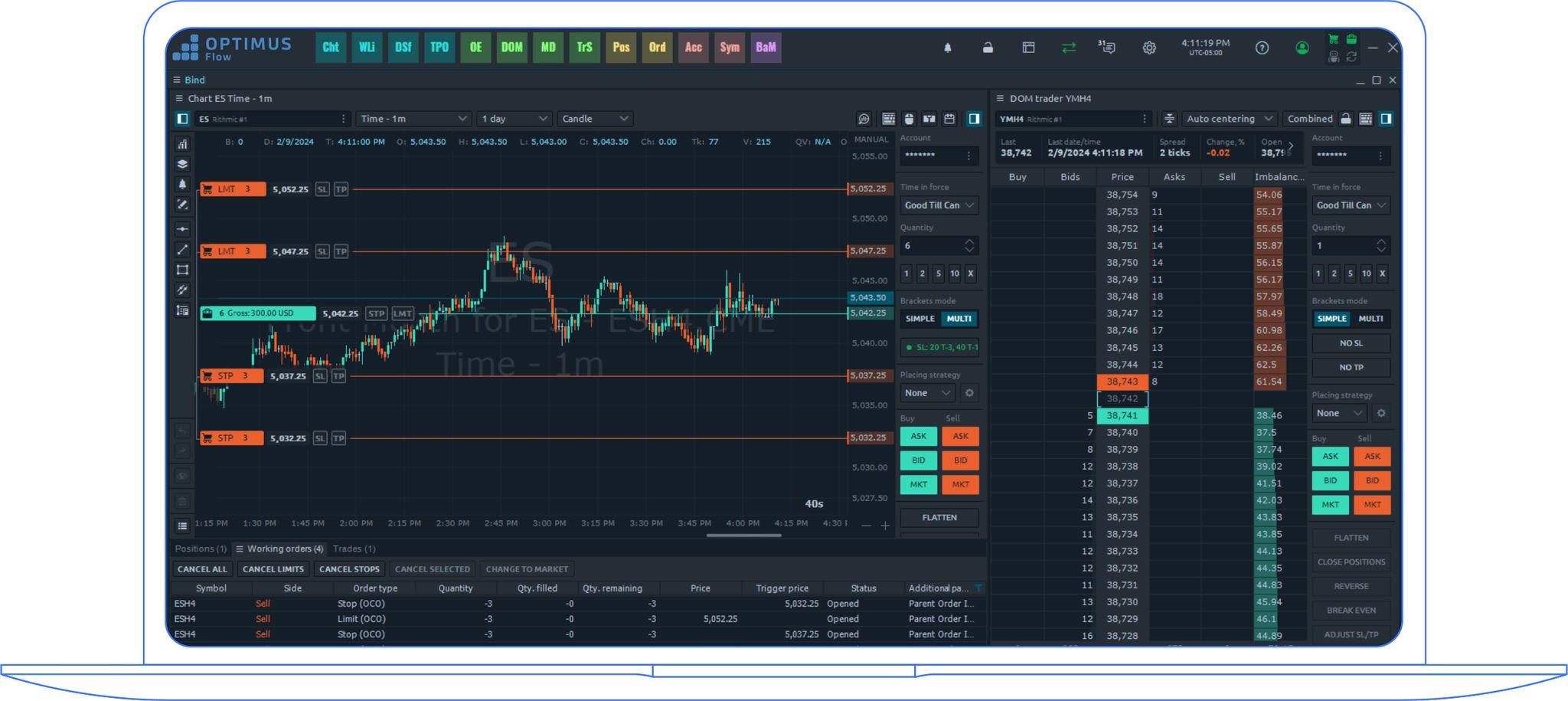
Best for: futures traders who want professional order-flow tools and a broker in one account, with no platform subscription.
Optimus Flow is the Quantower-powered platform from Optimus Futures, winner of Best Software for Trading Futures at the Benzinga Global Fintech Awards in 2023, 2024 and 2025. Optimus Futures clients get it with no monthly platform fee, alongside Optimus Web for the browser and Optimus Mobile for phones, all on the same account. Commissions start at $0.25 per side on micros and $0.75 per side on standard contracts, and day-trading margins are $50 for MES and $500 for ES.
The platform includes a DOM ladder for order entry, a DOM Surface heatmap, footprint (cluster) charts, volume profiles and TPO charts. Market replay and simulated trading let traders practice and review sessions without risking capital. These are tools many traders otherwise pay for through a separate platform license.
Orders route to CME Group futures through Rithmic or CQG. Traders who prefer another workflow can use the same account with TradingView, Sierra Chart, Bookmap or ATAS. CME Level 1 data is free for traders who place 10 or more trades a month, otherwise $3 a month, and exchange, clearing and NFA fees are passed through separately.
Optimus Flow's desktop application runs on Windows, so Mac users trade through Optimus Web or Optimus Mobile, or run the desktop platform on a Windows VPS. The account minimum is $500 for micros and $2,000 for E-mini and other standard contracts. Compare the platform's tools against the workflow you use, and test it in simulation before trading live.
5. TradingView: accessible charts with broker-dependent execution
Best for: beginners and chart-first traders who want the same charts on every device and already use a supported futures broker.
TradingView offers a free Basic plan and several paid subscriptions. The pricing page lists Essential at $12.95 per month billed annually, Plus at $29.95, Premium at $59.95 and Ultimate at $199.95 on that annual basis (checked on 31 Oct 2026). These figures are not a quote for monthly cancellation terms. A desktop platform receiving external TradingView signals can use a VPS for TradingView webhooks for the bridge, subject to the broker's supported connection.
The platform runs in a browser and provides desktop applications for Windows, Mac and Linux. Futures execution depends on a supported broker integration and the account's trading permissions. Futures brokers in TradingView's broker directory include NinjaTrader, Tradovate, AMP Futures, TradeStation, Optimus Futures, EdgeClear and Ironbeam. Exchange data subscriptions may be needed separately even when the charting subscription is paid.
Pine Script supports indicators, strategy testing and alerts. A strategy result or an alert is not itself a live brokerage order. Automated execution requires an appropriate supported integration or external service, with its own permissions and error handling. Confirm the entire order path before relying on alerts to trade unattended.
TradingView fits users who value accessible analysis across devices and have a compatible execution account. For a futures workflow, verify real-time data, broker support and the order types you need. General charting convenience should not conceal a mismatch between the displayed market and the executable contract.
6. MultiCharts: dedicated strategy development on Windows
Best for: strategy developers who want to code, backtest and automate in PowerLanguage, EasyLanguage or C# on Windows.
MultiCharts' current Standard subscription costs $99 per month and Advanced costs $149 (checked on 31 Oct 2026). Annual billing shows equivalents of $79 and $119 per month. Lifetime options are $1,499 for Standard and $1,999 for Advanced. Optional data and other add-ons have their own charges.
A Free plan now costs $0 and includes the trading simulator, sample historical data, and strategy development, backtesting and optimization. It has no market data, and access to supported brokers and data feeds starts with Standard.
The product offers the classic PowerLanguage environment and a.NET edition. Our MultiCharts PowerLanguage guide shows the syntax with examples. The distinction matters when choosing a programming language and existing strategy library. Its supported broker and feed adapters include futures connections, but the intended account and data source must be confirmed independently.
MultiCharts supports strategy development, backtesting and automated trading on Windows; on a Mac it needs Windows virtualization software. Historical results depend on data quality, fill assumptions and strategy logic. They do not demonstrate how an actual account will behave during a disconnect, partial fill or session transition.
Our MultiCharts guide describes the application. It can suit a trader who wants a dedicated strategy environment and is willing to manage the broker adapter and runtime. Select the edition for the code you intend to run, then test that code with the actual connection.
Uptime
99.999% uptime. Built for 24/7 trading reliability.
Your VPS runs in Tier IV datacenters with redundant power and network, monitored 24/7 on site.
See the uptime SLAFrom $29.99/mo · Windows or Linux
7. Bookmap: order-flow visualization with package-specific access
Best for: order-flow traders who read liquidity and the order book on a heatmap.
Bookmap lists Digital as free, Global at $49 per month, Global Plus at $99 and Global Premium at $199 (checked on 31 Oct 2026). Yearly billing lowers those to $39, $79 and $158 per month. Lifetime licenses cost $990, $1,990 and $3,990. Digital shows delayed US stocks and futures, plus real-time crypto.
Its heatmap visualizes liquidity and order-flow activity. Data and trading connections depend on the package and provider, including supported BookmapData, Rithmic and dxFeed arrangements. A software license does not include every data feed, and the selected package must permit the intended futures connection.
Bookmap supports Windows, Mac and Linux. Its Add-ons API for indicators and trading strategies, and compatible add-ons, can extend its functionality, but installing an order-flow tool is not equivalent to installing a complete automated trading system. Check the add-on's execution support and the account's permissions separately.
The Bookmap pricing guide helps distinguish the plans. Bookmap is most relevant when liquidity visualization is central to the trading process. If the main requirement is a simple execution ladder, compare that workflow directly before paying for analysis features that will remain unused.
8. ATAS: order-flow tools and a changing desktop lineup
Best for: footprint and order-flow traders who are comfortable paying in euros.
ATAS lists Start as free and monthly paid plans of €24.95 for Plus, €69.95 for Pro and €89.95 for Ultra (checked on 31 Oct 2026). Annual equivalents are €19.95, €39.95 and €49.95 per month. Start shows futures data with a 15-minute delay. Keep the euro denomination visible when comparing these subscriptions with dollar-priced alternatives.
Feed and broker access depends on the package. The published lineup includes futures connectors such as Rithmic and CQG, and broker connections such as Interactive Brokers, NinjaTrader and AMP Global. Confirm whether the selected plan permits trading through the required connector rather than only displaying its data.
Classic ATAS is a Windows application. ATAS X expands the lineup to Windows and Mac, so an old blanket statement that all ATAS products are Windows-only is no longer accurate. ATAS X is still labeled beta, so check it before moving a production workflow. Custom indicators and algorithms are written in C#.
Our ATAS pricing guide covers the plans. ATAS can suit a trader who uses footprint and order-flow analysis, provided the chosen product supports the intended operating system and account. Treat a product transition as a compatibility check, not an automatic upgrade recommendation.
9. MotiveWave: cross-platform editions with separate strategy features
Best for: Mac and Linux users who want a full desktop futures platform.
MotiveWave offers a free Community edition and paid subscriptions. Standard costs $24 per month, Order Flow $49, EW Lite $89, PRO $99 and Ultimate $159 (checked on 31 Oct 2026). One-time licenses are also available: $245, $595, $1,395, $1,495 and $2,295 respectively for those paid editions.
The desktop application has downloads for Windows, Linux and macOS (Intel and Apple Silicon). Its connection directory covers supported brokers and data feeds, including futures arrangements. Community is not a substitute for a paid live execution edition; choose the license that includes the actual order-entry and analysis functions you need.
PRO and Ultimate include strategy development, testing and automated trading features. Other editions focus on different analysis or execution requirements. A trader who needs automated strategies should compare those feature entitlements explicitly instead of choosing the cheapest paid edition.
The MotiveWave review explains the workspace. It can be relevant to Mac or Linux users who want a desktop futures application. One-time licensing also needs a separate look at included updates and later support costs, rather than assuming every future update is covered indefinitely.
How to choose a futures execution platform
Start with the broker and data feed, then work through the actual order path. Confirm contract symbols, order types, market depth, account permissions and session behavior. Test a normal trade, a cancelled order and a reconnect before evaluating decorative workspace options.
Next, decide whether the workflow is manual, alert-assisted or automated. A charting strategy, an API client and a desktop trading strategy are different runtimes. Match the platform's execution tools to the code or manual process you intend to use.
Finally, calculate software, data and transaction costs together. For a broader comparison of analysis tools, see our charting platforms guide. This article focuses on futures execution and the connections needed to place and manage orders.
Best brokers for NinjaTrader
NinjaTrader Desktop signs in with a NinjaTrader, Tradovate or Interactive Brokers account. A NinjaTrader Brokerage account includes the platform. Tradovate's support article "Using NinjaTrader Desktop with a Tradovate Account" covers the Tradovate login. Interactive Brokers connects through NinjaTrader's multi-broker connection.
| Broker | How NinjaTrader Desktop connects | Day-trade margin, ES / NQ / MES / MNQ | All-in cost per round turn, ES / MES |
|---|---|---|---|
| NinjaTrader Brokerage | Its own account, with Desktop, Web and Mobile included | $500 / $1,000 / $50 / $100 | $5.74 / $1.88 on the Free plan; $4.34 / $1.28 on Lifetime |
| Tradovate | Signs in with the Tradovate account | $500 / $1,000 / $50 / $100 | $5.74 / $1.88 on the Free plan; $4.34 / $1.28 on Lifetime |
| Interactive Brokers | Through NinjaTrader's multi-broker connection | $20,313 / $33,408 / $2,031 / $3,341, risk-based and changing daily (1 Nov 2026) | $4.48 / $1.22 |
All-in cost is one contract in and out at the entry or free tier: broker commission, CME exchange and clearing fees, broker clearing and routing fees, and the NFA fee. Monthly data and platform subscriptions are not included. Figures come from each broker's own site in November 2026 and can change at any time.
Not every futures broker supports NinjaTrader. AMP Futures says it can no longer enable NinjaTrader for new traders or new setups. Confirm that your broker supports NinjaTrader Desktop before you fund the account.
Running a desktop futures platform on a VPS
A VPS can keep a compatible desktop application available when a home computer sleeps or loses power. It does not remove broker outages, strategy faults or account rules. QuantVPS plans start at $29.99 per month, with 20% savings under annual billing (checked on 31 Oct 2026).
The plans come with a 99.999% uptime SLA, 0.52ms to CME from Chicago and automatic off-site backups on every VPS plan. Choose resources for the actual application, data connections and strategy workload. Test restarts, saved credentials and position reconciliation before using an unattended setup. Browser-based interfaces may need a different hosting arrangement from a Windows desktop strategy.
Frequently asked questions
What is the best futures trading platform for beginners?
NinjaTrader and Tradovate are the easiest start for most beginners: the Free plan has no monthly fee, simulated trading is free, and both run in a browser and on mobile. TradingView Basic is a free way to learn charts first. Optimus Flow is another option for beginners who want order-flow tools and simulated trading with no platform fee.
What is the cheapest futures trading platform?
Several offer a free edition or brokerage plan. Compare what that edition permits, then add exchange data and transaction charges. The cheapest application subscription may have higher commissions or lack the connection and automation you need.
Which futures platforms work on Mac?
Tradovate has a Mac desktop app and a browser version, NinjaTrader Web runs in a Mac browser, and TradingView has a macOS app. MotiveWave and Bookmap offer Mac desktop support, and ATAS X (beta) also supports Mac. Verify the exact edition and connector before treating it as equivalent to a Windows setup.
Can TradingView strategies trade futures automatically?
Pine Script strategies and alerts do not alone create live brokerage execution. A supported order integration or external service must handle execution, permissions and failures. Test that complete route rather than relying on the historical strategy display.
Does a platform subscription include exchange data?
Sometimes an account arrangement includes specific data, but many software licenses charge data separately. Exchange, depth level and professional status matter. Read the data entitlement associated with the actual account and subscription.
Is a VPS required for every futures platform?
No. A VPS is most relevant to a compatible desktop application or automated process that must stay available. A broker-hosted web interface has a different architecture. Decide what process needs to run continuously before choosing hosting.


