Intraday algorithmic trading demands precision, speed, and reliable platforms. The right software can process data in milliseconds, execute trades without emotional bias, and optimize strategies using historical data. This guide reviews five leading platforms - NinjaTrader, MetaTrader 5, TradeStation, Tradovate, and MultiCharts - highlighting their features, strengths, and trade-offs for intraday trading.
Key Takeaways:
- NinjaTrader: Best for futures traders; offers C# coding, advanced backtesting, and low-latency execution.
- MetaTrader 5: Popular for forex; features free access via brokers, multi-threaded backtesting, and a vast EA marketplace.
- TradeStation: Great for U.S. stocks and futures; uses EasyLanguage for strategy creation and offers portfolio-level backtesting.
- Tradovate: Cloud-based platform; integrates with TradingView, ideal for futures traders seeking mobility.
- MultiCharts: Tailored for advanced users; excels in portfolio testing, genetic optimization, and intrabar analysis.
Quick Comparison:
| Platform | Best For | Backtesting Depth | Automation Tools | Charting Features |
|---|---|---|---|---|
| NinjaTrader | Futures traders | Moderate | Advanced (C# or GUI) | Volume Profile, Footprint Charts |
| MetaTrader 5 | Forex traders | Basic | Extensive EA marketplace | Multi-timeframe, multi-asset |
| TradeStation | U.S. equities/futures | Strong | EasyLanguage, API support | RadarScreen, Matrix tools |
| Tradovate | Mobile/cloud futures | Basic | REST API, TradingView | TradingView integration |
| MultiCharts | Advanced portfolio testing | Exceptional | PowerLanguage, .NET | High-precision, intrabar tools |
Each platform caters to specific needs. Choose based on your trading goals, asset focus, and technical expertise.
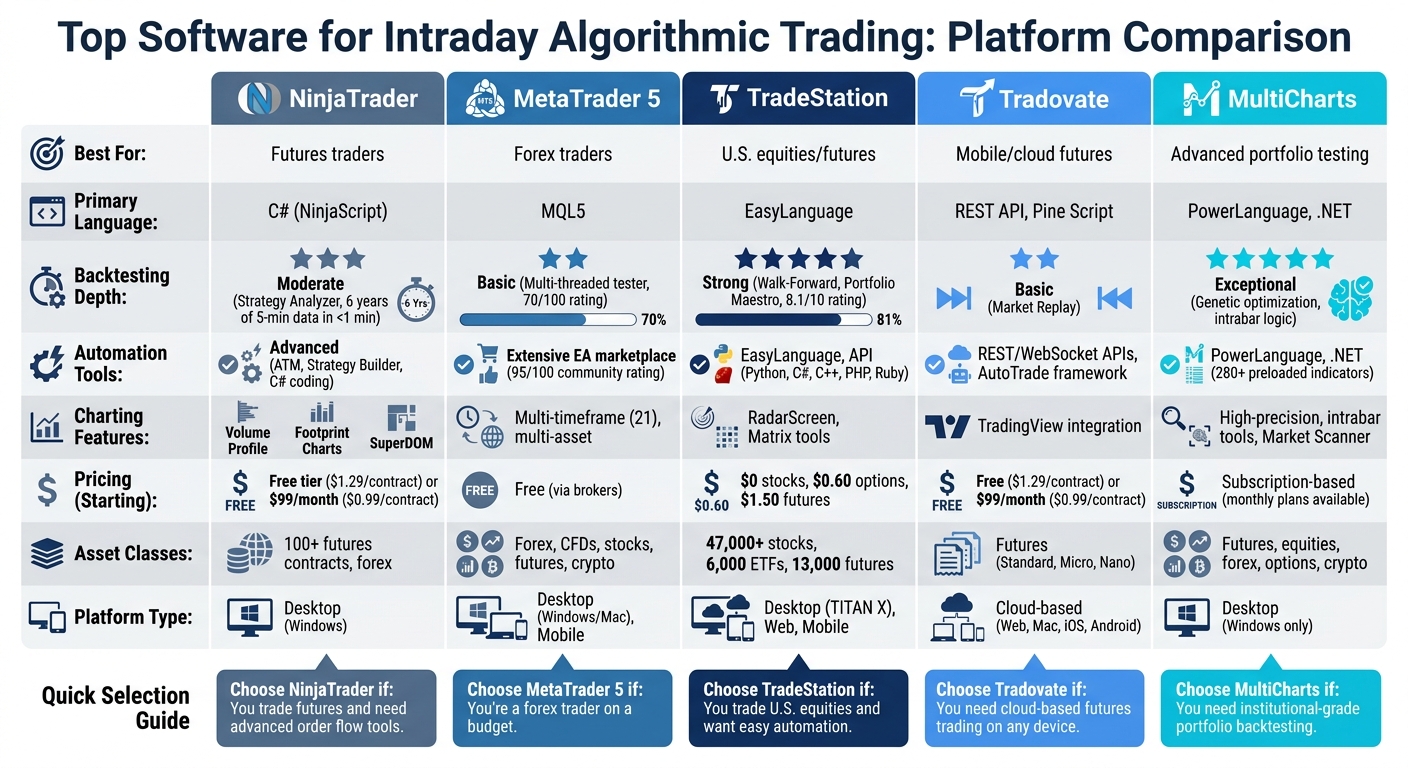
Top 5 Intraday Algorithmic Trading Platforms Comparison Chart
1. NinjaTrader
NinjaTrader is tailored for futures and forex traders seeking professional-level tools without the overwhelming complexity of institutional systems. It leverages C# (NinjaScript) for custom coding, giving users the advantage of a widely-used programming language rather than a proprietary one. This makes it easier to create advanced algorithms, similar to those used in enterprise software.
One of its standout features is the SuperDOM (Depth of Market) interface. This tool provides a real-time price ladder displaying bid/ask liquidity at all price levels. It also lets traders place orders, adjust stops, and modify targets with just a click. For traders focused on order flow, NinjaTrader offers built-in tools like volume profile and cumulative delta, which are often more advanced than those found on other retail platforms.
Real-Time Charting
NinjaTrader delivers over 100 indicators and various chart types, all powered by a high-performance charting engine. A particularly handy feature is the Market Replay, which allows users to download tick-by-tick historical data and replay it in real-time. This is perfect for testing strategies or practicing trade execution in conditions that mimic live markets. During periods of high trading volume, orders generally execute within 20–40 milliseconds, with more than 98% completing in under 80 milliseconds.
Backtesting Tools
The Strategy Analyzer, NinjaTrader's backtesting engine, is designed to handle large-scale data analysis efficiently. It can process six years of 5-minute data in under a minute, making it a practical choice for running simulations that replicate real-time market scenarios. The platform supports several optimization methods, including:
- Standard optimization
- Genetic algorithms for large parameter sets
- Walk-forward optimization to identify curve fitting
- Multi-objective optimization
For traders working with high-frequency strategies or tight stops, the Tick Replay feature reconstructs bars with high accuracy during backtesting, though it requires additional processing time.
Tom Nunamaker, Founder of Aeromir, highlights the platform's capabilities:
Strategy Analyzer is where most NinjaTrader users begin backtesting. It processes years of historical data in seconds, generates detailed trade-by-trade reports, and supports optimization, walk-forward analysis, and parameter sweeps.
Additionally, NinjaTrader includes Monte Carlo simulation, which analyzes trade sequences across thousands of randomized runs to assess profit probabilities and potential drawdowns.
Automation Features
NinjaTrader's automation tools complement its backtesting capabilities. The Advanced Trade Management (ATM) system offers partially automated position management, featuring tools like:
- Auto-Trail: Adjusts stop-loss levels as the market moves favorably
- Auto-Breakeven: Moves stops to the entry price after reaching a profit threshold
- Auto-Chase: Updates limit orders to follow the market if not immediately filled
These ATM strategies can run directly on the broker's server, reducing latency and ensuring stops remain active even if your internet connection fails.
For complete automation, the platform provides the Strategy Builder, a user-friendly interface for non-programmers, and NinjaScript for those who prefer custom coding in C#. It also supports an Automated Trading Interface (ATI) for integrating external applications via DLL or file-based systems.
Asset Class Support
NinjaTrader is designed for precise, intraday trading and offers native access to more than 100 futures contracts across CME, COMEX, and NYMEX. The platform has competitive intraday margins, such as $50 for micro contracts and $500 for standard E-mini contracts. While it supports forex trading, its strengths lie in futures and order flow analysis rather than retail forex trading.

Run 24/7 while you sleep. Keep bots, platforms, and trade copiers online on a dedicated VPS.
Low-latency VPS hosting for your trading platform.
 CHINYC
 LON
LONFrom $29.99/mo


 CHI/CME futuresNYC/US marketsLON/FX EAs
 DUB/Polymarket
 AMS/EU FX
 FRA/Central EU
 TYO/APAC crypto
| Pricing Tier | Cost | Commission per Side |
|---|---|---|
| Free Tier | $0/month | $1.29 (futures) |
| Monthly Subscription | $99/month | $0.99 |
| Lifetime License | $1,499 one-time | $0.59 |
For full order flow capabilities, expect to spend around $48/month for Level II data, as Level I data doesn't support depth-of-market strategies. To ensure the SuperDOM remains responsive during volatile market conditions, use a modern CPU, SSD, and a wired Ethernet connection instead of Wi-Fi - or offload the platform to a dedicated NinjaTrader VPS.
Note: NinjaTrader was acquired by Kraken in May 2025 but continues to operate independently. However, in the same year, the platform faced a $250,000 fine from the NFA for issues related to its anti-money laundering (AML) program.
With its extensive features and reliable execution tools, NinjaTrader remains a strong choice for intraday traders. Up next, we’ll look at how it compares to other platforms.
2. MetaTrader (MT4/MT5)
MetaTrader is a go-to platform for intraday trading, offering powerful tools tailored for automated strategies. It dominates the retail trading space, supported by more than 1,000 forex and CFD brokers. While MT4 remains widely used, MT5 introduces enhanced features for algorithmic traders, such as a multi-threaded Strategy Tester and broader support for assets like stocks, futures, and cryptocurrencies - not just forex. Most brokers provide the platform for free, contributing to its high value rating of 92/100.
Real-Time Charting
MetaTrader 5 delivers real-time charting for a range of assets, including forex, CFDs, stocks, futures, and cryptocurrencies. The platform offers a comprehensive suite of technical indicators and chart types, although the interface feels a bit outdated. For intraday traders, the charting engine is reliable, even if its execution speed is more of a solid baseline rather than matching institutional-grade platforms.
Backtesting Tools
One of MT5's standout features is its Strategy Tester, which is a significant improvement over MT4. It uses multi-threaded processing and genetic optimization algorithms to enhance testing efficiency. The tool supports four testing modes - "Every Tick Based on Real Ticks" (most accurate), "Every Tick" (synthetic), "1 Minute OHLC", and "Open Prices Only" - and enables multi-currency backtesting, making it ideal for strategies like pairs trading or cross-asset execution.
However, the accuracy of backtesting depends on broker-provided data, which may require third-party feeds for tick-level precision. The platform scores 70/100 for backtesting and 65/100 for data quality. Additionally, it includes a Stress Testing mode to simulate realistic market conditions by introducing random network delays.
Automation Features
MetaTrader simplifies automation with its Expert Advisors (EAs), which are programmed using MQL5, a trading-specific language similar to C++. The integrated MQL5 IDE, complete with MetaEditor, supports multi-threaded execution for smoother coding and debugging. Beginners can also use the MQL5 Wizard to create basic trading robots.
"MT5 is the default for retail forex algo trading. The MQL5 language is purpose-built for trading but lacks the ecosystem of Python." – AlgoPlatforms
The platform also supports a thriving marketplace for trading tools. The MQL5 Market is the largest online store for trading robots and indicators, earning a community rating of 95/100. For custom algorithm development, the MQL5 Freelance service connects users with professional coders. To ensure uninterrupted trading with minimal latency, MetaTrader offers built-in Virtual Hosting (VPS), although this comes at an extra cost.
Asset Class Support
While MetaTrader has traditionally excelled in forex and CFDs, MT5 expands its capabilities to include stocks, futures, and cryptocurrencies, depending on broker support. This broad asset coverage makes it a versatile choice for intraday traders looking to diversify their portfolios. The platform scores 79/100 for algorithmic trading and 82/100 for live trading performance.
| Feature | MetaTrader 5 Capability |
|---|---|
| Asset Classes | Forex, CFDs, Stocks, Futures, Crypto |
| Primary Language | MQL5 |
| Backtesting Engine | Multi-threaded Strategy Tester |
| Optimization | Genetic algorithms, Forward testing |
| Cost | Free (via most brokers) |
MetaTrader's appeal lies in its strong community support and zero cost for the platform itself. However, the quality of broker-provided data may pose challenges for high-frequency trading strategies. Up next, we’ll explore how TradeStation approaches intraday algorithmic trading.
3. TradeStation
TradeStation earns strong ratings for its intraday algorithmic trading (8.1/10) and feature set (8.6/10). With its cutting-edge TITAN X platform and improved options grouping, the platform has been a trailblazer in backtesting since 1987. Its proprietary EasyLanguage scripting stands out as an approachable alternative for beginners, offering a simpler learning curve compared to coding languages like C#.
Real-Time Charting
TradeStation provides professional-grade historical and real-time data for U.S. futures, equities, and options. Its advanced charting tools allow traders to tie strategy conditions directly to visual trade contexts. The RadarScreen tool adds another layer of functionality by scanning the market in real time, using both technical and fundamental criteria to generate alerts or initiate automated trades. However, a notable drawback is that algorithms generally only work on stocks with open charts, which could limit strategies requiring analysis across multiple tickers simultaneously.
Backtesting Tools
TradeStation excels in backtesting, leveraging tools like EasyLanguage, Walk-Forward Optimizer, and Portfolio Maestro to test and validate strategies. The Walk-Forward Optimizer reduces curve-fitting by testing strategy parameters across different data segments, while Portfolio Maestro enables portfolio-level backtesting across a wide range of stocks. Traders can also overlay backtested signals on price charts to visually evaluate entry and exit points. While the platform is excellent for single-system testing, traders with complex, multi-strategy portfolios may find specialized tools more suitable.
Automation Features
Automation is a core strength of TradeStation. Strategies can be automated using EasyLanguage or its Web API, with API support for multiple programming languages, including Python, C#, C++, PHP, and Ruby. However, free API access requires a funded account with a minimum of $10,000. According to Kevin Davey of KJ Trading Systems:
"TradeStation is the leading software platform for the testing and automation of algorithmic trading strategies."
The platform simplifies automation with a six-step process that makes live deployment easier. Direct market connectivity further streamlines the execution of automated strategies.
Execution Speed
TradeStation offers fast order execution tailored for active systematic traders. While it doesn’t achieve the sub-millisecond latency needed for institutional high-frequency trading, it delivers solid performance for most users. On average, the platform has achieved price improvements of $1.37 on equity orders and $19.43 on options. For those running strategies 24/7, TradeStation’s cloud and hosting solutions eliminate the hassle of managing local servers.
Asset Class Support
TradeStation supports a wide range of assets, including over 47,000 stocks, 6,000 ETFs, and 13,000 futures contracts. The platform covers U.S. stocks, ETFs, options, futures, and options on futures, although it exited the cryptocurrency market in February 2024. Pricing remains competitive, with $0 stock trades, $0.60 per options contract, and $1.50 per futures contract per side ($0.50 for micro futures).
| Feature | TradeStation Capability |
|---|---|
| Asset Classes | Stocks, ETFs, Options, Futures |
| Primary Language | EasyLanguage (Proprietary) |
| API Support | Python, C#, C++, PHP, Ruby |
| Backtesting Type | Single-system, Portfolio, Walk-Forward |
| Cost | $0 for stocks, $0.60 per options contract, $1.50 per futures (or $0.50 for micro futures) |
TradeStation’s seamless integration of backtesting and live execution makes it an attractive option for traders looking for an all-in-one trading platform.
Next, we’ll explore Tradovate's cloud-first approach to intraday algorithmic trading.
4. Tradovate
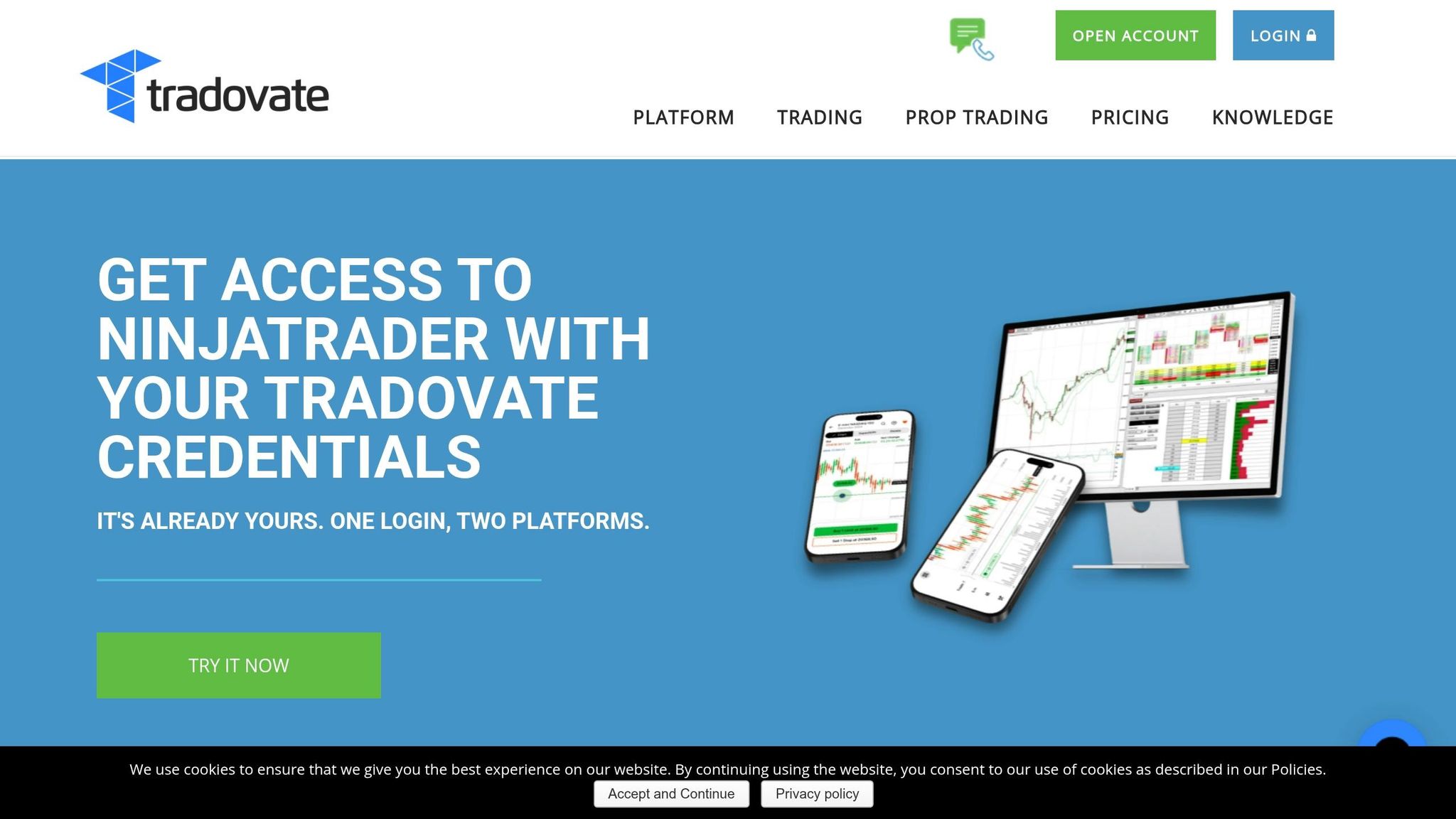
Tradovate is a cloud-based futures trading platform designed to operate without the need for local software. It works seamlessly across web browsers on both Mac and Windows, and it also offers mobile apps for iOS and Android. This makes it especially appealing to Mac users who want to avoid running Windows virtualization software.
According to Apex Trader Funding:
"Tradovate's cloud-based structure means orders are placed quickly across devices... Its focus on simplicity + speed makes it a favorite for scalpers and intraday traders."
Real-Time Charting
Tradovate includes built-in web-based charting with full TradingView integration. This allows algorithmic traders to use Pine Script strategies directly within the platform. Because of its cloud-based design, chart data and order management stay on the server, minimizing the risk of disconnections during high-volatility trading sessions.
Backtesting Tools
The platform features a Market Replay tool that enables traders to test strategies using historical tick-by-tick data. While the tool itself is fairly straightforward, it can be paired with TradingView's Pine Script for more advanced backtesting.
Automation Features
Tradovate supports REST and WebSocket APIs, along with an AutoTrade framework that responds to real-time market events. As Alexander from Tradovate explains:
"Automation can be a great way to take the emotional pressure out of day trading, especially if you already have a pre-determined set of cues or 'rules' that you already follow."
Stay online and closer to execution. Choose a VPS location for CME futures, New York markets, London FX, API trading, and more.
Host your platform near the market route that matters.
CHINYCLONFrom $29.99/mo
CHI/CME futuresNYC/US marketsLON/FX EAsDUB/PolymarketAMS/EU FXFRA/Central EUTYO/APAC cryptoFor those without coding experience, Tradovate integrates with third-party automation tools like PickMyTrade and TradersPost. These tools connect TradingView alerts to automate cloud-based execution around the clock. Features include automated order management, such as trailing stops and side swapping. PickMyTrade reports execution speeds under 200ms, though webhook-based setups may experience delays of 2–3 seconds. Note that API access requires a live account with at least $1,000 in equity.
Execution Speed
Tradovate uses server-side order management to ensure trades are executed smoothly, even during connection interruptions. When paired with Chicago-based VPS hosting close to CME servers, Tradovate can achieve latency as low as 0.52ms to CME futures exchanges. Johan, a long-term user, shares:
"I have been using Tradovate for years, it has to be one of the fastest and most reliable trade execution platforms available…lean and mean."
After a Q2-2025 user interface update, Tradovate reduced forced re-login incidents by 62%. Its trade desk operates 24/5, with any disruptions escalated within 15 minutes.
Asset Class Support
Tradovate is primarily designed for futures trading, offering Standard, Micro, and Nano/Event contracts across CME-linked markets. However, through integrations with platforms like TradersPost, it also supports stocks, options, and cryptocurrencies. For intraday traders, the platform offers competitive margins, starting as low as $50 for Micro contracts and $500 for Standard Futures.
| Plan Type | Monthly Fee | Standard Futures (per side) | Micro Futures (per side) |
|---|---|---|---|
| Free | $0 | $1.29 | $0.39 |
| Monthly | $99 | $0.99 | $0.29 |
| Lifetime | $1,499 (one-time) | $0.59 | $0.09 |
Additional exchange, clearing, and NFA fees apply separately [21].
Tradovate’s cloud-based design, combined with its TradingView integration, makes it a great choice for traders who value speed and accessibility over more intricate, native automation tools.
Next, we’ll take a closer look at MultiCharts and its capabilities for advanced algorithmic trading.
5. MultiCharts
MultiCharts is a Windows-based trading platform tailored for those who need advanced optimization and portfolio backtesting tools. In 2026, it earned an overall rating of 7.8/10, with its feature set receiving an 8.3/10 score. It was recognized as a semi-finalist in the "Professional Platforms" category during the 2024 Readers' Choice Awards and was a finalist for "Standalone Analytical Software" in both 2022 and 2023. What sets MultiCharts apart is its focus on scenario-driven optimization and precise intrabar analysis, making it ideal for portfolio-level strategy evaluation.
Real-Time Charting
MultiCharts offers a Market Scanner that tracks hundreds of instruments simultaneously, helping intraday traders identify opportunities across a wide range of securities in real time. The platform also includes Depth of Market (DOM) tools and Volume Profile histograms, which display volume on price bars - perfect for pinpointing key support and resistance levels during active sessions. Another standout feature is Market Replay, which allows traders to simulate live trading using historical data. This creates a safe environment to test and refine strategies before committing actual funds.
Backtesting Tools
One of MultiCharts' key strengths is its intrabar backtesting logic. Unlike traditional methods that only consider order fills at the close of a bar, MultiCharts simulates fills within a single price bar - essential for high-frequency and precise intraday strategies. The platform also excels in portfolio-level testing, managing correlations, position sizing, and capital allocation across multiple instruments. Its Genetic Optimizer efficiently identifies the best strategy parameters.
Quant Trading Tools praised the platform, stating:
"MultiCharts is what serious systematic traders pick when they want optimization horsepower and portfolio backtesting that actually works."
The platform supports EasyLanguage/PowerLanguage, allowing traders to migrate strategies from TradeStation with minimal adjustments. A free version is available, including a simulation mode with bundled data for immediate use.
Automation Features
MultiCharts supports automated trading through PowerLanguage and a .NET version (compatible with C# and VB.NET), enabling advanced strategy development. It comes preloaded with over 280 indicators, signals, and drawing tools. For high-frequency trading, third-party add-ons provide features like HFT cross-connections, external modules, and collocated hardware to minimize latency. TechnicalCentral, a MultiCharts partner, has supplied automation and HFT hardware solutions to over 500 clients in 20 countries.
The platform’s Order and Position Tracker simplifies the management of multiple brokers and accounts from one interface, making it easier to oversee several automated strategies at once. Execution speed is a top priority:
"Even with a winning strategy, just a short delay in order execution can make all the difference."
Asset Class Support
MultiCharts supports a variety of asset classes, including futures, equities, forex, options, and cryptocurrencies. It operates on a subscription-based model, with monthly plans available. For traders focused on precise intraday backtesting, investing in high-quality paid tick data - ranging from $50 to $300 per month - is recommended over relying on the free bundled data.
While MultiCharts offers impressive research and optimization tools, it does have a steep learning curve, and its user interface prioritizes functionality over ease of use. Additionally, the platform is exclusively designed for Windows. Next, we’ll dive into a comparison of all five platforms to guide you in choosing the best option for your intraday algorithmic trading strategies.
Platform Comparison: Strengths and Weaknesses
Different trading platforms cater to varying priorities, so understanding their strengths and limitations is key to finding the right fit for your intraday strategy. Below is a breakdown of how NinjaTrader, MetaTrader 5, TradeStation, Tradovate, and MultiCharts perform across essential features for algorithmic intraday trading.
| Platform | Backtesting Depth | Automation/Execution | Charting Capabilities | Best For |
|---|---|---|---|---|
| NinjaTrader | Moderate (C# based) | High (Tight broker integration) | Advanced (Volume Profile, Footprint) | Active US futures traders |
| MetaTrader 5 | Basic (Free tester) | High (Large EA marketplace) | Strong (21 Timeframes, Multi-threaded) | Retail Forex on a budget |
| TradeStation | Strong (EasyLanguage) | High (Seamless live deployment) | Advanced (RadarScreen, Matrix) | US Equities/Futures traders |
| Tradovate | Basic | Moderate | Basic Native (Integrated with TradingView) | Cloud-native futures trading |
| MultiCharts | Exceptional (Genetic optimization) | Moderate (Requires broker connection) | High-Definition (Genetic Optimization) | Serious systematic/portfolio traders |
This table highlights the unique strengths and trade-offs of each platform, giving you a foundation to decide which one aligns with your trading approach.
For example, NinjaTrader and TradeStation stand out as broker-native platforms, providing seamless live deployment for quicker workflows. If your focus is on speed and integration, these platforms offer a streamlined path from strategy development to execution.
On the other hand, MetaTrader 5 is well-suited for retail forex traders seeking automation without hefty upfront costs. While its backtesting capabilities are basic, its extensive Expert Advisor (EA) marketplace ensures robust automation options.
For traders prioritizing advanced research and portfolio-level backtesting, MultiCharts is a standout. Its genetic optimization and intrabar backtesting logic allow for highly realistic performance modeling, especially for intraday strategies involving correlated instruments.
If you’re looking for a modern, cross-platform experience, Tradovate delivers with its cloud-native design. It runs smoothly across Mac, web, and mobile devices, and its integration with TradingView enhances its charting capabilities.
Keep in mind that professional data feeds, which are critical for accurate analysis, typically cost between $50 and $300 per month. This reinforces the importance of aligning your platform choice with both your trading strategy and operational budget.
Conclusion
The trading platforms discussed cater to various needs, making the choice highly dependent on your experience level, target market, and workflow. TradeStation is a great option for beginners and intermediate traders, thanks to its EasyLanguage, which is simpler to learn compared to Python or C#. Meanwhile, NinjaTrader offers versatility, with a point-and-click interface for non-programmers and advanced C# capabilities for seasoned developers who require precise order execution. For those with significant experience, features like advanced backtesting and event-driven logic should take priority when evaluating platforms.
For traders focused on automated futures trading strategies, MultiCharts stands out with its high-precision intrabar backtesting and realistic fill modeling, making it a strong choice for advanced users.
It's always a smart move to test your strategies in a risk-free environment before committing. Both TradeStation and NinjaTrader provide simulation modes or paper trading to help validate your approach without risking capital. When comparing platforms, consider how efficiently you can transition from research to strategy evaluation. This "time-to-answer" metric often outweighs individual features.
Keep in mind that high-quality tick or minute-level data is crucial for intraday strategies, with costs ranging from $50 to $300 per month. This expense frequently surpasses the platform's subscription fee, so be sure to include it in your budget. Beginners should lean toward platforms with EasyLanguage or visual tools, while experienced developers may prefer C# or Python-based systems for greater flexibility. Ultimately, the right platform is the one that balances features, usability, and cost to meet your specific trading goals.
FAQs
Which platform is best for my market (futures, forex, or U.S. stocks)?
When choosing a trading platform, the best option often depends on your market and trading goals:
- NinjaTrader is a standout choice for futures trading, offering advanced features specifically designed for intraday traders.
- MetaTrader 5 shines in the forex market, providing a range of tools that support the use of Expert Advisors.
- For U.S. stock trading, TradeStation and MultiCharts are top picks, thanks to their strong backtesting and automation capabilities.
Each platform is built to cater to particular asset classes and trading strategies, making it important to align your choice with your specific needs.
Do I need paid tick data for accurate intraday backtesting?
High-quality tick data plays a key role in achieving accurate intraday backtesting. By capturing the exact sequence of trades and quotes, it offers a detailed and realistic view of market activity. This level of detail ensures that your backtesting results align closely with actual market conditions, making it easier to fine-tune short-term trading strategies effectively.
Should I use a VPS for running my algo 24/7 with low latency?
Using a VPS is a smart choice if you want your algorithm running around the clock. It guarantees continuous operation, minimizes latency, and offers a stable environment - essential elements for success in high-frequency or intraday trading. This setup is perfect for traders who need dependable and consistent performance to execute their strategies effectively.