No-Code Automated Trading: Build, Backtest & Deploy Your Strategy
No-code automated trading platforms make it simple to create, test, and deploy trading strategies without coding. Using visual tools like drag-and-drop interfaces, traders can define entry and exit rules, backtest strategies on historical data, and deploy them live on reliable servers like QuantVPS. These platforms save time, reduce errors, and provide access to built-in indicators and robust backtesting engines. Here's a quick breakdown:
- What It Does: Lets you automate trading strategies without programming.
- Key Features: Drag-and-drop tools, backtesting with historical data, and live deployment options.
- Why It Matters: Saves time, lowers errors, and simplifies trading for non-coders.
- How to Use It: Choose a no-code platform, build your strategy visually, backtest it, optimize parameters, and deploy it on QuantVPS for uninterrupted trading.
Platforms like AlgoWizard, Build Alpha, and MetaTrader integrate well with QuantVPS, offering tools to refine and execute strategies efficiently. QuantVPS ensures 24/7 stability, low latency, and scalability for live trading. Whether you're a beginner or an experienced trader, this setup allows you to focus on strategy while leaving the technical complexities behind.
Step 1: Select a No-Code Platform Compatible with QuantVPS
The first step is to choose a no-code platform that works seamlessly with QuantVPS. No-code platforms come in different types - some depend on vendor-managed clouds, while others generate code for on-premise deployment. For QuantVPS, you'll need one that supports on-premise deployment, allowing it to operate on your VPS hardware instead of being tied to a proprietary cloud. Additionally, evaluate the platform's features to ensure it meets your needs for developing and deploying trading strategies effectively.
Features to Look for in a No-Code Platform
Look for platforms with user-friendly drag-and-drop interfaces. Tools like AlgoWizard and Build Alpha let you visually define entry and exit conditions without writing a single line of code. Another must-have is a robust backtesting engine capable of simulating your strategies against years of historical data. These engines should calculate metrics like win rates, maximum drawdown, and profit factors, giving you a clear picture of a strategy's potential before you commit real capital.
The platform should also be able to export executable code (e.g., MQL4/5, EasyLanguage) that can run directly on QuantVPS, ensuring your strategies operate 24/7 without depending on your local machine. Other essential features include risk management tools, broker API connectivity, and real-time alerts to keep you informed of market changes.
Platforms That Work with QuantVPS
Once you're clear on the features you need, explore platforms that are proven to integrate well with QuantVPS.
MetaTrader 4/5 is a go-to choice for forex and CFD traders. For instance, AlgoWizard can generate Expert Advisors (EAs) for MetaTrader, which you can host on QuantVPS for uninterrupted trading. By leveraging QuantVPS's high-performance infrastructure, you ensure your strategies run around the clock. Build Alpha offers even more flexibility, supporting platforms like MetaTrader, TradeStation, and NinjaTrader. It also uses genetic algorithms to refine strategies, drawing from nearly 5,000 built-in signals. This versatility allows you to run multiple strategies on QuantVPS with consistent uptime.
TradeStation Desktop is another excellent option, offering a customizable trading environment with intuitive tools like its drag-and-drop interface. Its RadarScreen® feature can monitor up to 1,000 symbols in real-time with over 180 technical indicators, making it ideal for managing multiple strategies on QuantVPS's dedicated servers. For those who prefer a natural language approach, QuantConnect's Mia AI allows you to design and backtest strategies simply by describing them. QuantConnect processes over $45 billion in notional volume monthly and conducts more than 15,000 backtests daily.
When choosing a platform, ensure it supports Windows or Linux, which are standard environments for QuantVPS. Platforms that use Docker containers for isolated algorithm execution are also a plus, as they allow VPS resources to scale efficiently with the number of strategies you run. Finally, confirm the platform integrates directly with major brokerages like Interactive Brokers, Alpaca, or TradeStation. Seamless API connections from your VPS are critical for live trading success.
Step 2: Build Your Trading Strategy Using Visual Tools
Once you've chosen your trading platform, it's time to turn your trading plan into an active strategy. This step involves using visual tools that simplify the process. Most platforms offer a strategy canvas, where you can drag and drop modules, tweak settings with dropdown menus, and adjust sliders. This visual approach aligns with how traders naturally think about strategies, making the shift to automated trading feel intuitive.
Define Your Trading Goals and Parameters
Before diving into the canvas, take a step back and define your trading objectives. Identify the market type you want to trade - whether it's E-mini S&P 500 futures, stocks, forex, or commodities. Decide on the candle interval (1-minute, 5-minute, daily, etc.) and set your trading hours (e.g., 9:30 AM to 4:00 PM EST). It's also essential to establish your risk limits, such as a maximum daily loss or position size based on your account balance.
In May 2025, one trader used a "Range Breakout" indicator for E-mini S&P 500 futures. They set a time range from 9:30 AM to 9:45 AM on 5-minute candles. Their entry condition was configured as "Current Close crosses above Range Breakout Low" combined with "Time of Day is after 10:00:00." The strategy included a trailing stop-loss of 150 points and was backtested on historical data from March 2022 to May 2025, producing a monthly profit-loss heat map.
In May 2025, one trader used a "Range Breakout" indicator for E-mini S&P 500 futures. They set a time range from 9:30 AM to 9:45 AM on 5-minute candles. Their entry condition was configured as "Current Close crosses above Range Breakout Low" combined with "Time of Day is after 10:00:00." The strategy included a trailing stop-loss of 150 points and was backtested on historical data from March 2022 to May 2025, producing a monthly profit-loss heat map.
With your goals and parameters clearly defined, you’re ready to bring your strategy to life using drag-and-drop tools.
Using Drag-and-Drop Features to Build Strategies
Visual tools make it easy to translate your trading plan into actionable steps. No-code platforms often come with extensive indicator libraries, allowing you to add popular tools like RSI, MACD, or moving averages to your strategy. You can drag these indicators onto the canvas, set entry and exit conditions using logical operators like "And" or "Or", and fine-tune parameters with simple controls. For instance, combining an RSI indicator with a time-based condition using "And" logic can help filter out false signals.
The "Legs" feature lets you define specific actions, such as placing orders, setting trailing stops, or establishing profit targets. For example, in June 2025, a trader built a no-code strategy using a "Golden Cross" method. They entered positions when the 50-day moving average crossed above the 200-day moving average. By dragging the necessary modules onto the canvas, they configured a 2% stop-loss through a visual panel and validated the strategy with backtesting to evaluate risk-adjusted returns, maximum drawdown, and trailing drawdown.
To refine your strategy further, parameterize inputs like moving average periods or stop-loss percentages. This makes adjustments easier and allows for optimization. You can also enhance your approach by layering exits - setting profit targets, fixed percentage stop-losses, and trailing stops simultaneously. Finally, always test your strategy in a paper trading environment before using real funds. This helps identify potential execution or timing issues without putting your capital at risk.
Step 3: Backtest Your Strategy on Historical Data
With your strategy designed using visual tools, the next step is to see how it would have performed in the past. Backtesting allows you to simulate your trading algorithm on historical data, giving you a sense of its potential effectiveness and revealing any flaws before putting real money on the line.
"Backtesting is the process of simulating a trading algorithm on historical data. By running a backtest, you can measure how the algorithm would have performed in the past." - QuantConnect
"Backtesting is the process of simulating a trading algorithm on historical data. By running a backtest, you can measure how the algorithm would have performed in the past." - QuantConnect
No-code platforms make this process straightforward. You can run backtests to simulate performance and seamlessly transition to live trading using the same system, ensuring consistency between testing and execution. Many of these platforms even provide access to massive datasets - over 1 TB of cleaned market data - spanning equities, crypto, and futures. This gives you a solid foundation to validate your trading strategy.
How Backtesting Works on No-Code Platforms
The process is simple: select your strategy, choose a date range, and hit "Run." The platform then simulates trades based on historical data, producing an equity curve and detailed performance metrics. The equity curve shows how your account balance would have changed over time, while additional data breaks down individual trades and overall performance.
Pay close attention to key performance metrics:
NEVER MISS A TRADE
Your algos run 24/7
even while you sleep.
99.999% uptime • Chicago, New York, London & Amsterdam data centers • From $59.99/mo
- Net Profit: Total return in dollars.
- Win Rate: The percentage of profitable trades.
- Maximum Drawdown: The largest drop from a peak to a trough - this is critical for understanding potential risk.
- Sharpe Ratio: Measures risk-adjusted returns.
- Probabilistic Sharpe Ratio (PSR): Estimates the likelihood that your Sharpe Ratio is genuinely better than a benchmark.
To understand whether your strategy is truly effective, compare its equity curve to a benchmark like SPY. This helps determine if your strategy generates alpha. Many platforms also let you export summary reports in formats like PDF or HTML, complete with advanced metrics like Annual Variance, Tracking Error, and Information Ratio.
For those looking to speed up development, some platforms offer "virtual nodes" that allow you to run multiple backtests simultaneously. This feature is especially useful when testing different parameters or strategies at the same time.
"Concurrent backtesting speeds up your strategy development because you don't have to wait while a single backtest finishes executing." - QuantConnect
"Concurrent backtesting speeds up your strategy development because you don't have to wait while a single backtest finishes executing." - QuantConnect
Once you’ve gathered these results, the next step is to validate your strategy across various market conditions and asset classes.
Comparing Backtesting Results Across Timeframes and Assets
After analyzing your initial results, it’s crucial to test your strategy under different market conditions. Running it across various timeframes and asset classes ensures it can adapt to changing environments. No-code platforms simplify this by letting you choose symbols, timeframes (e.g., 1-minute, 5-minute, or daily), and date ranges through intuitive dropdown menus.
You can also apply forward testing, which involves splitting historical data into two parts: one for backtesting and the other for testing on unseen data. This helps ensure your strategy isn’t overfitted to past data.
Keep your strategy straightforward. Overcomplicating it with too many parameters increases the risk of overfitting. If you find yourself running more than 70 backtests on a single idea, it’s likely a sign of overfitting. Instead, start with a clear hypothesis - like "A breakout above the morning range leads to sustained upward momentum" - and test that specific idea.
Finally, evaluate Drawdown across different assets to understand the potential risks during live trading. Use the Sharpe Ratio for a fair comparison of high-volatility assets like crypto versus lower-volatility ones like forex. This approach helps you make smarter decisions about allocating capital and diversifying your portfolio.
When backtesting confirms your strategy’s reliability, you’ll be ready to move on to optimization and live deployment on QuantVPS.
Step 4: Optimize and Refine Your Strategy Parameters
After backtesting, it’s time to dig deeper and identify areas where your strategy can improve. Pay close attention to risk-adjusted metrics like the Sharpe Ratio, Maximum Drawdown, and Recovery Factor. These metrics can reveal whether your strategy is genuinely solid or if its past performance was just a stroke of luck.
Identifying Weaknesses and Areas for Improvement
Start by evaluating your Maximum Drawdown, which represents the largest drop from a peak to a trough in your account balance. If this number feels uncomfortably high, it’s a sign you may need to tweak your risk settings or refine your entry rules before going live.
"Maximum drawdown measures the strategy's largest historical peak-to-trough decline... This metric directly reflects the psychological stress and capital requirements needed to sustain the strategy."
– QuantStrategy.io Team
"Maximum drawdown measures the strategy's largest historical peak-to-trough decline... This metric directly reflects the psychological stress and capital requirements needed to sustain the strategy."
– QuantStrategy.io Team
Another red flag to watch for is overfitting. This happens when your strategy performs impressively on historical data but struggles in live markets. Spending too much time fine-tuning without a clear hypothesis can lead to optimizing for noise rather than uncovering a real market edge.
Don’t overlook your Expected Payoff, which is the average profit or loss per trade. If this figure is low, even small increases in transaction costs or slippage could wipe out your edge. Also, double-check for procedural errors like look-ahead bias or ignoring commissions, as these can falsely inflate your backtest results.
Testing Optimized Strategies for Consistency
After addressing weaknesses and fine-tuning your parameters, it’s essential to re-test your strategy. Use out-of-sample data - a portion of historical data that wasn’t used during optimization - to validate your adjustments. This helps confirm that your strategy is robust and not just curve-fitted to past data.
For a more realistic approach, try walk-forward optimization. This method involves optimizing your strategy on a rolling window of data (e.g., six months) and then testing it on the next period (e.g., two months). Tools like MetaTrader 5 can automate this process, re-testing the top-performing parameter combinations on forward periods.
"A slightly less profitable strategy that is highly robust is almost always preferable to a historically perfect strategy that immediately breaks down in live market conditions."
– QuantStrategy.io Team
"A slightly less profitable strategy that is highly robust is almost always preferable to a historically perfect strategy that immediately breaks down in live market conditions."
– QuantStrategy.io Team
When analyzing results, look for plateaus in your optimizations - broad ranges of parameters that deliver consistent performance. Spikes in performance might indicate over-tuning. Additionally, stress test your strategy using tick data and simulate network delays to ensure it holds up under real-world conditions.
Once your strategy consistently performs well across different timeframes, assets, and market conditions, it’s ready for live deployment. Running it on QuantVPS ensures you can leverage its low-latency environment for smooth and efficient execution.
Step 5: Deploy Your Strategy on QuantVPS for Live Trading
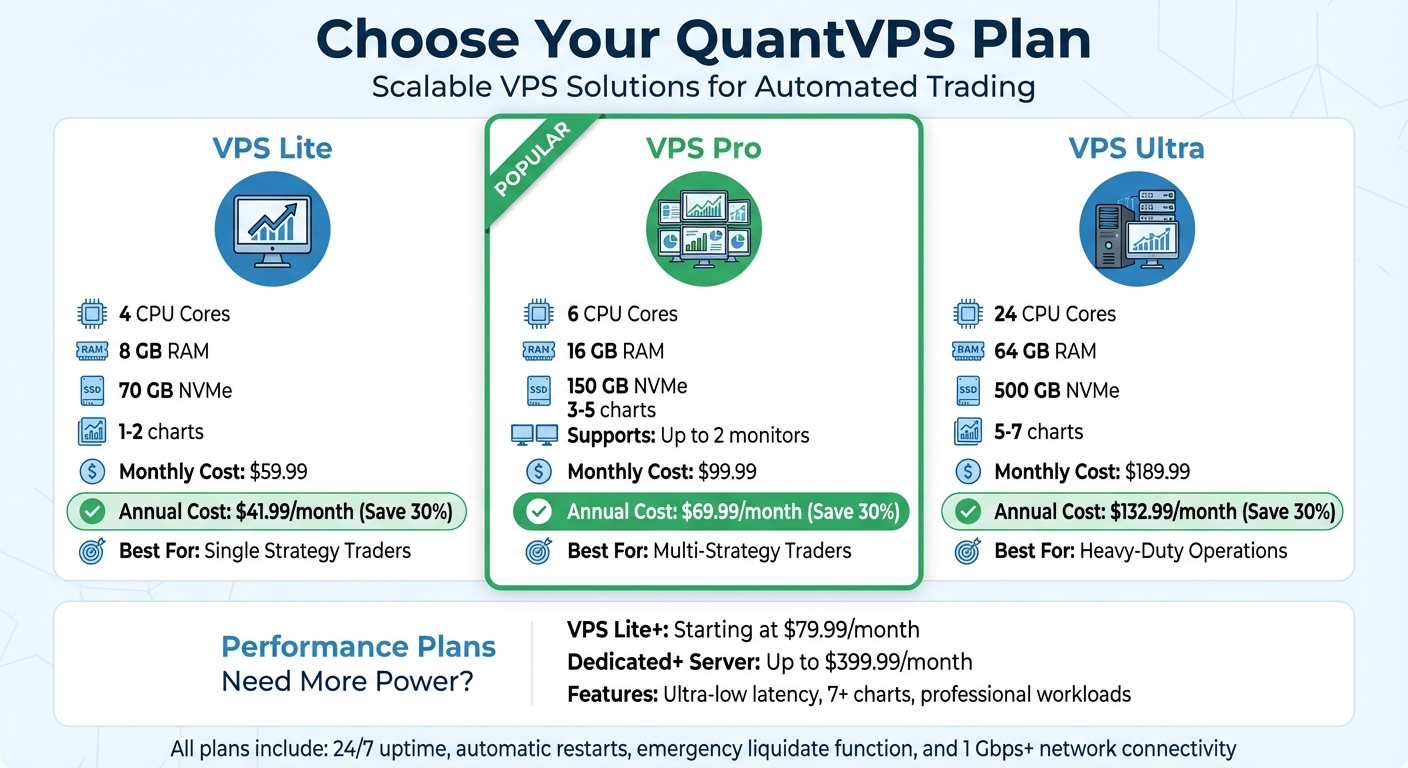
QuantVPS Plan Comparison: Features, Specs, and Pricing for Automated Trading
QuantVPS Plan Comparison: Features, Specs, and Pricing for Automated Trading
Now that your strategy is optimized, it’s time to put it to work in real markets. Deploying it on QuantVPS ensures ultra-low latency (typically 0–1ms to major exchanges), uninterrupted uptime, and the stability required for automated trading. Let’s walk through how to set up your QuantVPS environment and get your strategy live.
Setting Up Your QuantVPS Environment
After signing up for QuantVPS, you’ll receive login credentials via email. Use these credentials to connect through Windows Remote Desktop or Microsoft Remote Desktop if you're on a Mac. Enter your VPS IP address, username, and password to access your remote trading environment.
Once logged in, open the browser and download your preferred no-code trading platform, such as NinjaTrader, MetaTrader, or TradeStation. The installation process typically takes about 10 minutes. However, if you're using platforms like QuantConnect Local Platform that require Docker, you may need extra time to download engine images.
STOP LOSING TO LATENCY
Execute faster than
your competition.
Sub-millisecond execution • Direct exchange connectivity • From $59.99/mo
After installing the platform, connect it to your broker’s live account by entering your broker credentials during the setup wizard. For enhanced security, enable two-factor authentication (2FA) using tools like Google Authenticator or Authy. It’s also a good idea to update your 2FA settings every 30 days.
With your platform ready and linked to your broker, the next step is to select the best VPS for algorithmic trading that matches your specific requirements.
Choosing the Right QuantVPS Plan for Your Needs
QuantVPS offers different plans tailored to various trading capacities. Here’s a breakdown to help you decide:
- VPS Lite: Designed for single strategies on 1–2 charts. It includes 4 CPU cores, 8 GB RAM, and 70 GB NVMe storage. This plan is perfect for smaller operations.
- VPS Pro: Ideal for traders managing multiple strategies across 3–5 charts. It provides 6 CPU cores, 16 GB RAM, and 150 GB NVMe storage, with support for up to two monitors.
- VPS Ultra: Built for heavy-duty operations, this plan supports 5–7 charts. It offers 24 CPU cores, 64 GB RAM, and 500 GB NVMe storage.
| Plan | CPU Cores | RAM | Storage | Trading Capacity | Monthly Cost | Annual Cost |
|---|---|---|---|---|---|---|
| VPS Lite | 4 | 8 GB | 70 GB NVMe | 1–2 charts | $59.99 | $41.99/month (annually) |
| VPS Pro | 6 | 16 GB | 150 GB NVMe | 3–5 charts | $99.99 | $69.99/month (annually) |
| VPS Ultra | 24 | 64 GB | 500 GB NVMe | 5–7 charts | $189.99 | $132.99/month (annually) |
For traders who need ultra-low latency and professional-grade workloads, QuantVPS also offers Performance Plans. These start at $79.99/month for VPS Lite+ and go up to $399.99/month for Dedicated+ Server configurations, which can handle 7+ charts and demanding trading setups.
Monitoring and Managing Live Deployments on QuantVPS
Keeping a close watch on performance is essential when using QuantVPS. While the platform provides the stability and uptime needed for consistent operation, you still need to actively monitor trades, resource usage, and potential issues. Here’s how to manage your live deployment effectively.
Real-Time Monitoring Tools and Alerts
Once your deployment is live, a live results page becomes available, showing real-time equity curves, open positions, executed trades, and key statistics like Net Profit and Unrealized Profit. Performance charts also track vital metrics, including CPU usage and RAM consumption.
To stay ahead of potential problems, configure alerts through your platform. Notifications can be sent via Email, SMS, Telegram, or Webhook when specific events occur - such as order fills, cancellations, or new trade signals from your strategy. If you prefer a custom setup, Webhook notifications allow you to send HTTP-POST requests to your server, enabling you to log trading data in a private database.
For added reliability, enable the "Automatically restart algorithm" feature. This ensures the system will attempt up to five restarts if your strategy encounters runtime errors or API disconnections, provided it has been running for at least five minutes. If you’re using brokerages requiring two-factor authentication, like Interactive Brokers, schedule a "Weekly Restart UTC" time to get notified on Sundays for re-authentication. This prevents your algorithm from halting due to a timeout.
Should you encounter a bug or unexpected behavior, the "Liquidate" button on the live results page acts as an emergency stop. It immediately liquidates all holdings and halts the algorithm.
As your trading operation grows, ensure that your VPS resources are scaling alongside your activity.
Scaling Your Strategy with QuantVPS
Once you’ve established real-time monitoring, scaling your infrastructure becomes key to maintaining performance as trading activity increases. Whether you’re running multiple strategies or managing larger portfolios, QuantVPS makes scaling straightforward. If you notice your current plan nearing its limits - like hitting maximum RAM usage or needing to monitor more charts - consider upgrading to VPS Pro or VPS Ultra for additional CPU cores and RAM.
Each security subscription consumes about 5 MB of RAM. If you’re expanding the number of assets you trade, factor this into your resource planning. For advanced operations, such as running machine learning models or monitoring seven or more charts, the Dedicated Server plan offers 16+ dedicated cores and 128 GB RAM, providing the power needed for professional workloads.
Keep an eye on your resource usage through performance charts. If CPU or RAM usage consistently approaches maximum capacity, it’s time to upgrade. With QuantVPS's unmetered bandwidth and low-latency network connections (1 Gbps+ as standard, and 10 Gbps+ on Dedicated plans), you won’t need to worry about connectivity slowing down your trading as you scale.
Wrapping It All Up
By following the steps outlined, moving from strategy design to live deployment has become simpler and more accessible thanks to no-code platforms and QuantVPS. No-code automated trading removes the hurdles of complex programming, allowing you to build, test, and deploy strategies quickly. Many of these platforms come packed with over 90 pre-built indicators and let you backtest strategies using up to 8 years of historical data. This means you can refine and validate your ideas without putting your hard-earned money on the line.
When it comes to deployment, QuantVPS takes the guesswork out of local setups. It provides the reliable, round-the-clock environment needed to trade in markets like futures, forex, and crypto. According to QuantConnect, their infrastructure supports algorithms with uninterrupted uptime for as long as six months. Plus, QuantVPS features automatic restarts and an emergency liquidate function to protect your capital in unpredictable situations. This stability gives you the confidence that your strategies can handle even the toughest market conditions.
Whether you’re running one strategy or juggling multiple systems, QuantVPS scales effortlessly to match your trading needs. From choosing the right no-code platform to deploying live strategies, every step is designed to create a smooth and efficient trading experience. With QuantVPS, you’re backed by infrastructure that supports consistent and successful live trading.
FAQs
How do I know if my backtest is overfitted?
To spot overfitting, it's essential to see how your strategy holds up with unseen data or during live trading, rather than relying solely on historical performance. Techniques like walk-forward analysis, Monte Carlo simulations, or benchmarking against random strategies can be incredibly useful. These approaches help confirm that your results aren't just a product of random noise or over-optimization of parameters.
What data and costs should I include in backtesting?
When conducting backtesting, make sure to incorporate historical market data that aligns with your strategy. This data might include elements like price movements, trading volume, and relevant technical indicators. Additionally, account for trading costs - such as commissions, slippage, and spreads - to get a more realistic assessment of your strategy's performance. Ignoring these factors could lead to overly optimistic results that won't hold up in real-world trading.
What’s the safest way to go live on QuantVPS?
To ensure a smooth and secure experience when going live on QuantVPS, take advantage of its dedicated resources and low-latency connections for stable trading. Start by setting up your platform securely - use strong passwords and enable two-factor authentication for extra protection.
Before deploying, thoroughly backtest your trading strategy using historical data to identify potential issues. Once live, keep a close eye on performance, especially in the beginning. Regular updates to your platform are crucial, and setting alerts for any unusual activity can help you respond quickly to potential problems. These steps will help maintain stable and secure trading operations.
To spot overfitting, it's essential to see how your strategy holds up with unseen data or during live trading, rather than relying solely on historical performance. Techniques like walk-forward analysis, Monte Carlo simulations, or benchmarking against random strategies can be incredibly useful. These approaches help confirm that your results aren't just a product of random noise or over-optimization of parameters.
When conducting backtesting, make sure to incorporate historical market data that aligns with your strategy. This data might include elements like price movements, trading volume, and relevant technical indicators. Additionally, account for trading costs - such as commissions, slippage, and spreads - to get a more realistic assessment of your strategy's performance. Ignoring these factors could lead to overly optimistic results that won't hold up in real-world trading.
To ensure a smooth and secure experience when going live on QuantVPS, take advantage of its dedicated resources and low-latency connections for stable trading. Start by setting up your platform securely - use strong passwords and enable two-factor authentication for extra protection.
Before deploying, thoroughly backtest your trading strategy using historical data to identify potential issues. Once live, keep a close eye on performance, especially in the beginning. Regular updates to your platform are crucial, and setting alerts for any unusual activity can help you respond quickly to potential problems. These steps will help maintain stable and secure trading operations.
"}}]}