
TradeSyncer is a cloud trade copier for connected futures accounts. Its plans differ in the number of broker connections and accounts included, so the right comparison starts with your actual logins rather than an advertised maximum account count. This review uses TradeSyncer's published product and pricing information checked on 10 Oct 2026; it does not describe a performance test.
TradeSyncer suits traders who want account copying to run in the cloud rather than inside a local NinjaTrader workspace. A cloud copier still depends on broker connectivity, the firm's rules and each account's order handling. It does not guarantee identical fills or make one risk limit apply to every follower.
TradeSyncer pricing and account limits
TradeSyncer's pricing page lists three monthly plans. A connection means a broker or platform login; it is not the same thing as an individual account beneath that login.
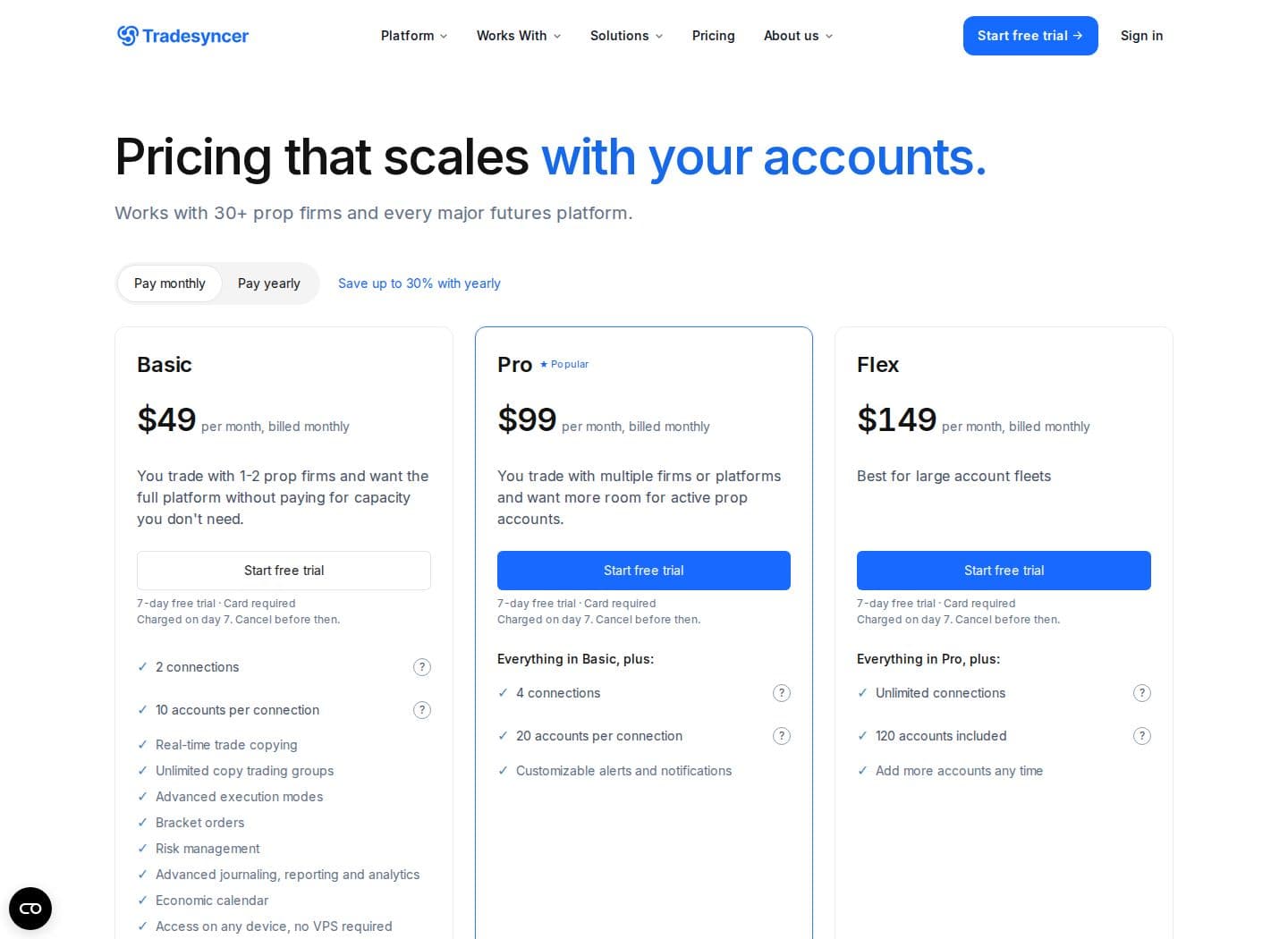
| Plan | Monthly price | Connection limit | Account allowance |
|---|---|---|---|
| Basic | $49 | 2 connections | 10 accounts per connection |
| Pro | $99 | 4 connections | 20 accounts per connection |
| Flex | $149 | Unlimited connections | 120 accounts included; additional accounts can be added |
Source: TradeSyncer pricing page, checked on 10 Oct 2026.
Count both credentials and accounts before choosing. For example, several accounts visible beneath one login may use one connection, while accounts at different firms can require separate logins. A plan with enough account slots can still have too few connections for your arrangement.
The seven-day trial requires a card. TradeSyncer's homepage and pricing FAQ differ on the exact first-charge day, so cancel before the trial ends if you do not want to continue and check the billing terms shown at signup. Prices and allowances can change.
Uptime
99.999% uptime. Built for 24/7 trading reliability.
Your VPS runs in Tier IV datacenters with redundant power and network, monitored 24/7 on site.
See the uptime SLA







From $29.99/mo · Windows or Linux
Supported brokers and platforms
TradeSyncer's supported connection list names every data connection and platform it works with. The connections include Tradovate, dxFeed, CQG and Volumetrica. Rithmic is on the list too, along with trading platforms such as NinjaTrader, TradingView, Quantower, ATAS, Sierra Chart, Tradesea and DeepChart. Hyperprop is marked coming soon rather than currently available, so check that status again before choosing software around it.
A trading frontend and an account backend are different. NinjaTrader can display an account supplied through a supported connection, but the platform name does not establish which feed your prop account uses. The distinction between dxFeed and Rithmic matters when comparing copiers with different connection support.
If you trade through Quantower or Sierra Chart, identify the underlying account first. Then verify the copier's exact connection and order workflow. Do not assume that a charting-platform logo means every broker connection beneath it is supported.
Copying and risk controls
The cloud application manages lead and follower relationships across its supported connections. Set quantities and account-specific controls around each firm's contract limits and drawdown, then check the broker's position and open-order views. Copying the same contract does not mean separate accounts have equal remaining risk allowance.
Follower orders can be rejected, partially filled or executed at a different price. Check how the selected configuration handles reductions, exits and cancellations before using it on funded accounts. A copier's risk tools support that process; the trader remains responsible for the firm's rules.
Alternatives
Tradecopia
Tradecopia is the first alternative to consider for Tradovate, Rithmic and multi-account prop copying. It offers a Windows or macOS desktop application and hosted browser-based plans, with unlimited follower accounts and connections according to its pricing page. Firm account caps still apply, and its current compatibility guide excludes dxFeed and CQG.
Monthly base prices are $49.99 for Pro Desktop, $79.99 for Pro+ Lite and $149.99 for Pro+. Use code QUANT for 30% off. Pro Desktop and Pro+ Lite offer a seven-day trial on monthly or quarterly billing; Pro+ does not. Compare the desktop and hosted operating models as well as account capacity.
Order flow
Built for scalpers. Heatmaps on dedicated resources.
Order-flow heatmaps and DOM ladders run on dedicated CPU, memory and NVMe, so your charts keep responding during volatility.
See the dedicated hardwareFrom $29.99/mo · Windows or Linux
CrossTrade
CrossTrade fits a different job: TradingView webhooks into NinjaTrader 8, with the desktop Add-On running. Standard is $29 monthly for webhooks, journaling and the manual dashboard; Pro is $49 monthly and adds copying, Account Manager and REST API; Elite is $99 monthly and adds Signal Share and MCP features. Its seven-day trial includes all features.
CrossTrade also supports direct Tradovate cloud routing. Signal Share works between your own NinjaTrader machines, not Tradovate accounts. Match the feature to the workflow instead of treating webhook automation and broker-account copying as interchangeable.
Replikanto
Replikanto is an option if you already manage the accounts inside NinjaTrader 8. FlowBots' USD product page showed a single-machine lifetime license at $299 and a one-year license at $249 in October 2026. The copier runs inside NinjaTrader, supports allocation and ATM copying, and includes configurable Follower Guard actions.
A license covers a computer rather than a fixed follower-account count. Remote internet copying introduces additional machine licenses and Submit credits. That cost model differs from a cloud subscription, so calculate the machines and connections actually required.
Does TradeSyncer need a VPS?
TradeSyncer's cloud copier does not require a VPS simply to remain running. You may separately need a computer for a charting platform or other application, but that is a different part of the setup. A hosted copier does not gain a second hosting requirement just because the lead account is viewed from a desktop platform.
If you run NinjaTrader on the desktop alongside a cloud copier, NinjaTrader VPS hosting is one operating option. Lower latency still doesn't guarantee identical fills or protect an account from rule breaches.
Who should consider TradeSyncer?
Consider TradeSyncer when its supported connections and cloud operation fit your accounts and the firm's rules permit the workflow. Choose the plan after counting logins and followers, and compare the total recurring cost with the desktop or hosted alternatives. Use our overview to compare futures trade copiers before committing to one operating model.
Start validation in demo or simulation where available. Check entry, exit, quantity changes and reconnect behavior, then keep each follower's actual position visible during trading. The useful question is whether the product matches your account and order workflow, rather than which tool advertises the shortest delay.


