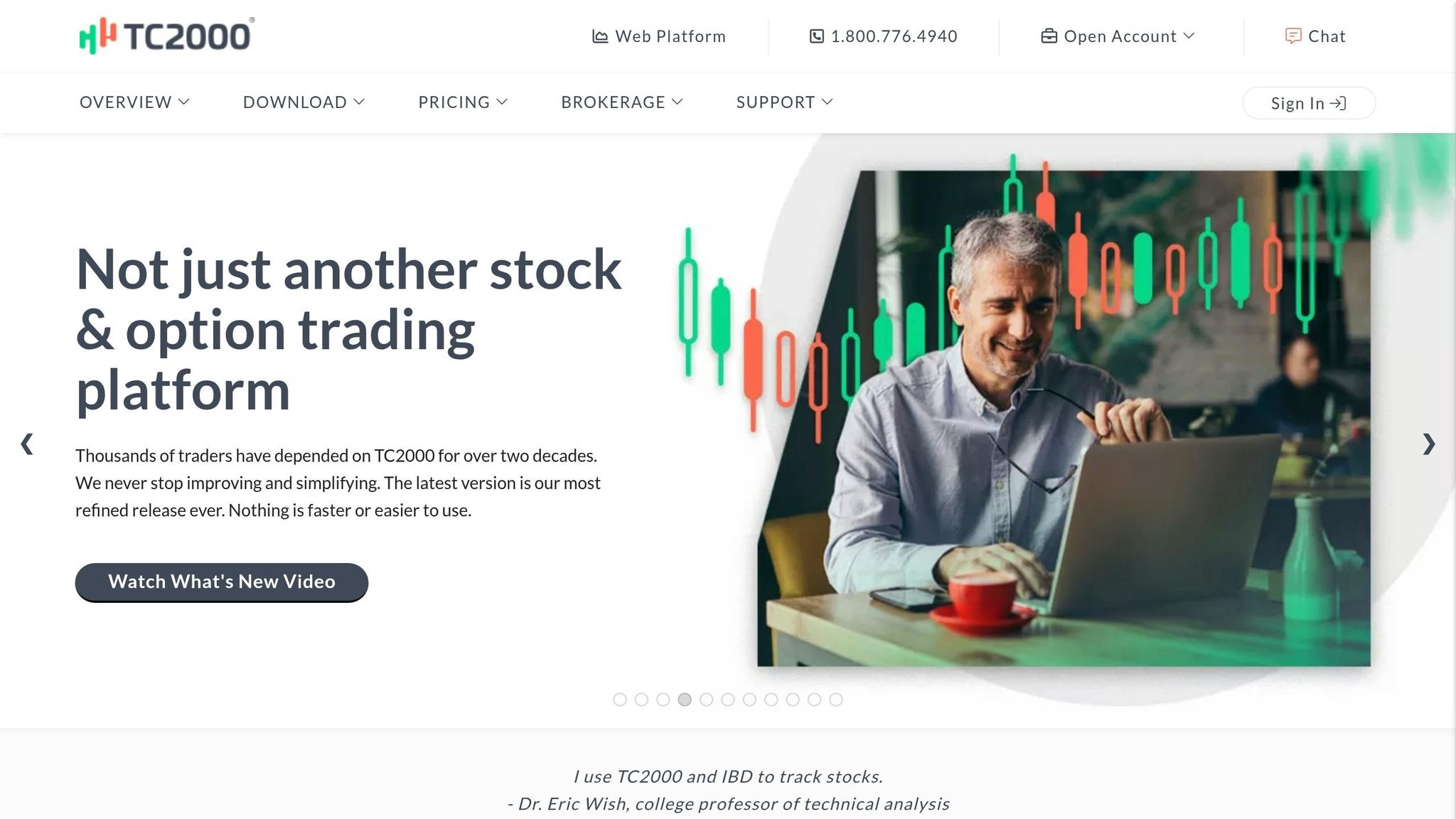
TC2000 is a stock screening and charting platform designed for traders focused on U.S. and Canadian markets. With 30+ years of experience and numerous awards, it offers tools for real-time stock screening, advanced charting, and direct trade execution. Key features include:
- EasyScan® Engine: Screens thousands of stocks using 192 fundamental and 240+ technical criteria in seconds.
- Advanced Charting: Overlays fundamental metrics on price charts and supports direct-from-chart trading.
- Options Trading: Includes tools like profit/loss zones and multi-leg strategy capabilities.
- Speed: Scans S&P 500 in 157ms and syncs charts across monitors in just 10ms.
- Customization: Flexible interface with alerts, watchlists, and workspace personalization.
Limitations: No cryptocurrency support, international markets, or automated backtesting. Mac users need emulation software for the desktop version.
Plans start at $24.99/month, with advanced features available in higher tiers. Best suited for active traders prioritizing speed and technical analysis.
Main Features of TC2000
Stock Screening Tools
TC2000's EasyScan® engine is designed to sift through millions of data points instantly to identify stocks that meet your specific criteria. With access to 192 fundamental variables and over 240 technical indicators, it allows you to combine technical triggers, like moving average crossovers, with fundamental data, such as quarterly EPS growth, to narrow down your search in seconds.
For those who prefer a no-code approach, the Condition Wizard offers a step-by-step guide to creating complex screening rules without needing programming expertise. Advanced users, on the other hand, can leverage Personal Criteria Formulas (PCF) - a proprietary formula language that enables crafting highly specific strategies beyond the built-in tools. The platform's efficiency is notable: scanning the S&P 500 using five criteria takes just 157ms, with 276 different criteria fields available for strategy customization.
The EasyScan Dashboards feature allows you to monitor multiple scans in real time. This means you can watch stocks move between different scan results as market conditions change, helping you stay on top of emerging opportunities. Additionally, conditions can be turned into sortable watchlist columns, letting you rank and filter stocks by true/false outcomes or numerical values - a feature that simplifies decision-making and speeds up your response to market shifts.
Charting Capabilities
TC2000 pairs its screening tools with powerful charting features, including direct trading execution. The platform supports over 240 technical indicators, and lets you "daisy chain" them by plotting one indicator on top of another. A particularly useful feature is the ability to overlay 129 fundamental metrics, such as EPS, PE ratio, and sales data, directly onto price charts. This lets you visually connect a stock's financial performance with its price movements.
For options traders, TC2000 provides historical and real-time bid/ask data along with shaded "Profit & Loss Zones". These zones visually display where your strategy becomes profitable or incurs losses at various price levels. The platform also supports direct-from-chart trading, where you can drag limit and stop orders to specific price points and view your long or short positions in real time. With access to up to 1,500 bars of historical data across any timeframe, users can zoom in using the scroll wheel and navigate through history using bracket keys ([ ]), allowing for a deeper analysis of past trends.
This seamless integration of charting and trading tools simplifies the process of moving from identifying a setup to executing a trade.
Customization and Interface
TC2000 offers a highly flexible interface, allowing traders to tailor the platform to their needs. You can customize windows, toolbars, and save workspaces for different strategies. It even lets you assign custom colors to any plot, color-code price bars based on specific conditions, and edit the chart toolbar to include only your most-used drawing tools.
The platform's alert system is another standout feature, offering notifications for price levels, trendlines, or indicator conditions. Alerts can be delivered via email, SMS, or on-screen pop-ups, ensuring you never miss critical market changes. Watchlist management is equally robust, featuring tracking columns, custom date sorts, and the ability to flag items or attach personal notes to specific symbols. For traders managing multiple positions, the multi-chart sync feature ensures real-time alerts and updates are coordinated across multiple monitors.
Together, these customization options and tools create a streamlined and efficient trading experience tailored to the needs of active traders.
Pros and Cons of TC2000
Main Strengths
TC2000 sets itself apart with impressive speed, offering a 157ms S&P 500 scan and 10ms multi-chart sync - well ahead of industry benchmarks. This speed is crucial for traders managing multiple positions across different screens, ensuring they can act quickly.
The platform also boasts top-tier customer support, earning a perfect 5.00/5 rating, and has been recognized with "Best Software" awards for 25 consecutive years.
One of its standout features is the seamless integration of screening, charting, and execution. With the ability to combine 192 fundamental variables and 170+ technical indicators in a single scan, traders can streamline their analysis and execute trades directly from the charts. For options traders, tools like visual profit/loss zones and multi-leg strategy capabilities further enhance usability.
NEVER MISS A TRADE
Your algos run 24/7
even while you sleep.
99.999% uptime • Chicago, New York & London data centers • From $59.99/mo
That said, no platform is without its drawbacks.
Known Limitations
One of TC2000's biggest gaps is its lack of comprehensive backtesting tools, earning it a 0.00/5 score in quantitative simulation. Traders who rely on in-depth historical analysis may find this limiting and might need to pair TC2000 with another platform. As Barry D. Moore, CFTe, from Liberated Stock Trader, explains:
TC2000 is fast and cost-effective, but lags the competition in backtesting, AI, pattern recognition, and social features.
Another limitation is its narrow focus. TC2000 supports only U.S. and Canadian equities and options, with no functionality for forex, futures, or cryptocurrencies. Additionally, the platform lacks modern AI-driven features like automated trading signals or advanced trend recognition tools.
Mac users face additional hurdles, as TC2000 is primarily designed for Windows. To use it on a Mac, users must rely on the web version or invest in Windows emulation software like Parallels, which costs around $79.99. Real-time news integration also requires a separate add-on, priced at up to $50 per month, and news links often open in external browser windows instead of within the platform.
Comparison Table
Here's a quick look at TC2000's key strengths and areas for improvement:
| Feature | Strength | Limitation |
|---|---|---|
| Scanning Speed | 157ms for S&P 500 scans with 5 criteria | No AI-driven automated scanning |
| Charting | 10ms multi-chart sync; highly interactive | Limited to 7 core chart types |
| Market Coverage | Extensive U.S./Canada stock, ETF, and options data | No support for crypto, futures, forex, or international markets |
| Strategy Testing | Historical condition testing available | 0.00/5 backtesting score; lacks full simulation tools |
| Platform Access | Native Windows app ensures fast performance | Mac users need emulation software |
| Customer Support | 5.00/5 U.S.-based support team | Real-time news requires a $50/month add-on |
How Traders Use TC2000
TC2000's design is built to support a variety of trading strategies, offering tools for both technical and fundamental analysis.
Screening for Technical Patterns
The EasyScan engine in TC2000 helps traders filter the market by combining technical and fundamental criteria. For example, to spot a moving average crossover, you can click the Price Plot label, select "Create Condition", and set it to "Crossing Moving Average." You can then specify the timeframe, such as "Now" (current bar), "x bars ago", or "within last x bars." This flexibility allows traders to customize their scans to fit specific strategies. With over 170 technical indicators available - like RSI, Bollinger Bands, and Ichimoku Cloud - you can layer multiple conditions to refine your search.
TC2000 also enables real-time alerts on price levels, trendlines, or indicator conditions. These alerts can be sent via email, SMS, or displayed on-screen, helping traders respond quickly to market changes. This combination of technical tools and alert systems creates a powerful platform for identifying and acting on trading opportunities.
Fundamental Analysis Applications
For those who rely on fundamental analysis, TC2000 offers access to 192 fundamental variables. Traders can filter stocks based on metrics like earnings growth, debt ratios, or sales trends. You can even overlay fundamental data, such as Quarterly EPS, directly onto price charts to check if the price movement aligns with financial performance. Barry D. Moore, CFTe, from Liberated Stock Trader, highlights this capability:
"TC2000 is a power player if you want real-time fundamental stock screening layered with technical screens, all integrated into live watch lists connected to your charts."
For advanced screening, the Premium+ plan ($83.32/month) includes real-time EasyScan dashboards that automatically update as market conditions shift, saving time and ensuring you're always working with the latest data.
Running TC2000 on VPS Hosting
TC2000 is primarily a Windows-based application. While a web version exists, Mac users need emulation software like Parallels (approximately $79.99) to run the full desktop version. Many professional traders prefer using a dedicated QuantVPS to host the native Windows version. This setup ensures optimal performance, especially for resource-heavy features like the Platinum tier's ($89.98/month) second-by-second scan updates.
A VPS with strong CPU and memory capabilities handles continuous data processing more efficiently than standard hardware. This is particularly useful for setups with multiple monitors and floating windows running live EasyScan dashboards. Additionally, using a VPS ensures your personal settings, watchlists, and notes are accessible from any device, maintaining TC2000's focus on speed and reliability.
Pricing and Value
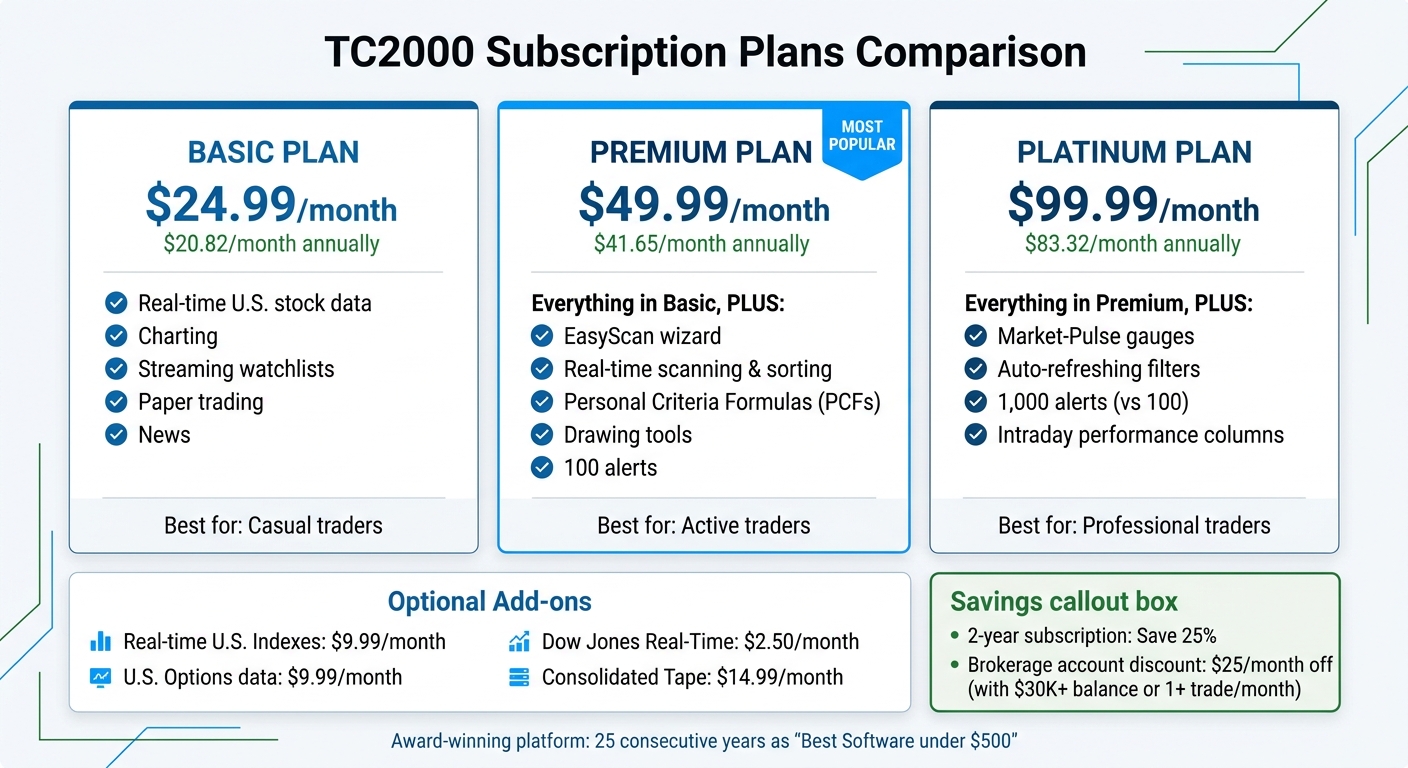
TC2000 Subscription Plans Comparison: Features and Pricing
STOP LOSING TO LATENCY
Execute faster than
your competition.
Sub-millisecond execution • Direct exchange connectivity • From $59.99/mo
Subscription Plans
TC2000 provides three subscription tiers, each tailored to different trading needs. The Basic plan starts at $24.99 per month (or $20.82 per month when billed annually). It includes features like real-time U.S. stock data, charting, streaming watchlists, paper trading, and news. The Premium plan costs $49.99 per month (or $41.65 per month annually) and adds tools like the EasyScan wizard, real-time scanning and sorting, Personal Criteria Formulas (PCFs), drawing tools, and 100 alerts. For those requiring more advanced features, the Platinum plan is available at $99.99 per month (or $83.32 per month annually). It includes everything in the Premium tier, plus Market-Pulse gauges, auto-refreshing filters, 1,000 alerts, and intraday performance columns.
All plans include real-time U.S. stock data from the NYSE, Amex, and Nasdaq. Optional add-ons are available, such as real-time U.S. Indexes and U.S. Options data for $9.99 per month each, Dow Jones Real-Time for $2.50 per month, and Consolidated Tape for $14.99 per month. These pricing options aim to provide flexibility while maintaining the platform's reputation for speed and a streamlined trading experience. Additionally, users who opt for a 2-year subscription can save 25% off standard rates.
For active traders, there’s an opportunity to offset costs. By maintaining a TC2000 Brokerage account with a balance over $30,000 or executing at least one trade per month, users can receive a $25 monthly discount. This can potentially reduce the software cost to $0.
Cost vs. Value Analysis
When weighing TC2000's cost against its features, the platform has consistently stood out. It has been recognized by Stocks & Commodities Magazine readers as the "Best Analytical Software under $500" for 25 straight years. Its Value Score of 3.39 surpasses the industry median of 2.82, with impressive performance metrics like scanning the S&P 500 across five criteria in approximately 157 milliseconds and maintaining a multi-chart latency of just 10 milliseconds.
The Premium tier is often highlighted as offering the best balance between price and functionality. As Barry D. Moore, CFTe, explains:
You buy TC2000 for workflow and speed, not because it's the lowest cost way to cover every feature category.
Similarly, Warrior Trading notes:
Honestly, I don't think the Platinum package is worth the jump in price so I went with the Gold package.
This "Gold package" refers to the Premium tier. While the Basic plan is affordable, it lacks essential features like scanning and alerts that many traders depend on. On the other hand, the Platinum tier's added tools may not justify the higher price for most users.
Ultimately, the platform's value depends on your trading style. For traders who prioritize real-time screening and minimal latency, TC2000 is a strong contender, costing around $2.74 per day on an annual plan. However, systematic traders requiring advanced backtesting may find TC2000 less suitable, as its quantitative backtesting fidelity score is 0.00. Those needing more robust tools might consider Python backtesting libraries.
For active traders taking advantage of the brokerage discount, the effective cost drops significantly, making TC2000 a strong choice for those who emphasize speed and efficient workflows.
Final Thoughts
TC2000 stands out for its speed and execution, making it a go-to platform for active U.S. stock and options traders. With multi-chart latency clocking in at just 10 milliseconds and the ability to scan the entire market in seconds, it’s no surprise that TC2000 has been recognized as the "Best Analytical Software under $500" by Stocks & Commodities magazine for an impressive 25 years straight.
The Premium plan, priced at $49.99 per month, provides access to essential scanning tools and custom formulas. Active brokerage users can also benefit from discounts, adding to the platform's appeal. However, while TC2000 excels in execution and workflow efficiency, it does come with a few trade-offs.
The platform is laser-focused on rapid screening and execution, which means it lacks some features traders might expect. For instance, there are no backtesting capabilities - scoring a 0.00/5 in this area - so systematic traders will need a separate solution for validating historical strategies. Additionally, the platform does not include AI-driven tools for trading and limits its coverage to U.S. and Canadian equities and options, offering no support for forex, futures, or cryptocurrencies.
For traders who prioritize speed and need to manage multiple charts seamlessly, TC2000 remains a reliable and efficient choice. Its 4.83/5 rating for Speed & Ease of Use and AAA-rated customer support highlight its value as a dependable trading platform. Just ensure your trading approach aligns with its strengths: fast execution across multiple monitors.
FAQs
Which TC2000 plan should I choose?
When choosing a TC2000 plan, it all comes down to your personal needs and goals. The platform provides several plans, each with different tools and features. Take the time to assess which capabilities align with your trading or investing strategies. Carefully compare the options to ensure you select the plan that suits you best.
Does TC2000 work on a Mac?
Yes, TC2000 is compatible with Mac devices through its web platform or mobile app. Although it doesn’t have a dedicated Mac application, you can easily access it using a web browser. Alternatively, there are specific instructions available to ensure smooth use on Mac systems. This means you can take full advantage of TC2000’s features without requiring a Windows device.
How can I backtest strategies with TC2000?
To backtest strategies in TC2000, leverage its charting and screening tools to test your trading rules on historical data. Start by configuring your rules within the platform, then evaluate how they would have performed in the past. For step-by-step instructions, check out TC2000's tutorials or help resources, which walk you through the process and ensure you get the most out of its backtesting features.