cTrader VPS for cBots & Automated Forex Trading

Run cTrader cBots and copy trading 24/7 with 0–10ms latency to cTrader brokers.

  • cTrader pre-installed
  • Manage over Remote Desktop
  • 99.999% uptime
Rated 4.9 out of 5 Trusted by 20,000+ traders
$10B+* traded weekly

cTrader VPS

QuantVPS New York → Forex Brokers

0–10 ms

to Forex Brokers

Your trading computer in the cloud.

Connect and control your trading strategies from any device, anywhere in the world, through secure remote desktop, while execution remains on QuantVPS.

cTrader VPS runs as a trading computer in the cloud on the QuantVPS Edge with 0-10 millisecond routing to Forex Brokers.

Optimized for cTrader

More platforms on QuantVPS.

cTrader VPS pricing: choose your plan.

QuantVPS offers high-performance VPS hosting for forex trading, built for MetaTrader, cTrader and Expert Advisors that run through the 24/5 session. Deploy in New York for 0–10ms to FX brokers' trade servers while running cTrader, your EAs and your trade copiers. Dedicated and Dedicated+ in New York reach NY4-hosted forex broker servers in under 1ms.
Optimized VPS forcTrader VPS

No contracts, cancel anytime.

  • VPS Pro+

    Most popular
    $129.99 per month

    Server Specifications

    • Latency
    • PlatformcTrader
    • Location
      New York based VPS optimized for ultra fast low latency tradingNew York, USA
    • Processor
    • Compute power
    • RAM
    • Storage
    • Operating System
      Loading operating system
    • Network
    • Monitor Support
    • Setup Time
    • Backtesting
    • Backups
    • AI Compatible
  • Every plan includes

    Included at no extra cost

    $019 inclusions, every plan

    Hover or tap a feature for details

    Trading & access

    6 included

    Network & protection

    5 included
    How we protect your server

    Support & reliability

    5 included

    Flexible plans

    3 included

Straight terms.

Minimum rate lock
3 years
Money-back guarantee
14 days
How billing works

Tell us how you trade. Get the plan that fits.

We size the CPU, memory, and datacenter around the way you actually trade, with no guesswork and no upsell to a tier you will not use.

  1. Choose guidance
  2. Pick your platform
  3. Size your workspace
  4. Review your setup

A cTrader VPS built for always-on charts, strategies, algos and faster execution.

Run cTrader on a VPS in New York. Access your trading workspace through Remote Desktop while your platform runs near NY4 FX brokers. Follow the same three steps, with resources and connectivity selected for your trading setup.
  1. Secure remote accessWindows, Mac, iPhone, iPad or Android

    Your trading computer. In the cloud.

    Connect and control your trading strategies from any device, anywhere in the world, through secure remote desktop, while execution remains on QuantVPS.

    • Global Access
    • Remote Desktop
    • 24/7 Uptime
  2. Continuous operationWindows Server or Ubuntu 24.04

    Run cTrader on New York infrastructure. Built for continuous trading.

    Host bots, algorithms, and critical software on the QuantVPS Edge in New York, configured for continuous low-latency operation.

    • High Performance
    • New York Datacenter
    • Trading Optimized
  3. 0-10ms network latencyNew York → NY4 FX brokers

    Execute through a direct path to NY4 FX brokers. Fewer hops, less slippage.

    Send orders over a direct, low-latency connection to NY4 FX brokers in 0-10ms, reducing network hops and slippage. The server remains available independently of the local computer and internet connection.

    • Low Latency
    • Fewer Hops
    • Reduced Slippage

Run cTrader and local cBots on your VPS

  1. Connect to your Windows VPS

    Use the server address and credentials in your control panel with Remote Desktop on Windows or Windows App on Mac.

  2. Sign in to cTrader

    Open the Windows client and sign in with the cTrader ID linked to your intended broker account.

  3. Configure local automation

    Import compatible cBots and indicators, choose their execution mode, and test parameters and permissions on a demo account.

  4. Disconnect without signing out

    Close the remote connection, not the application or Windows session. Apps can continue while the server is on; monitor reconnects, account sessions, and scheduled maintenance.

What is a VPS for cTrader?

A cTrader VPS runs the Windows desktop client and locally hosted cBots on a remote computer. This is different from a cBot deployed to a separate cloud-execution service. Your desktop, indicators, and local automation use the VPS resources while your broker connection remains external.

Choosing the best VPS for cTrader

Size for the cBots, chart count, and custom indicator workload. Confirm whether each bot runs locally or through cloud execution so you do not pay for an unnecessary desktop session. Broker account access, bot licenses, and platform permissions remain separate.

Optimized for cTrader.

Your cTrader VPS stays online for the whole forex week, hosted in New York on a typical 0–10 ms route to your broker.

Two builds. Pick yours.

cTrader arrives installed on Windows Server 2022, ready to log in. Choose from 40+ Windows platform templates at checkout.

Choose your operating system

Ready to log in

Services
Background services that cause stutter, stripped out
Stripped
Resources
CPU, memory and NVMe reserved for your VPS
Reserved
Platform
cTrader, installed at checkout
Pre-installed
Access
Full administrator access over Remote Desktop
Admin
Network
A dedicated IP with DDoS protection
Protected

Windows Server 2025 is available by request.

Your new VPSWindows Server 2022
<60s
  1. Order placed
  2. Windows Server 2022 deployed
  3. cTrader installed
  4. Remote Desktop ready

Ready in under 60 seconds. From checkout to login.

Your cTrader VPS is typically deployed and ready in under 60 seconds after purchase, reachable over Remote Desktop. Dedicated servers take 30–120 minutes.

Online for the whole forex week.

Forex trades around the clock from Sunday 5 PM to Friday 5 PM New York time. cTrader keeps running on your VPS between your Remote Desktop check-ins.

Regular hours in New York time (ET); holidays and early closes vary. Check-ins are illustrative.

Prop firms

Built for funded prop firm traders. Evaluation and funded accounts on one desktop.

Your evaluation and funded accounts trade from the same desktop, still running when you disconnect.

Compatible with leading trade copiers. Run funded-account workflows with tools such as Replikanto, CrossTrade, and other platform-specific trade copiers. Compare features & pricing

cBots and copy trading 24/7, 0–10ms to cTrader brokers.

Keep cTrader, cBots and supported copy-trading workflows running around the clock. Choose New York or London around your broker’s gateway for the published 0–10ms forex route, and test automation with your account before going live.

What changes when cTrader runs on QuantVPS.

Three things change when cTrader moves off your desk: where your orders start, how it holds up in a fast market, and the hardware under it.
Simulated broker quotes. The same buy order travels over two example routes.

Execution

Accelerate Your cTrader Execution with Our Premium cTrader VPS. Optimized low-latency routing.

Advanced forex trading through cTrader requires optimal connectivity for superior execution quality. Our high-speed cTrader VPS, delivering 0-10ms latency to major liquidity providers, ensures your cTrader trades achieve the best possible fills. Experience the execution quality that professional forex traders demand.

Volatility

Master Forex Volatility: Ensure cTrader Stability with a Robust cTrader VPS. Stable through market volatility.

Major economic events and market news can create extreme volatility in forex markets. A professional cTrader VPS delivers the processing power and infrastructure reliability needed to handle intensive cTrader operations during turbulent trading conditions. Maintain consistent platform performance during high-impact events. All of it runs with 99.999% uptime on enterprise-grade hardware in professional datacenters staffed 24/7 by on-site engineers, not a desktop under a desk.

PassMark referenceData through 2026-10-05

Single-threadOne core · higher is faster

Standard VPSAMD EPYC 7003
2,554
Performance VPSAMD Ryzen 9 9950X
4,728
Every plan's benchmarks

Hardware

The QuantVPS Edge: Specialized Infrastructure for cTrader Trading. Dedicated CPU, memory, and NVMe.

Professional forex trading through cTrader demands institutional-quality hosting. QuantVPS provides cTrader VPS solutions specifically optimized for advanced forex platforms. Access premium connectivity to major liquidity providers, enterprise-grade processing power, and dedicated resources that maximize cTrader performance. Your cTrader VPS is live in under 60 seconds, backed by a 14-day money-back guarantee. Moving from another provider? We handle the migration and your first month is free.

cTrader on the VPS. The shortest route to your broker.

cTrader runs on your QuantVPS server in New York. Your device only shows the session; its orders and data take a typical 0–10 ms route to your broker, and keep flowing after you disconnect.
cTraderSession live

Pre-installed + optimized

cTrader pre-installed and optimized.

Pick cTrader at checkout and it arrives installed on a Windows build tuned for trading, with resources reserved so the platform stays responsive from your first session. Log in to your broker account and trade; no downloads, no setup scripts.

On the VPS
cTrader
Deployment
New York, USA
Published route
0–10 ms to your broker
Access
Remote Desktop from any device
Illustration. The route figure is the published typical figure for New York, USA, not a live measurement.

Every plan runs on the same 99.999% infrastructure.

99.999% monthly VPS availability, backed by our SLA. Availability and service-credit eligibility are assessed monthly under the SLA’s measurement rules, coverage and exclusions.

  • Core infrastructure. Redundant systems ensure continuous operation.

  • Network availability. Multiple carriers and automatic failover.

  • SLA-backed promise. Contractual uptime guarantee with credits.

99.999% Uptime SLAMonthly VPS availability. Illustrates the commitment, not measured service history.

Server & network availability · 99.999% SLA

Every market sessionAround the clock

View live status

Tier IV datacenters, operated and protected around the clock

Tier IV.

Concurrently maintainable facilities. Built to keep your trading environment running.

Explore infrastructure
Automatic backups for cTrader VPS

Backups

Protect Your cTrader Environment: Comprehensive cTrader VPS Backup. Automated backup workflows.

Your cTrader configurations, automated trading systems, and historical analysis represent valuable trading assets. Our enterprise backup infrastructure automatically safeguards your complete cTrader VPS forex trading environment. Trust that your cTrader setups, algorithms, and market data remain secure and recoverable.

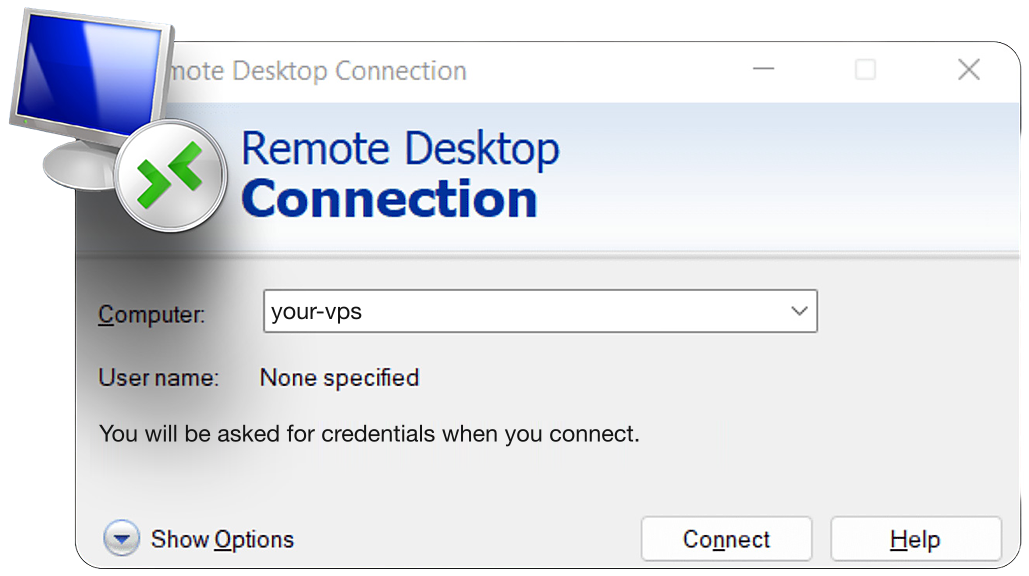
Remote Desktop Connection client on Windows

Remote Desktop on Windows

Access

Access Your cTrader Platform Globally with Our cTrader VPS. 99.999% uptime SLA.

Global forex markets operate around the clock, requiring constant access to your cTrader trading environment. Our intuitive web management console and complete remote desktop capabilities provide full control over your cTrader VPS from any worldwide location. Maintain your forex trading edge across all sessions.

What traders say about QuantVPS.

Your strategies keep running, even when you step away. Low-latency execution, live market volume, and SLA-backed reliability. Here is what traders say about it in their own words.

01VPS Ultra+ user · Customer story

Reviews change on their own. Pause, Previous or Next keeps one on screen; Play starts them again.

2+ years

with QuantVPS

“I started off with a different VPS company. After no support and tons of issues, I switched to QuantVPS. Tremendous experience after being with them for more than 2 years now.”

VPS Ultra+ user · 2+ year customerCustomer story

Disclaimer: Testimonials are quoted verbatim from individual QuantVPS customers and public review sites. Some are excerpts from longer reviews. Individual results vary. Latency, error rates, and cost outcomes depend on your location, platform, broker, and configuration. Testimonials are not a guarantee of future performance and do not constitute trading advice.

cTrader VPS FAQ.

cTrader questions, answered
Sound familiar?5 common ones

Ever missed a setup because you were away from your desk?

Your platform keeps running. Log back in from any device.

If any of these sound familiar, a trading VPS is the fix.

Install the official or broker-provided cTrader desktop client, sign in to your cTrader ID, and select the intended trading account. Restore workspaces and check the current platform requirements before adding automation.

A locally hosted cBot needs its cTrader runtime and server session to remain available. Disconnect remote access rather than closing cTrader or signing out. Test bot startup, connection recovery, and position checks.

Not necessarily. Cloud execution is a separate cTrader feature with its own capabilities and restrictions. A VPS is relevant when you need desktop-based execution, local dependencies, or companion applications outside that cloud environment.

MT4 EAs are not native cTrader cBots. Use a cTrader-compatible implementation and verify its dependencies and broker behavior. Hosting does not translate MQL4 code into a cTrader strategy.

Consider symbols, tick-processing frequency, indicators, and the number of simultaneous instances. Backtests can compete with local live bots. Monitor CPU and memory under real market activity and separate heavy research when needed.

Check the endpoint used by the specific broker account inside cTrader. Compare regional connection measurements rather than choosing by broker headquarters. An account offered by the same brand can still use a different server.
See all FAQ

Answers on servers, latency, access, security and support.