
To install OpenClaw, run curl -fsSL https://openclaw.ai/install.sh | bash on macOS, Linux or WSL2, or iwr -useb https://openclaw.ai/install.ps1 | iex in Windows PowerShell. OpenClaw needs Node.js 24.16+ or 26.1+ (Node 26 is recommended), and the installer sets up Node for you when it is missing. Onboarding then connects a model, and openclaw gateway install keeps the Gateway running in the background (checked on 10 Oct 2026).
Every command below comes from two official sources, both checked on 10 Oct 2026. The first is the OpenClaw docs. The second is the OpenClaw GitHub README. OpenClaw is an open-source AI assistant: one Gateway process runs on your machine and you message it from chat apps such as Telegram, WhatsApp, Slack or Discord.
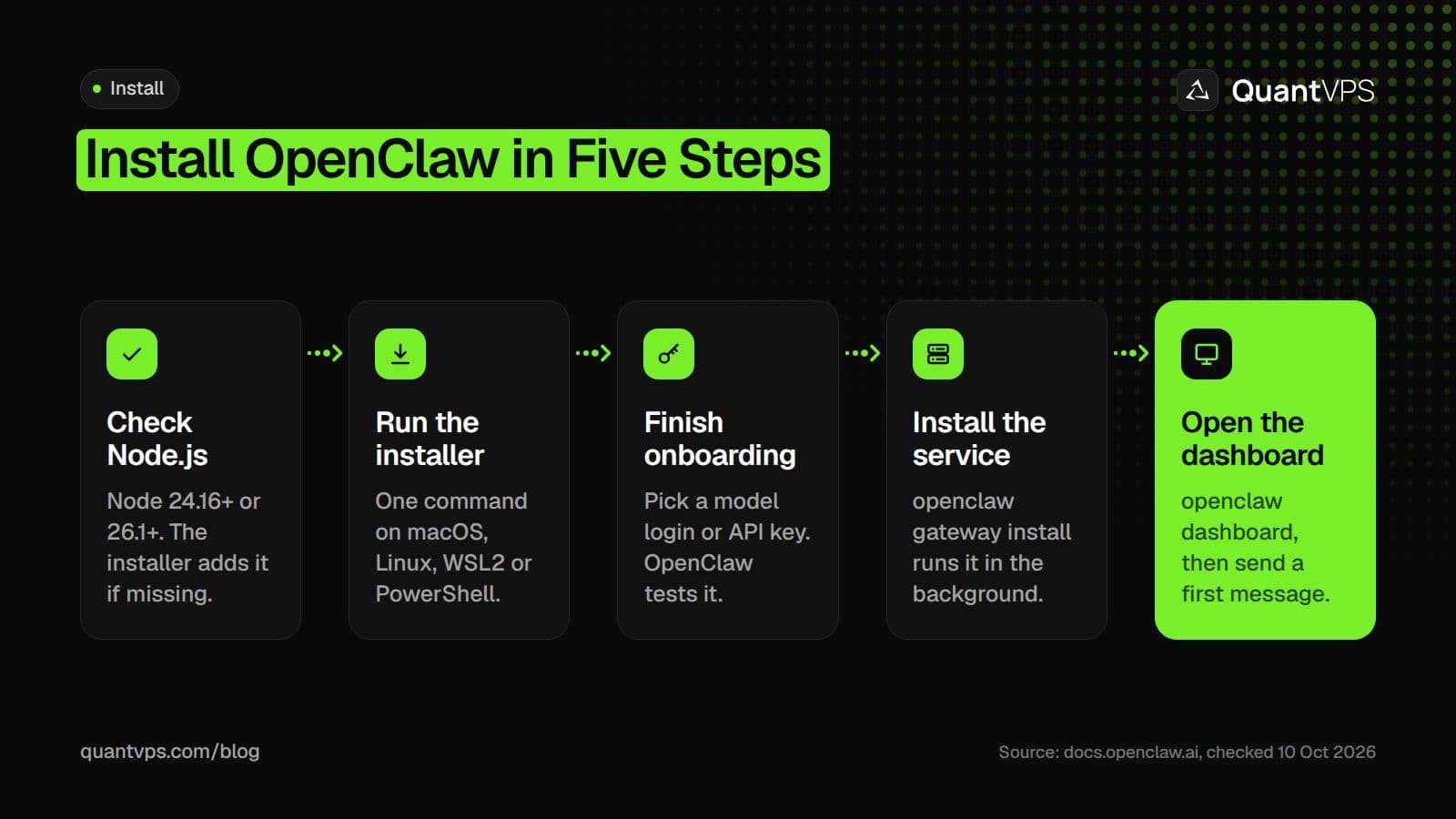
The OpenClaw install path from the official getting started guide.
Requirements
OpenClaw needs Node.js 24.16 or newer on the 24 line, or 26.1 or newer, plus a model it can use. The install page lists these requirements:
| Item | Requirement (checked on 10 Oct 2026) |
|---|---|
| Node.js | Node 24.16+ or 26.1+. Node 26 is recommended. Node 22, 23 and 25 are unsupported. |
| Operating system | macOS, Linux or Windows (Windows Hub app, PowerShell installer or WSL2) |
| AI access | An existing Claude Code or Codex CLI login, or a provider API key |
| Server minimum | 1 vCPU, 1 GB RAM, about 500 MB disk |
| Server recommended | 1 to 2 vCPU, 2 GB+ RAM; Ubuntu LTS or another modern Debian/Ubuntu |
| Not supported | Linux ARMv7 |
Check your Node version first:
node --version
You only need pnpm if you build OpenClaw from source. The installer script below handles Node for you, so most people can skip a manual Node install.
Install on macOS or Linux
On macOS or Linux, one command installs OpenClaw and starts onboarding. The script detects your OS, installs Node if needed, installs OpenClaw and opens the setup wizard:
curl -fsSL https://openclaw.ai/install.sh | bash
When Node is missing, the installer provisions Node 26 through Homebrew on macOS and the Node 24 LTS line through NodeSource on Linux. To install without running onboarding, add the flag from the docs:
curl -fsSL https://openclaw.ai/install.sh | bash -s -- --no-onboard
If you already manage Node yourself, install the npm package instead. This command is for npm 12 or npm 11.16+; on npm 11.15 and earlier, leave out --allow-scripts=openclaw:
npm install -g openclaw@latest --allow-scripts=openclaw
openclaw onboard --install-daemon
Prefer an app on a Mac? The docs point to the macOS menu bar app: download the OpenClaw-<version>.dmg asset from the OpenClaw GitHub releases page and launch OpenClaw.app. Check the install with these three commands:
openclaw --version      # confirm the CLI is available
openclaw doctor         # check for config issues
openclaw gateway status # verify the Gateway is running
Uptime
99.999% uptime. Built for 24/7 trading reliability.
Your VPS runs in Tier IV datacenters with redundant power and network, monitored 24/7 on site.
See the uptime SLA







From $29.99/mo · Windows or Linux
Install on Windows (PowerShell installer or WSL2)
Windows has three supported routes: the Windows Hub app, the PowerShell installer, or a Linux Gateway inside WSL2. The Windows page calls WSL2 "the most Linux-compatible Gateway runtime on Windows".
PowerShell installer
For a terminal-first setup, run this in PowerShell:
iwr -useb https://openclaw.ai/install.ps1 | iex
If Node is missing, the script tries winget, then Chocolatey, then Scoop. If none of those work, it downloads the official Node.js 26 Windows zip into %LOCALAPPDATA%\OpenClaw\deps\portable-node. On native Windows, the background Gateway runs as a Scheduled Task.
WSL2
To run the Gateway in your own WSL2 distro, install Ubuntu from PowerShell:
wsl --install -d Ubuntu-24.04
Inside WSL, enable systemd, then restart WSL from PowerShell with wsl --shutdown:
sudo tee /etc/wsl.conf >/dev/null <<'EOF'
[boot]
systemd=true
EOF
Then install OpenClaw inside WSL with the Linux command:
curl -fsSL https://openclaw.ai/install.sh | bash
openclaw gateway status
Windows Hub is the desktop option. It is a signed app for Windows 10 20H2+ and Windows 11 that installs without administrator rights, and its Set up locally button builds an app-owned WSL Gateway for you.
First-run setup and choosing a model
Onboarding starts on its own after the installer runs. Pick Quick start to reuse AI access OpenClaw finds on your machine, or Custom setup for the full guided flow.
Quick start looks for a Claude Code or Codex CLI login, API-key environment variables, and tool-capable models already installed in Ollama or LM Studio on the same host. You choose one, and OpenClaw tests only that choice with a real completion before it saves anything. It then starts the Gateway in the foreground and opens the web dashboard.
The foreground Gateway stops when you press Ctrl+C, and your config stays saved. To run it in the background, install the service and check it:
openclaw gateway install
openclaw gateway status   # listening on port 18789
openclaw dashboard
openclaw gateway install sets up a LaunchAgent on macOS, a systemd user unit on Linux and WSL2, or a Scheduled Task on native Windows. Type a message in the dashboard chat to confirm you get a reply.
Which model? The models FAQ says to use "the strongest latest-generation model your provider stack offers", because weaker or heavily quantized models are more open to prompt injection. To change the model later without wiping your config, run openclaw models set or openclaw configure --section model, and check access with openclaw models status.
Remote desktop
Your trading computer. In the cloud.
Connect and control your trading strategies from any device, anywhere in the world, through secure remote desktop, while execution remains on QuantVPS.
Choose your cloud trading computerFrom $29.99/mo · Windows or Linux
Connecting chat apps
Telegram is the fastest first channel: it needs only a bot token and no plugin install. The channels page gives this command:
openclaw channels add --channel telegram --token <bot-token>
Run openclaw channels add with no flags to pick from the full list, which includes WhatsApp, Slack, Discord, Signal, iMessage, Microsoft Teams and Matrix. Check each connection with openclaw channels status --probe. WhatsApp needs QR pairing and stores more state on disk.
By default, most channels answer an unknown sender with a pairing code instead of processing the message. That keeps strangers from driving your agent.
Keeping OpenClaw running 24/7 on a server
To keep OpenClaw answering around the clock, run the Gateway on a server that never sleeps. The OpenClaw hosting FAQ puts it plainly: "Want 24/7 reliability? Use a VPS." A laptop disconnects the Gateway when it sleeps or reboots for updates.
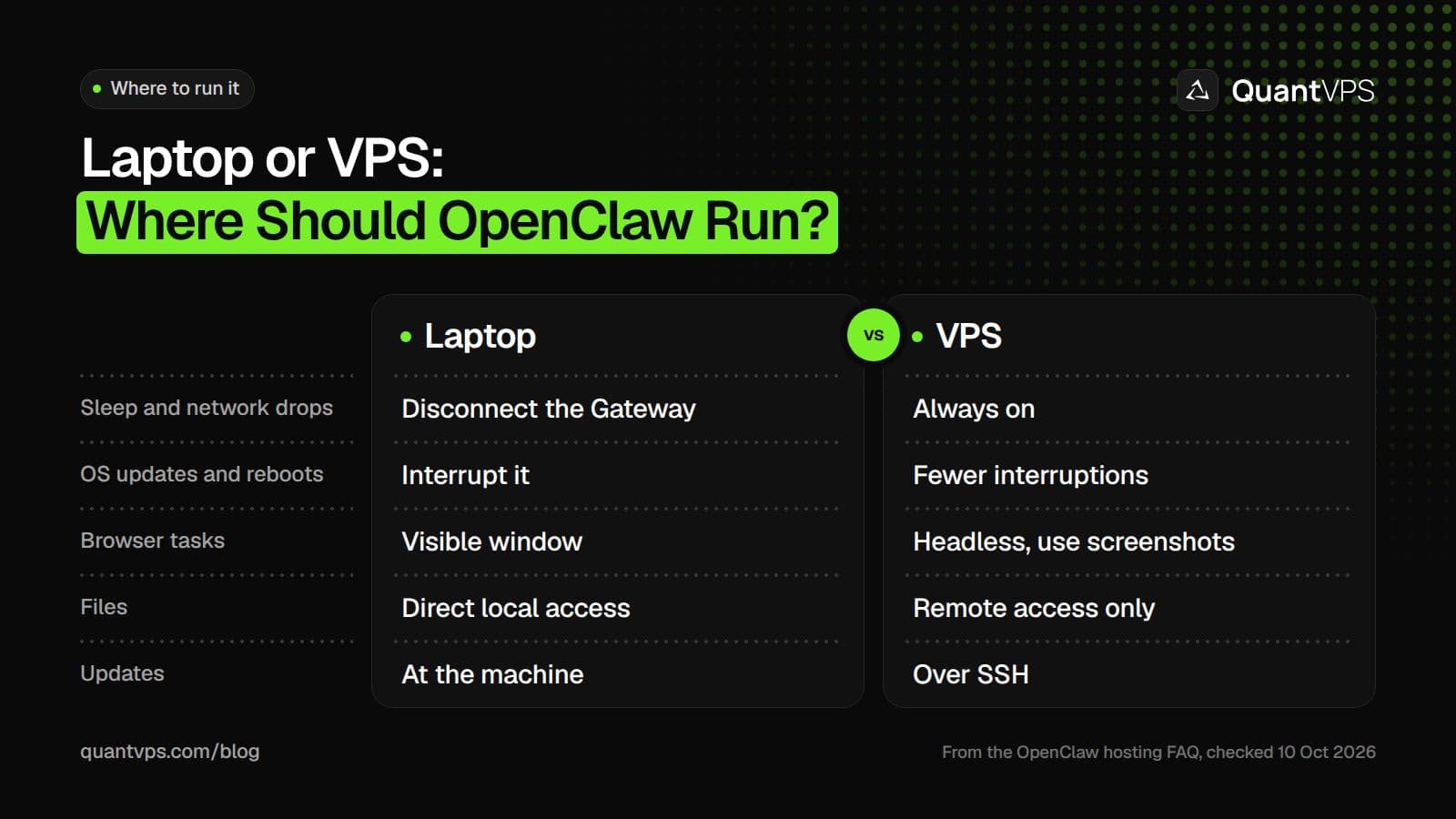
The trade-offs the OpenClaw docs list for a laptop and a VPS.
On a Linux server, install OpenClaw, then let onboarding install the systemd user service:
openclaw onboard --install-daemon
The Gateway runbook adds one step so the service keeps running after you log out of SSH:
sudo loginctl enable-linger $(whoami)
Keep the Gateway on loopback and reach the dashboard through an SSH tunnel from your own computer, then open http://127.0.0.1:18789/:
ssh -N -L 18789:127.0.0.1:18789 <user>@<host>
A QuantVPS OpenClaw VPS gives the Gateway a Linux server with SSH access that stays on when your laptop is closed. Every plan includes 99.999% uptime, always-on DDoS protection with advanced filtering, and automatic off-site backups on every VPS plan. The OpenClaw docs still say to treat the VPS as the source of truth and back up its state and workspace yourself, for example with openclaw backup create.
Security basics (API keys, permissions)
OpenClaw ships with conservative defaults, and one command tells you if your setup has drifted from them:
openclaw security audit
- Keep secrets private. Treat everything under ~/.openclaw/ as sensitive: openclaw.json can hold tokens, and credentials/ holds channel credentials. The secrets page sets 700 on the folder and 600 on the config file; openclaw doctor can tighten them.
- Keep the Gateway off the public internet. It binds to loopback by default. If you bind it to lan or tailnet, the Gateway requires a shared secret (gateway.auth.token or gateway.auth.password).
- Limit tool access. Quick start gives the default agent full access. The docs publish a hardened baseline that narrows tools to a messaging profile and denies shell execution; re-enable tools only for agents you trust.
- Use a dedicated OS user if the host is shared, and consider a separate phone number for WhatsApp, Signal or Telegram.
Updating and troubleshooting
Update with one command. openclaw update detects your install type, checks the new version, then activates it and restarts and verifies the Gateway:
Order flow
Built for scalpers. Heatmaps on dedicated resources.
Order-flow heatmaps and DOM ladders run on dedicated CPU, memory and NVMe, so your charts keep responding during volatility.
See the dedicated hardwareFrom $29.99/mo · Windows or Linux
openclaw update
openclaw update --dry-run   # preview without applying
If your install is older than July 2026, the updating guide says to upgrade to 2026.9.5 first, run its Doctor migrations, then upgrade to latest. After a manual install, run openclaw doctor, openclaw gateway restart and openclaw health.
When something breaks, the troubleshooting page gives a fixed order of checks:
openclaw triage
openclaw status
openclaw gateway status
openclaw doctor
openclaw channels status --probe
openclaw logs --follow
If the shell says openclaw is not found, it is almost always a PATH issue: npm's global bin folder is not on your PATH. Check with node -v, npm prefix -g and echo "$PATH".
FAQs
What Node.js version does OpenClaw need?
OpenClaw needs Node 24.16+ or Node 26.1+, and Node 26 is recommended (checked on 10 Oct 2026). Node 22, 23 and 25 are unsupported. The installer script installs a supported Node for you when it is missing.
Can I install OpenClaw on Windows without WSL?
Yes. The PowerShell installer runs OpenClaw natively on Windows, and the Windows Hub app is a desktop option. WSL2 is still the most Linux-compatible way to run the Gateway on Windows.
Is OpenClaw free?
The README says OpenClaw has no paid tier, hosted service or token, and it is stewarded by the OpenClaw Foundation. The model you connect runs under your own provider login or API key.
What port does the OpenClaw dashboard use?
The Gateway listens on port 18789. On the same machine, open http://127.0.0.1:18789/. On a server, reach it through an SSH tunnel or Tailscale rather than a public port.
How much RAM does OpenClaw need on a VPS?
The docs list an absolute minimum of 1 vCPU, 1 GB RAM and about 500 MB of disk. They recommend 1 to 2 vCPU and 2 GB or more RAM for logs, media and multiple channels, on Ubuntu LTS.


