



Opening checkout

Optimus Futures VPS for Futures Trading

Trade your Optimus Futures account 24/7 on a Chicago VPS with latency as low as 0.52ms to CME, on AMD Ryzen. 99.999% uptime and 24/7 support.

  • Optimus Flow pre-installed
  • Rithmic or CQG at login
  • Copier ready for prop firms
Rated 4.9 out of 5 Trusted by thousands of traders $10B+* traded weekly

Your trading computer in the cloud.

Connect and control your trading strategies from any device, anywhere in the world, through secure remote desktop, while execution remains on QuantVPS.

Optimus VPS runs as a trading computer in the cloud on the QuantVPS Edge with 0.52 millisecond routing to CME.

Optimized for Optimus

More platforms on QuantVPS.

Optimus VPS pricing: choose your plan.

QuantVPS offers high-performance VPS hosting for trading, purpose-built for automated futures trading. Deploy a trading VPS in our CME-adjacent Chicago location for low-latency connectivity while running NinjaTrader, TradeStation, Quantower, MultiCharts, Tradovate, and other major futures platforms.
Optimized VPS forOptimus VPS

No contracts, cancel anytime.

  • VPS Pro+

    Most popular
    $129.99 per month

    Server Specifications

    • Latency
    • PlatformOptimus
    • Location
      Chicago based VPS optimized for ultra fast low latency tradingChicago, USA
    • Processor
    • Compute power
    • RAM
    • Storage
    • Operating System
      Loading operating system
    • Network
    • Monitor Support
    • Setup Time
    • Backtesting
    • Backups
    • Detect+
    • AI Compatible
  • 20 inclusions, every plan

    Included at no extra cost. Hover or tap a feature for details.

    Trading & access

    6 included
    • Run trading platforms compatible with your chosen Windows or Linux system. Platform licenses and market-data subscriptions are separate, and available CPU and RAM determine how much you can run at once.
    • No plan-imposed limit on exchange connections through your trading software. Exchange permissions, data subscriptions, platform limits, and available server resources still apply.
    • No plan-imposed cap on API connections for your trading tools. Broker and API rate limits, account permissions, and available server resources still apply.
    • Run AI agents, compatible runtimes, and your own MCP servers on your VPS. These workloads use your plan’s included CPU, memory, and storage; connect your own APIs and tools.
    • Administrator access on Windows or root access on Linux lets you install compatible platforms, indicators, and tools, and manage your server settings.
    • Run compatible trade copiers such as Replikanto. Software licenses are separate, and the number of accounts you can copy depends on your software and server resources.

    Network & protection

    5 included
    • Choose Chicago for infrastructure near CME exchange connectivity. Actual latency depends on your broker, data feed, and network route; the latency row shows the estimate for the selected location.
    • Your server has its own IP address for remote access and connecting trading tools. You can use it with services that support IP allowlisting.
    • Always-on DDoS (distributed denial-of-service) protection with advanced traffic filtering, plus firewalls and intrusion detection.
    • Server protection complements network DDoS filtering. You should still keep your operating system and trading software updated and protect your account credentials; no protection eliminates every security risk.
    • Every plan includes unmetered bandwidth.
    How we protect your server

    Support & reliability

    6 included
    • Get help around the clock from a US-based team familiar with trading platforms, data feeds, and VPS troubleshooting.
    • Our support team can help you move your trading environment from another server. Contact us to coordinate the move and check any platform-specific requirements.
    • Get assistance connecting to your server and setting up your trading environment. Provisioning time is shown separately for each plan.
    • Our Network Operations Center monitors every server, network path, and datacenter 24x7x365 with a 15-minute first-reply target for critical issues. Average first response under 10 minutes.
    • QuantVPS Detect+ is included with every plan at no extra cost. It monitors NinjaTrader 8 and other trading platforms, and data feed and broker connections (for example Rithmic, CQG, Tradovate and IBKR), and alerts by email and in the dashboard.
    • Our industry-leading 99.999% uptime guarantee SLA gives a service credit for any covered outage of a minute or more, under the SLA terms. It covers service availability, not broker, exchange, or trading-platform availability.

    Flexible plans

    3 included
    • There is no one-time server setup charge. Your selected plan, billing period, and any optional add-ons determine the price shown at checkout.
    • Upgrade from your dashboard as your trading workload grows. To move to a smaller plan, contact support. Available configurations and billing adjustments depend on the change.
    • Cancel your subscription at any time with no hidden fees.

CPU Mark by plan, what the estimates mean, latency, storage and backups

The details behind every value on the plan cards. Hover or tap a value on a card for the same details.

Chart and strategy estimates

A starting point for active charts or automated strategies, not a limit.

Adds load:
Indicators, market data and separate platform instances
Leave room for:
Busy sessions and backtesting
Based on:
Audited analysis of 25,000+ VPS performance tickets

Prop-firm account estimates

A starting point for prop-firm accounts on compatible trading platforms, not an account limit.

Firms such as:
Apex Trader Funding, Lucid Trading, Tradeify, MyFundedFutures
Adds load:
Charts, indicators, market data, copiers and automation
Based on:
Audited analysis of 25,000+ VPS performance tickets

Check each firm's rules on automation, trade copiers and account access. Platform permissions and software licenses are separate.

Latency

Estimated 0.52ms from Chicago to CME.

Platform:
Optimus
Datacenter:
Chicago, USA

Futures on CME Globex. Home of Tradovate, Rithmic, and NinjaTrader. Orders and market data skip your home connection.

Processor

Standard VPS:
AMD EPYC server cores for reliable multi-core performance
High-Frequency VPS:
AMD Ryzen 9, which boosts up to 5.7 GHz
Dedicated:
AMD Ryzen 9. Single-tenant bare metal: the whole server is yours.
Dedicated+:
Latest-generation AMD Ryzen 9. Single-tenant bare metal: the whole server is yours.

High-Frequency plans are 85% faster per thread, the speed charting and order-entry platforms feel most. Charting and order-entry platforms run mostly on one or two threads, so a faster thread keeps charts and the DOM responsive.

Memory

Standard VPS:
DDR4
High-Frequency VPS:
DDR5, the latest generation
Dedicated:
DDR4
Dedicated+:
DDR5, the latest generation

A workload estimate, not a limit. Platforms, charts and market data share the memory, so leave headroom for busy sessions.

Storage

Room for the operating system, your platforms, market data and files.

Drive:
Enterprise NVMe
Drive rating:
Up to 7,000 MB/s
Redundancy, dedicated servers:
RAID 1, RAID 10 on request

The operating system and installed software use part of it. Choose a larger plan to keep more data.

Operating system

Recommended for Optimus: Windows.

Windows, VPS:
Server 2022 · Server 2025 · 11 Pro
Windows, dedicated servers:
Server 2025 · Server 2022 · 11 Pro
Ubuntu:
24.04 · 22.04 LTS
Access:
Administrator on Windows, root SSH on Ubuntu

Windows suits desktop platforms such as NinjaTrader and MetaTrader. Ubuntu suits Linux bots, APIs and Docker.

Network

Speed is how much data moves at once, not order latency.

Bandwidth:
Unmetered
Standard VPS:
1 Gbps+ (10 Gbps burst)
High-Frequency VPS:
3 Gbps+ (10 Gbps burst)
Dedicated:
1 Gbps+ (3 Gbps burst)
Dedicated+:
10 Gbps+ (20 Gbps burst)

Latency is how long one message waits. Actual throughput depends on the network route and workload.

Monitor support

Spread charts across the screens of your own computer in one Remote Desktop session, up to the number each plan lists.

For 2 screens:
VPS Pro / VPS Pro+ or higher

Tick "Use all my monitors" in Remote Desktop before you connect.

Setup time

The typical time from purchase until your VPS is ready.

VPS plans:
Under 60 seconds
Dedicated servers:
30–120 min
Setup help:
24/7 from our support team

Backtesting

No backtesting:
Sized for live trading, not for backtests on historical data.
Simple backtesting:
Suits simple strategy backtests on historical data. Large datasets or several tests at once can strain this plan.
Moderate backtesting:
Suits larger backtests and historical datasets than the Pro tier. Testing shares CPU and RAM with your live platforms.
Extensive backtesting:
Built for extensive backtesting and strategy optimization on dedicated resources. Test time still depends on your software, data size and strategy.
For backtests:
VPS Pro / VPS Pro+ or higher
Heavier testing:
VPS Ultra / VPS Ultra+ or higher
Optimization runs:
Dedicated

Backups

An extra recovery point for your VPS, at no extra cost. Most dedicated servers are delivered with RAID 1. It is not guaranteed unless you ask. Ask for RAID 1 or RAID 10, and we deliver it as requested.

Included on:
Every Standard and High-Frequency VPS

Keep separate copies of important trading files as well. RAID is not a backup: it does not undo a deletion or a corrupted file.

QuantVPS Detect+

Alerts when your platform or data feed stops. Included with every plan for $0.

Monitors:
NinjaTrader 8 and other trading platforms, data feed and broker connections, and the VPS itself
Alerts:
Configurable alerts for critical events
Email:
Up to 30 a day for each VPS
Dashboard:
Past alerts of the last 90 days

AI Compatible

Agents you can install: Claude Code (Linux), Codex (Linux), OpenCode (Linux), Hermes (Linux), OpenClaw (Linux), Cursor CLI (Windows or Linux), AutoGPT (Linux), n8n (Linux), LM Studio (Windows), Gemini CLI (Linux).

Agents run on your plan's CPU, memory and storage with your own API keys. Local models need more memory. Your own MCP servers and the QuantVPS REST API work too. Unsure which agent to use? Our team helps you set it up at no charge.

Compute power

CPU Mark and single-thread reference of every plan
PlanCPU MarkSingle-threadProcessor
VPS Starter2,5502,554AMD EPYC 7003
VPS Lite5,0922,554AMD EPYC 7003
VPS Pro8,0202,554AMD EPYC 7003
VPS Ultra15,1852,554AMD EPYC 7003
VPS Starter+8,1004,728AMD Ryzen 9 9950X
VPS Lite+15,6004,728AMD Ryzen 9 9950X
VPS Pro+22,2004,728AMD Ryzen 9 9950X
VPS Ultra+28,1004,728AMD Ryzen 9 9950X
Dedicated45,2473,477AMD Ryzen 9 5950X
Dedicated+65,7084,728AMD Ryzen 9 9950X

Logarithmic scale from 1,000 to 65,708. Bar lengths are not proportional to scores. Derived from PassMark CPU Mark (cpubenchmark.net, data through Oct 5, 2026) for the installed processor, scaled to each plan's vCPUs. Dedicated scores are bare-metal averages, from PassMark CPU Mark (cpubenchmark.net, data through Oct 5, 2026). Not a live test of your VPS or server. Some Dedicated+ servers run another latest-generation Ryzen 9: 54,290 CPU Mark, 4,670 single-thread.

Billing terms.

Minimum rate lock
3 years
Money-back guarantee
14 days
How billing works

Tell us how you trade. Get the plan that fits.

We size the CPU, memory, and datacenter around the way you actually trade. No guesswork, and no upsell to a tier you will not use.

  1. Choose guidance
  2. Pick your platform
  3. Size your workspace
  4. Review your setup

An Optimus VPS built for always-on charts, strategies, algos and faster execution.

Run Optimus on a VPS in Chicago. Access your trading workspace through Remote Desktop while your platform runs near CME. Follow the same three steps, with resources and connectivity selected for your trading setup.
  1. Secure remote accessWindows, Mac, iPhone, iPad or Android

    Your trading computer. In the cloud.

    Connect and control your trading strategies from any device, anywhere in the world, through secure remote desktop, while execution remains on QuantVPS.

    • Global Access
    • Remote Desktop
    • 24/7 Uptime

    Workflow stage

    The complete workflow behind this stage

    Connect to the Windows workspace through Remote Desktop from a supported desktop or mobile device. The platform and strategies keep running on the server when the local device disconnects.
  2. Continuous operationWindows Server or Ubuntu 24.04

    Run Optimus on Chicago infrastructure. Built for continuous trading.

    Host bots, algorithms, and critical software on the QuantVPS Edge in Chicago, configured for continuous low-latency operation.

    • High Performance
    • Chicago Datacenter
    • Trading Optimized

    Workflow stage

    The complete workflow behind this stage

    Run automated platforms and related software on a server located in Chicago. Select the CPU, memory, and storage tier around the processes, charts, and historical work the setup performs. The firewall, network configuration, and security come optimized for trading performance.
  3. 0.52ms network latencyChicago → CME

    Execute through a direct CME path. Fewer hops, less slippage.

    Send orders over a direct, low-latency connection to CME in 0.52ms, reducing network hops and slippage. The server remains available independently of the local computer and internet connection.

    • Low Latency
    • Fewer Hops
    • Reduced Slippage

    Workflow stage

    The complete workflow behind this stage

    Place the workspace near CME when that route matters to the strategy. The published 0.52ms figure measures network latency; fills and slippage still depend on the broker, venue, order type, and market conditions. How we measure latency.

Run Optimus-connected trading tools on a VPS

  1. Connect to your Windows VPS

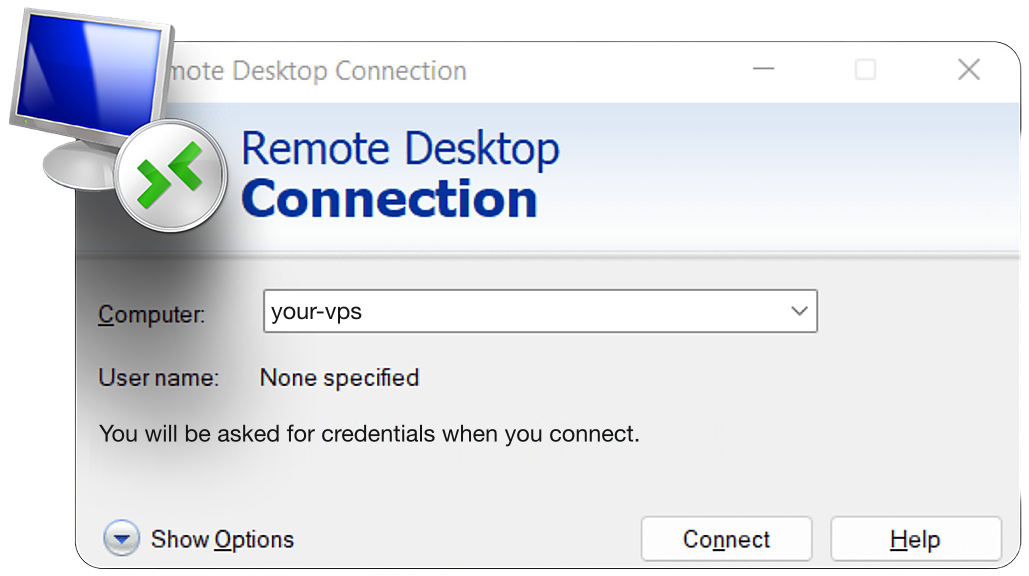
    Use the server address and credentials in your control panel with Remote Desktop on Windows or Windows App on Mac.

  2. Install your account-supported terminal

    Use the platform and connection option confirmed for your Optimus Futures account.

  3. Configure the trading connection

    Add assigned feed credentials, confirm the trading account and exchange subscriptions, and validate your workspace in simulation where available.

  4. Disconnect without signing out

    Close the remote connection, not the application or Windows session. Apps can keep running while the VPS is on. Monitor reconnects, account sessions, and scheduled maintenance.

What is a VPS for Optimus?

An Optimus VPS hosts the trading platform connected to your Optimus Futures account. Your terminal runs on a remote Windows desktop while brokerage and data services remain external. Use the platform-and-feed combination authorized for your specific account.

Choosing the best VPS for Optimus

Choose resources for your actual front end, whether it is a compact DOM workspace or a larger order-flow layout. Confirm feed compatibility and account permissions with Optimus before installation. Hosting does not include platform licensing or exchange data subscriptions.

Optimized for Optimus.

Your Optimus VPS stays online for every CME Globex session, hosted in Chicago on a typical 0.52 ms route to CME.

Two builds. Pick yours.

Your Optimus platform arrives installed on Windows Server 2025 or 2022, ready to log in. Choose from 40+ Windows platform templates at checkout.

Choose your operating system

Ready to log in

Services
Background services that cause stutter, stripped out
Stripped
Resources
CPU, memory and NVMe reserved for your VPS
Reserved
Platform
Your Optimus platform, installed at checkout
Pre-installed
Access
Full administrator access over Remote Desktop
Admin
Network
A dedicated IP and always-on DDoS protection with advanced filtering
Protected

Windows Server 2025 is standard on Dedicated servers and available on VPS plans.

Your new VPSWindows Server 2025
<60s
  1. Order placed
  2. Windows Server 2025 deployed
  3. Your Optimus platform installed
  4. Remote Desktop ready

Ready in under 60 seconds. From checkout to login.

Your Optimus VPS is typically deployed and ready in under 60 seconds after purchase, reachable over Remote Desktop. Dedicated servers take 30–120 minutes.

Online for every CME Globex session.

CME Globex equity-index futures trade from Sunday 5 PM to Friday 4 PM Chicago time, pausing for an hour each afternoon. Between your Remote Desktop check-ins, your VPS stays online with your Optimus platform open, market data keeps flowing and your strategies keep running.

Regular hours in Chicago time (CT); holidays and early closes vary. Check-ins are illustrative.

Prop firms

Prop firms QuantVPS traders use. Evaluation and funded accounts on one desktop.

Sign in through Tradovate or Rithmic, and your evaluation and funded accounts trade from the same desktop, still running when you disconnect.

Connected through Tradovate and Rithmic: Apex Trader Funding, Lucid Trading, Tradeify, My Funded Futures and 28 more.

Compatible with leading trade copiers. Run funded-account workflows with tools such as Replikanto, CrossTrade, and other platform-specific trade copiers. Compare features & pricing

Simulated · not real results

Accounts
AccountPosFillRealized P/LOpen P/LTotal P/LBalance
T-551072-01--$1,715.00$295.00$2,010.00$52,010.00
T-551072-02--$940.00$302.50$1,242.50$101,242.50
T-551072-03--$2,060.00$250.00$2,310.00$52,310.00
T-551072-04--$3,120.00$527.50$3,647.50$153,647.50
R-208134-01--$1,240.00$182.50$1,422.50$51,422.50
R-208134-02--$1,385.00$137.50$1,522.50$51,522.50
R-208134-03--$860.00$545.00$1,405.00$101,405.00

Optimus Flow's Accounts shows seven sample accounts.

A trade copier copies the lead account's ES order to the other six accounts, and each one fills in turn.

These accounts, prices and profits are simulated, not real results. Trading involves substantial risk of loss, and simulated results do not guarantee future results.

Optimus Flow is a trademark of its respective owner. QuantVPS is independent and is not affiliated with, endorsed by, or sponsored by Optimus Futures, LLC, or any of its affiliates.

Optimus Flow, NinjaTrader or Sierra Chart on your Optimus Futures VPS, as low as 0.52ms to CME.

Run Optimus Flow, NinjaTrader or Sierra Chart with your supported Optimus Futures connection from Chicago. Your VPS provides a network route to CME as low as 0.52ms and an always-on workspace; account permissions and order handling stay with the broker and feed.

What changes when your Optimus trading runs on QuantVPS.

Two things change when your Optimus trading moves off your desk: how it holds up in a fast market, and the hardware under it.

Volatility

Trade Through Volatility: Eliminate Freezes with a Dedicated Optimus Futures VPS. Stable through market volatility.

Don't let platform freezes during CPI, FOMC, or Non-Farm Payroll derail your futures strategy. Local PCs struggle under the data load of a fast CME session. A dedicated Optimus Futures VPS provides the consistent, powerful resources needed to process intense market data smoothly, ensuring reliable order execution and platform responsiveness when it counts. All of it runs with 99.999% uptime from top-tier datacenters with redundant power and network and a 24/7 on-site engineering team. A local PC in an office cannot offer that.

PassMark referenceData through 2026-10-05

Single-threadOne core · higher is faster

Standard VPSAMD EPYC 7003
2,554
High-Frequency VPSAMD Ryzen 9, latest generation
4,728
Every plan's benchmarks

Hardware

The QuantVPS Advantage: The Optimal VPS for Optimus Futures Traders. Dedicated CPU, memory, and NVMe.

Why settle for generic hosting? QuantVPS delivers a Chicago-based VPS engineered for futures traders on Optimus Futures. Benefit from 0.52ms latency to CME, enterprise-grade AMD hardware, dedicated resources, and 24/7 support that knows the platforms Optimus traders actually use. Your Optimus VPS is live in under 60 seconds, backed by a 14-day money-back guarantee. Moving from another provider? We handle the migration and your first month is free.

How your order reaches the exchange and fills.

Your Optimus platform pre-installed and optimized. Pick your Optimus-connected platform at checkout, Optimus Flow, NinjaTrader, or Sierra Chart, and it arrives installed on a Windows build tuned for trading, ready for your Rithmic or CQG routing. First session starts with a login, not an installer. The same QuantVPS trading VPS runs every Optimus-connected platform.
On the VPS
Your Optimus platform
Deployment
Chicago, USA
Published route
0.52 ms to CME
Access
Remote Desktop from any device

QuantVPS // Order execution

Illustration // sample prices

On CME Globex, resting orders at the same price generally fill in the order they arrive. With your platform in Chicago, a limit joins the queue earlier and an exit reaches the book sooner.

  1. Step 1: Rest a limit on the ladderA BUY limit joins the queue at its price on the DOM.
  2. Step 2: Move up the queueSellers hit the bid. The heat at your price thins as the orders ahead of yours fill.
  3. Step 3: Fill, on the tape and the chartYour print, your fill bubble, your open position.

Execution

Get Filled on the Price You Expect with Our Optimus Futures VPS. Optimized low-latency routing.

Slippage on ES, NQ, and CL can turn a winning futures strategy into a losing one. Our Chicago Optimus Futures VPS, with 0.52ms latency to CME, keeps your Rithmic and CQG order routes as short as possible, so orders from Optimus Flow, NinjaTrader, or Sierra Chart reach the exchange closer to your intended price.

Illustration with sample prices, not live market data. The route figure is the published typical figure for Chicago, USA, not a live measurement. Latency shortens the route; it does not guarantee a fill or a price.

Latency lessonAll lessons

Your Optimus VPS, close to the market: 0.52ms to CME from Chicago.

Put your Optimus server in the QuantVPS datacenter closest to the broker, exchange, or data feed it connects to, and reach it from wherever you trade.

Your home-to-VPS connection affects how responsive the remote desktop feels. The VPS-to-venue connection is the separate path your trading software uses.

View QuantVPS datacenters

8 locations. One connected network.

Short paths to the venue. Built for continuity.

Direct peering and Tier-1 carriers keep order routes fast. Multiple carriers and automatic failover support availability.

  • 7

    Locations with Windows for Optimus

  • 4

    Venues hosted near Chicago

Choose for the connection, not your postcode.

Our network spans eight data centers, all available for self-service VPS orders. Location and plan availability are shown at checkout. The 0.52ms figure is from Chicago to CME; latency varies by destination and region.

Choose your Optimus plan

Every plan runs on the same 99.999% infrastructure.

99.999% monthly VPS availability, backed by an industry-leading uptime guarantee SLA: a service credit for any covered outage of a minute or more. Availability and credits are assessed monthly under the SLA’s measurement rules, coverage and exclusions.

  • Core infrastructure. Redundant systems ensure continuous operation.

  • Network availability. Multiple carriers and automatic failover.

  • 99.999% uptime SLA. A service credit for any covered outage of a minute or more.

  • QuantVPS1 minute10% credit, from the first failed check
  • Competitor AAfter 21.6 minutes5% credit; nothing at 99.95% or more
  • Competitor BNot stated below 86.4 minutespromises 99.99%; its credit table starts at 10% for 99.8%
  • Competitor CMarket hours only10% below 100%, no minimum, counted from your report
  • Competitor DNone publishedits terms rule out credits

Competitors A to D: from each provider’s own published SLA or terms, read on 4 Nov 2026. Their terms can change. Credits are requested within 30 days after the month ends.

99.999% Uptime SLAMonthly VPS availability. Illustrates the commitment, not measured service history.

Server & network availability · 99.999% SLA

Every market sessionAround the clock

View live status

Tier IV datacenters, operated and protected around the clock

Tier IV.

Concurrently maintainable facilities. Built to keep your trading environment running.

Explore infrastructure
Automatic backups for Optimus VPS

Backups

Automatic Backups for Your Optimus Futures VPS. Automated backup workflows.

Recreating complex workspaces, chart templates, and automated strategies takes valuable time. Every VPS plan includes automatic off-site backups. Turn them on in the Control Panel under Manage Backups, and keep your own copies of important files too.

Remote Desktop Connection client on Windows

Remote Desktop on Windows

Access

Your Optimus Futures Platform, Anywhere: Seamless Optimus VPS Access. 99.999% uptime SLA.

Break free from your desktop. Our web-based control panel and included RDP access give you full command over your Optimus Futures VPS from any device, anywhere in the world. Manage your platform, check positions, and adjust strategies, knowing your Optimus setup stays exactly how you left it.

Choose your Optimus plan

What traders say about QuantVPS.

Your strategies keep running, even when you step away. Low-latency execution, live market volume, and SLA-backed reliability. Here is what traders say about it in their own words.

Rated 4.9 stars ·
Trusted by thousands of traders around the world

01VPS Ultra+ user · Customer story

Reviews change on their own. Pause, Previous or Next keeps one on screen; Play starts them again.

2+ years

with QuantVPS

“I started off with a different VPS company. After no support and tons of issues, I switched to QuantVPS. Tremendous experience after being with them for more than 2 years now.”

VPS Ultra+ user · 2+ year customerCustomer story

Disclaimer: Testimonials are quoted verbatim from individual QuantVPS customers and public review sites. Some are excerpts from longer reviews. Individual results vary. Latency, error rates, and cost outcomes depend on your location, platform, broker, and configuration. Testimonials are not a guarantee of future performance and do not constitute trading advice.

A managed trading VPS, not a server you set up yourself.

Trading hardware, exchange proximity, and real help. One VPS subscription.

Compare your options

QuantVPS

Built for traders

AWS EC2

Self-managed Windows VM

Your bill

QuantVPS

Unmetered bandwidth + support included

CPU, RAM + NVMe in one VPS subscription.

AWS EC2
Compute, disks + usage charges

Hardware

QuantVPS

Ryzen 9. Built for performance.

Every High-Frequency VPS · DDR5 + NVMe.

AWS EC2
Choose your instance family

Exchange proximity

QuantVPS

As low as 0.52 ms to CME

Typical latency from our Chicago infrastructure.

AWS EC2
Choose a region. Test the route.

Human help

QuantVPS

24/7 support from traders

People who understand your trading workspace.

AWS EC2
Choose a technical support plan

Getting started

QuantVPS

A workspace set up for trading

Supported platform setup + a team to help.

AWS EC2
Configure your own workspace

Uptime SLA

QuantVPS

99.999% for one VPS

Monthly target in our SLA. No second server needed.

AWS EC2
99.5% for one instance

All 5 in one subscription Ryzen 9 on High-Frequency plans

5 to choose and configure

Comparison details & sources

Your bill

QuantVPS
Your plan includes CPU, RAM, storage, and unmetered bandwidth. It also includes VPS setup and support, with no separate support subscription. Taxes, optional extras, and third-party licenses remain separate.
AWS EC2
EC2 runtime and EBS storage are priced separately. Data-transfer charges depend on usage.

Hardware

QuantVPS
Every High-Frequency VPS uses AMD Ryzen 9 processors (up to 5.7 GHz), DDR5 ECC memory, and enterprise NVMe. Standard plans use AMD EPYC. Resources chosen for the workload. Specifications vary by plan.
AWS EC2
Match an instance family, vCPU, memory, storage, and tenancy to your workload.

Exchange proximity

QuantVPS
Our Chicago infrastructure delivers latency as low as 0.52ms to CME. Choose the QuantVPS region nearest your broker or exchange connection. Latency varies by endpoint, route, and configuration; this is not an AWS or Azure latency measurement.
AWS EC2
Select an AWS Region or Local Zone, then validate the route to your broker or exchange endpoint.

Human help

QuantVPS
Our trading-focused support team includes traders. We include help with VPS setup, remote access and platform troubleshooting. Available 24/7.
AWS EC2
AWS includes Basic support. Technical support and its scope depend on your AWS Support plan.

Getting started

QuantVPS
Choose a supported platform setup, with help getting your VPS ready to use.
AWS EC2
Choose an image and instance, configure access, then install your trading software.

Uptime SLA

QuantVPS
Our SLA sets a 99.999% monthly uptime target for each VPS (about 26 seconds a month), with no second server or zone to set up. If a VPS misses it, you get a service credit of 10% to 100% of that VPS’s monthly fee, by how far uptime fell. The SLA does not guarantee uptime: the service credit is the remedy.
AWS EC2
The Amazon Compute SLA commits to 99.5% monthly uptime for a single EC2 instance. The 99.99% region commitment applies only when your instances run in two or more Availability Zones of the region. Below the commitment, AWS gives a service credit of 10%, 30% or 100% of the monthly charge, by how far uptime fell. The SLA was last updated May 25, 2022.

QuantVPS

Trading-focused VPS

Your trading desk.

Hardware, workspace, and help together.

Your VPS plan

CPU + RAM

NVMe storage

Bandwidth

Setup and platform help included
Service illustration · Resources vary by plan

Amazon EC2

Self-managed Windows VM

Your cloud project.

Flexible infrastructure you configure.

Windows image

Instance type

Storage

Access rules

Then connect and install your trading software.

Setup illustration · Based on official documentation

This compares a QuantVPS trading VPS with a self-managed Windows VM. AWS and Azure also offer managed services, marketplace software, and partner solutions. Those offerings differ. You manage your trading strategies, broker accounts, datafeeds, and platform licenses with either approach.

Features and availability depend on your plan and region. This is a service comparison, not a measured speed or price comparison. Sources reviewed September 19, 2026. Uptime commitments read November 14, 2026, from each provider’s SLA and our SLA.

Included resources vary by plan. Taxes, optional extras, and third-party licenses remain separate.

Compare QuantVPS plansPut your workspace on a trading VPS.

Optimus VPS FAQ.

Optimus questions, answered
Sound familiar?5 common ones

Ever missed a setup because you were away from your desk?

Market data keeps flowing and your strategies keep running.

If any of these sound familiar, a trading VPS is the fix.

Install the platform approved for your specific Optimus account, then configure its assigned data and routing service. The VPS hosts that application; it does not replace the brokerage or provide account access.

Confirm each application’s license and the account’s supported connections first. Parallel sessions may be restricted by the data service. If permitted, size for both workspaces and keep order ownership clear.

Use the selected platform’s export or backup process, then restore on the VPS. Check connection credentials, account mappings, and custom indicators after import instead of copying settings without verification.

No. Exchange subscriptions and broker permissions remain separate. Confirm the instruments and depth data available to your account before choosing an order-flow configuration.

A compact DOM consumes different resources than multiple footprint charts and historical analysis panels. Measure your chosen front end, include companion tools, and keep headroom for fast futures sessions.

Use an interface supported by the account’s platform and routing arrangement. Validate strategy permissions with the provider and test risk controls and recovery. A VPS alone does not enable an unsupported automation feature.
See all FAQAnswers on servers, latency, access, security and support.