Running Kalshi bots on a home setup can lead to slow performance and missed trades due to high latency, unstable connections, and limited hardware. A VPS (Virtual Private Server), especially one located near Kalshi's servers in Chicago, solves these issues by offering:
- Ultra-low latency (0–1ms): Faster order execution compared to 50–200ms on home internet.
- Reliable uptime: Less than 5 minutes of downtime per month versus 2–8 hours at home.
- Dedicated resources: Powerful CPUs, NVMe storage, and stable networks ensure smooth 24/7 bot operation.
With a VPS, your bots can respond instantly to market changes, avoid slippage, and trade efficiently. Setting up a VPS is straightforward, with plans starting at $59.99/month. For serious Kalshi traders, low latency and stable performance are game-changers.
Problems with Running Kalshi Bots from Home
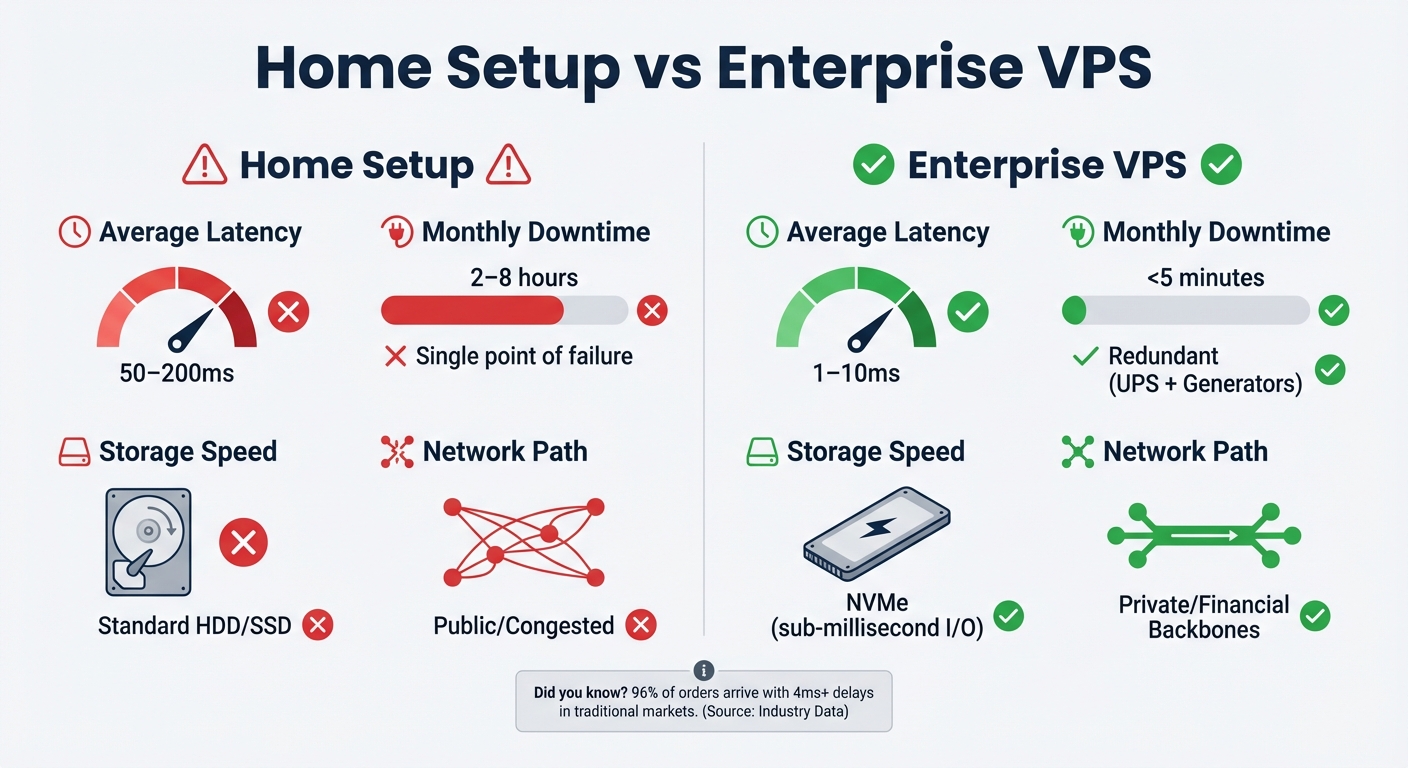
Home Setup vs VPS Performance Comparison for Kalshi Trading Bots
High Latency from Home Internet
Home internet connections might boast impressive download speeds, but they fall short when it comes to the ultra-low latency essential for trading. Residential ISPs typically deliver latency in the range of 50–200ms to exchange servers, whereas a properly located VPS can achieve just 1–10ms.
This limitation largely comes down to physics. A single millisecond of latency translates to about 124 miles of distance. So, if you're operating bots from California while Kalshi's servers are in Chicago, no amount of "faster internet" will eliminate the delay. Add to that the congestion caused by shared infrastructure during peak hours, and latency spikes become inevitable. Research shows that in traditional markets, 96% of orders arrive at exchanges with delays exceeding 4ms, meaning traders with 100ms+ latency are consistently outpaced in arbitrage opportunities.
And latency isn’t the only issue. Operating from home introduces another major hurdle: stability.
Downtime from Power and Internet Outages
Home internet connections typically experience 2–8 hours of downtime per month, compared to the less than 5 minutes offered by enterprise-grade VPS solutions. This can be disastrous during critical trading moments - whether it’s breaking political news, sudden weather changes, or shifts in economic indicators. A single 15-minute outage during a volatile period could mean missed arbitrage opportunities or an inability to exit positions in time.
Home setups are riddled with single points of failure: one power line, one ISP connection, and no backup systems. Unexpected outages from forced operating system updates, accidental unplugging of equipment, or hardware failures can easily disrupt operations. Professional traders mitigate these risks by using VPS platforms equipped with redundant power supplies, backup internet carriers, and other safeguards.
Even if your home connection stays online, the hardware itself often lacks the resilience and resources needed for continuous high-speed trading.

Run 24/7 while you sleep. Keep bots, platforms, and trade copiers online on a dedicated VPS.
Low-latency VPS hosting for your trading platform.
 CHINYC
 LON
LONFrom $59.99/mo


 CHI/CME futuresNYC/US marketsLON/FX EAs
 DUB/Polymarket
 AMS/EU FX
 FRA/Central EU
 TYO/APAC crypto
Limited Computing Resources
The average home computer isn’t built to handle the demands of 24/7 trading. During periods of intense market activity, limited processing power and slower storage can lead to execution delays and missed trades. For example, when market tick rates surge to hundreds per second, traditional hard drives or SATA SSDs in home setups may cause brief system freezes.
Low RAM can trigger disk swapping, further delaying critical trades. Meanwhile, background processes running on your machine consume CPU cycles, compounding delays and degrading performance.
| Feature | Home Setup | Enterprise VPS |
|---|---|---|
| Average Latency | 50–200ms | 1–10ms |
| Monthly Downtime | 2–8 hours | <5 minutes |
| Power Reliability | Single point of failure | Redundant (UPS + Generators) |
| Storage Speed | Standard HDD/SSD | NVMe (sub-millisecond I/O) |
| Network Path | Public/Congested | Private/Financial Backbones |
How VPS Hosting Improves Kalshi Bot Performance
A VPS offers a game-changing solution for automated trading by providing dedicated resources tailored to handle the demands of prediction markets. Unlike home setups, which can be plagued by connectivity issues and hardware limitations, a VPS ensures consistent performance and reliability. Here's how QuantVPS enhances Kalshi bot performance.
Approximately 1ms Latency for Faster Order Execution
QuantVPS's Chicago servers boast ultra-low latency - often around 1ms - to Kalshi's infrastructure. Compare this to the 50–200ms delays typical of home internet connections. In prediction markets, where arbitrage opportunities can vanish in milliseconds, this speed is critical. Between April 2024 and April 2025, automated systems captured $40 million in arbitrage profits from prediction markets. Faster order execution not only seizes these fleeting opportunities but also minimizes slippage, ensuring orders are filled at the intended price rather than being affected by transmission delays. Combined with a dependable network, this low-latency setup ensures your bots are always ready to act.
Continuous Uptime and Server Reliability
Enterprise-grade data centers provide an unmatched level of reliability. With features like redundant power systems, backup generators, and multiple internet carriers, these centers keep your bots running even when home setups might fail - whether it's due to storms, ISP outages, or power fluctuations. While home connections can experience 2–8 hours of downtime per month, QuantVPS typically limits downtime to less than 5 minutes. For prediction markets that operate 24/7, this reliability is crucial for capturing market opportunities that can arise at any time.
Dedicated CPU, RAM, and Storage
QuantVPS allocates dedicated CPU power, generous RAM, and cutting-edge NVMe storage to ensure smooth performance, even during peak trading activity. This setup eliminates the risk of system freezes or slowdowns that are common with consumer-grade hardware. Whether your bot is monitoring basic market activity or executing complex algorithms, these resources ensure it operates at maximum efficiency, giving you an edge in fast-paced trading environments.
Why Chicago VPS Location Matters for Kalshi Trading
Network Distance to Trading Servers
When it comes to ultra-low latency, Chicago's location plays a crucial role in boosting the performance of Kalshi trading bots. Known as the financial hub of the United States, Chicago offers a unique advantage. Running your Kalshi bot from this city means access to optimized network routes and specialized peering agreements designed for seamless financial data transmission. This setup reduces jitter and prevents latency spikes, issues often seen with residential connections or servers located outside financial centers.
Being close to major exchange infrastructure gives traders a direct edge. A Chicago VPS leverages premium network providers and fine-tuned routing paths to reduce the number of network hops. This streamlined connectivity lays the groundwork for the high-performance hardware offered by QuantVPS in Chicago.
QuantVPS Chicago Server Specifications
QuantVPS Chicago servers are built with cutting-edge technology, including AMD Ryzen 7950X3D and EPYC processors paired with NVMe M.2 SSD storage. These servers achieve an impressive benchmark latency of just 0.52ms to major exchange matching engines and support speeds of 1Gbps+, with bursts up to 10Gbps. This performance stands in stark contrast to the limitations of consumer-grade setups, offering a significant advantage for traders.
This robust infrastructure is designed to handle data-heavy operations without bottlenecks, ensuring that Kalshi bots execute trades efficiently. As Kalshi is the only CFTC-regulated prediction exchange in the U.S., the institutional-grade setup of QuantVPS aligns perfectly with the platform's professional trading standards.
Additionally, these servers guarantee 99.999% uptime, thanks to redundant power systems and multiple network carriers. This reliability is essential in a market environment that operates around the clock, ensuring no opportunity is missed.
How to Set Up Kalshi Bots on QuantVPS
Chicago's ultra-low latency infrastructure offers a significant edge for deploying Kalshi bots. Here's how to get started with QuantVPS.
Selecting Your VPS Plan
Stay online and closer to execution. Choose a VPS location for CME futures, New York markets, London FX, API trading, and more.
Host your platform near the market route that matters.
CHINYCLONFrom $59.99/mo
CHI/CME futuresNYC/US marketsLON/FX EAsDUB/PolymarketAMS/EU FXFRA/Central EUTYO/APAC cryptoPick a plan that matches the complexity of your bot's operations:
- VPS Lite: $59.99/month, ideal for monitoring a single market.
- VPS Pro: $99.99/month, suitable for multi-market arbitrage.
- VPS Ultra: $189.99/month, designed for advanced strategies.
- Dedicated Server: $299.99/month, perfect for high-frequency trading needs.
Opting for annual billing can save you about 30%.
Configuring Your VPS Server
Once you’ve selected and ordered your VPS plan, log in using the credentials provided in the QuantVPS dashboard. Connect to your server through Remote Desktop Protocol (RDP), ensuring you choose the Chicago location for the best proximity to Kalshi's servers.
Use a browser like Edge or Chrome to download any necessary software. Transfer your bot code and configuration files via RDP's file transfer feature. After that, set up your Kalshi API keys and define the required environment variables. To confirm the setup, run latency tests using the Command Prompt. These tests ensure everything is functioning correctly and that latency is as expected.
Finally, fine-tune your server settings to fully utilize QuantVPS's capabilities.
Running and Monitoring Your Bots
Once your VPS is configured, focus on maintaining your bots' performance and stability.
Start by launching your bot script and configure it to auto-start on Windows Server. Use the QuantVPS control panel to schedule regular backups and perform occasional ping tests to ensure latency remains between 0–1ms. As of March 2, 2026, QuantVPS has processed over $11.65 billion in just 24 hours, showcasing its reliability.
If you want to experiment with new configurations, consider ordering an additional VPS. Running both servers simultaneously lets you test changes without disrupting your existing setup. Once satisfied, you can transfer files at your convenience and cancel the original server.
Conclusion
Running Kalshi bots from home presents significant hurdles that can negatively impact trading performance. QuantVPS addresses these issues with lightning-fast latency of approximately 1ms from Chicago, enterprise-level uptime, and dedicated hardware designed to handle orders smoothly and without delays.
Professional VPS hosting offers clear benefits over residential setups. With low latency and dependable infrastructure, your bots can execute trades exactly when opportunities arise, reducing slippage and improving fill rates.
Chicago's position as a major trading hub amplifies this advantage. Its proximity to key financial networks provides 0.52ms latency to CME Group and 0–2ms to IBKR. This allows your bots to act faster than competitors relying on slower connections, a crucial edge that compounds across thousands of trades. Achieving this level of precision requires cutting-edge infrastructure.
QuantVPS pairs AMD Ryzen 7950X3D processors with NVMe SSD storage and enterprise-grade DDoS protection to ensure uninterrupted performance, even during volatile market conditions when opportunities arise most frequently. Starting at $59.99/month, QuantVPS delivers the professional tools needed for high-performance algorithmic trading.
When it comes to Kalshi bot trading, latency and location are key to success. QuantVPS provides both, ensuring your bots perform consistently in the moments where every millisecond counts.
FAQs
How do I measure my latency to Kalshi from a VPS?
To check how quickly your VPS connects to Kalshi, you can use tools like ICMP ping or run API connectivity tests. These methods let you measure the network round-trip time (RTT) by sending requests to Kalshi's server or API endpoint and recording the response time in milliseconds. Tracking this latency is essential for fine-tuning trading performance, especially when using low-latency VPS configurations.
Which VPS plan fits my Kalshi bot’s strategy?
When selecting a VPS plan for your Kalshi bot, your decision should hinge on your latency requirements and trading volume. If ultra-low latency is critical, the Chicago VPS is a solid choice, offering an impressive latency of approximately 0.52ms to CME Group exchanges - perfect for time-sensitive trading strategies.
For smaller bots or less intensive needs, the VPS Lite plan at $49/month provides a cost-effective option. However, if you're running high-frequency strategies that demand more processing power and resources, the VPS Ultra plan at $199/month is better suited to handle the workload. Ultimately, pick a plan that aligns with both your trading strategy and budget.
Do I need a Chicago VPS for best fills?
A Chicago VPS is highly recommended for achieving the best order fills in trading. Why? It offers ultra-low latency - approximately 0.52ms - to CME futures exchanges. This speed is crucial for executing trades efficiently, minimizing slippage, and ensuring your orders are processed faster and more precisely.