Which remote desktop tool is best for trading? Here's the short answer:
- Parsec: Best for traders who need ultra-low latency (7–10ms on LAN) and real-time responsiveness. Ideal for scalping or day trading with its smooth 4K/60 FPS streaming and fast input lag (29ms). Paid plans start at $8.33/month for multi-monitor setups. (See how to configure remote desktop for multiple monitors.)
- RDP: Perfect for automated trading and 24/7 VPS reliability. Built into Windows, it’s bandwidth-efficient (100–300 Kbps for basic tasks) and integrates seamlessly with Windows Server. Security requires careful configuration.
- RustDesk: Best for privacy-focused traders. Open-source with self-hosting options, it ensures full control over your data. Latency (50–70ms inter-city) is higher than Parsec, but it works across all platforms and is free for personal use.
Quick Comparison
| Feature | Parsec | Microsoft RDP | RustDesk |
|---|---|---|---|
| Primary Strength | Low latency (7–10ms) | Windows integration | Privacy & self-hosting |
| Latency (LAN) | 7–10ms | 15–25ms | 18–30ms |
| Encryption | AES-256 | TLS (up to 1.3) | End-to-end TLS |
| Cross-Platform | Windows-centric | Windows only | Full (Windows, macOS, Linux, mobile) |
| Self-Hosting | No | Yes | Yes |
| Cost | Free/$8.33+ per month | Included with Windows Pro | Free/self-hosting costs |
Bottom line: Choose Parsec for speed, RDP for simplicity, and RustDesk for privacy. Each tool has strengths tailored to specific trading needs.
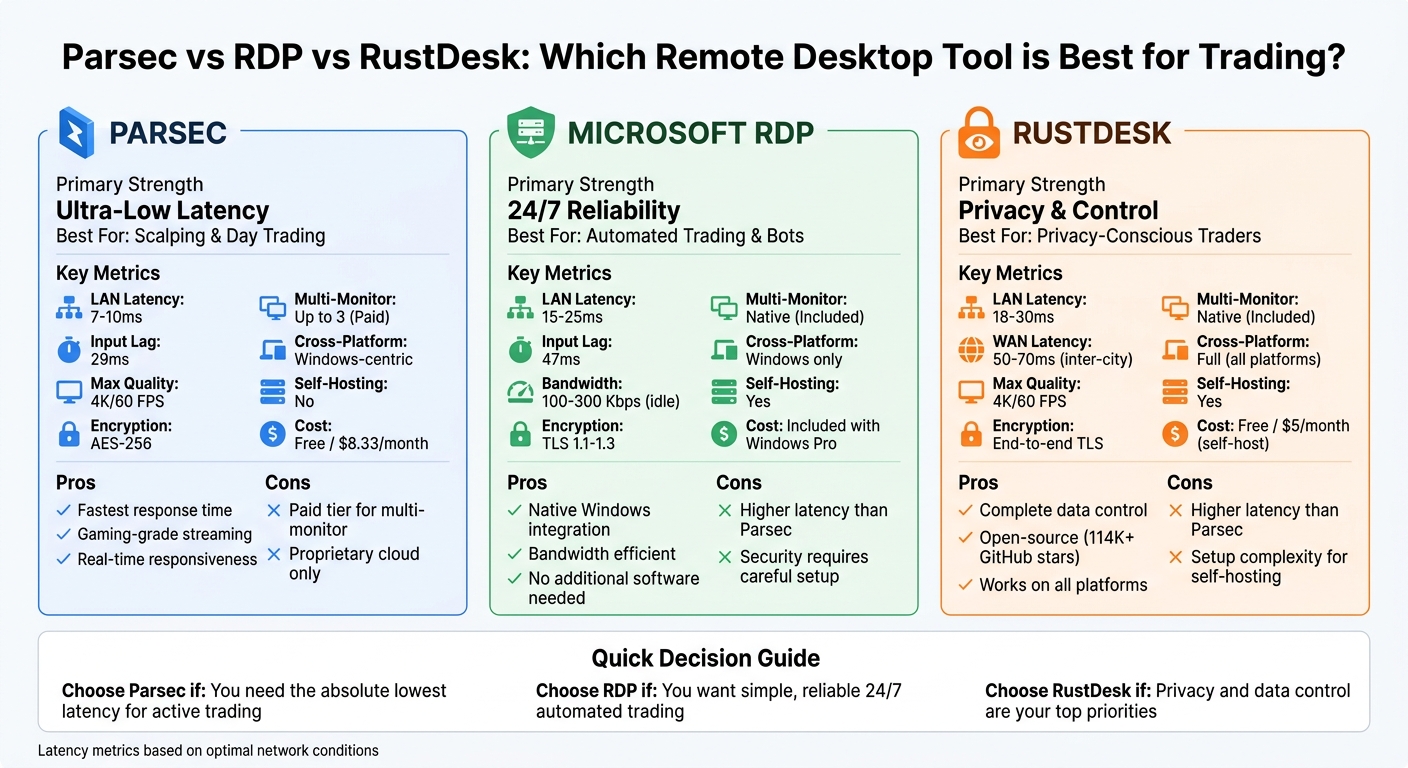
Parsec vs RDP vs RustDesk: Remote Desktop Performance Comparison for Trading
Parsec for Trading VPS Access
Performance and Latency
Parsec is known for delivering ultra-low latency streaming, making it ideal for trading applications. On a local network, round-trip latency typically ranges between 7–10ms. For inter-city fiber connections - common when accessing a VPS from home or an office - the median latency is around 25–35ms.
This performance is powered by Parsec's proprietary BUD protocol, a custom UDP-based networking stack built specifically for interactive streaming. With its zero-buffer architecture and low-level hardware acceleration, Parsec can detect network congestion and adapt in real-time, minimizing latency at every step.
"In the case of lots of loss, the best move with a video stream is to tweak the encoder's bitrate... we built our own networking protocol to shave milliseconds while maintaining high definition video." - Parsec Blog
For traders, these milliseconds matter. A mere 10ms latency difference can result in absorbing 1–2 pips of slippage during fast-moving events like NFP releases or central bank announcements. Parsec's low-latency performance also ensures a reliable connection, even under varying network conditions.
Connection Stability for Trading
Low latency is only part of the equation - connection stability is equally critical for smooth trading. Parsec addresses network fluctuations by dynamically adjusting to available bandwidth without introducing delays. For instance, if you're on a 12 Mbps connection, Parsec optimizes bandwidth usage while maintaining video quality. The protocol is designed to perform best with connections offering less than 50ms ping and 30 Mbps bandwidth.
Parsec supports 60–144 FPS streaming at resolutions up to 4K, ensuring that chart updates remain fluid even during periods of intense market volatility. To enable remote desktop functionality without needing a physical monitor attached to the server, simply check the "Virtual Display Driver" box during installation.
Security Features and Multi-Monitor Support
Parsec doesn’t just focus on speed; it also prioritizes security and functionality. Every session is encrypted with AES-256 per-session keys, and the data stream is protected using DTLS 1.2 encryption. With peer-to-peer, end-to-end encrypted connections, your trading data remains private and doesn’t pass through third-party servers. Additionally, NAT-traversal allows secure connections through firewalls without requiring complex port forwarding.
For traders using multi-monitor setups, Parsec supports up to three displays simultaneously. Each monitor can have its own settings for bandwidth, resolution, and frame rate, making it easy to dedicate one screen to charts and another to order execution.

Run 24/7 while you sleep. Keep bots, platforms, and trade copiers online on a dedicated VPS.
Low-latency VPS hosting for your trading platform.
 CHINYC
 LON
LONFrom $29.99/mo


 CHI/CME futuresNYC/US marketsLON/FX EAs
 DUB/Polymarket
 AMS/EU FX
 FRA/Central EU
 TYO/APAC crypto
To unlock multi-monitor streaming, you’ll need the paid Warp tier at $8.33 per user per month (billed annually). This tier also includes 4:4:4 color subsampling, which eliminates issues like the "bleeding" of red and green candle colors on charts - a common problem with lower-quality compression. For larger teams, the Teams plan ($30 per user per month) provides features like SAML SSO and centralized management.
To add screens during a session, press Ctrl+Shift+S. Ensure your VPS display settings are set to "Extend" mode, as multi-monitor features won’t work if screens are mirrored or duplicated.
RDP for Trading VPS Access
Performance and Bandwidth Usage
Microsoft's RDP is designed to be efficient with bandwidth, transmitting only screen updates instead of full video. For basic tasks, bandwidth usage typically falls between 100–300 Kbps, while running trading platforms like NinjaTrader can require 500 Kbps–1 Mbps.
The protocol uses dynamic bandwidth allocation to adjust image quality and frame rates in real-time based on network conditions. This means it adapts seamlessly as you update charts or execute trades. Even when idle, RDP sessions consume just 0.3 Kbps, keeping the connection active without draining resources.
In benchmarks, RDP demonstrated a median input lag of 47 ms. While slightly higher than Parsec's 29 ms, it remains suitable for most trading needs. The protocol also boasts a session launch time of 3.1 seconds and a RAM overhead of just 68 MB, highlighting its overall efficiency. If you're dealing with limited bandwidth, you can further reduce latency by lowering the display resolution and disabling features like remote audio or printer redirection.
| Usage Scenario | Estimated Bandwidth |
|---|---|
| Idle Session | ~0.3 Kbps |
| Basic Use (Documents/Email) | 100–300 Kbps |
| Moderate Use (Trading Tools) | 500 Kbps–1 Mbps |
| Microsoft Excel (Active Updates) | 150–500 Kbps |
| Heavy Use (Multimedia/Video) | 2–5 Mbps+ |
In addition to its bandwidth efficiency, RDP offers robust security measures, making it a solid choice for trading applications.
Security Protocols and Encryption
RDP incorporates Network Level Authentication (NLA), which ensures users authenticate before a session begins. This prevents unauthorized access to the login screen itself. It also supports TLS 1.1, 1.2, and 1.3, encrypting all communications to safeguard against threats like man-in-the-middle attacks.
However, RDP's security history serves as a reminder of the importance of proper configuration. For example, in February 2025, a manufacturing company in Ohio fell victim to a LockBit ransomware attack. The attackers exploited stolen RDP credentials on a server where NLA was disabled and multi-factor authentication was not in place. The breach resulted in $1.1 million in damages, including a $680,000 ransom payment and $420,000 in recovery expenses.
To secure RDP in trading environments:
- Never expose RDP port 3389 directly to the internet. Use a VPN for access instead.
- Enable NLA via Windows Group Policy.
- Set up multi-factor authentication using tools like Duo or Microsoft Entra ID.
- Restrict access by IP address through Windows Firewall, allowing only trusted sources.
- While changing the default port can reduce automated scans, it should be part of a broader security strategy.
Windows Server Integration
RDP's integration with Windows Server enhances its reliability and ease of use, especially for trading applications.
A key advantage of RDP is its native compatibility with Windows Server 2022, the operating system used by all QuantVPS plans. As a Microsoft-built protocol, RDP operates at the kernel level, reducing overhead and latency compared to third-party tools.
This integration allows for complete administrative control without requiring extra software. You can manage trading platforms, configure services, and apply security updates through the same Windows interface you’re already familiar with. Trading platforms like MetaTrader 4/5 and NinjaTrader run continuously on the server, ensuring that automated strategies remain active even if you disconnect your local machine.
RDP also supports features like clipboard sharing, file redirection, and multi-channel communication for audio and video. Professional data centers typically guarantee 99.9% uptime, translating to less than nine hours of downtime annually. To further optimize performance on QuantVPS, disable visual elements such as "Desktop Background", "Font Smoothing", and "Visual Styles" in the RDP client's "Experience" tab. This reduces the data load and improves responsiveness.
RustDesk for Trading VPS Access
Performance and Connection Speed
RustDesk is an open-source remote desktop tool that uses peer-to-peer technology and end-to-end encryption. Its performance metrics show a median LAN latency of 18–30 ms, compared to Parsec's 7–10 ms. On a 100 Mbps inter-city fiber connection, RustDesk's latency increases to 50–70 ms (versus Parsec's 25–35 ms), and on public Wi-Fi, it ranges from 95–150 ms, while Parsec records 60–90 ms in similar conditions.
| Scenario | Parsec (ms) | RDP (ms) | RustDesk (ms) |
|---|---|---|---|
| Same-room LAN | 7–10 | ~15–25 | 18–30 |
| Inter-city (100 Mbps) | 25–35 | 45–60 | 50–70 |
| Public Wi-Fi | 60–90 | 90–140 | 95–150 |
While RustDesk may not match Parsec's ultra-low latency, it performs well enough for most trading workflows. If you self-host a relay server, you can reduce latency further by cutting out delays from third-party relays, ensuring a more stable and responsive connection. This makes RustDesk a practical choice for trading setups, especially where self-hosting is an option.
Self-Hosted Security and Data Privacy
RustDesk stands out for its self-hosting capabilities, which provide greater security and control over connection data. This is particularly valuable for traders managing sensitive strategies or operating within strict regulatory frameworks.
"Self-hosting your own server adds more security by removing any dependency on a third-party relay." – Patrick Hearn, XDA Developers
When you self-host RustDesk, all connection data stays within your infrastructure, minimizing exposure risks and aiding compliance with regulations. Its peer-to-peer connections further enhance session security by protecting against unauthorized access. For even stronger security, you can customize your self-hosted instance with configurations designed to reduce vulnerability to automated scans.
RustDesk's Pro version steps up security with features like access control lists, user-level permissions, device grouping, and multi-factor authentication. To deploy securely, use the official Docker Compose files and always download RustDesk directly from its official website. Additionally, traders or firms can personalize the client with custom branding to align with their professional image.
Cross-Platform Compatibility
RustDesk's broad platform support adds to its appeal. It works seamlessly across Windows, macOS, Linux, iOS, Android, and web browsers, making it easy to access your trading VPS from virtually any device. Unlike Parsec, which focuses more on Windows, RustDesk provides host and client software for all major desktop operating systems. Its Flutter-based interface ensures a consistent user experience across platforms, and features like clipboard synchronization and a dual-pane file manager simplify tasks like transferring trading logs or screenshots.
To get the best performance, you can enable direct IP access to bypass relay servers. Mac users should manually grant accessibility and screen recording permissions to avoid functionality issues. For mobile users, lowering resolution or frame rates can help maintain stability on weaker networks.
Stay online and closer to execution. Choose a VPS location for CME futures, New York markets, London FX, API trading, and more.
Host your platform near the market route that matters.
CHINYCLONFrom $29.99/mo
CHI/CME futuresNYC/US marketsLON/FX EAsDUB/PolymarketAMS/EU FXFRA/Central EUTYO/APAC cryptoRustDesk is free for personal use, and self-hosting typically costs as little as $5 per month for a basic VPS. With over 114,000 stars on GitHub, RustDesk has become one of the most popular open-source remote desktop tools available. Its combination of performance, security, and cross-platform flexibility makes it a strong choice for managing trading VPS access.
Comparison Table: Parsec vs RDP vs RustDesk
Compare key metrics for trading VPS access.
| Feature | Parsec | Microsoft RDP | RustDesk |
|---|---|---|---|
| Primary Strength | Ultra-low latency (Gaming grade) | 24/7 Reliability & Windows Integration | Privacy & Self-hosting |
| Median Input Lag | 29–38 ms | 47 ms | 50–70 ms (WAN) |
| LAN Latency | 7–10 ms | 15–25 ms | 18–30 ms |
| Max Streaming Quality | 4K / 60 FPS | Variable | 4K / 60 FPS (tuning required) |
| Encryption | AES-256 per-session | TLS / RSA-2048 | End-to-end TLS |
| Multi-Monitor Support | Paid tier required (Warp/Teams) | Native / Included | Native / Included |
| Self-Hosting | No (proprietary cloud) | Yes (server roles) | Yes (relay/rendezvous) |
| Cross-Platform | Windows-centric hosting | Windows host only | Full (Windows, macOS, Linux, mobile) |
| Open Source | No | No | Yes (AGPL-3.0) |
| Personal Use Pricing | Free | Included with Windows Pro | Free |
| Paid Plans | $8.33/month (Warp) | N/A | $9.90/month (Individual) |
| Best For | Active trading/scalping | Standard VPS admin & 24/7 bots | Privacy-conscious traders |
The table above highlights each tool's strengths in performance, security, and usability.
Parsec stands out for its ultra-low latency and smooth visuals, making it perfect for traders who need real-time responsiveness. However, unlocking features like multi-monitor support requires a paid plan. Microsoft RDP, on the other hand, ensures uninterrupted sessions, even if your local connection drops, making it a solid choice for automated trading systems. RustDesk appeals most to those prioritizing privacy and control, especially if you're comfortable setting up your own relay server to keep data entirely within your control.
This comparison blends performance, reliability, and security aspects to help you choose the best fit for your trading VPS needs. Whether your priority is minimizing lag, ensuring constant uptime, or maintaining data privacy, there's a solution tailored to your workflow.
Which Remote Desktop Tool Should You Use
Best Tool for Different Trading Needs
The right remote desktop tool for trading largely depends on your specific trading style. If you're a scalper or day trader who relies on real-time responsiveness, Parsec stands out. With a median input lag of just 29 ms compared to RDP's 47 ms, Parsec delivers an experience that feels almost like you're working on a physical machine. A Hacker News user, kaladin-jasnah, sums it up perfectly: "Parsec is hands down the best solution I've encountered due to its low latency". This low lag is critical for executing trades that hinge on split-second market changes.
For automated trading and 24/7 bot setups, RDP remains a solid choice. It's built into Windows Server, requires no extra software, and integrates seamlessly with QuantVPS. Its native multi-monitor support makes it ideal for running multiple dashboards without additional licensing fees. However, as another Hacker News user, fsh, notes, "RDP is noticeably laggy in comparison [to Parsec]. I would even say that Parsec over a good internet connection... feels more responsive than RDP over LAN".
If privacy is your priority, RustDesk is worth considering. This tool is ideal for traders in regulated industries or those who value complete control over their data. With RustDesk, you can self-host your relay server, ensuring all trading data stays within your infrastructure. As the Ultimate Systems Blog highlights, "RustDesk is the privacy-first rebel: perfect for self-hosted homelabs, regulated industries, and anyone who trusts open-source code more than marketing brochures". However, RustDesk's latency (50–70 ms over inter-city connections) may not suit high-frequency trading.
Next, let's see how these tools align with different QuantVPS plans for optimal performance and cost management.
Matching Tools with QuantVPS Plans
Pairing the right remote desktop tool with your QuantVPS plan ensures you get the best balance of performance and cost.
- VPS Pro ($99.99/month or $69.99/month annually) is a great match for Parsec, especially for traders managing 3–5 charts. Its 6 cores and 16 GB RAM easily handle Parsec's hardware-accelerated encoding, which uses about 112 MB of RAM compared to RDP's 68 MB. This plan also supports dual monitors, making it a perfect fit for Parsec's Warp tier ($8.33/month), which enables streaming across up to three monitors.
- For lighter setups, VPS Lite ($59.99/month or $41.99/month annually) pairs well with RDP. This plan is ideal for single-chart setups or automated bots that don't demand high visual responsiveness. With 4 cores and 8 GB RAM, RDP's lower resource requirements help preserve system performance.
- More demanding setups call for VPS Ultra ($189.99/month or $132.99/month annually) or Dedicated Server plans ($299.99/month or $209.99/month annually). These plans can comfortably run all three tools. If you're considering RustDesk, these higher-tier plans allow you to allocate resources for a self-hosted relay server while managing complex, multi-chart trading operations. With 24+ cores and 64–128 GB RAM, even Parsec's 4K at 60 FPS streaming won't slow you down.
Setup Tips for Better Performance
To get the most out of your chosen tool, follow these setup tips. Start by installing Parsec or RustDesk via RDP. Once installed, switch to your preferred tool for daily trading. Disabling "Clipboard Sync" and "Audio Redirection" can cut CPU usage by 22–37%, reducing network jitter during high-volume trades and improving overall responsiveness.
For Parsec, make sure hardware acceleration is activated on both your local machine and VPS. Parsec's ability to achieve sub-16 ms latency relies heavily on GPU encoding (e.g., NVENC for NVIDIA or AMF for AMD). Without a modern GPU, you won't fully benefit from Parsec's speed. Also, set your streaming quality to 4:4:4 color subsampling to ensure crisp text on trading dashboards.
RDP users should enable Network Level Authentication (NLA) to block up to 92% of unauthorized access attempts. Always route RDP through a VPN or secure gateway to protect your VPS from automated attacks - never expose it directly to the internet.
For RustDesk, self-host the relay server (hbbs/hbbr) on a separate VPS for as little as $5/month. This setup ensures your trading data never passes through third-party infrastructure, giving you full control over your information. This is especially important for institutional traders or those handling regulated financial data.
Conclusion
Selecting the right remote desktop tool hinges on your specific trading requirements. Parsec is a standout option for its ultra-low latency. With sub-16ms latency, it ensures remote trading feels nearly as smooth as working locally. For scalpers or day traders who depend on split-second reactions, Parsec's proprietary streaming codec is a game-changer. Its Warp subscription, priced at $8.33 per month (billed annually), provides access to this performance boost. As Alex Chen, Senior Developer Tools Specialist, explains:
"Parsec's streaming technology is in a different league - built specifically for latency-sensitive use cases".
RDP is a solid choice for traders who prioritize simplicity and native Windows integration. It’s included with Windows Server and pairs seamlessly with QuantVPS. However, security is critical - RDP should never be exposed directly to the internet. With over 3.5 million devices vulnerable due to unsecured RDP ports, always use a VPN or secure gateway to stay protected.
For those who prioritize privacy, RustDesk offers the ability to self-host your relay server, ensuring that trading data remains private. This open-source tool, boasting over 114,000 stars on GitHub, is highly regarded for its focus on security. Patrick Hearn from XDA-Developers highlights its strengths:
"A self-hosted instance of RustDesk offers better privacy... End-to-end encryption beats ad-hoc security any day".
That said, RustDesk's 50–70ms inter-city latency may not be ideal for high-frequency trading platforms. Still, it remains a reliable option for regulated environments or proprietary algorithmic setups.
FAQs
Do I need a GPU to use Parsec well?
You don’t absolutely need a GPU to run Parsec well. Integrated graphics, such as Intel HD 4000 or NVIDIA 600 series, meet the basic requirements. That said, if you're aiming for top-notch performance - like 4K streaming with minimal delay - a dedicated GPU with hardware encoding is highly recommended. While Parsec can function with integrated graphics, having a dedicated GPU makes a noticeable difference in streaming quality and responsiveness.
How can I secure RDP without opening port 3389?
To keep RDP secure without exposing port 3389, you can use a few effective techniques. One option is secure tunneling, such as using the AWS CLI with SSM port forwarding. Another method involves setting up RDP certificate authentication through a Remote Desktop Gateway, combined with client certificate policies for added security.
If those options don't fit your setup, you can also change the default RDP port to a custom one. Pair this with strict firewall rules - like limiting access by specific IP addresses or CIDR blocks - to further lock down access. These strategies can significantly lower security risks without needing to rely on a VPN.
Is self-hosting RustDesk hard to set up?
Self-hosting RustDesk is doable but does require some technical know-how. The setup involves installing and configuring two executables: hbbr (for relay) and hbbs (for signaling). You'll also need to open specific network ports (TCP 21114-21119 and UDP 21116). While there are guides available for platforms like Windows and Docker, the process of configuring networks and servers might feel a bit overwhelming for beginners. However, with clear documentation and some technical experience, it’s a task that can be tackled.