
If you have watched a funded account shrink faster than expected on a bad trading day, you know how quickly things can go wrong without a clear loss limit. My Funded Futures uses a daily loss limit rule to protect both the trader and the account. Understanding how it works can mean the difference between keeping your funded status and losing it. This article breaks down how the drawdown rule is calculated, what counts toward your maximum daily loss, and how to stay within boundaries.
With a stable setup, you spend less time troubleshooting and more time protecting your account balance and staying within your prop firm's risk management rules.
Summary
- Prop firms calculate daily loss limits differently, and the distinction matters more than most traders realize. Some firms count only realized profits and losses from closed trades, while others include unrealized P&L from open positions. That difference means a floating loss on a position you intend to hold can count against your limit right now, before you close anything.
- The stated daily loss limit is not your actual risk budget. Slippage, commissions, and open-position fluctuations all reduce the amount you can practically risk on any given day.
- Setting a personal stop well inside the firm's hard limit is one of the most reliable ways to avoid a breach. That gap is not unused capacity. It is structural protection.
- Position sizing needs to recalculate as losses accumulate throughout the session, not stay fixed at the opening trade size. A trader who risks $150 per trade on a $600 personal budget has room for four trades at the start. After two losses, the remaining budget is $300, and the next trade should be sized against that reduced figure, not the original one.
- Automation removes the willpower problem from daily loss management. Platforms that let you set a maximum daily loss and automatically halt trading take the decision out of the moment when emotion is most likely to override discipline. Research cited in the article suggests that traders who implement strict daily loss limits reduce account blowout risk by up to 60%, and automation is the most consistent way to enforce that.
- Revenge trading is the most common way daily limits get breached. A loss triggers a larger entry, which produces a larger loss, which triggers an even larger entry. That sequence can exhaust a remaining risk budget in minutes. Recognizing the pattern before it starts requires building a trigger into the process itself, such as checking the remaining personal risk budget the moment the impulse to recover a loss appears.
- A trading VPS addresses this by keeping automated strategies and stop-loss orders running on a stable, low-latency connection, so execution holds up even on the sessions where a single technical failure could push an otherwise manageable trade past the daily limit.
What is a Daily Loss Limit and Why Do They Matter for Prop Traders?
A daily loss limit is the ceiling on how much a funded trader can lose within a single trading day. What happens when you reach it depends on the firm: at some firms a breach fails the account, while My Funded Futures' Builder plan uses a soft pause that stops trading for the rest of the session. That single rule shapes every position size, every entry decision, and every moment you choose to walk away from the screen.
Example: If your funded account carries a daily loss limit of $500, hitting -$500.01 triggers the rule just as -$5,000 would. At a hard-limit firm the account fails; on an MFFU Builder account, trading pauses until the next session.
Warning: Even a soft daily loss limit ends your trading day. Treat the number as a hard stop for the session, and plan every session around it.
| What It Controls | Why It Matters |
|---|---|
| Maximum daily drawdown | Protects the firm's capital from outsized losses |
| Position sizing decisions | Forces traders to size responsibly on every entry |
| Entry timing and frequency | Limits revenge trading and emotional overtrading |
| Account status | A breach pauses trading for the session (MFFU Builder) or fails the account (hard-limit firms) |
Takeaway: The daily loss limit is the defining rule of prop trading. Every position, every entry, and every exit decision must be made with this hard ceiling in mind.
Why prop firms built this rule in the first place
Prop firms give traders real money and need them to protect it as hard as they pursue returns. The daily loss limit exists because trading without limits to recover losses can erase weeks of careful gains. According to 4PropTrader, funded accounts can reach up to $250,000, raising the stakes for both sides. The limit filters for professionalism.
Why do calculation methods catch so many funded traders off guard?
Traders who lose funded accounts to daily loss limit violations usually know the rule exists. What catches them off guard is how the loss gets calculated. Some firms measure losses at the end of the day; others use real-time breach systems where a temporary floating loss (even on a trade that eventually closes in profit) triggers immediate termination. These structures are not interchangeable, and treating them as such is one of the most costly assumptions a funded trader can make.
Does a fixed or trailing limit change how you should trade?
Not all daily loss limits work the same way. A fixed dollar limit (say $2,000 on a $100,000 account) is easy to track. A trailing loss limit differs: as your profits grow, the floor rises with them, meaning success narrows your margin for error rather than expanding it. Knowing which model your firm uses before your first trade is foundational to your entire risk framework.
Why does platform uptime matter when volatility spikes?
Watching your positions manually works fine during calm markets, but breaks down when the market moves wild and many positions shift simultaneously. Our trading VPS keeps your platform connected during those moments, ensuring your stop orders execute as intended and you can monitor losses in real time.
That VPS runs in Chicago, 0.52 ms from CME, with a 99.999% uptime SLA. See our NinjaTrader VPS.
What the daily loss limit actually tests
The daily loss limit is a professionalism checkpoint disguised as a risk rule. It forces the question: can you stop trading when the day is no longer in your favor? Traders who pass challenge phases and reach funded status often discover the psychological weight of that question exceeds expectations. The temptation to recover a bad morning session before the day closes is real, and the firms know it. The5ers notes that most prop firms reset the daily loss limit every 24 hours, meaning a clean slate is always one day away, but only if you protect your account long enough to see it.
Knowing the reset exists and trusting yourself to stop trading before you need it are two different disciplines.
Strategies to Manage Your Daily Loss Limit
Respecting your daily loss limit requires a deliberate process that recalculates your exposure in real time, adjusts your trade size as losses build up, and establishes a personal stop inside the firm's hard floor.
"The traders who survive long-term are not the ones who avoid losses. They are the ones who control the size of every loss before it controls them." (Risk Management Best Practices)
Tip: Set your personal stop threshold at 70–80% of the firm's hard floor. This gives you a critical buffer zone to exit before the firm's limit triggers an automatic cutoff.
Warning: Failing to recalculate exposure in real time is one of the most common mistakes traders make. As losses accumulate, your remaining risk budget shrinks. Your position sizing must shrink with it.
| Strategy | Purpose | When to Apply |
|---|---|---|
| Real-time exposure recalculation | Tracks remaining daily risk budget | After every trade |
| Dynamic trade size adjustment | Reduces size as losses build | When losses hit 25–50% of daily limit |
| Personal stop inside hard floor | Prevents firm-level cutoff | Set before the trading day begins |
Uptime
99.999% uptime. Built for 24/7 trading reliability.
Your VPS runs in Tier IV datacenters with redundant power and network, monitored 24/7 on site.
See the uptime SLA







From $29.99/mo · Windows or Linux
Build a Personal Risk Layer Inside the Firm's Limit
The firm's daily loss limit is the wall you must never reach, not your operating budget. According to Trade That Swing, stopping after losing 2% of account capital prevents a single bad day from consuming a week or month of gains. Set your personal stop meaningfully tighter than the firm's limit. If the firm allows $2,000, set your personal stop at $1,500. That $500 gap absorbs slippage, commissions, and open-trade fluctuation that could push a compliant position into a technical breach before you can react.
- Firm daily limit: $1,000
- Personal stop: $600
- Maximum planned risk per trade: $150
- After two losses: $300 used
- Remaining personal risk: $300
- Next trade size: recalculated downward, not held at $150
Most traders treat their starting risk per trade as fixed rather than as a fraction of remaining budget. After two losses, your remaining personal risk is $300, not $600. The next trade must be sized against $300, making your maximum risk smaller than at the open. This recalculation is essential: it keeps the framework intact as the day progresses.
Practical Strategies That Reinforce the Framework
Risk Less Per Trade
Capping your risk per trade at 10 to 15% of your daily loss limit ensures no single trade can wipe out your session. If your daily limit is $1,000, that puts your per-trade risk between $100 and $150, letting you take several setups before the limit comes into view.
Set a Personal Limit Below the Firm's
The buffer must account for execution costs, not intended risk alone. Slippage and commissions reduce your effective risk budget on every trade; ignoring them is how traders breach limits despite technically sound setups.
Avoid Overtrading
A losing morning often triggers a search for recovery trades, and each additional entry depletes the remaining daily budget faster than the original loss. Quality over quantity is arithmetic: fewer trades mean fewer opportunities for losses to compound into a breach.
Use Daily Stop-Loss Automation
Some platforms allow you to set a maximum daily loss that halts trading automatically once hit. This removes the willpower problem entirely. You decide to stop before the session begins, not during a losing streak when the urge to recover is strongest. PNL Ledger reports that traders who implement strict daily loss limits reduce account blowout risk by up to 60%, and automation is the most reliable way to enforce discipline when emotion runs high.
Journal Your Emotions as a Risk Signal
The urge to recover losses is a predictable response to financial pain and the most direct path to breaching a daily limit. Journaling connects to the risk mechanism: when you notice the impulse to revenge-trade, check your remaining personal risk budget and recalculate your next allowable trade size. The journal entry should trigger a number, not a reflection.
Stop Trading After a Profitable Session
Many traders lose their morning gains by continuing to trade into the afternoon out of habit or boredom. A profitable session is a completed session. You can breach the daily loss limit on winning days too, through overtrading after a strong start.
Common Mistakes That Accelerate Breaches
Not Tracking Real-Time Equity
Closed-trade profit and loss is incomplete. Unrealized losses on open positions count toward your daily limit on most prop firm platforms. Traders monitoring only closed trades operate with incomplete data, creating a breach that feels sudden but was building in an open position the entire time.
Trading Too Large
Oversized positions compress the entire daily risk budget into one or two trades. No framework survives a position sized at 50% of the daily limit. The recalculation process works only when individual trade risk remains small enough to permit multiple entries before the personal stop is reached.
Revenge Trading
A loss triggers a larger entry, which triggers a larger loss, which triggers an even larger entry. This sequence exhausts the remaining personal risk budget in minutes. Recognizing the pattern before it starts is the only reliable defense, and you must build that recognition into the process, not improvise it in the moment.
Ignoring Slippage and Fees
Execution costs are not a rounding error on a funded account. On a day where your personal stop is $600, and your per-trade risk is $150, a single trade with $20 of slippage and commissions costs $170, not $150. Across four trades, that gap adds up to $80 of unplanned exposure. Build it into your calculations from the start.
Failing to Adjust for Volatility
High-volatility sessions require smaller position sizes to maintain the same dollar risk per trade. A stop distance that costs $150 in a calm market can cost $300 in a fast-moving one if price gaps through your level. Not adjusting means your real risk per trade exceeds your plan, and the daily budget depletes faster than expected.
Your firm's daily loss limit is the hard boundary. Your personal risk limit should sit within that boundary, and every new trade should be sized against the remaining risk, not the risk you had at the beginning of the day.
How MFFU Calculates the Daily Loss Limit

MFFU sets your Daily Loss Limit using fixed dollar amounts instead of percentages. This approach ensures the limit remains the same throughout your trading journey, no matter how much your account balance grows or how successful your trades are. For example, on a Builder 50K account the daily loss limit is a fixed $1,000 soft pause. Even if your account balance increases significantly, that $1,000 limit doesn't change. The Builder 50K allows up to 4 minis or 40 micros, so a few full-size losing trades can reach that limit quickly. The goal? To help you avoid over-leveraging and protect your account from rapid depletion. Let’s break down how these fixed amounts are calculated.
The Calculation Formula Explained
MFFU uses preset dollar amounts based on your account type. For instance, the Builder 25K has a $600 soft daily loss limit, the 50K $1,000, the 100K $1,750 and the 150K $2,500. These limits don’t fluctuate - they stay fixed from the moment you begin trading until you either breach a rule or upgrade your account.
The limit applies to all activity during the trading day, which runs from 6:00 PM to 4:10 PM EST. This includes both closed trades and any unrealized losses from open positions. For example, if you’ve already lost $800 on closed trades and have an open position showing a $200 unrealized loss, you’ve hit the $1,000 limit for a Builder 50K account.
What Affects Your Daily Loss Limit
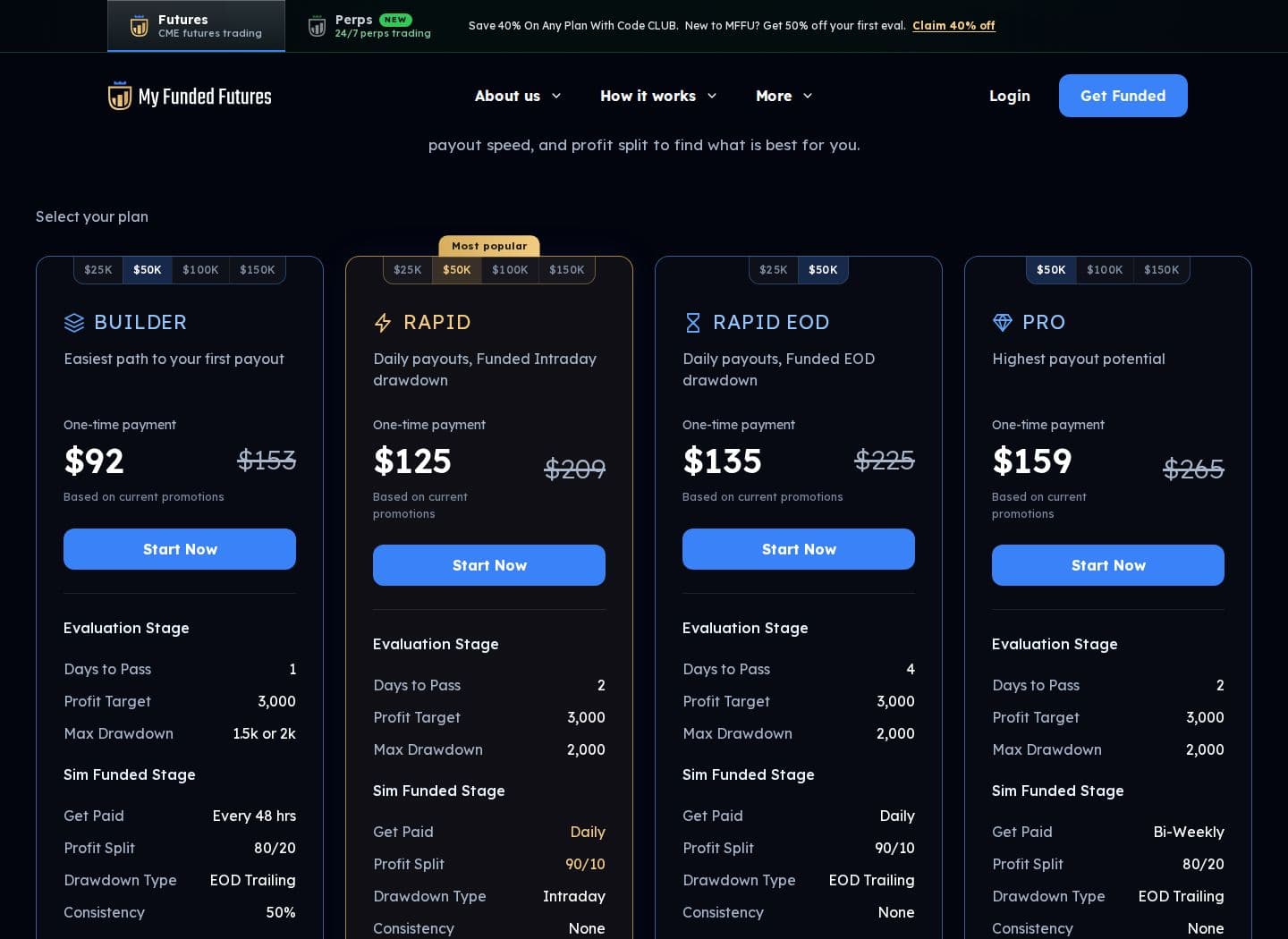
Two main factors determine your daily limit: your account plan and your starting account size. Among current plans, only Builder has a daily loss limit (a soft pause); Rapid, Rapid EOD and Pro have none. Starter, Expert, Starter Plus, Core, Scale and Flex are legacy plans that are no longer sold.
Another key element is contract limits. For example, trading 4 E-Mini contracts on the Builder 50K's $1,000 limit means a 3-point adverse move (with each point costing $50 per contract) costs $600, or 60% of your daily limit.
"Soft DLL does not breach your account. Hitting the $1,750 Soft DLL soft-pauses trading for the rest of the trading session. The account remains open and the evaluation continues the next trading session." (MyFundedFutures, Builder 100K guide)
Next, we’ll explore how these limits differ depending on the account type.
Daily Loss Limits by Account Type
Daily loss limits depend on the type of account plan, not just the account size. For Rapid, Rapid EOD and Pro, there are no daily loss limits in either the evaluation or the sim-funded stage. The Builder plan has a soft daily loss limit at every stage, and Flex is now a legacy plan. This policy provides traders with more freedom to refine their strategies without restrictions.
On Builder, the soft daily loss limit applies in the evaluation and sim-funded stages, and the Builder 50K keeps a $1,000 limit on its live account too; hitting it pauses new trades for the rest of the session without closing the account. These limits are tied to the account size and remain fixed after being set. For instance, a Builder 50K has a $1,000 soft daily loss limit, the 100K $1,750 and the 150K $2,500.
Order flow
Built for scalpers. Heatmaps on dedicated resources.
Order-flow heatmaps and DOM ladders run on dedicated CPU, memory and NVMe, so your charts keep responding during volatility.
See the dedicated hardwareFrom $29.99/mo · Windows or Linux
Account Types and Their Loss Limits
Here’s a breakdown of daily loss limits for different MFFU account plans:
| Account Plan | Account Size | Daily Loss Limit |
|---|---|---|
| Builder | $25,000 | $600 (soft pause) |
| Builder | $50,000 | $1,000 (soft pause) |
| Builder | $100,000 | $1,750 (soft pause) |
| Builder | $150,000 | $2,500 (soft pause) |
| Rapid | All sizes | None |
| Rapid EOD | $50,000 | None |
| Pro | All sizes | None |
Daily Loss Limit vs. Maximum Drawdown: What's the Difference?
The Daily Loss Limit (DLL) and Maximum Drawdown (MDD) are two distinct safeguards designed to protect your MFFU account. The DLL acts like a financial "circuit breaker", limiting how much you can lose in a single trading day. On the other hand, the MDD is a broader safety measure, ensuring your balance never falls more than a set dollar amount below its highest end-of-day level. Knowing how these limits work is crucial for keeping your account in good standing.
One major distinction lies in how they reset. The Daily Loss Limit resets with each new session at 6:00 PM EST, meaning you can start fresh the next session. The Maximum Drawdown, however, is cumulative - it tracks your account's performance over its entire duration and doesn’t reset. This means you could hit your DLL multiple times without losing your account, as long as your total losses stay below the MDD threshold. Crossing the DLL stops your trading for the day but leaves your account active for the next session. Breaching the MDD, however, results in the termination of your account's evaluation or funded status, requiring a reset fee - typically around $97.
For example, on a Builder 50K account, the soft DLL is $1,000, while the end-of-day trailing max loss is $2,000 (or $1,500 with the add-on). By understanding these limits, you can use them as performance benchmarks to manage risk and pass a prop firm challenge more effectively. Up next, examine the consequences of exceeding these thresholds and strategies to avoid them.
What Happens If You Breach the Daily Loss Limit?
If you go over your Daily Loss Limit (DLL), the MyFundedFutures system steps in and halts all trading activity for the rest of that trading day. This means you won’t be able to open any new positions until trading resumes at 6:00 PM EST. This enforced pause acts as a cooling-off period, giving you time to evaluate your strategy and workspace risk controls.
A DLL breach doesn’t mean your account is terminated. While trading is paused for the day, your account remains active. Open positions will stay open unless they also hit your Maximum Drawdown. Once the new trading day begins, your account will automatically reset, allowing you to continue trading without any additional steps. Plus, you won’t face the $97 reset fee unless you exceed the Maximum Loss Limit, which helps protect your account’s overall standing.
However, frequent breaches of the DLL could lead to a formal account review by the risk management team. To avoid this, take the opportunity to analyze your trades after a breach and steer clear of impulsive actions like revenge trading. Staying disciplined is key to maintaining long-term success.
Real Trading Examples of the Daily Loss Limit
Here are two scenarios that show how the Daily Loss Limit works in trading, using real MFFU account settings. These examples highlight how losses can add up quickly and trigger the system's safeguards.
Example 1: The Morning Momentum Trade Gone Wrong
Imagine a Builder 50K account with a $1,000 soft Daily Loss Limit. The trading day begins at 6:00 PM EST. By 9:30 AM EST, the trader takes a long position on ES futures, anticipating a bullish move. Unfortunately, the market moves in the opposite direction. By 10:15 AM EST, the trader has $700 in realized losses, leaving only $300 before hitting the $1,000 limit.
Later, at 11:00 AM EST, the trader enters another trade with a $250 risk. Price slips through the stop and the trade shows an unrealized loss of $320. At this point, the account's total loss is $700 (realized) + $320 (unrealized) = $1,020. Since this exceeds the $1,000 limit, the soft pause kicks in and the trader can't trade again until the next session opens at 6:00 PM EST. The account itself stays open.
This example shows how a couple of poorly timed trades can quickly end your trading day, even on a soft limit.
Example 2: Death by a Thousand Cuts
Now consider a Builder 25K account with a $600 soft Daily Loss Limit. The trader makes 15 small trades throughout the day, with mixed results. By 2:00 PM EST, they’ve accumulated $380 in realized losses, plus $45 in commissions and fees, for $425 in total. This leaves just $175 before hitting the limit. If the trader takes one more scalp trade with a $200 stop loss and the stop is hit, the loss passes the limit and the soft pause stops trading for the rest of the day.
This scenario underscores the importance of tracking not just trade losses but also additional costs like fees and commissions to avoid exceeding the limit.
These examples emphasize the need for careful risk management and close monitoring of cumulative losses to stay within your Daily Loss Limit.
How to Avoid Breaching the Daily Loss Limit
Staying within your Daily Loss Limit (DLL) is all about smart risk management. A good starting point is to cap your risk per trade at 10–15% of your DLL. For example, if you're trading a Builder 50K account with a $1,000 DLL, your maximum risk per trade should range between $100 and $150.
To add an extra layer of protection, consider setting a personal "soft" limit that’s 20–30% below the official DLL. For instance, if your firm’s limit is $1,000, you could stop trading once losses hit $750. This buffer accounts for slippage or unexpected costs.
Risk Management Techniques
One effective approach is the "three-strike rule." If you face three consecutive losing trades, cut your position sizes by 50% for the rest of the session. This strategy helps avoid the emotional spiral that can lead to "loss acceleration" and breach your DLL.
Another tip: steer clear of trading during Tier 1 economic data releases. MyFundedFutures does not allow T1 news trading on Rapid, Rapid EOD and Pro sim-funded accounts (it is allowed in their evaluations and on Builder), as slippage during such times can bypass stop losses and trigger a breach.
For contract sizes, always align them with your DLL rather than just your account balance. For example, on a Builder 50K account with a $1,000 DLL, trading 4 mini ES contracts risks $200 per point, so five points against you would use the entire daily limit. Choose your contract sizes with that in mind.
Using Technology to Track Your Losses
Efficient tracking of losses is just as important as planning your trades. Real-time monitoring tools can help you stay within your limits. If you’re using Tradovate, enable the "Accounts" module and configure it to display "DRAWDOWN AUTO LIQ LEVEL" and "DIST DRAWDOWN." These settings will show your current limit and how close you are to breaching it.
The MFFU Dashboard also offers a Daily Loss Guard feature, which tracks your real-time profit and loss, including simulated commissions and fees, throughout your session.
This minimizes the risk of technical disruptions that could prevent you from executing protective stops or staying aware of your loss thresholds.
Here’s a quick reference table to help you align your risk limits with your account type:
| Account Type | Daily Loss Limit | Recommended Risk Per Trade (10-15% of DLL) | Max Contracts |
|---|---|---|---|
| Builder 25K | $600 | $60 - $90 | 2 Minis |
| Builder 50K | $1,000 | $100 - $150 | 4 Minis |
| Builder 100K | $1,750 | $175 - $263 | 6 Minis |
| Builder 150K | $2,500 | $250 - $375 | 9 Minis |
| Rapid / Rapid EOD / Pro | None | N/A | Varies by size |
Conclusion
The Daily Loss Limit plays a key role in managing risk for MFFU traders. It’s not just about protecting your capital - it’s also about maintaining your composure. For example, on a Builder 50K account, reaching the $1,000 limit pauses trading for the rest of the session, ensuring losses don't spiral out of control.
Disciplined risk habits also buy you time. A paused session costs far less than a failed account, so every day you stay inside the limit is another chance to reach your target. That is why consistent risk tracking and careful trading decisions matter so much.
To effectively manage the Daily Loss Limit, traders need strong risk control habits and dependable tools. Using low latency trading VPS options for a stable platform connection is critical - it reduces the chances of technical issues interfering with your ability to track losses or execute necessary risk measures.
When approached with the right mindset, the Daily Loss Limit becomes more than just a restriction. It’s a tool for growth, helping traders focus on sustainable performance. By respecting this limit, you’re not limiting potential - you’re building a solid foundation for long-term success.
FAQs
Does the daily loss limit include commissions and fees?
Yes, the daily loss limit takes commissions and fees into account. It's calculated based on your net profit and loss for the trading day, which includes all trading-related expenses like fees and commissions. Be sure to include these costs when planning your trades to stay within the limit and adhere to MFFU rules.
What time does MFFU’s trading day reset for the daily loss limit?
The MFFU trading day runs from 6:00 PM EST, when the Globex session opens, to 4:10 PM EST, when open positions are closed. The daily loss limit resets with each new session at 6:00 PM EST.
How can I set a personal stop-loss limit below the daily loss limit?
To manage risk effectively, set a personal stop-loss that falls below your daily loss limit. This means aligning your stop-loss orders with your individual risk tolerance for each trade. Typically, this could range from 0.1% to 0.25% of your trading capital.
Keep a close eye on your cumulative losses throughout the day to ensure they don’t exceed your overall daily loss limit. The daily loss limit acts as a safeguard, halting trading if it’s reached. While the daily limit protects you on a broader scale, personal stop-losses help control risk at the trade level, giving you more precision in managing potential losses.


