Low latency trading is all about speed - executing trades in microseconds or even nanoseconds. This matters because even a 1-millisecond delay can cost millions annually for large firms. Here's what you need to know:
- Why Speed Matters: Faster systems mean better trade execution, less slippage, and higher profits. Delays as small as 74 milliseconds can lead to losses of $170 per 120 trades at 1 lot.
- Where Delays Happen: From network ingress to strategy logic and order generation, every step in the tick-to-trade process adds latency.
- How to Reduce Latency: Use colocation services, advanced hardware like FPGA NICs, and software optimizations like kernel bypass to cut delays.
- Key Tools: Proximity hosting near exchanges, direct fiber connections, and high-performance servers are essential for staying competitive.
For traders, the takeaway is simple: every microsecond counts. Whether you're a high-frequency trader or running algorithms, optimizing your infrastructure and execution speed can make or break your success.
How Latency Works in Trading: The Tick-to-Trade Process
Tick-to-Trade Latency Breakdown: Where Delays Occur in Trading Systems
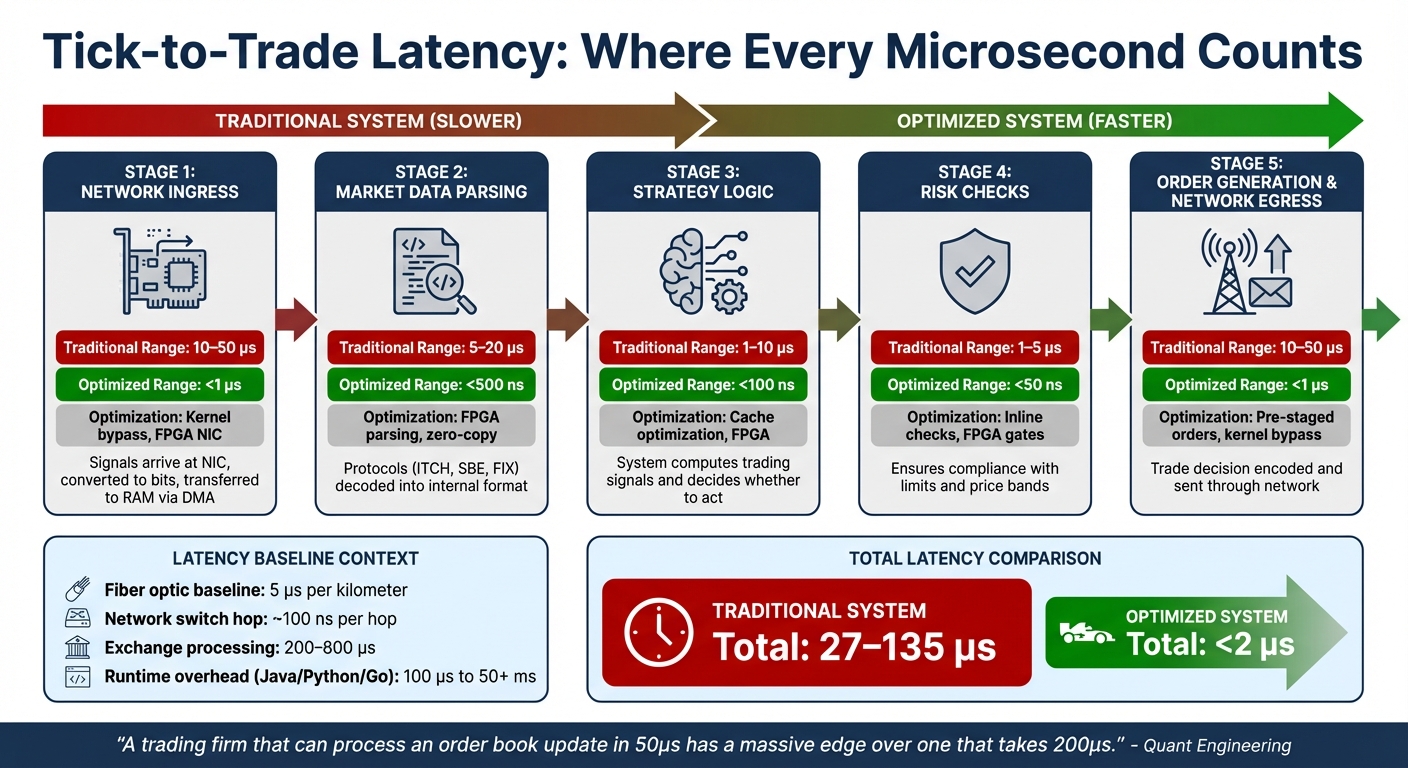
Tick-to-trade (T2T) is the precise measurement of time between receiving a market event - a "tick" - and sending out the corresponding order message. This process, often referred to as the wire-to-wire cycle, highlights where time is consumed in trading systems.
At its core, physics sets the baseline for latency. Fiber optic cables, for instance, introduce about 5 microseconds (µs) of delay per kilometer due to light traveling at 200,000 km/s within the fiber. On top of that, each network switch hop adds around 100 nanoseconds. These physical limitations are the starting point, even before data is processed by the system.
Where Latency Occurs in the Trading Workflow
The T2T process can be broken down into several stages, each contributing to overall latency:
- Network Ingress: Signals arrive at the Network Interface Card (NIC), are converted into bits, and transferred to RAM via Direct Memory Access (DMA). This step introduces delays of 10–50 µs, influenced by operating system tasks like interrupt handling and context switching.
- Market Data Parsing: Protocols such as ITCH, SBE, or FIX are decoded into a usable internal format. This step can add 5–20 µs unless optimized.
- Strategy Logic and Risk Checks: The system computes trading signals, decides whether to act, and performs inline risk checks to ensure compliance with limits and price bands. Combined, these steps can take 2–15 µs in traditional setups.
- Order Generation and Network Egress: The trade decision is encoded into an outbound message and sent back through the network. This stage can add another 10–50 µs.
One major bottleneck is the round-trip hop over the PCIe bus between the NIC and CPU, which slows down software-based systems. Additionally, runtime overheads from languages like Java, Python, or Go can introduce unpredictable delays ranging from 100 µs to over 50 milliseconds. Exchanges themselves contribute further, adding 200–800 µs for internal matching and risk checks.
| Component | Traditional Range | Optimized Range | Optimization Method |
|---|---|---|---|
| Network Receive | 10–50 µs | <1 µs | Kernel bypass, FPGA NIC |
| Market Data Parse | 5–20 µs | <500 ns | FPGA parsing, zero-copy |
| Strategy Logic | 1–10 µs | <100 ns | Cache optimization, FPGA |
| Risk Checks | 1–5 µs | <50 ns | Inline checks, FPGA gates |
| Network Transmit | 10–50 µs | <1 µs | Pre-staged orders, kernel bypass |
Optimizing each stage is critical for achieving sub-millisecond performance, which is essential in low-latency trading environments. These delays have a direct impact on execution quality.
How Latency Impacts Trading Performance
The combined delays in the T2T process play a significant role in trading outcomes. In price-time priority markets, even a delay of nanoseconds can push your order further back in the queue, reducing the likelihood of execution. Slower systems may also fall victim to faster participants who exploit outdated quotes, leading to increased hedging costs and reduced profit margins. During volatile periods, delays of just a few milliseconds can significantly affect execution prices, cutting into potential profits.
"A trading firm that can process an order book update in 50µs has a massive edge over one that takes 200µs." - Quant Engineering
Jitter, or inconsistent latency, is often more detrimental than slow average speeds. A system with a consistent 10 µs response time is far more reliable than one that averages 5 µs but occasionally spikes to 500 µs. High-frequency trading (HFT) now makes up about 55% of U.S. equity volume. Standard algorithmic systems typically operate at over 100 µs, while optimized software using kernel bypass can achieve 1–10 µs. The most advanced HFT firms, leveraging FPGAs, operate in the 100–500 nanosecond range.
Core Infrastructure Components for Ultra-Low Latency
To tackle the delays outlined earlier, three essential infrastructure elements are key to achieving sub-millisecond execution: optimized network connectivity, colocation services, and high-performance hardware. Each addresses specific latency challenges in the tick-to-trade process, forming the backbone of competitive trading systems.
Network Connectivity and Physical Proximity
Physical distance directly impacts latency. Light travels through fiber optics at about 200,000 km/sec, so a server 1,000 kilometers from an exchange adds at least 5 milliseconds of one-way delay due to propagation alone. In high-frequency trading, every meter of cable counts, as even small distances add nanoseconds of delay.

Run 24/7 while you sleep. Keep bots, platforms, and trade copiers online on a dedicated VPS.
Low-latency VPS hosting for your trading platform.
 CHINYC
 LON
LONFrom $29.99/mo


 CHI/CME futuresNYC/US marketsLON/FX EAs
 DUB/Polymarket
 AMS/EU FX
 FRA/Central EU
 TYO/APAC crypto
"High-frequency trading is not won in Python notebooks or strategy decks. It is won in physical space." - Digital One Agency
Minimizing network hops is also critical. Public internet routing can introduce 20–200 milliseconds of latency. Direct Market Access (DMA) bypasses brokers and sends orders straight to the exchange's order book, cutting out multiple checkpoints. For long-distance links, microwave technology offers faster transmission than fiber, reducing round-trip latency between hubs like Chicago and New Jersey to about 8 milliseconds, compared to 13 milliseconds for fiber.
Consistency is just as important as speed. A stable 15-microsecond connection outperforms an unstable 9-microsecond path that fluctuates under load. This is why traders cluster their infrastructure in financial hubs like Equinix NY4/5/6 (New York), Aurora DC3 (Chicago), and Equinix LD4 (London), where liquidity is concentrated [4, 20].
Once network optimizations are in place, colocation becomes the next step to further reduce latency.
Colocation Services and Direct Market Access (DMA)
Colocation involves housing your server in the same data center as the exchange’s matching engine, reducing the physical transmission distance to just meters [4, 17]. This is done via cross-connects, which are physical fiber optic cables linking your server rack directly to the exchange's network switch [17, 20]. By eliminating the public internet, colocation slashes latency to less than 500 microseconds for order acknowledgment.
Exchanges use fiber equalization to ensure uniform cable lengths, creating a level playing field for all colocated participants. Below is a comparison of latency profiles by setup type:
| Setup Type | Latency Profile | Distance | Best For |
|---|---|---|---|
| Standard Retail | 20ms – 200ms | Thousands of miles | Swing traders, investors |
| VPS Solution | 5ms – 50ms | Near exchange city | Retail algos, day traders |
| Direct Market Access | 1ms – 10ms | Near exchange city | Scalpers, pro algos |
| True Colocation | < 1ms (Microseconds) | Inside exchange facility | HFT, market makers |
Costs for colocation vary. For example, CME Group charges $12,000 per month for a 10G handoff at its Aurora, Illinois data center, plus a $2,000 setup fee [18, 20]. Cross-connects typically cost $350–$550 per month, though exchanges often impose higher fees for access ports. For traders seeking lower costs, proximity hosting via a VPS in the same city or data center campus offers a middle ground, ensuring cleaner network paths at a fraction of the price [17, 20].
High-Performance Hardware: NICs, SSDs, and CPUs
Hardware plays a crucial role in eliminating delays. Network Interface Cards (NICs) are often the first bottleneck. Standard NICs add 20–50 microseconds of latency. Advanced NICs with kernel bypass capabilities, like those from Solarflare or Mellanox, reduce this to 1–5 microseconds. For even greater speed, FPGA-based NICs process data in hardware, achieving latencies as low as 100–500 nanoseconds.
"The NIC choice often determines the latency floor for the entire system regardless of software optimization." - Arpit, Author, Nadcab
Beyond networking, CPUs with high single-thread performance and large L3 caches are essential. Traders often disable hyper-threading and power-saving features to ensure consistent performance [7, 4]. Techniques like thread pinning, which assigns critical tasks to specific CPU cores, prevent operating system interference.
For storage, NVMe SSDs are critical for fast data logging and state persistence. Paired with high-speed RAM (often overclocked and equipped with ECC for reliability), these components ensure maximum throughput when all memory channels are utilized [21, 7]. To maintain consistent performance, traders configure hardware for determinism - using fixed CPU frequencies, large page sizes, and optimal PCIe locality [7, 4].
These hardware optimizations, combined with network and colocation strategies, create the high-speed infrastructure needed to compete in today’s trading landscape.
Trading VPS Hosting with QuantVPS for Minimal Latency
QuantVPS takes trading infrastructure to the next level by offering proximity hosting designed to achieve minimal latency. With servers strategically located in Chicago and New York, QuantVPS ensures ultra-low latency trading, delivering as little as 0.52 milliseconds to the CME matching engine.
This setup leverages direct fiber-optic cross-connects to exchanges like CME Globex, paired with AMD EPYC and Ryzen processors, high-speed DDR4/DDR5 RAM, and NVMe M.2 SSDs to eliminate processing delays. Additionally, all servers come pre-installed with Windows Server 2022 and offer a 99.999% uptime SLA, ensuring reliability.
"Our Chicago datacenter provides ultra-low latency (<0.52ms) directly to the CME exchange, enabling faster futures trade execution and significantly minimizing slippage." – QuantVPS
QuantVPS provides network speeds starting at 1Gbps, with the ability to burst up to 10Gbps, making it capable of handling the high-intensity data demands of active trading environments. Supporting over $11.30 billion in daily futures volume, QuantVPS allows traders to scale their resources instantly via a user-friendly dashboard, ensuring no downtime or data loss as strategies evolve.
QuantVPS Standard Plans Comparison
Choosing the right VPS plan depends on the number of charts and strategies you run at once. For basic setups with 1–2 charts, the VPS Lite plan is a solid choice. If you’re working with 3–5 charts and need simple backtesting capabilities, VPS Pro offers the necessary power. For more demanding workloads - 5+ charts with moderate to extensive backtesting - VPS Ultra or Dedicated Server plans provide the CPU cores and RAM required.
| Plan | Price (Monthly) | CPU Cores | RAM | NVMe Storage | Number of Monitors Supported | Network Speed | Ideal For |
|---|---|---|---|---|---|---|---|
| VPS Lite | $59.99 | 4 cores (AMD EPYC) | 8GB DDR4 | 70GB | 1 monitor | 1Gbps+ (10Gbps burst) | 1–2 charts |
| VPS Pro | $99.99 | 6 cores (AMD EPYC) | 16GB DDR4 | 150GB | Up to 2 monitors | 1Gbps+ (10Gbps burst) | 3–5 charts |
| VPS Ultra | $189.99 | 12–24 cores (AMD EPYC) | 32–64GB DDR4 | 320–500GB | Up to 4 monitors | 1Gbps+ (10Gbps burst) | 5–7 charts |
| Dedicated Server | $299.99 | 12+ cores (AMD Ryzen) | 128GB DDR4 | 2TB+ | Up to 6 monitors | 10Gbps+ (10Gbps burst) | 7+ charts & bots |
Multi-monitor support through Remote Desktop enables professional traders to create flexible, efficient workspaces tailored to their needs.
For those who demand even faster performance, QuantVPS offers Performance Plans (+), which further enhance processing power and speed.
QuantVPS Performance Plans (+) for Advanced Trading
Performance Plans are built for traders managing complex strategies or high-frequency trading where every microsecond matters. These plans incorporate DDR5 ECC memory and higher-clocked processors, providing significant boosts in calculation speeds and chart rendering.
The performance improvements are clear: the VPS Lite+ plan achieves a PassMark score of 8,500, compared to 5,092 for the standard VPS Lite. At the top end, the Dedicated+ plan reaches an impressive 68,230 - over 13 times faster. For traders managing multiple prop firm accounts, VPS Pro+ at $129.99/month ensures smooth handling of simultaneous order flows. Institutional traders or those running 30+ accounts should consider the Dedicated+ plan at $399.99/month, offering 128GB DDR5 RAM and 16+ dedicated cores.
QuantVPS also provides a 5-question configurator on its website, helping traders match their platform and strategy needs to the best plan. Upgrades are seamless, with prorated billing ensuring no interruptions as trading operations expand.
Software and Hardware Strategies to Improve Execution Speed
When it comes to shaving off those critical microseconds in trading, software plays just as big a role as hardware. While infrastructure and server specs set the foundation, the way software interacts with hardware can make or break execution speed. Standard operating systems introduce delays that, in the high-stakes world of trading, can be costly. The goal? Minimize every layer between market data and order execution.
Event-Driven Architecture and Kernel Bypass
Traditional network stacks funnel data through multiple operating system layers, adding latency at every step. Kernel bypass technologies like DPDK or Solarflare OpenOnload cut through this by mapping network card memory directly into user space. This eliminates intermediary OS layers, dropping network latency from 20–50μs to a mere 1–5μs.
How does this work? By avoiding interrupts and context switches. Instead of waiting for the OS to notify the application about incoming data, busy polling constantly checks the network card for packets. Yes, this increases CPU usage, but for traders working in microsecond windows, it’s a worthwhile tradeoff.
"The NIC choice often determines the latency floor for the entire system regardless of software optimization." – Arpit, Nadcab Labs
Operating system tweaks also play a big part. Disabling CPU power-saving modes (C-states and P-states) ensures the processor is always ready to operate at full speed. Using huge memory pages - 2MB or 1GB instead of the standard 4KB - reduces Translation Lookaside Buffer (TLB) misses significantly, sometimes by as much as 100x. Pre-allocating memory at startup further avoids delays during trading.
Lock-free data structures are another game-changer. By replacing traditional mutexes with atomic operations and Single-Producer Single-Consumer (SPSC) queues, you eliminate the risk of delays caused by threads waiting on locks. Similarly, switching from text-based FIX protocol messages (200–800 bytes) to binary protocols like ITCH or SBE (20–60 bytes) reduces CPU-intensive string parsing, speeding up the process.
But software tuning isn’t the only way to push the limits - hardware-based solutions take things even further.
Stay online and closer to execution. Choose a VPS location for CME futures, New York markets, London FX, API trading, and more.
Host your platform near the market route that matters.
CHINYCLONFrom $29.99/mo
CHI/CME futuresNYC/US marketsLON/FX EAsDUB/PolymarketAMS/EU FXFRA/Central EUTYO/APAC cryptoFPGA Acceleration and Thread Pinning
Field-Programmable Gate Arrays (FPGAs) bring a whole new level of speed by running trading logic directly in hardware. Unlike CPUs, which process instructions one at a time, FPGAs can handle multiple tasks - like market data parsing, order book updates, and signal generation - simultaneously through parallel circuits.
For context, CPUs typically take 500–1,000 microseconds for tick-to-trade execution. FPGAs, on the other hand, can complete the same process in just 150–300 nanoseconds. In one benchmark from November 2025, a Xilinx Virtex UltraScale+ FPGA with four parallel decoder modules achieved 20–25 nanoseconds parsing latency per message and 100–150 nanoseconds total pipeline latency. That system handled 8.3 million messages per second at peak, offering a 3–7x speed advantage over CPU-based setups.
"FPGA logic acts as the processor. You are not programming instructions - you are designing circuits that directly process market data and orders." – Algo Trading Desk
For those sticking with CPUs, thread pinning (or CPU affinity) is an effective software-based optimization. By dedicating specific CPU cores exclusively to trading threads, you can eliminate context switches caused by OS scheduler activity. Linux kernel parameters like isolcpus and nohz_full ensure trading threads operate without interference. Disabling hyper-threading further prevents resource sharing between logical cores, keeping performance consistent.
| Feature | CPU-Based Trading | FPGA-Accelerated Trading |
|---|---|---|
| Processing | Sequential (one instruction at a time) | Parallel (simultaneous hardware logic) |
| Latency | 500–1,000 μs | 150–300 ns |
| Jitter | High (due to OS scheduling and interrupts) | Near-zero (deterministic) |
| Context Switching | 50–1,000 CPU cycles per switch | Zero (data flows directly to logic) |
Implementing FPGAs isn’t cheap - it can cost anywhere from $1 million to $3 million and requires a team of 5–10 engineers working for 6–18 months. Many firms opt for a hybrid setup: using FPGAs for fixed tasks like market data parsing and risk checks, while CPUs handle the more dynamic strategy logic with kernel-bypass techniques. This approach strikes a balance between speed and flexibility, a critical factor in high-frequency trading.
Hardware Tuning and Monitoring for Competitive Performance
Even the most advanced trading systems need ongoing adjustments and monitoring to maintain their edge. Over time, network settings can shift, memory performance can degrade, and software updates or OS patches might introduce unexpected latency. Regular tuning ensures that systems stay sharp and competitive, complementing the infrastructure strategies discussed earlier.
Fine-Tuning Network Switches, RAM, and Storage
Small network missteps can cause microsecond-level delays, which is unacceptable in high-frequency trading. FPGA-based Smart NICs, like those from Solarflare and Mellanox, process data directly on hardware, bypassing the operating system entirely. Pairing these with kernel bypass technologies like DPDK or OpenOnload can slash network latency from 20–50μs to as low as 1–5μs. Advanced setups often incorporate Layer 1 switches to completely eliminate delays caused by traditional network equipment.
RAM configuration is just as critical as its capacity. For example, using all available memory channels - such as the 8-channel setups found in modern servers - maximizes bandwidth and prevents bottlenecks during high-demand periods. ECC (Error Correction Code) memory enhances reliability, while configuring huge pages (2MB or 1GB instead of the default 4KB) and locking memory with mlockall ensures trading processes don’t encounter delays from memory swapping.
When it comes to storage, the goal is to isolate storage-related tasks from the trading path. NVMe SSDs, like Intel Optane, are excellent for logging and state persistence. However, for tasks requiring instant data access - like market data feeds or order book snapshots - RAM disks eliminate storage latency altogether. Disabling CPU power-saving features such as C-states ensures processors operate at full speed without delays, while routing interrupt requests (IRQs) to non-trading cores keeps background activities from interfering with critical execution threads.
After hardware is optimized, keeping a close eye on performance in real time is the next step.
Tools for Latency Monitoring and Failover Strategies
Once hardware is finely tuned, precise monitoring and reliable failover mechanisms are critical to maintaining low latency. Monitoring tools and strategies help identify issues and ensure uninterrupted operations.
Accurate latency tracking demands hardware-level timestamping. Software-based timing simply isn’t precise enough for trading at microsecond speeds. Instead, systems use tools like Precision Time Protocol (PTP), FPGA-based capture devices, and GPS-synchronized clocks to achieve nanosecond-level precision. High-performance setups collect telemetry data through lock-free ring buffers, which avoid adding latency, and store it in time-series databases like QuestDB for real-time analysis.
The focus shouldn’t just be on average latency but on the tail end - metrics like p99 and p99.9 latency reveal spikes that averages can mask. A system with an average latency of 2μs but a p99 of 50μs has significant issues during market surges. Latency budgeting, which breaks down the tick-to-trade path into measurable segments (like ingress, transmission, venue processing, and post-trade), helps pinpoint delays. Running automated round-trip benchmarks daily can catch "silent latency inflation" caused by updates or patches before it impacts live trading.
Failover strategies are essential for avoiding downtime during hardware failures or network disruptions. Key setups include independent hardware-based kill switches and circuit breakers to immediately halt malfunctioning algorithms. Geographic failover reroutes traffic to backup nodes in different data centers, while dual network uplinks from separate providers ensure connectivity even if one path fails. BGP (Border Gateway Protocol) optimization allows for automatic path switching, and redundant power supplies with UPS systems and generators keep systems running during power outages. Professional trading environments aim for 99.99% uptime, which translates to less than 53 minutes of downtime annually.
QuantVPS Integration: Achieving 0-1ms Latency in Practice
Ultra-low latency trading starts with the right infrastructure in the right place. QuantVPS makes this possible by strategically positioning its servers in major financial hubs - Chicago, near the CME Group, and New York, close to the NYSE and NASDAQ. This setup uses direct fiber-optic cross-connects to exchange matching engines, cutting out the usual 10–15 network hops of standard internet routing. The result? Latencies as low as 0.52ms for CME futures and U.S. equities. This proximity is the backbone of their performance, supported by carefully designed hardware.
The hardware is built to handle the demands of low-latency trading. QuantVPS servers are powered by high-performance AMD EPYC/Ryzen processors, paired with DDR4/DDR5 RAM and NVMe M.2 SSDs optimized for trading workloads. Network interfaces provide 1Gbps speeds, with bursts up to 10Gbps to handle high-volatility trading sessions. Additionally, the servers come pre-configured with Windows Server 2022, fine-tuned for trading right out of the box.
The effectiveness of this infrastructure is reflected in real-world trading volumes. On February 15, 2026, QuantVPS servers in Chicago handled $11.30 billion in futures trading, while the New York servers processed $11.28 billion on February 5, 2026. With a 99.999% uptime guarantee - equating to less than 5.26 minutes of downtime per year - QuantVPS ensures uninterrupted trading. The combination of strategic location and reliable hardware delivers outstanding performance and near-perfect availability.
Traders can choose VPS locations tailored to their specific asset classes for maximum efficiency. For CME futures traders using platforms like NinjaTrader, Tradovate, and Rithmic, Chicago is the ideal choice. Meanwhile, equities and options traders using Thinkorswim, DAS Trader Pro, or Interactive Brokers benefit from the New York servers. The infrastructure also supports multi-monitor RDP setups, enabling professional workspace management and 24/7 trading, regardless of the status of a trader's local system.
The impact of these measures on trading performance is clear. A technical study from May 2025 compared two identical expert advisors trading GBP/JPY over 120 trades. The London-based system, with sub-1ms latency, achieved a cumulative slippage of +0.20 pips. In contrast, the New York system, with 75ms latency, experienced -1.50 pips of slippage. This 1.70 pip difference equated to a $170 loss per 120 trades at 1 lot, which could scale to $12,000 annually for a trader executing 100 lots.
"That difference equals 1.70 pips of slippage, translating to $170 per 120 trades at just 1 lot. For high-frequency traders executing hundreds of trades daily, this compounds into thousands annually." - Ace Zhuo, Fintech Entrepreneur at TradingFXVPS
Conclusion: Key Takeaways for Low Latency Trading Success
Low latency trading demands a fully integrated infrastructure to keep delays to an absolute minimum. Even a difference between sub-millisecond and 50–75ms latency can lead to significant losses from slippage over time. To stay competitive, traders need a carefully designed network that tackles delays at every step.
The real advantage lies in identifying and addressing latency bottlenecks. Strategies like colocating in data centers such as Equinix NY4 or LD4, leveraging kernel bypass technologies to cut network delays by up to 90%, and using hardware accelerators like FPGAs can dramatically improve execution speeds. With high-frequency trading driving about 55% of U.S. equity volume, operating at nanosecond precision has become the industry standard, continuously raising the bar.
For traders who can’t justify the $12,000+ monthly expense of institutional colocation, VPS hosting offers a cost-effective alternative. QuantVPS, for instance, provides servers strategically positioned near major U.S. exchanges, ensuring low-latency performance through direct fiber cross-connects and optimized networks. This setup supports popular trading platforms and meets the needs of professional traders.
Tail latency metrics, such as P99 and P99.9, give a clearer picture of performance under real-world conditions compared to averages. Simple yet impactful adjustments - like disabling CPU power-saving modes, assigning trading threads to dedicated cores, and enabling TCP_NODELAY for faster network communication - can yield noticeable gains. Ongoing fine-tuning is essential to maintain an edge.
Ultimately, aligning your infrastructure with your trading strategy is key. A scalper trading CME futures will have different latency needs than an arbitrage trader. By understanding specific latency requirements, selecting the right data center location, and implementing precise hardware and software optimizations, traders can secure consistent execution and boost long-term profitability.
FAQs
What latency should I target for my strategy?
For most trading strategies, achieving latency of less than 1 millisecond (ms) is often the goal - this is particularly crucial for high-frequency and algorithmic trading. For even faster performance, nanosecond (ns) precision is expected to become the benchmark by 2026. To reach these speeds and stay competitive, focusing on infrastructure improvements like colocation and direct market access (DMA) can make a significant difference.
Is a nearby trading VPS enough, or do I need colocation?
For ultra-low latency trading, simply using a nearby trading VPS might not cut it. That’s where colocation comes in. By placing your hardware right next to the servers of exchanges and liquidity providers, colocation slashes delays to the bare minimum, giving you faster execution speeds when every millisecond counts.
How do I measure and reduce latency jitter?
To keep latency jitter in check, start by examining how latency fluctuates over time. Tools like histograms or percentile-based metrics can help you visualize and understand this variability. Once you've identified the issue, focus on reducing jitter by fine-tuning your hardware, network, and software components.
Some effective strategies include adopting kernel bypass technologies, placing servers in exchange data centers to minimize physical distance, and adjusting system settings such as CPU pinning and memory management for optimal performance. Consistent monitoring is key to maintaining stable performance, especially in environments like low-latency trading where every millisecond counts.