
Yes, Kalshi has a public API: a REST API for market data, orders and your portfolio, a WebSocket API for live order book updates, and a FIX API for institutional order entry. You create an API key (a Key ID plus a private key) in your Kalshi account's Profile Settings, and a separate demo environment with mock funds at demo.kalshi.co lets you test before trading real money.
The Kalshi Order Book API is a tool for accessing real-time data on binary markets. It offers two main interfaces: a REST API for snapshots and a WebSocket API for live updates. The API focuses on bid data due to the reciprocal pricing model, where "YES" and "NO" prices always sum to $1.00. This simplifies data handling and ensures efficiency for traders.
Key features include:
- REST API: Fetch complete order book snapshots for one or multiple markets.
- WebSocket API: Stream real-time updates with minimal latency.
- Authentication: Secure your access with RSA-based credentials and headers.
- Trading Integration: Automate order placement and portfolio management.
To get started, you'll need API credentials, which include a Key ID and a private key. These are used to generate secure headers for authenticated requests. For live trading, the WebSocket API provides continuous updates, while REST endpoints are better for occasional data retrieval.
This API is ideal for developing automated trading systems, reducing manual effort, and accessing accurate market data. Kalshi lists no membership fee, and executed orders pay trading fees that depend on the contract price, as set out in Kalshi's fee schedule. REST calls are rate-limited, so optimize your usage with features like bulk requests and local caching. To put this into practice, follow our step-by-step guide to setting up a Kalshi trading bot.
Does Kalshi Have an API?
Yes. Kalshi has a REST API for market data, orders and portfolio data, a WebSocket API for streaming updates, and a FIX API for firms that trade through FIX engines. Anyone who signs up for a Kalshi account can create API keys and starts on the Basic access tier.
| Interface | What it does | Access |
|---|---|---|
| REST (Trade API v2) | Markets, order books, orders, portfolio and historical data | Public market data works without a key; account data and orders need signed requests |
| WebSocket | Streams order book deltas, tickers, trades and your fills | An API key is required to open the connection |
| FIX | Order entry and market data over FIXT.1.1 (FIX 5.0 SP2) with TLS | API key; some FIX sessions need approval from Kalshi's institutional team |
Kalshi's fee schedule lists no membership fee, and API orders pay the same trading fees as any other order. Taker fees follow round up(0.07 x C x P x (1-P)), where C is the number of contracts and P the price in dollars, so 100 contracts cost $1.75 at 50 cents and less toward 1 or 99 cents (checked on 10 Oct 2026).
Kalshi API Base URLs: Production and Demo
Kalshi runs separate production and demo environments, and API keys from one don't work in the other. The external-api hosts are the ones Kalshi recommends for API traders, and the older hosts are still supported.
| Environment | REST base URL | WebSocket URL |
|---|---|---|
| Production | https://external-api.kalshi.com/trade-api/v2 (also https://api.elections.kalshi.com/trade-api/v2) |
wss://external-api-ws.kalshi.com/trade-api/ws/v2 (also wss://api.elections.kalshi.com/trade-api/ws/v2) |
| Demo | https://external-api.demo.kalshi.co/trade-api/v2 (also https://demo-api.kalshi.co/trade-api/v2) |
wss://external-api-ws.demo.kalshi.co/trade-api/ws/v2 (also wss://demo-api.kalshi.co/trade-api/ws/v2) |
Despite the elections subdomain, the production API covers all Kalshi markets, not only elections. The examples below use the older api.elections host, which still works. Demo uses mock funds, and Kalshi warns that demo prices and market behavior may not reflect real markets.
Kalshi Order Book Endpoints
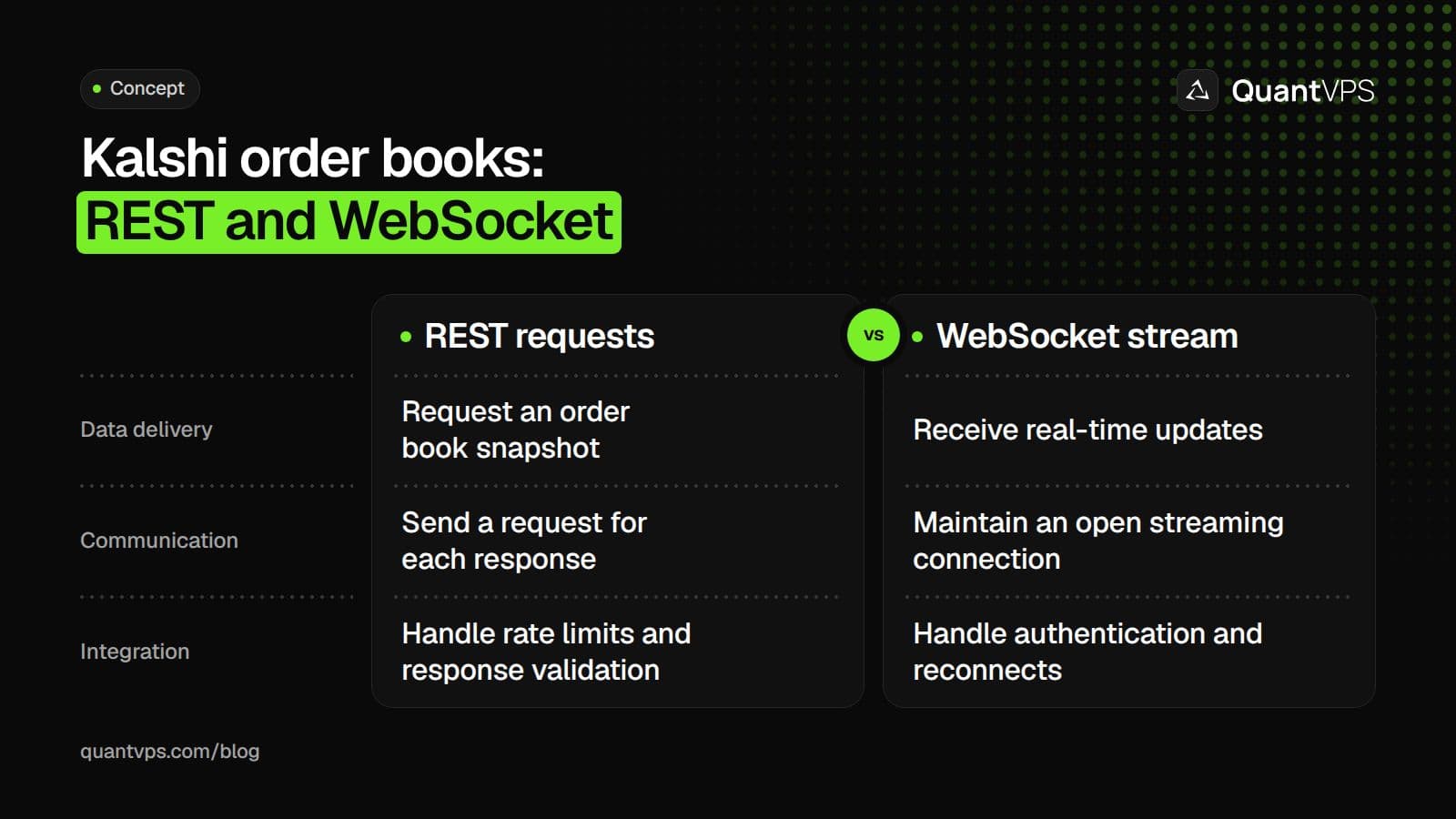
Kalshi provides three endpoints to access its order book data: two REST options for snapshots and one WebSocket for real-time updates. Each serves a distinct purpose depending on your trading requirements. Here’s a closer look at each option and how they work.
The REST endpoint (GET https://api.elections.kalshi.com/trade-api/v2/markets/{ticker}/orderbook) delivers a complete bid snapshot for a specific market. Replace {ticker} with the market's identifier (e.g., "KXHIGHNY-24JAN01-T60") to retrieve the data. This endpoint doesn’t require authentication and includes an optional depth parameter (ranging from 0 to 100) to limit the number of price levels returned. The response is formatted as an orderbook_fp object, containing yes_dollars and no_dollars arrays. Each array consists of two-element string arrays: [price_dollars, count_fp], sorted in ascending order so the highest bid appears last.
The bulk REST endpoint (GET /markets/orderbooks) is designed for retrieving order book data for up to 100 tickers in a single request. This reduces the need for multiple API calls when monitoring several markets. Like the single-ticker endpoint, it works without authentication.
For real-time updates, the WebSocket endpoint (wss://api.elections.kalshi.com/trade-api/ws/v2) offers a persistent connection. Once subscribed to orderbook_delta, you’ll first receive an orderbook_snapshot, followed by incremental updates that reflect changes in the order book. This approach minimizes bandwidth usage and latency compared to repeatedly polling the REST endpoint. WebSocket connections always require authentication during the handshake. Additionally, you can subscribe to multiple channels (e.g., ticker, trade, fills) within a single connection.
Here’s a quick comparison of the REST and WebSocket endpoints:
| Feature | REST (/markets/{ticker}/orderbook) |
WebSocket (/ws/v2) |
|---|---|---|
| Communication | Request-Response (Polling) | Streaming (Push) |
| Latency | Higher (limited by polling frequency) | Lower (real-time) |
| Authentication | Not required | Required for all connections |
| Data Provided | Full snapshot of bids | Initial snapshot + incremental deltas |
| Best For | One-off lookups, simple apps | Active trading, live price tracking |
Next, we’ll cover how to set up API authentication to securely access these endpoints.
API Authentication Setup
Kalshi endpoints, apart from a few public REST calls, require proper authentication using API credentials, secure headers, and adherence to best practices. Here’s a step-by-step guide to setting everything up.
Order flow
Built for scalpers. Heatmaps on dedicated resources.
Order-flow heatmaps and DOM ladders run on dedicated CPU, memory and NVMe, so your charts keep responding during volatility.
See the dedicated hardware







From $29.99/mo · Windows or Linux
Getting Your API Credentials
Start by logging into your Kalshi account and navigating to the API Keys section. Click on Create New API Key (or Create Key) to generate your credentials. Kalshi will provide you with:
-
Key ID: A unique identifier, such as
a952bcbe-ec3b-4b5b-b8f9-11dae589608c. -
Private Key: Delivered in PEM format and downloaded as a
.txtfile. Ed25519 is now the default key type; choose RSA when you create the key if you follow the RSA-PSS signing steps in this guide.
Once you’ve downloaded your Private Key, make sure to store it securely because you won’t be able to retrieve it later. According to Kalshi:
For security reasons, the private key will not be stored by our service, and you will not be able to retrieve it again once this page is closed.
If you lose the key, you’ll need to generate a new key pair.
You can also create API keys programmatically by sending a POST request to /trade-api/v2/api_keys with your RSA public key in PEM format and specifying the required scopes (e.g., read or write). This process applies to both the demo environment (demo-api.kalshi.co) and production (api.elections.kalshi.com).
Once you have your credentials, you’re ready to configure authentication headers.
Required Authentication Headers
Authenticated requests must include these three headers:
-
KALSHI-ACCESS-KEY: Your unique API Key ID. -
KALSHI-ACCESS-TIMESTAMP: The current Unix timestamp in milliseconds. -
KALSHI-ACCESS-SIGNATURE: An RSA-PSS SHA256 signature of the request timestamp, HTTP method, and request path.
To generate the signature:
-
Concatenate the timestamp, HTTP method (e.g.,
GETorPOST), and request path (excluding query parameters). For example, if the request is for/trade-api/v2/portfolio/orders?limit=5, sign only/trade-api/v2/portfolio/orders. - Use RSA-PSS with SHA256 to sign the string.
- Base64-encode the resulting signature.
For WebSocket requests, the path to sign is /trade-api/ws/v2.
| Header | Description | Example |
|---|---|---|
KALSHI-ACCESS-KEY |
Your unique API Key ID | a952bcbe-ec3b-4b5b-b8f9-11dae589608c |
KALSHI-ACCESS-TIMESTAMP |
Current Unix time in milliseconds | 1703123456789 |
KALSHI-ACCESS-SIGNATURE |
Base64-encoded RSA-PSS signature of the request | base64_encoded_string |
Once your headers are set, it’s crucial to implement security measures to protect your keys and requests.
API Security Best Practices
- Never expose your private key in client-side code. Signing should always be performed on a secure backend.
- Store your private key securely. Use encrypted storage or a secure key management system.
- Rotate your keys regularly. This minimizes the risk in case of a key compromise.
- Test in the demo environment first. Before moving to production, ensure your setup works correctly in the demo environment.
Common issues include:
-
401 Unauthorizederrors, which may indicate an incorrect Key ID or private key file path. - Signature mismatches, often caused by including query parameters in the signed path or using seconds instead of milliseconds for the timestamp.
How to Connect and Retrieve Order Book Data
Once authentication is set up, you can access order book data either through REST APIs for snapshots or WebSocket for live updates. Below, we’ll walk through both methods and cover how to handle errors effectively.
Fetching Order Book Data with REST APIs
To fetch an order book snapshot, use the GET endpoint:
https://api.elections.kalshi.com/trade-api/v2/markets/{ticker}/orderbook.
Replace {ticker} with the market ID, such as KXHIGHNY-24JAN01-T60.
You can include the depth parameter to specify the number of price levels to retrieve. This parameter accepts integers between 0 and 100. A value of 0 or any negative number will return all available levels. For instance, adding ?depth=5 to the URL will fetch the top five price levels on each side.
The response is structured in an orderbook_fp object, where prices and contract counts are formatted as strings to eliminate floating-point inaccuracies. Kalshi meters API traffic in tokens: on the Basic tier, a standard request costs 10 tokens, which works out to about 20 reads and 10 writes per second (see the rate limits section below). If you exceed your budget, the server responds with an HTTP 429 (Too Many Requests) error.
Streaming Real-Time Data via WebSocket
For real-time order book updates, connect to the WebSocket endpoint:
-
Production:
wss://api.elections.kalshi.com/trade-api/ws/v2 -
Testing:
wss://demo-api.kalshi.co/trade-api/ws/v2
Authentication is required during the initial WebSocket handshake. Include these headers in your request:
-
KALSHI-ACCESS-KEY -
KALSHI-ACCESS-SIGNATURE -
KALSHI-ACCESS-TIMESTAMP
To generate the signature, concatenate the current timestamp, the HTTP method (GET), and the path (/trade-api/ws/v2). Then, sign this string using your private key with RSA-PSS and SHA256.
After establishing the connection, subscribe to the orderbook_delta channel by sending a JSON command. The server will send two types of messages:
-
orderbook_snapshot: A complete snapshot of the current order book state. -
orderbook_delta: Incremental updates that include price, side, and changes to apply to your local order book.
Process the orderbook_snapshot first to ensure your local state is in sync before applying any orderbook_delta updates. If you're using Python's websockets library, it automatically handles ping/pong frames to keep the connection alive. For other libraries, you might need to implement this manually. Use exponential backoff for reconnections and handle incoming messages asynchronously to avoid blocking the connection during high-frequency updates.
Error Handling and Response Validation
With REST or WebSocket, it’s crucial to validate responses and handle errors appropriately. REST API errors return standard HTTP codes:
- 400: Bad request (e.g., invalid parameters).
- 401: Unauthorized (e.g., missing or invalid credentials).
- 404: Ticker not found.
- 500: Server error.
WebSocket errors are sent as JSON messages with an error code and description. Common examples include:
- 8 (Unknown channel): Invalid channel name.
- 9 (Auth required): Missing authentication.
- 16 (Market not found): Invalid ticker.
Check for the presence of yes_dollars and no_dollars in responses to ensure data integrity. Use high-precision libraries like Python’s Decimal to handle prices and contract counts, avoiding floating-point issues.
When creating RSA-PSS signatures for authenticated requests, always sign the path without query parameters. For example, sign /trade-api/v2/portfolio/orders even if the request URL includes ?limit=5. Also, ensure the KALSHI-ACCESS-TIMESTAMP reflects the current Unix time in milliseconds, not seconds, to prevent signature validation errors.
Uptime
99.999% uptime. Built for 24/7 trading reliability.
Your VPS runs in Tier IV datacenters with redundant power and network, monitored 24/7 on site.
See the uptime SLAFrom $29.99/mo · Windows or Linux
API Integration Workflow
After connecting to the API and gathering order book data, the next steps involve market discovery, order management, trade execution, and improving system performance.
Finding Markets and Retrieving Order Books
Begin by identifying available markets with the GET /markets endpoint. You can filter results using parameters like status, event_ticker, and series_ticker to refine your search. For active trading, always include status=open in your query to exclude markets that are settled or initialized.
The response is paginated, with a default limit of 100 results per page. However, you can increase this to 1,000 results by using the limit parameter. To navigate through multiple pages of results, use the cursor parameter. Once you've pinpointed the markets you want, access their order books using GET /markets/{ticker}/orderbook for a specific market or GET /markets/orderbooks to retrieve data for up to 100 tickers at once.
Keep in mind that the API only returns bid data due to the reciprocal pricing model. The order book arrays are sorted in ascending order, with the best bid appearing as the last element.
For real-time updates, use the WebSocket endpoint and subscribe to the appropriate channels. Initially, the server sends an orderbook_snapshot containing the full order book state, followed by incremental orderbook_delta updates. Authentication headers are required during the WebSocket handshake, even for accessing public data like tickers and trades.
Once you've gathered the necessary market data, you can move on to executing trades.
Placing Orders Through the API
Orders are placed using the POST /portfolio/orders endpoint, which requires parameters like ticker, action, side, count, type, and yes_price. Be sure to include a unique client_order_id (UUID) to prevent duplicate orders.
Kalshi now also offers Create Order (V2) at POST /portfolio/events/orders, which uses a single-book bid or ask side and fixed-point dollar prices. Its docs say the legacy /portfolio/orders endpoint will be deprecated no earlier than May 6, 2026, so new clients should use the V2 path.
To track the status of your orders, use GET /portfolio/orders. Orders can transition through several states: resting (active in the order book), partially_filled (some contracts matched), filled (all contracts matched), canceled (removed by user), or expired (automatically canceled at expiration). You can modify existing orders with POST /portfolio/orders/{order_id}/amend or cancel them using DELETE /portfolio/orders/{order_id}.
For batch processing, the POST /portfolio/orders/batched endpoint allows you to create multiple orders in a single request. Executed orders pay Kalshi's standard trading fee, which depends on the contract price: taker fees follow round up(0.07 x C x P x (1-P)), at most $0.02 on a single contract (checked on 10 Oct 2026).
With the basics of order placement covered, the next step is to fine-tune your connection for better performance.
Reducing Latency and Improving Performance
To minimize latency, rely on WebSocket orderbook_delta subscriptions instead of polling REST endpoints. Process updates asynchronously to handle high-frequency data efficiently. After receiving the initial orderbook_snapshot, apply orderbook_delta updates to maintain a local cache, avoiding the need for repeated full snapshots.
Each user is limited to five concurrent WebSocket connections, so it's best to multiplex subscriptions on a single connection. Only subscribe to the specific market tickers relevant to your strategy to conserve bandwidth and processing power. Use the update_subscription command to add or remove tickers from an active session, rather than opening new connections.
Running the client on a Kalshi VPS keeps those WebSocket sessions open around the clock.
Market metadata, such as titles, expiration times, and series information, changes infrequently. Cache this data locally to reduce unnecessary API calls. If you encounter 429 Too Many Requests errors, implement an exponential backoff strategy (waiting 1 second, then 2, then 4, up to 60 seconds) to avoid further throttling. On the Basic tier, Kalshi's token budgets allow about 20 read requests and 10 write requests per second.
Kalshi API Rate Limits and Access Tiers
Kalshi meters authenticated API traffic in tokens per second, with separate Read and Write budgets. Most requests cost 10 tokens, so the Basic tier's 200 read and 100 write tokens per second allow about 20 reads and 10 writes per second (checked on 10 Oct 2026).
| Tier | Read tokens per second | Write tokens per second | How you get it |
|---|---|---|---|
| Basic | 200 | 100 | Complete account signup |
| Advanced | 300 | 300 | Call the Upgrade Account API Usage Level endpoint |
| Expert | 600 | 600 | 0.075% volume share, or assigned by Kalshi |
| Premier | 1,200 | 1,200 | 0.125% volume share, or assigned by Kalshi |
| Paragon | 2,400 | 2,400 | 0.25% volume share, or assigned by Kalshi |
| Prime | 4,800 | 4,800 | 0.50% volume share, or assigned by Kalshi |
| Prestige | 12,000 | 9,600 | 1.00% volume share, or assigned by Kalshi |
Volume share is your trailing 30-day volume divided by twice the previous month's exchange volume, and Kalshi reviews it daily. A request over budget gets 429 Too Many Requests with no Retry-After header, so back off and retry. Batch endpoints bill every order in the batch, so they don't save tokens.
Historical Data Endpoints
Kalshi splits its data into live and historical tiers: once markets, trades, orders and positions pass a cutoff, they move from the live endpoints to /historical endpoints. Call GET /historical/cutoff first to see the current cutoff for each data type.
| Endpoint | Returns |
|---|---|
GET /historical/cutoff |
The current cutoff timestamps |
GET /historical/markets |
Settled markets older than the cutoff |
GET /historical/markets/{ticker}/candlesticks |
Candlesticks for archived markets |
GET /historical/trades |
All trades older than the cutoff |
GET /historical/fills |
Your fills older than the cutoff |
GET /historical/orders |
Your canceled or executed orders older than the cutoff |
GET /historical/positions |
Your settled positions archived from the live data |
Events and series stay on their normal endpoints. Resting orders and unsettled positions always stay on the live endpoints, and the historical endpoints use the same cursor pagination.
Official SDKs
Kalshi publishes three official SDKs: kalshi_python_sync and kalshi_python_async for Python, and kalshi-typescript for TypeScript. The old kalshi-python package is deprecated.
-
Python (sync):
pip install kalshi_python_sync -
Python (async):
pip install kalshi_python_async -
TypeScript:
npm install kalshi-typescript
Kalshi notes that its SDKs may lag the API and recommends that active traders treat its OpenAPI and AsyncAPI specifications as the source of truth. RSA keys work with every SDK version, while Ed25519 keys need SDK 3.31.0 or later.
Conclusion
The Kalshi Order Book API brings together real-time market data access and automated trade execution through its REST and WebSocket architecture. For snapshots of the order book, use GET /markets/{ticker}/orderbook, and for incremental updates that reflect market changes, connect to wss://api.elections.kalshi.com/trade-api/ws/v2. This setup allows traders to develop responsive trading systems. By simplifying market discovery, order execution, and real-time updates, the API offers a comprehensive toolkit for automated trading.
To set up authentication, you’ll need to generate RSA key pairs and include the following headers in your requests: KALSHI-ACCESS-KEY, KALSHI-ACCESS-TIMESTAMP, and KALSHI-ACCESS-SIGNATURE. Kalshi’s order book only provides bid data due to its reciprocal pricing model.
The integration process involves discovering markets with GET /markets, fetching order book data, and placing orders through POST /portfolio/orders. For better performance, subscribe only to the tickers you need, keep a local cache of market metadata, and handle orderbook_delta updates asynchronously to keep up with high-frequency data.
Kalshi lists no membership fee for API access, and executed orders pay trading fees that depend on the contract price. On the Basic tier, rate limits work out to about 20 reads and 10 writes per second. Before moving to the production environment, test your setup in the demo environment at demo-api.kalshi.co to ensure everything runs smoothly.
FAQs
Why does Kalshi’s order book only show bids?
In Kalshi's binary prediction markets, the order book is streamlined by displaying only bids. Why? Because a bid for YES at a specific price automatically translates to an ask for NO at the complementary price. This setup eliminates the need for separate ask listings, showcasing only the highest prices buyers are ready to pay for either outcome. It’s a clean, efficient way to present the market dynamics.
How do I generate the RSA signature for Kalshi API requests?
To create the RSA signature, start by combining the current timestamp (in milliseconds), the HTTP method, and the request path into a single string (e.g., timestamp + HTTP_METHOD + path). Next, use your private RSA key and the RSA-PSS algorithm to sign this string. Once signed, encode the resulting signature in base64 format. Finally, include this base64-encoded signature in the KALSHI-ACCESS-SIGNATURE header of your API request to authenticate.
When should I use REST vs WebSocket for order book data?
When you need a current snapshot of the order book, REST is the way to go. It's perfect for tasks like initial loading or periodic updates since the REST endpoint gives you the latest full state without needing a constant connection.
On the other hand, for real-time updates, WebSocket is your best option. It starts with an initial snapshot and then sends incremental updates, making it ideal for low-latency applications such as trading bots or live dashboards.


